
הקדמה
The Nitecore NU30 is a high-performance, lightweight rechargeable headlamp designed for various outdoor activities. It features a powerful primary white LED, high CRI auxiliary white LEDs for close-range illumination, and a red auxiliary LED for preserving night vision. With its integrated USB-C charging and durable construction, the NU30 provides reliable lighting for your adventures.

בילד: פראָנט view of the Nitecore NU30 headlamp מיט זיין אַדזשאַסטאַבאַל קאָפּבאַנד.
פּעקל אינהאַלט
ביטע טשעק די פּאַקעט פֿאַר די פאלגענדע זאכן:
- Nitecore NU30 Headlamp
- וסב- C צו וסב- C טשאַרדזשינג קאַבלע
- העאַדבאַנד
- נייטקאָר סטיקער
פּראָדוקט איבערview
The Nitecore NU30 features a dual-button interface for intuitive control over its various light sources and brightness levels. The headlamp unit is attached to an adjustable, elastic headband for comfortable wear.

Image: Diagram illustrating the location of the Power Button and Mode Button on the Nitecore NU30 headlamp.
קאָנטראָלס:
- מאַכט קנעפּל: Controls power on/off and brightness levels for the primary white light.
- מאָדע קנעפּל: Switches between different light sources (primary white, auxiliary white, auxiliary red) and special modes.
טשאַרדזשינג די העאַדלamp
The NU30 headlamp is equipped with a built-in 1500mAh Li-ion battery and a USB-C charging port for convenient recharging. A power indicator will show the charging status.
- Locate the USB-C charging port on the side of the headlamp.
- Connect the included USB-C to USB-C charging cable to the headlamp and a USB power source (e.g., wall adapter, power bank, computer).
- The power indicator will illuminate during charging.
- Charging is complete when the indicator light changes or turns off (refer to the power indicator section for details). A full charge typically takes approximately 2 hours.

Image: The Nitecore NU30 headlamp being charged via its USB-C port.
אַפּערייטינג ינסטראַקשאַנז
The NU30 offers multiple light sources and modes for various lighting needs.

Image: Diagram illustrating the three distinct light sources available on the Nitecore NU30 headlamp.
מאַכט אויף / אַוועק:
- צו אָנהייבן: Press and hold the Power Button for 1 second. The headlamp will turn on in the previously used primary white light mode.
- צו קער אַוועק: ווען דער העדלamp is on, long press either the Power Button or the Mode Button until the light turns off.
Switching Light Sources:
ווען דער העדלamp is on, short press the Mode Button to cycle through the light sources in the following order:
Primary White Light → Auxiliary White Light → Auxiliary Red Light → Primary White Light...
Adjusting Brightness (Primary White Light):
When the Primary White Light is active, short press the Power Button to cycle through brightness levels:
Low → Mid → High → Low...
Auxiliary White Light Modes:
When the Auxiliary White Light is active, short press the Power Button to cycle through:
Ultralow → Flood → Ultralow...

Image: Visual comparison demonstrating the wide and even illumination of the TrueVision+ flood beam.
Auxiliary Red Light Modes:
When the Auxiliary Red Light is active, short press the Power Button to cycle through:
Low → High → Slow Flashing → Low...
Special Modes (SOS / Beacon):
ווען דער העדלamp is off, press and hold the Mode Button for 1 second to directly access SOS mode. While in SOS mode, short press the Power Button to switch to Beacon mode. Short press the Power Button again to return to SOS. Long press either button to turn off.
מאַכט ינדיקאַטאָר:
The power indicator light provides information on the remaining battery power. Refer to the product's specific indicator patterns for detailed battery status (e.g., flashes for remaining power, solid for charging, off for fully charged).
וישאַלט
Proper maintenance ensures the longevity and optimal performance of your Nitecore NU30 headlamp.
- רייניקונג: ווישן די קאָפּamp מיט אַ ווייכער, דamp שטאָף. ויסמיידן ניצן אַברייסיוו קלינערז אָדער סאָלוואַנץ.
- סטאָרידזש: קראָם די קאָפּamp in a cool, dry place when not in use. Recharge the battery every 3 months to maintain battery health if stored for extended periods.
- וואַסער קעגנשטעל: The NU30 is rated IP66, meaning it is protected against powerful water jets. Do not submerge the headlamp in water. Ensure the USB-C port cover is securely closed to maintain water resistance.
טראָובלעשאָאָטינג
If you encounter issues with your NU30 headlamp, try the following solutions:
- העדלamp נישט אויסגעדרייט: זיכער מאַכן אַז די באַטאַרייע איז אָנגעלאָדן. פֿאַרבינדט דעם קאָפּamp to a power source using the USB-C cable and check if the charging indicator activates.
- ליכט ארויסגאַנג איז שוואַך: די באַטעריע קען זיין שוואַך. לאָדט ווידער אויף די קאָפּ-ליניע.amp גאָר.
- טשאַרדזשינג אַרבעט נישט: Check the USB-C cable for damage and ensure the power source is functional. Try a different cable or power adapter.
- קנעפּלעך רעאַגירן נישט: פאַרזיכערן די כעדלamp is not in a locked mode (if applicable, refer to specific product features for lock-out functions). If issues persist, contact customer support.
ספּעסאַפאַקיישאַנז
Detailed technical specifications for the Nitecore NU30 headlamp:
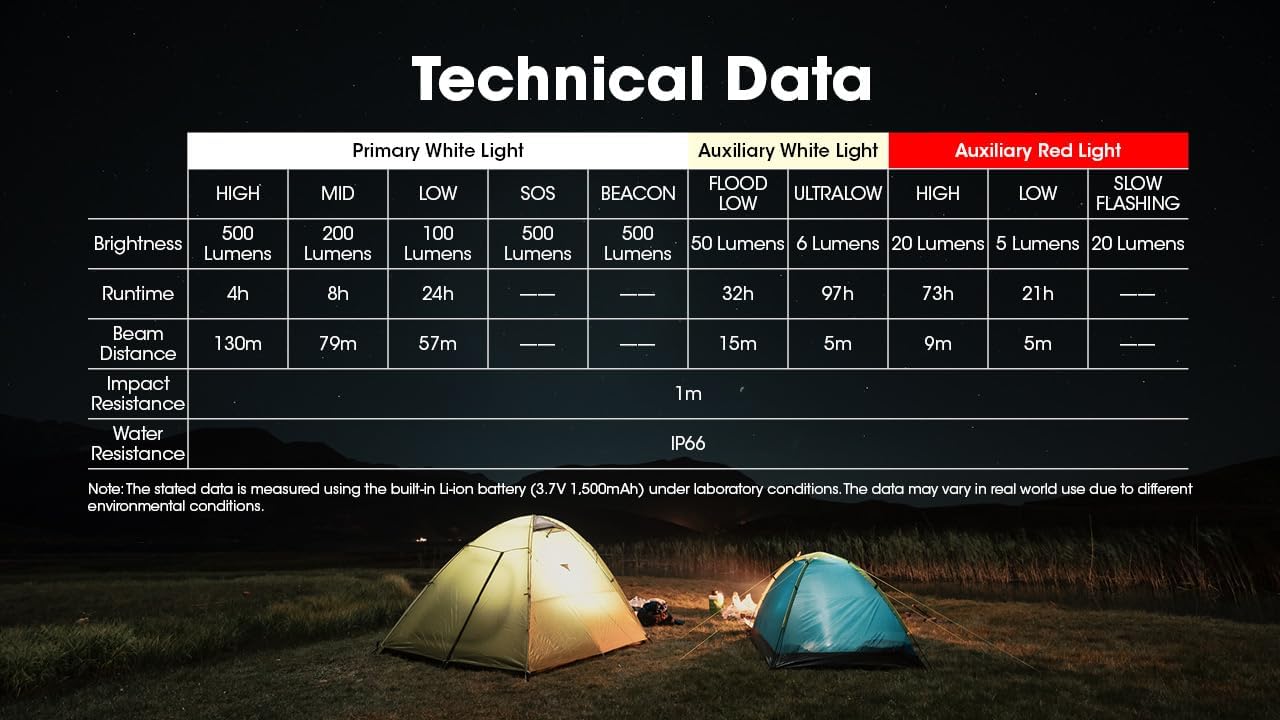
Image: Comprehensive table detailing the technical specifications of the Nitecore NU30 headlamp.
| שטריך | דעטאַל |
|---|---|
| מאַקס ברייטנאַס | 500 לומענס |
| מאַקסימום שטראַל דיסטאַנס | 130 מעטער (142 יאַרדס) |
| באַטערי טיפּ | געבויט-אין 1500 מאַה לי-יאָן באַטערי |
| טשאַרדזשינג פּאָרט | וסב-C |
| מאַקס רונטימע | Up to 97 hours (Ultralow Auxiliary White) |
| פּראַל קעגנשטעל | 1 מעטער |
| וואַסער קעגנשטעל | IP66 |
| וואָג | 90 ג (3.17 אַז) |
| מאַטעריאַל | Durable PC Material |
זיכערקייַט אינפֿאָרמאַציע
Please read and follow these safety guidelines to prevent injury or damage to the headlamp:
- Do not shine the light directly into eyes, as this may cause temporary vision impairment.
- דו זאלסט נישט דיסאַסעמבאַל אָדער מאָדיפיצירן די קאָפּamp, as this may void the warranty and cause damage.
- האַלטן אויס פון דערגרייכן פון קינדער.
- ויסמיידן ויסשטעלן די קאָפּamp צו עקסטרעם טעמפּעראַטורעס אָדער דירעקט זונשייַן פֿאַר פּראַלאָנגד פּיריאַדז.
וואָראַנטי און שטיצן
Nitecore products are backed by a warranty. For detailed warranty terms and conditions, please refer to the official Nitecore website or the warranty card included with your product. If you require technical support or have questions about your NU30 headlamp, please contact Nitecore customer service or your authorized dealer.
For more information, visit the official Nitecore webפּלאַץ: www.nitecore.com