
הקדמה
This manual provides detailed instructions for the safe and proper installation, operation, and maintenance of your SANUS Simplicity Full Motion TV Mount, Model SMF421-B3. Please read all instructions carefully before beginning installation to ensure correct assembly and to prevent injury or damage.
This mount is designed to securely hold televisions ranging from 26 inches to 55 inches in size, with a maximum weight capacity of 55 lbs (25 kg). It offers full motion capabilities, including tilt, swivel, and extension, allowing for optimal viewינג אַנגלעס.
זיכערקייַט אינפֿאָרמאַציע
ווארענונג: Failure to read and follow all instructions can result in personal injury, property damage, or voiding of warranty. Do not install this product if you do not understand these instructions or have doubts about the safety of the installation.
- Verify that the mounting surface can safely support the combined weight of the mount and the television.
- נישט איבערשטייגן די מאקסימום וואָג קאַפּאַציטעט פון 55 פונט (25 ק"ג).
- דער פּראָדוקט איז בדעה בלויז פֿאַר דרינענדיק נוצן.
- Use only the hardware provided by SANUS.
- If mounting to wood studs, ensure the studs are solid and located accurately.
- If mounting to concrete or concrete block, ensure the wall is solid and use appropriate anchors (not always included).
- Always use a qualified installer if you are unsure about your ability to install this product safely.
פּעקל אינהאַלט
Before installation, ensure all parts are present and undamaged. If any parts are missing or defective, contact SANUS customer service.

Image: All components of the SANUS Simplicity Full Motion TV Mount, including the wall plate, TV brackets, and various hardware, are laid out for inspection.
טיפּישע פּאַקעט אינהאַלט כולל:
- וואַנט פּלאַטע פֿאַרזאַמלונג
- טעלעוויזיע קלאַמער אָרעמס (2)
- Mounting Hardware Kit (screws, washers, spacers for various TV types and wall types)
- ינסטראַקשאַנז מאַנואַל
סעטאַפּ און ינסטאַלירונג
מכשירים פארלאנגט (ניט אַרייַנגערעכנט):
- שטיפט פינדער
- Drill with appropriate drill bits (wood or masonry)
- מדרגה
- פיליפּס קאָפּ שרויפנ - ציער
- כאָלעל מוטער-שליסל
- בלייַער
- מעאַסורינג טייפּ
שריט 1: צוטשעפּען טעלעוויזיע בראַקאַץ צו טעלעוויזיע
- לייגט פֿאָרזיכטיק אייער טעלעוויזיע מיטן פּנים אַראָפּ אויף אַ ווייכער, ריינער ייבערפֿלאַך כּדי צו פֿאַרמייַדן שאָדן צום עקראַן.
- ידענטיפיצירן די VESA מאַונטינג האָלעס אויף די צוריק פון דיין טעלעוויזיע.
- Select the correct diameter and length screws from the hardware kit that fit your TV's mounting holes. Use washers and spacers if necessary to ensure a snug fit without overtightening.
- Attach the two TV bracket arms to the back of your TV using the selected screws. Ensure the arms are level and securely fastened. Do not overtighten.
שריט 2: אינסטאַלירן וואַנט פּלאַטע צו וואַנט
- Determine the desired height for your TV. Mark the center of the desired TV location on the wall.
- פֿאַר האָלץ שטיפט ינסטאַלירונג: Use a stud finder to locate the center of two adjacent wood studs. Position the wall plate so that its mounting holes align with the center of the studs. Use a level to ensure the wall plate is perfectly horizontal. Mark the drill points. Drill pilot holes (refer to manual for specific drill bit size). Secure the wall plate to the studs using the provided lag bolts and washers.
- For Concrete/Concrete Block Installation: Position the wall plate at the desired height and use a level to ensure it is horizontal. Mark the drill points. Drill pilot holes (refer to manual for specific drill bit size and depth). Insert concrete anchors (if provided or purchased separately) into the pilot holes. Secure the wall plate to the wall using the provided lag bolts and washers.
- Ensure the wall plate is firmly and securely attached to the wall before proceeding.
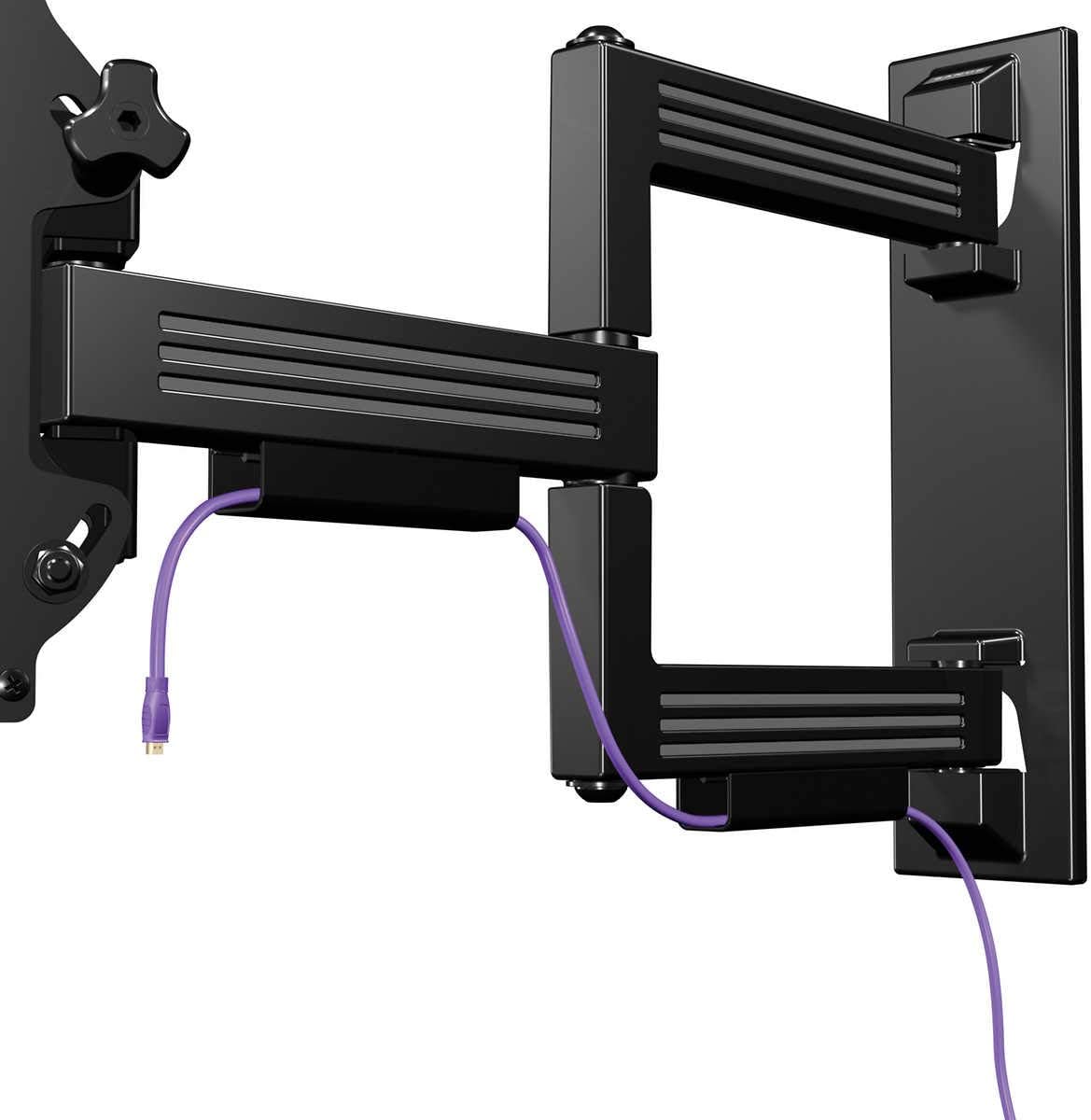
Image: The SANUS Simplicity Full Motion TV Mount is shown installed on a wall, extended, with a purple cable neatly routed through its integrated cable management channels.
שריט 3: הענגען טעלעוויזיע אויף וואַנט פּלאַטע
- With assistance, carefully lift the TV with the attached brackets and hook the brackets onto the wall plate.
- זיכער מאַכן אַז דער טעלעוויזאָר איז זיכער אַרײַנגעזעצט אויף דער וואַנט פּלאַטע.
- Engage any safety locking mechanisms on the TV brackets to prevent accidental dislodgement. Refer to the specific instructions for your mount model for details on locking mechanisms.
אַפּערייטינג ינסטראַקשאַנז
Your SANUS Simplicity Full Motion TV Mount allows for flexible positioning of your television.
- פארלענגערונג: Gently pull the TV away from the wall to extend the arm.
- סוויוול: Carefully pivot the TV left or right to achieve your desired viewינג ווינקל.
- טילט: Loosen the tilt adjustment knobs (if applicable, refer to your specific model's design), adjust the TV to the desired vertical angle, and then retighten the knobs to secure the position. The mount supports up to 60 degrees of tilt.
- קאַבלע פאַרוואַלטונג: Utilize the integrated cable channels on the mount arm to route and conceal cables for a tidy appearance.
Always move the TV smoothly and avoid sudden, forceful movements. Do not hang or apply excessive weight to the TV or mount arm.
וישאַלט
רעגולערע אויפהאלטונג גאראנטירט די לאנגעוויטי און זיכערע אפעראציע פון אייער טעלעוויזיע מאונט.
- פּעריאָדיש דורכקוק: Every 6-12 months, inspect all mounting hardware and connections to ensure they are secure. Tighten any loose screws or bolts.
- רייניקונג: Clean the mount with a soft, dry cloth. Do not use abrasive cleaners or solvents, as these may damage the finish.
- שמירן: The moving parts of the mount are designed for smooth operation and generally do not require lubrication. If movement becomes stiff, consult SANUS customer support.
טראָובלעשאָאָטינג
| פּראָבלעם | מעגלעך סיבה | לייזונג |
|---|---|---|
| דער טעלעוויזאר איז נישט גלייך נאך דער אינסטאלאציע. | Wall plate was not installed level. | Remove TV, adjust wall plate to be level, and re-mount TV. Some mounts have post-installation leveling adjustments; refer to your specific model's features. |
| דער באַרג פילט זיך לויז אָדער וואָקלדיק. | Mounting hardware is not fully tightened or wall support is inadequate. | Immediately remove TV. Re-check all wall plate fasteners and ensure they are securely tightened into solid studs or concrete. If the wall is damaged, consult a professional. |
| Difficulty moving the TV (swivel/tilt/extend). | Friction points may be too tight or mechanism needs adjustment. | Check for any adjustment screws or knobs on the mount that control tension. Loosen slightly if movement is too stiff. Do not over-loosen. |
ספּעסאַפאַקיישאַנז
- מאָדעל: SMF421-B3
- סאָרט: SANUS
- מאַונטינג טיפּ: וואנט בארג
- באַוועגונג טיפּ: Swivel, Tilt, Extend
- מאַטעריאַל: פּלאַסטיק
- קאָליר: שוואַרץ
- קאַמפּאַטאַבאַל טעלעוויזיע סיזעס: 26" - 55"
- מאַקסימום וואָג קאַפּאַציטעט: 55 לבס (25 קג)
- געשפּרייט פון וואנט: ביז 21"
- נידעריק-פּראָfile פּלאַן: 2.1" from wall when retracted
- מאַקסימום טילט ווינקל: 60 דיגריז
- UPC: 793795532121
וואָראַנטי און שטיצן
וואָראַנטי: This SANUS product is covered by a 2-Year Manufacturer's Warranty. Please retain your proof of purchase for warranty claims. The warranty covers defects in materials and workmanship under normal use.
קונה שטיצן: For technical assistance, missing parts, or warranty inquiries, please contact SANUS customer service. Visit the official SANUS webזייטל פֿאַר קאָנטאַקט אינפֿאָרמאַציע און נאָך רעסורסן.
אָנליין רעסורסן: For further information, installation videos, and FAQs, please visit the Sanus Store on Amazon or the official SANUS webפּלאַץ.