
1. הקדמה
This manual provides essential instructions for the proper use and care of your Yamaha RAV536 (Part # ZP601100) OEM remote control. This remote is designed to operate specific Yamaha A/V receiver models, ensuring seamless control over your audio and video system. Please read this manual thoroughly before use to ensure optimal performance and longevity of your remote control.
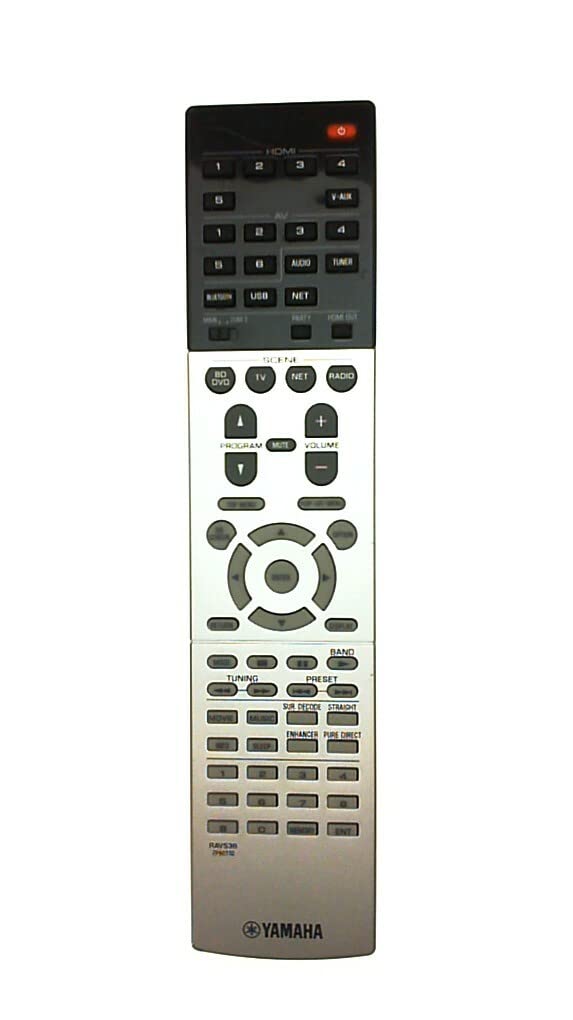
Figure 1: Yamaha RAV536 Remote Control. This image displays the front view of the remote, highlighting its button layout and ergonomic design.
2. קאַמפּאַטאַבאַל מאָדעלס
The Yamaha RAV536 (ZP601100) remote control is specifically designed for use with the following Yamaha A/V receiver models:
- TSR-7790
- RX-V679BL
- HTR-6068
- TSR-7790BL
- RX-A750
- RX-V679
- RX-V779
וויכטיק: This is an OEM remote control and is not universal. It is intended to replace the original remote supplied with the listed models only. Compatibility with other models is not guaranteed.
3. אויפשטעלן: באַטעריע אינסטאַלאַציע
To begin using your Yamaha RAV536 remote control, you must install batteries. The remote requires two (2) AAA batteries (not included).
- עפֿענען די באַטערי אָפּטייל: געפינט דעם דעקל פונעם באַטעריע־אָפּטייל אויף דער הינטערשטער זייט פונעם ווײַטקאָנטראָל. רוקט דעם דעקל אַראָפּ אָדער דריקט דעם שלאָס און הייבט אויף צו עפֿענען.
- אַרייַנלייגן באַטעריז: Insert two new AAA batteries into the compartment. Ensure that the positive (+) and negative (-) terminals of the batteries align correctly with the polarity indicators inside the compartment. Incorrect installation can prevent the remote from functioning.
- פאַרמאַכן די באַטערי אָפּטייל: לייגט צוריק דעם דעקל פונעם באַטעריע־אָפּטייל דורך עס צוריקצורוקן אין פּלאַץ ביז עס קליקט זיכער.
באַמערקונג: Always use new batteries for optimal performance. Do not mix old and new batteries, or different types of batteries, as this can lead to leakage or malfunction.
4. אָפּעראַציע
Once batteries are installed, the Yamaha RAV536 remote control is ready for use with your compatible Yamaha A/V receiver. No additional programming is typically required for OEM remotes.
- Pointing the Remote: Point the remote control directly towards the infrared (IR) sensor on your Yamaha A/V receiver. Obstructions between the remote and the receiver can block the signal.
- קנעפּל פאַנגקשאַנז: Each button on the remote corresponds to a specific function on your A/V receiver (e.g., Power, Volume, Input Selection, Menu Navigation). Refer to the owner's manual of your specific Yamaha A/V receiver model for a detailed explanation of each button's function and how to operate your system.
- קייט: The remote operates effectively within a range of approximately 10 meters (33 feet) from the receiver, provided there are no significant obstructions.
For advanced features and specific operational procedures, consult the comprehensive owner's manual that came with your Yamaha A/V receiver.
5. וישאַלט
געהעריגע אויפהאלטונג גאראנטירט די לאנגעוויטי און פארלעסלעכע פאָרשטעלונג פון אייער ווײַטקאָנטראָל.
- באַטערי פאַרבייַט: Replace batteries when the remote's response becomes sluggish or stops working. Always replace both batteries simultaneously with new ones of the same type (AAA).
- רייניקונג: To clean the remote, gently wipe it with a soft, dry cloth. For stubborn dirt, slightly dampווישט דעם שטאָף מיט וואַסער אָדער אַ מילדן, נישט-שרייַבנדיקן רייניגער. פֿאַרמייַדט ניצן שטרענגע כעמיקאַלן, סאָלווענטן אָדער שרייַבנדיקע מאַטעריאַלן, ווײַל די קענען שאַטן די ייבערפלאַך אָדער אינעווייניקסטע קאָמפּאָנענטן פֿון דער ווײַטקאָנטראָל.
- סטאָרידזש: If the remote will not be used for an extended period, remove the batteries to prevent potential leakage and damage. Store the remote in a cool, dry place away from direct sunlight and extreme temperatures.
- ויסמיידן טראפנס און ימפּאַקץ: Protect the remote from physical shocks, drops, and impacts, which can damage internal circuitry.
6. טראָובלעשאָאָטינג
If you experience issues with your Yamaha RAV536 remote control, refer to the following common troubleshooting steps:
- ווייַט ניט ריספּאַנדינג:
- Check if the batteries are inserted correctly, observing polarity (+/-).
- פאַרבייַטן אַלטע באַטעריעס מיט נייַע AAA באַטעריעס.
- Ensure there are no obstructions between the remote's IR emitter and the receiver's IR sensor.
- Verify that you are pointing the remote directly at the receiver.
- Limited Range or Intermittent Operation:
- פאַרבייַטן באַטעריז מיט נייַע.
- Ensure the remote's IR emitter and the receiver's IR sensor are clean and free from dust or smudges.
- Reduce the distance between the remote and the receiver.
- קוקט נאָך שטאַרקע ליכט-קוואַלן (למשל, דירעקטע זונשייַן, פֿלאָרעסצענט ליכט) וואָס קענען שטערן דעם IR סיגנאַל.
- ספּעציפֿישע פֿונקציעס אַרבעטן נישט:
- Confirm that your A/V receiver is powered on and functioning correctly.
- Refer to your A/V receiver's owner's manual to ensure you are using the correct buttons for the desired functions.
If the problem persists after trying these steps, contact Yamaha customer support or refer to your receiver's manual for further assistance.
7. ספּעסאַפאַקיישאַנז
| סאָרט | יאַמאַהאַ |
| מאָדעל נאָמען | RAV536 |
| טייל נומער | זפּ601100 |
| קאָליר | שוואַרץ |
| קאַנעקטיוויטי טעכנאָלאָגיע | ינפרערעד (IR) |
| מאַקסימום קייט | 10 מעטער (אומגעפער 33 פֿיס) |
| באַטערי טיפּ | 2 X AAA (ניט אַרייַנגערעכנט) |
| קאָנטראָללער טיפּ | קנעפּל קאָנטראָל |
| ספּעציעלע שטריך | ערגאַנאַמיק פּלאַן |
| סמאַרט היים קאַמפּאַטאַבילאַטי | Not Smart Home Compatible |
8. שטיצן & וואָראַנטי
For detailed support regarding the functions of your Yamaha A/V receiver, please refer to the owner's manual provided with your original receiver unit. This remote control is an OEM replacement part.
Warranty information for this replacement remote control is typically covered under the terms of purchase from your retailer. Please retain your proof of purchase for any warranty claims. For direct support, you may visit the official Yamaha webפּלאַץ אָדער קאָנטאַקט זייער קונה סערוויס אָפּטיילונג.
איר קענט געפֿינען מער אינפֿאָרמאַציע און שטיצע רעסורסן אויף דער יאַמאַהאַ קראָם אויף אַמאַזאָן.