
הקדמה
This manual provides comprehensive instructions for the Sharp EN2A27S TV Remote Control. It covers essential information regarding setup, operation, maintenance, and troubleshooting to ensure optimal performance with your compatible Sharp Smart LCD HDTV Television.
פּעקל אינהאַלט
- Sharp EN2A27S TV Remote Control
Note: Batteries are not included and must be purchased separately. Two AAA batteries are required.
סעטאַפּ
ייַנמאָנטירונג פון באַטאַרייע
- געפֿינען די באַטאַרייע אָפּטייל אויף די צוריק פון די ווייַט קאָנטראָל.
- רוקט דעם דעקל פונעם באַטעריע־אָפּטייל אַראָפּ צו עס עפֿענען.
- אַרײַנשטעלן צוויי AAA באַטעריעס, און זיכער מאַכן אַז די פּאָזיטיוו (+) און נעגאַטיוו (-) טערמינאַלן זענען ריכטיק אויסגעשטעלט מיט די מאַרקירונגען אינעווייניק אין דעם אָפּטייל.
- שטופּט צוריק דעם דעקל פון דעם באַטעריע־אָפּטייל ביז עס קליקט זיכער.
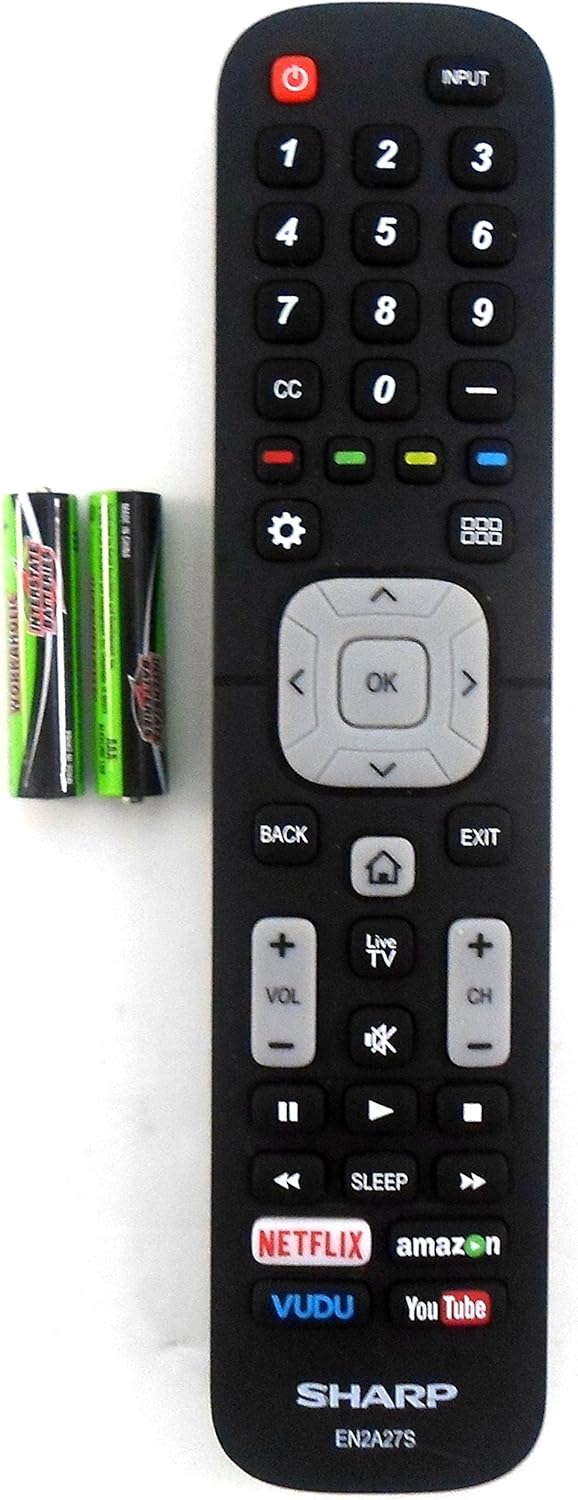
Image: The Sharp EN2A27S remote control shown alongside two AAA batteries, indicating where batteries are inserted for operation.
The remote control is now ready for use with your compatible Sharp TV. No programming is typically required for original Sharp remote controls.
אַפּערייטינג ינסטראַקשאַנז
The Sharp EN2A27S remote control provides direct access to various functions of your Sharp Smart LCD HDTV. Familiarize yourself with the button layout for efficient operation.

בילד: א דעטאַלירטע view of the lower portion of the Sharp EN2A27S remote, showcasing dedicated buttons for Netflix, Amazon, Vudu, and YouTube.
שליסל פאַנגקשאַנז:
- מאַכט (רויטער קנעפּל): טורנס די טעלעוויזיע אויף אָדער אַוועק.
- אַרייַנשרייַב: Selects the video input source (e.g., HDMI 1, HDMI 2, AV).
- נומער קנעפּלעך (0-9): Directly select TV channels.
- פֿאַרמאַכטע אונטערשריפֿט (CC): מאַכט די אונטערשריפטן אָן אָדער אויס.
- קאָליר קנעפּלעך (רויט, גרין, געל, בלוי): Used for specific functions within menus or applications, as indicated on the TV screen.
- סעטטינגס (גיר ייקאַן): גייט אריין אין דעם טעלעוויזאר'ס הויפט סעטינגס מעניו.
- Grid Icon: Opens the TV's smart hub or app launcher.
- נאַוויגאַציע פּאַד (אַרויף, אַראָפּ, לינקס, רעכטס, גוט): נאַוויגירט דורך מעניוז און באַשטעטיקט אויסוואלן.
- צוריק: קערט צו די פריערדיקע פאַרשטעלן אָדער מעניו.
- אַרויסגאַנג: פֿאַרלאָזט דעם איצטיקן מעניו אָדער אַפּליקאַציע.
- Home (House Icon): קערט צוריק צום טעלעוויזיע'ס היים עקראַן.
- לעבן טעלעוויזיע: טוישט צו לעבעדיגע טעלעוויזיע בראָדקאַסט.
- באַנד אַרויף / אַראָפּ (VOL +/-): Adjusts the TV's volume level.
- Mute (Speaker Icon): שטומט אדער אנשטומט דעם טעלעוויזאר'ס אודיא.
- קאַנאַל אַרויף/אַראָפּ (CH +/-): טוישט טעלעוויזיע קאַנאַלן.
- שפּיל קאָנטראָלן (שפּילן, פּויזע, שנעל פֿאָרווערטס, צוריקשפּײַלן, אָפּשטעלן): קאָנטראָלס מעדיע פּלייבאַק.
- שלאָף: שטעלט א טייַמער כּדי דער טעלעוויזיע זאָל זיך אויטאָמאַטיש אויסלעשן.
- Dedicated App Buttons (Netflix, Amazon, Vudu, YouTube): גיט דירעקטן צוטריט צו די סטרימינג אַפּלאַקיישאַנז.
קאַמפּאַטאַבילאַטי
The Sharp EN2A27S TV Remote Control is compatible with the following Sharp Smart LCD HDTV Television models:
55H6B, 50H7GB, 50H6B, N6200U, LC-60N6200U, LC-60N7000U, LC-65N7000U, LC-43N7000U, LC-50N7000U, LC-55N7000U, LC-40N5000U, LC-43N5000U, LC-43N6100U, LC-50N5000U, LC-50N6000U, LC-55N620CU, LC-55N5300U, LC-55N6000U, LC-60N5100U, LC-65N5200U, LC-65N6200U, LC-65N9000U, LC-75N620U, LC-75N8000U.
וישאַלט
רייניקונג:
- ווישט ווי די ווײַטקאָנטראָל מיט אַ ווייכן, טרוקענעם שטאָף.
- Do not use liquid cleaners, sprays, or abrasive materials, as these may damage the remote's surface or internal components.
באַטערי זאָרגן:
- Replace batteries when the remote's responsiveness decreases.
- אַרויסנעמען די באַטעריעס אויב די ווײַטקאָנטראָל וועט נישט ווערן גענוצט פֿאַר אַ לענגערע צײַט כּדי צו פֿאַרמײַדן ליקאַדזש.
- פּאָטער פון געוויינט באַטעריז לויט די היגע רעגיאַליישאַנז.
טראָובלעשאָאָטינג
ווייַט ניט ריספּאַנדינג:
- טשעק באַטעריז: Ensure batteries are inserted correctly with the correct polarity (+/-). Replace old or depleted batteries with new ones.
- שורה פון דערזען: Ensure there is a clear line of sight between the remote control and the TV's infrared sensor. Obstructions can block the signal.
- ווייַט סענסאָר: Verify that the TV's remote sensor is not blocked or dirty.
- טעלעוויזיע מאַכט: Confirm that the TV is powered on and not in standby mode.
קנעפּלעך נישט ארבעטן:
- Individual Button Test: If only specific buttons are not working, try pressing them firmly. If the issue persists, the remote may require replacement.
- ריין רימאָוט: Dust or debris under buttons can sometimes cause issues. Refer to the cleaning instructions in the Maintenance section.
ספּעסאַפאַקיישאַנז
| מאָדעל נומער | EN2A27S |
| Internal Item Number | 8541714996 |
| סאָרט | שאַרף |
| פּראָדוקט דימענשאַנז | 8 X 2 X 0.5 אינטשעס |
| פּונקט וואָג | 2.89 אונסעס |
| קאָליר | שוואַרץ |
| מאַקס נומער פון שטיצט דעוויסעס | 1 |
| קאַמפּאַטאַבאַל דעוויסעס | טעלעוויזיע |
| פאַבריקאַנט | OEM Sharp |
שטיצן
For further assistance or inquiries regarding your Sharp EN2A27S TV Remote Control, please refer to the support resources provided by Sharp or your television's original documentation. You may also visit the official Sharp website for product information and customer service contacts.