
Sharp PN-B501
Sharp PNB501 50-Inch Monitor User Manual
Model: PN-B501
הקדמה
Thank you for choosing the Sharp PNB501 50-inch monitor. This display is designed for high-quality visual performance, featuring a 1920x1080 resolution, a 5000:1 contrast ratio, and a built-in System-on-Chip (SoC) for enhanced functionality. This manual provides essential information for the proper installation, operation, and maintenance of your monitor. Please read it thoroughly before use and keep it for future reference.

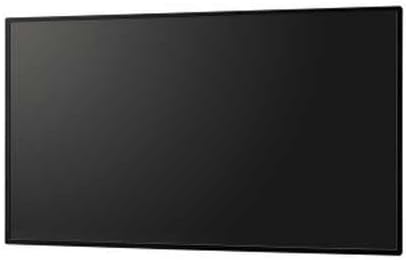
פיגורע 1: פראָנט view of the Sharp PNB501 50-inch monitor, showcasinג זײַן גלאַטן דיזײַן.
סעטאַפּ
Follow these steps to set up your Sharp PNB501 monitor. Ensure all components are present and undamaged before proceeding.
1. אַנפּאַקינג און פּלייסמאַנט
- נעמט פֿאָרזיכטיק אַרויס דעם מאָניטאָר פֿון זײַן פּאַקאַדזשינג. האַלט אָן אַלע פּאַקאַדזשינג מאַטעריאַלן פֿאַר צוקונפֿטיקן טראַנספּאָרט אָדער סטאָרידזש.
- Place the monitor on a stable, flat surface or mount it securely using a compatible VESA mount (sold separately). Ensure adequate ventilation around the display.
2. קאַנעקטינג קאַבלעס
The PNB501 features various input ports for versatile connectivity.
פיגורע 2: דערציען view פונעם מאָניטאָר, ארויסהייבנדיק די פֿאַרשידענע אַרייַנגאַנג און אַרויסגאַנג פּאָרץ.
- מאַכט קשר: Connect the power cord to the monitor's AC inlet and then to a grounded electrical outlet.
- ווידעא ינפּוט: Connect your video source (e.g., PC, media player) to the monitor using a DisplayPort cable (Display Port x 1 Mini) or other available video inputs.
- אַודיאָ קאַנעקשאַן: If your video source does not transmit audio via the video cable, connect an audio cable from your source to the monitor's audio input.
- נעץ קאַנעקשאַן: For network features or SoC functionality, connect an Ethernet cable to the LAN port.
3. ערשטע אויפשטעל
- דריק דעם מאַכט קנעפּל אויף דעם מאָניטאָר אָדער ווייַט קאָנטראָל.
- The monitor will display the Sharp logo and then search for an active input signal.
- If no signal is detected, ensure your source device is powered on and the correct input is selected on the monitor.
אַפּערייטינג ינסטראַקשאַנז
This section covers the basic operation of your Sharp PNB501 monitor.
1. מאַכט אויף / אויסגעלאשן
- צו קער אויף די מאָניטאָר, דריקן די מאַכט button on the monitor's control panel or the remote control.
- צו אויסלעשן דעם מאָניטאָר, דריק די מאַכט button again. The monitor will enter standby mode.
2. ינפּוט סעלעקציע
צו באַשטימען צווישן פאַרשידענע ווידעא קוואלן:
- דרוק די אַרייַנשרייַב or מקור button on the remote control or monitor.
- Use the navigation buttons to select the desired input (e.g., DisplayPort, HDMI).
- דרוק אַרייַן or OK צו באַשטעטיקן דיין סעלעקציע.
3. מעניו נאַוויגאַציע
Access and adjust monitor settings using the On-Screen Display (OSD) menu:
- דרוק די מעניו קנעפּל צו עפענען די OSD.
- ניצן די אַרויף / אַראָפּ or לינקס / רעכט navigation buttons to browse through menu options (e.g., Picture, Audio, System).
- דרוק אַרייַן or OK to select a sub-menu or adjust a setting.
- Use the navigation buttons to change values or select options.
- דרוק מעניו ווידער אָדער אַרויסגאַנג to close the OSD.
וישאַלט
Proper maintenance ensures the longevity and optimal performance of your Sharp PNB501 monitor.
1. רייניקן דעם עקראַן
- שטענדיק אויסלעשן און ארויסנעמען דעם מאָניטאָר פון עלעקטרישן שטעקער איידער איר רייניגט.
- ניצן אַ ווייך, לינט-פֿרייַ שטאָף אַ ביסל דampאָפּגעווישט מיט וואַסער אָדער אַ ספּעציעלע פאַרשטעלן רייניקונג לייזונג.
- ווישט אָפּ דעם עקראַן אויף אַ לייכטן אופן. פֿאַרמייַדט צו שטאַרקן דרוק.
- ניצט נישט קיין שרײַבנדיקע רייניגער, אַלקאָהאָל, בענזין אדער פֿאַרדינער, ווײַל די קענען שאַטן דעם עקראַן־איבערפֿלאַך.
2. רייניקן דעם קאַבינעט
- Wipe the monitor cabinet with a soft, dry cloth.
- פֿאַר שווערן שמוץ, ניצט אַ טוך לײַכטampened with a mild, non-abrasive detergent solution, then wipe dry.
3. סטאָרידזש
- If storing the monitor for an extended period, place it in its original packaging to protect it from dust and physical damage.
- קראָם אין אַ קיל, טרוקן אָרט אַוועק פון דירעקט זונשייַן און עקסטרעם טעמפּעראַטורעס.
טראָובלעשאָאָטינג
This section provides solutions to common issues you might encounter with your Sharp PNB501 monitor. If the problem persists, please contact customer support.
קיין מאַכט
- זיכער מאַכן אַז דער עלעקטרישער שנור איז זיכער פארבונדן סיי צום מאָניטאָר און סיי צו אַ אַרבעטנדיקן עלעקטרישן אַוטלעט.
- קאָנטראָלירט צי די עלעקטרישע אַוטלעט איז אַקטיוו דורך אַרײַנשטעקן אַן אַנדער דעוויס.
- Press the power button firmly on the monitor or remote control.
קיין סיגנאַל / ליידיקער עקראַן
- Verify that the video cable (e.g., DisplayPort) is securely connected to both the monitor and the source device.
- Ensure the source device (e.g., computer) is powered on and outputting a signal.
- Use the monitor's input selection feature to ensure the correct input source is chosen.
- Try connecting a different video source or cable to rule out a faulty component.
נעבעך בילד קוואַליטי
- Check the resolution settings on your source device. Ensure it is set to the monitor's native resolution (1920x1080).
- Adjust picture settings (brightness, contrast, sharpness) via the OSD menu.
- Ensure the video cable is not damaged or excessively long.
קיין אַודיאָ
- Increase the volume on the monitor and the source device.
- Check if the audio cable is properly connected (if not using audio over DisplayPort).
- Ensure the audio output on your source device is not muted or set to an incorrect output.
ספּעסאַפאַקיישאַנז
Detailed technical specifications for the Sharp PNB501 monitor:
| שטריך | באַשרייַבונג |
|---|---|
| סאָרט | שאַרף |
| מאָדעל נומער | PN-B501 |
| גרייס פון דעם עקראַן | 49.5 אינטשעס |
| פאַרשטעלן האַכלאָטע | 1920x1080 (FHD 1080p) |
| אַספּעקט פאַרהעלטעניש | 16:9 |
| באַשרייַבונג פון דער אויבערפלאַך פון דעם עקראַן | גלאָסי |
| פּונקט וואָג | 49 פונט |
| פּראָדוקט דימענשאַנז (LxWxH) | 44.21 X 2.76 X 25.47 אינטשעס |
| נומער פון פּראַסעסערז | 4 (Built-in SoC) |
| פאַבריקאַנט | די קאַפּיטאַליזיישאַן פון SHARP ELECTRONICS CORP |
| ערשטער דאַטע בנימצא | 2 מערץ 2018 |
וואָראַנטי און שטיצן
Sharp stands behind the quality of its products. For specific warranty terms and conditions, please refer to the warranty card included with your product or visit the official Sharp website. General support information is provided below.
קונה שטיצן
If you require technical assistance, have questions about your product, or need to arrange for service, please contact Sharp customer support. You can often find contact information on the official Sharp webוועבזייטל אדער דורך דעם פארקויפער וואו איר האט געקויפט דעם פראדוקט.
For additional resources and product information, you may visit the official Sharp store page:
Visit the Sharp Store on Amazon
Please note that return policies, such as the 30-day easy returns, are typically handled by the retailer.
Ask a question about this manual
Ask about setup, troubleshooting, compatibility, parts, safety, or missing instructions. Manuals+ will review the question and use this page’s manual context to help answer it.