
1. הקדמה
א דאנק פארן קויפןasing the Sharp HT-SB140MT 2.0 150W Soundbar. This soundbar is designed to enhance your audio experience, providing clear and powerful sound for your television, music, and other media. With its sleek design and versatile connectivity options, including Bluetooth, HDMI ARC/CEC, Optical, and Auxiliary inputs, it integrates seamlessly into any home entertainment setup. This manual provides essential information for safe and effective use, including setup, operation, maintenance, and troubleshooting.
2. זיכערקייַט אינפֿאָרמאַציע
- מאַכט מקור: פאַרזיכערן די מאַכט צושטעלן וואָלtage matches the requirements specified on the soundbar. Use only the provided power cable.
- ווענטילאַטיאָן: Do not block any ventilation openings. Maintain adequate space around the soundbar for proper airflow.
- וואַסער און נעץ: Do not expose the soundbar to dripping or splashing water. Do not place objects filled with liquids, such as vases, on the apparatus.
- היץ: Do not place the soundbar near heat sources such as radiators, heat registers, stoves, or other apparatus (including ampליפיערס) וואָס פּראָדוצירן היץ.
- רייניקונג: Unplug the soundbar from the power outlet before cleaning. Use a dry, soft cloth for cleaning. Do not use liquid cleaners or aerosol cleaners.
- סערוויס: דו זאלסט נישט פּרווון צו דינען דעם פּראָדוקט זיך. קאָנטאַקט אַלע קוואַלאַפייד סערוויס פּערסאַנעל.
- באַטעריז: The remote control uses a CR2 battery. Ensure correct polarity when inserting batteries. Do not mix old and new batteries.
3. פּעקל אינהאַלט
ביטע קאָנטראָלירט אַז אַלע זאכן זענען פאַראַן אין דעם פּעקל:
- Sharp HT-SB140MT Soundbar
- ווייַט קאָנטראָל
- מאַכט קאַבלע
- באַניצער מאַנואַל (דעם דאָקומענט)
4. פּראָדוקט איבערview

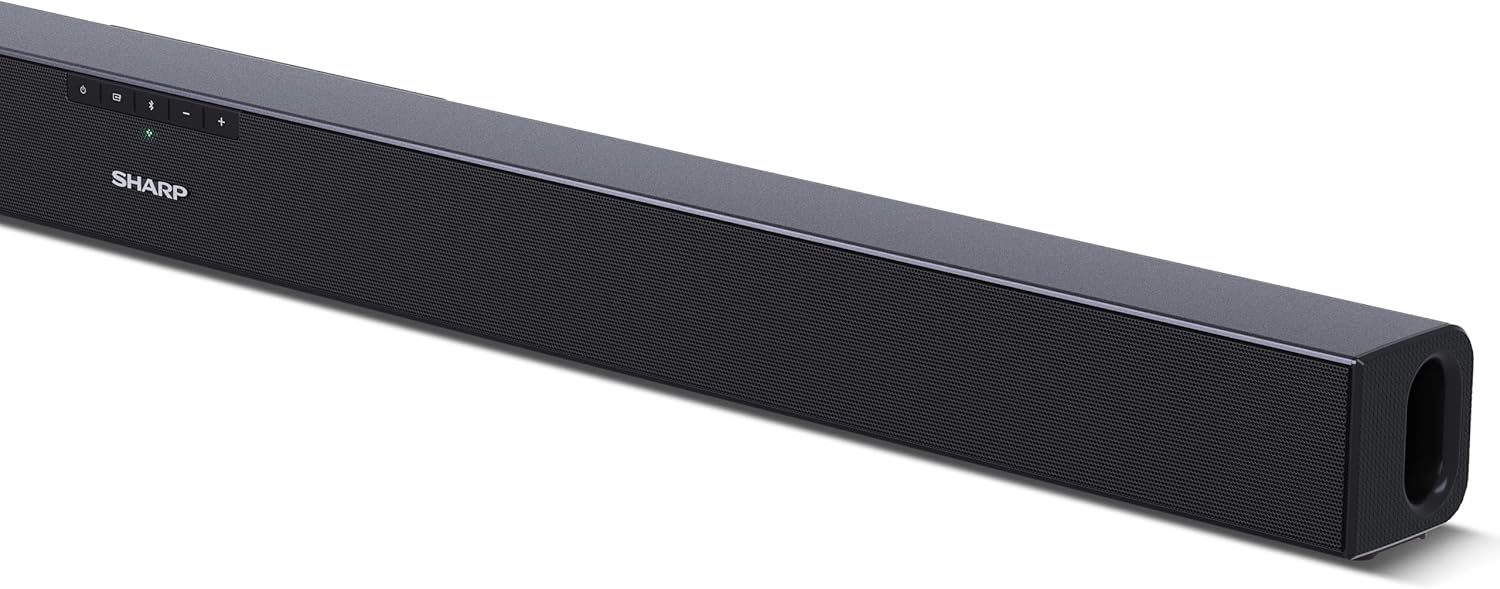
פיגורע 4.1: פראָנט View
The front of the soundbar features the Sharp logo and LED indicators for source selection and status. Control buttons for power, input, and volume are located on the top panel.
פיגורע 4.2: דערציען View (Connections)
The rear panel provides all necessary connection ports: HDMI ARC, Optical (S/PDIF), and Auxiliary (3.5mm) input, along with the power input.

פיגורע 4.3: רימאָוט קאָנטראָל
The included remote control allows for convenient operation of the soundbar, including power, input selection, volume, bass, and treble adjustments.
5. סעטאַפּ
5.1 פּלייסמאַנט
The Sharp HT-SB140MT Soundbar can be placed on a flat surface, such as a TV stand, or wall-mounted. Its slim profile of 6 cm allows it to fit easily under most TV screens without obstructing the view.

Figure 5.1: Soundbar Placement
The soundbar is ideally positioned directly in front of your television for optimal sound projection.
5.2 פֿאַרבינדן זיך צו דיין טעלעוויזיע
קלייַבן איינער פון די פאלגענדע קשר מעטהאָדס:
- HDMI ARC/CEC (Recommended): Connect an HDMI cable (not included) from the HDMI ARC port on your TV to the HDMI ARC port on the soundbar. This allows your TV remote to control the soundbar's volume and power. Ensure HDMI ARC/CEC is enabled in your TV's settings.
- Digital Optical Audio (S/PDIF): Connect an optical cable (not included) from the Optical Out port on your TV to the OPTICAL IN port on the soundbar. Select the Optical input on the soundbar.
- Auxiliary (AUX): Connect a 3.5mm audio cable (not included) from the headphone jack or AUX Out port on your TV to the AUX IN port on the soundbar. Select the AUX input on the soundbar.
5.3 מאַכט קאַנעקשאַן
After connecting the audio cable, plug the power cable into the soundbar's power input and then into a wall outlet (220-240V / 50Hz).
6. אַפּערייטינג ינסטרוקטיאָנס
6.1 מאַכט אויף / אַוועק
דריק דעם "Power" קנעפּל אויף דער סאַונדבאַר אָדער די ווײַטקאָנטראָל צו דרייען דעם אַפּאַראַט אָן אָדער אויס.
6.2 מקור סעלעקציע
Press the Input button on the soundbar or the remote control repeatedly to cycle through the available input sources: HDMI ARC, Optical, AUX, and Bluetooth. The LED indicator on the soundbar will change to reflect the selected source.
6.3 באַנד אַדזשאַסטמאַנט
Use the Volume Up (+) and Volume Down (-) buttons on the soundbar or the remote control to adjust the sound level.
6.4 בלועטאָאָטה פּערינג
צו פאַרבינדן אַ בלועטאָאָטה מיטל:
- Select Bluetooth input on the soundbar. The Bluetooth LED indicator will flash, indicating pairing mode.
- אויף אייער סמאַרטפאָון, טאַבלעט, אאז"וו, אַקטיווירט בלועטוט און זוכט פֿאַר פֿאַראַן דעוויסעס.
- Select "SHARP HT-SB140MT" from the list of devices.
- Once connected, the Bluetooth LED indicator will stop flashing and remain solid. You can now stream audio wirelessly to the soundbar.
6.5 Sound Modes (Equalizer)
The soundbar features an equalizer with different sound modes to optimize audio for various content types. Use the EQ button on the remote control to cycle through these modes (e.g., Movie, Music, News). You can also adjust Bass and Treble levels using dedicated buttons on the remote.
7. וישאַלט
7.1 רייניקונג
To clean the soundbar, unplug it from the power outlet. Use a soft, dry, lint-free cloth to wipe down the surfaces. Do not use abrasive cleaners, waxes, or solvents as they may damage the finish.
7.2 סטאָרידזש
If you plan to store the soundbar for an extended period, disconnect it from the power supply and store it in a cool, dry place, away from direct sunlight and extreme temperatures.
8. טראָובלעשאָאָטינג
אויב איר טרעפט פּראָבלעמען מיט אייער סאַונדבאַר, זעט די פאלגענדע געוויינטלעכע פּראָבלעמען און לייזונגען:
| פּראָבלעם | מעגלעך סיבה | לייזונג |
|---|---|---|
| קיין געזונט פון די סאָונדבאַר. | די סאַונדבאַר איז אויסגעלאָשן אָדער שטיל. אומרעכטע איינגאַבע מקור אויסגעקליבן. די קאַבלען זענען נישט ריכטיק פֿאַרבונדן. טעלעוויזיע אַודיאָ אַוטפּוט סעטטינגס זענען פאַלש. | זייט זיכער אז די סאַונדבאַר איז אנגעצונדן און נישט אויף שטום. Select the correct input source (HDMI ARC, Optical, AUX). Check all cable connections (HDMI, Optical, AUX). Verify your TV's audio output settings are set to external speakers or the correct digital output. |
| בלוטוט דעווייס קען נישט זיך פארבינדן. | די סאַונדבאַר איז נישט אין פּערינג מאָדע. מיטל איז אויס פון קייט. אריינמישונג פון אנדערע דעווייסעס. | Ensure the soundbar is in Bluetooth input mode and the LED is flashing. Move your Bluetooth device closer to the soundbar (within 10 meters). Turn off other Bluetooth devices nearby. Try unpairing and re-pairing. |
| ווייַט קאָנטראָל איז נישט ארבעטן. | Battery is low or inserted incorrectly. שטערונג צווישן ווײַטקאָנטראָל און סאַונדבאַר. Remote control is faulty. | Replace the CR2 battery and ensure correct polarity. Remove any obstructions between the remote and the soundbar's sensor. אויב ישוז אָנהאַלטן, קאָנטאַקט קונה שטיצן. |
9. ספּעסאַפאַקיישאַנז
| מאָדעל נאָמען | HT-SB140(מט) |
| רעדנער טיפּ | סאָונדבאַר |
| אַרומרינגלען סאָונד קאַנאַל קאַנפיגיעריישאַן | 2.0 |
| מאַקסימום רעדנער אַרויסגאַנג מאַכט | 150 וואטס |
| אָפטקייַט ענטפער | 60 הז |
| קאַנעקטיוויטי טעכנאָלאָגיע | Bluetooth, HDMI ARC/CEC, Digital Optical Audio (S/PDIF), 3.5mm Auxiliary (AUX) |
| ווירעלעסס קאָמוניקאַציע טעכנאָלאָגיע | בלועטאָאָטה |
| Maximum Range (Bluetooth) | 10 מעטער |
| קאָנטראָל מעטאָד | ווייַט קאָנטראָל |
| מאַכט מקור | לופטקילונג (הויפּט) |
| אַרייַנשרייַב וואָלtage | 220-240 וואלטס |
| קאָליר | שוואַרץ |
| מאַטעריאַל | פּלאַסטיק, מעטאַל |
| מאַונטינג טיפּ | וואנט בארג, טאַבלעטאָפּ |
| פּראָדוקט דימענשאַנז (L x W x H) | 95 X 6 X 6 סענטימעטער |
| פּונקט וואָג | 1.5 קילאָגראַמס |
| אַרייַנגערעכנט קאַמפּאָונאַנץ | ווייַט קאָנטראָל |
| באַטערי פארלאנגט | 1 קר 2 באַטאַרייע |
| וואָטערפּרוף | ניין |
| ספּער פּאַרץ אַוואַילאַביליטי | 5 יאר |
| ווייכווארג דערהייַנטיקונגען געראַנטיד ביז | אינפֿאָרמאַציע ניט בנימצא |
10. וואָראַנטי און שטיצן
The Sharp HT-SB140MT Soundbar comes with a Limited Warranty. Please refer to the warranty card included in your package for specific terms and conditions. Spare parts are available for up to 5 years from the date of purchase.
For technical support, service, or warranty claims, please contact Sharp customer service through their official website or the contact information provided in your product documentation. When contacting support, please have your product model number (HT-SB140(MT)) and purchase details ready.