
1. פּראָדוקט איבערview
The Sharp EL-531TG-GY is a scientific calculator designed for students and professionals requiring advanced mathematical functions. It features a 2-line display and Multi-Line Playback, facilitating the input and review of complex equations. This model is suitable for general math, algebra, geometry, trigonometry, statistics, biology, chemistry, and general science applications.
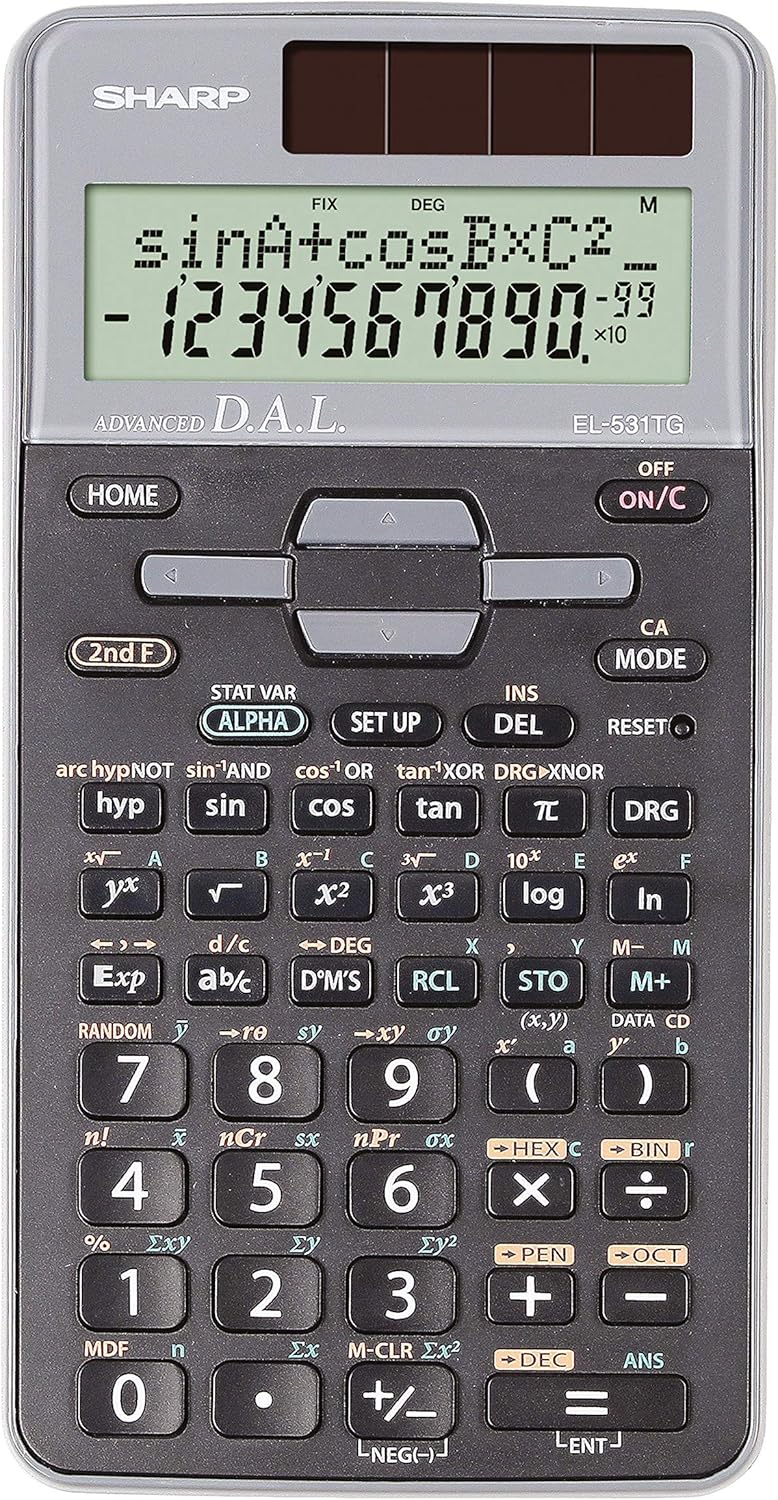
פיגורע 1: פראָנט view of the Sharp EL-531TG-GY Scientific Calculator, showing the display, keypad, and solar panel.
2. אויפשטעלן און ערשטע באנוץ
2.1 מאַכט מקור
The EL-531TG-GY calculator operates using both solar power and a single LR44 button cell battery. The solar panel provides power in well-lit environments, while the battery ensures operation in low-light conditions or when solar power is insufficient. An LR44 battery is included with the calculator.
2.2 טורנינג אויף / אַוועק
- צו דרייען דעם קאַלקולאַטאָר ON, דריקן די ON/C שליסל.
- צו דרייען דעם קאַלקולאַטאָר OFF, דריקן די צווייטע פ. שליסל נאכגעגאנגען דורך די OFF key (which is typically the same as ON/C).
2.3 Initial Display Settings
Upon first use or after a reset, the calculator will typically default to certain settings (e.g., DEG for angle units). Refer to Section 3.3 for details on changing mode settings.
3. אַפּערייטינג ינסטרוקטיאָנס
3.1 גרונטלעכע אריטמעטישע אפעראציעס
אַרייַן נומערן ניצנדיק די נומערישע קלאַוויאַטור. ניצט די +, -, ×, און ÷ keys for addition, subtraction, multiplication, and division, respectively. Press = to obtain the result.
3.2 וויסנשאפטלעכע פונקציעס
The calculator performs over 273 advanced scientific functions. Many functions are accessed by pressing the צווייטע פ. key before the desired function key.
- טריגאָנאָמעטריק פאַנגקשאַנז: ניצן זינד, קאָס, טאַן. Inverse functions (זינד⁻¹, קאָס⁻¹, ברוין⁻¹) ווערן צוגעגריפן דורך צווייטע פ..
- לאָגאַריטמישע פונקציעס: ניצן קלאָץ (באַזע 10) און ln (נאַטירלעכער לאָגאַריטם).
- כוחות און וואָרצלען: ניצן x², √, x³, ³√.
- בראָכצאָל: ניצן די d/c key for fraction input and conversion.
3.3 Mode Settings (DEG/RAD/GRAD)
To change the angle unit mode (Degrees, Radians, Gradians):
- דרוק די DRG שליסל.
- ריפּיטידלי דריקן DRG to cycle through DEG (Degrees), RAD (Radians), and GRAD (Gradians). The current mode is indicated on the display.
3.4 זכּרון פונקציעס
The calculator includes memory functions for storing and recalling values.
- קראָם (STO): דרוק STO followed by a variable key (e.g., A, B) to store the displayed value.
- RCL (צוריקרופן): דרוק RCL followed by the variable key to recall the stored value.
- M+ (זיקאָרן פּלוס): Adds the displayed value to the independent memory.
- מ- (זיקאָרן מינוס): Subtracts the displayed value from the independent memory.
3.5 Multi-Line Playback
The 2-line display allows for Multi-Line Playback, enabling users to review previous calculations and expressions. Use the directional arrow keys (up/down) to scroll through past entries and results. This feature is useful for checking work or re-using parts of previous calculations.
4. וישאַלט
4.1 רייניקונג
To clean the calculator, wipe the surface gently with a soft, dry cloth. Do not use abrasive cleaners, solvents, or excessive moisture, as these can damage the display or internal components.
4.2 באַטערי פאַרבייַט
The calculator uses one LR44 button cell battery. If the display becomes dim or erratic in low-light conditions, the battery may need replacement. To replace the battery:
- זייט זיכער אז דער קאַלקולאַטאָר איז אויסגעלאָשן.
- געפינט די באַטאַרייע אָפּטייל אויף דער צוריקזייט פון די קאַלקולאַטאָר.
- פֿאָרזיכטיק עפֿנט דעם דעקל פֿון דעם אָפּטייל.
- אַרויסנעמען די אַלטע LR44 באַטאַרייע און אַרײַנשטעלן אַ נײַע, זאָרגנדיק פֿאַר די ריכטיקע פּאָלאַריטעט (+/-).
- פאַרמאַכן די באַטאַרייע אָפּטייל דעקן סיקיורלי.
4.3 סטאָרידזש
When not in use, store the calculator in a cool, dry place away from direct sunlight and extreme temperatures. The hard cover included with the calculator provides protection from scratches and minor impacts.
5. טראָובלעשאָאָטינג
5.1 ווייַז ישוז
- ליידיק אָדער טונקעל אַרויסווייַזונג: Ensure sufficient light for the solar panel. If the issue persists, replace the LR44 battery.
- Erratic Display: This may indicate a low battery. Replace the LR44 battery.
5.2 Incorrect Results
- Check Mode Settings: Verify that the angle unit (DEG, RAD, GRAD) is set correctly for trigonometric calculations.
- Input Error: Review your input using the Multi-Line Playback feature to ensure the expression was entered correctly.
- Memory Contents: If using memory functions, ensure the stored values are correct.
5.3 Calculator Not Responding
If the calculator becomes unresponsive, try performing a reset. Locate the באַשטעטיק button (often a small recessed button requiring a thin object like a paperclip to press). Pressing this button will clear all memory and return the calculator to its factory default settings.
6. ספּעסאַפאַקיישאַנז

פיגורע 2: פראָנט view of the Sharp EL-531TG-GY Scientific Calculator, illustrating its dimensions.
| שטריך | באַשרייַבונג |
|---|---|
| מאָדעל נומער | SH-EL531TGGY |
| ווייַז טיפּ | 2-line LCD with Multi-Line Playback |
| פאַנגקשאַנז | Over 273 advanced scientific functions |
| מאַכט מקור | זונ - ענערגיע און 1 x LR44 באַטאַרייע (אריינגערעכנט) |
| מאַטעריאַל | פּלאַסטיק |
| דימענסיעס (L X W X H) | 16.1 x 8 x 1.5 ס״מ (אומגעפער) |
| וואָג | 100 ג (בעערעך) |

פיגורע 3: זייַט view of the Sharp EL-531TG-GY Scientific Calculator, showing its slim profile.
7. וואָראַנטי און שטיצן
7.1 וואָראַנטי אינפֿאָרמאַציע
This product is covered by a manufacturer's warranty. Please refer to the warranty card included with your purchase or visit the official Sharp webוועבזייטל פֿאַר דעטאַלירטע וואָראַנטי טערמינען און באַדינגונגען ספּעציפֿיש פֿאַר אייער געגנט.
7.2 קונה שטיצן
For technical assistance, troubleshooting not covered in this manual, or service inquiries, please contact Sharp customer support. Contact information can typically be found on the Sharp official webוועבזייטל אדער אויף דער פּראָדוקט פּאַקאַדזשינג.