
Sharp HT-SBW110
Sharp HT-SBW110 2.1 Bluetooth Soundbar System User Manual
Model: HT-SBW110 | Brand: Sharp
1. הקדמה
א דאנק פארן קויפןasing the Sharp HT-SBW110 2.1 Bluetooth Soundbar System. This manual provides essential information for setting up, operating, and maintaining your soundbar system. Please read it thoroughly before use to ensure proper functionality and safety.
The HT-SBW110 is a powerful 2.1 channel soundbar system designed to enhance your audio experience, featuring 180W total RMS power, a dedicated wireless subwoofer, and versatile connectivity options including Bluetooth, HDMI ARC, Optical, and AUX inputs.

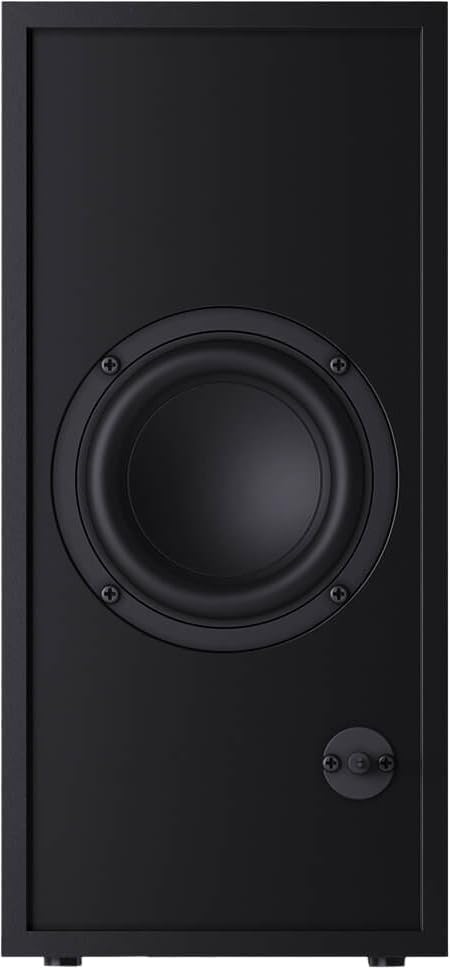
Figure 1.1: Sharp HT-SBW110 Soundbar and Subwoofer
This image displays the Sharp HT-SBW110 soundbar and its accompanying separate subwoofer, showcasinזייער גלאַט שוואַרץ דיזיין.
2. פּעקל אינהאַלט
ביטע קאָנטראָלירט אַז אַלע זאכן זענען פאַראַן אין דעם פּעקל:
- Sharp HT-SBW110 Soundbar
- ווירעלעסס סובוואָאָפער
- ווייַט קאָנטראָל
- מאַכט קאַבל פֿאַר סאָונדבאַר
- מאַכט קאַבל פֿאַר סאַבוואָאָפער
- באַניצער מאַנואַל (דעם דאָקומענט)
- Batteries for Remote Control (1 x CR2)
3. זיכערקייַט אינפֿאָרמאַציע
Always follow basic safety precautions when using this product to reduce the risk of fire, electric shock, or injury:
- שטעלט נישט אויס דעם אפּאַראַט צו טריפֿענישן אָדער שפּריצן.
- דו זאלסט נישט שטעלן אַבדזשעקץ אָנגעפילט מיט ליקווידס, אַזאַ ווי וואַסעס, אויף דעם אַפּאַראַט.
- זיכער מאַכן אַז עס איז גענוג ווענטילאַציע. נישט פֿאַרשטאָפּן קיין ווענטילאַציע עפענונגען.
- Do not place the soundbar or subwoofer near heat sources such as radiators, heat registers, stoves, or other apparatus (including ampליפיערס) וואָס פּראָדוצירן היץ.
- ניצן בלויז אַטאַטשמאַנץ / אַקסעסעריז ספּעסיפיעד דורך דער פאַבריקאַנט.
- אָפּשטויסן דעם אַפּאַראַט בעשאַס בליץ סטאָרמז אָדער ווען אַניוזד פֿאַר לאַנג פּיריאַדז.
- אָפּשיקן אַלע סערוויסעס צו קוואַלאַפייד סערוויס פּערסאַנעל.
4. סעטאַפּ
4.1 פּלייסמאַנט
סאָונדבאַר: Place the soundbar on a flat, stable surface directly in front of your TV, centered for optimal sound dispersion. Ensure there are no obstructions in front of the soundbar's speakers.
סובוואָאָפער: The wireless subwoofer can be placed anywhere in the room, ideally within 5-10 meters of the soundbar, for best bass response. Avoid placing it in enclosed spaces that might muffle the sound.
The soundbar is also wall-mountable. Refer to the included wall-mounting template (if provided) for proper installation.
4.2 קאַנעקשאַנז
Connect your soundbar to your TV or other audio sources using one of the following methods:

Figure 4.1: Soundbar Rear Panel Connections
This image shows the rear panel of the Sharp HT-SBW110 soundbar, highlighting the various input ports including HDMI ARC, Optical, and AUX.
- HDMI ARC (רעקאָמענדירט):
Connect an HDMI cable from the HDMI ARC port on your soundbar to the HDMI ARC port on your TV. This allows audio from your TV to be sent to the soundbar and enables control of the soundbar volume using your TV remote (if your TV supports HDMI CEC).
- אָפּטיש:
Connect an optical audio cable from the OPTICAL input on your soundbar to the optical digital audio output on your TV or other audio source.
- AUX:
Connect a 3.5mm audio cable from the AUX input on your soundbar to the headphone jack or audio output of your device (e.g., smartphone, MP3 player).
- מאַכט קשר:
Connect the power cables to the soundbar and subwoofer, then plug them into a wall outlet (AC 220-240V, 50Hz).
The subwoofer will automatically pair with the soundbar once both are powered on. A blue indicator light on the subwoofer will confirm a successful connection.
5. אַפּערייטינג ינסטרוקטיאָנס
5.1 רימאָוט קאָנטראָל איבערview
פיגורע 5.1: רימאָוט קאָנטראָל
This image displays the sleek, minimalist remote control for the Sharp HT-SBW110 soundbar, showing its various buttons for power, input selection, volume, bass, treble, and EQ modes.
The remote control allows you to manage all functions of your soundbar system. Insert the provided CR2 battery into the remote control before first use.
- מאַכט קנעפּל (⏷): Turns the soundbar On/Off.
- Input/Source Button (↵): Switches between HDMI ARC, Optical, AUX, and Bluetooth inputs.
- באַנד אַרויף / אַראָפּ (+/-): אַדזשאַסטירט דעם הויפּט באַנד לעוועל.
- שטום קנעפּל (🔇): מיוטעס אָדער אַנמיוט די געזונט.
- באַס +/-: Adjusts the bass level of the subwoofer.
- טרעבל +/-: אַדזשאַסץ די טרעבאַל מדרגה.
- עק קנעפּל: Cycles through preset equalizer modes: Music, Film, Talk.
- בלועטאָאָטה קנעפּל (Ⓘ): Enters Bluetooth pairing mode.
5.2 יקערדיק אָפּעראַציע
- מאַכט אויף / אַוועק: Press the Power button on the remote or on the soundbar's top panel.
- אויסקלייַבן אַרייַנשרייַב: Press the Input/Source button repeatedly to cycle through available inputs (HDMI ARC, Optical, AUX, Bluetooth). The LED indicator on the soundbar will change color to indicate the selected input.
- סטרויערן באַנד: Use the Volume +/- buttons on the remote or the soundbar to adjust the listening level.
- טוישן EQ מאָדע: Press the EQ button to select between Music, Film, or Talk sound modes.
5.3 בלועטאָאָטה פּערינג
- Press the Input/Source button on the soundbar or remote until the Bluetooth input is selected (usually indicated by a blue LED).
- The soundbar will automatically enter pairing mode, and the Bluetooth LED will flash.
- אויף אייער בלוטוט דעווייס (סמאַרטפאָן, טאַבלעט, אאז"וו), אַקטיווירט בלוטוט און זוכט פֿאַר פֿאַראַן דעווייסעס.
- Select "SHARP HT-SBW110" from the list of devices.
- Once paired, the Bluetooth LED on the soundbar will stop flashing and remain solid blue. You can now play audio from your device through the soundbar.
6. וישאַלט
- רייניקונג: ניצט אַ ווייכע, טרוקענע שטאָף צו רייניקן די ייבערפלאַכן פון די סאַונדבאַר און סאַבוווּפער. ניצט נישט פליסיקע רייניגער אָדער אַעראָסאָל שפּריץ.
- ווענטילאַטיאָן: Ensure that the ventilation openings on the soundbar and subwoofer are not blocked by dust or debris.
- סטאָרידזש: אויב איר לייגט דאָס אַפּאַראַט אַוועק פֿאַר אַ לענגערע צייט, נעמט עס אַרויס פֿון דער עלעקטרישער אַוטלעט און לייגט עס אַוועק אין אַ קיל, טרוקן אָרט.
7. טראָובלעשאָאָטינג
| פּראָבלעם | מעגלעך סיבה | לייזונג |
|---|---|---|
| קיין מאַכט | שטראָם קאַבל נישט פארבונדן; שטראָם אַוטלעט נישט אַקטיוו. | Ensure power cables are securely connected to the soundbar, subwoofer, and wall outlet. Try a different outlet. |
| קיין געזונט | אומרעכטע איינגאבע אויסגעקליבן; וואליום צו נידעריג; קאבלען נישט ריכטיג פארבונדן. | Select the correct input source. Increase volume. Check all audio cable connections. Ensure TV audio output is set to external speakers. |
| בלועטאָאָטה פּערינג פיילז | סאַונדבאַר נישט אין פּערינג מאָדע; דעווייס צו ווייט; שטערונג. | Ensure soundbar is in Bluetooth pairing mode (flashing blue LED). Move device closer to soundbar. Avoid strong electromagnetic interference. Try unpairing and re-pairing. |
| ווייַט קאָנטראָל נישט ארבעטן | באַטעריעס אויסגעשעפּט; שטערונג צווישן ווײַטקאָנטראָל און סאַונדבאַר. | Replace batteries. Ensure clear line of sight between remote and soundbar's IR receiver. |
אויב די פראבלעם בלייבט, ביטע זעט די וואראנטי און שטיצע סעקציע פאר ווייטערדיגע הילף.
8. ספּעסאַפאַקיישאַנז
| אַודיאָ טשאַנאַלז | 2.1 טשאַנאַלז |
| גאַנץ RMS מאַכט | 180 וו |
| Soundbar RMS Power | 30 וו |
| סאַבוואָאָפער RMS מאַכט | 30 וו |
| אָפטקייַט ראַנגע | 60 - 20000 הערץ |
| קאַנעקטיוויטי טעכנאָלאָגיע | ווייערד & ווירעלעסס |
| בלועטאָאָטה ווערסיע | 4.2 |
| HDMI פּאָרץ | 1 (ARC) |
| אָפּטיש אַודיאָ אַרייַנשרייַב | 1 |
| AUX ינפּוט | יא |
| אַק אַרייַנשרייַב חלקtage | 220 - 240 V |
| אַק אַרייַנשרייַב אָפטקייַט | 50 הז |
| טיפּיש מאַכט קאַנסאַמשאַן | 30 וו |
| סטאַנדביי מאַכט קאַנסאַמשאַן | 0.5 וו |
| Soundbar Dimensions (W x D x H) | 800 X 60 X 60 מם (31.5 X 2.4 X 2.4 אינטשעס) |
| סאָונדבאַר וואָג | 1.3 קג (2.9 לבס) |
| Subwoofer Dimensions (W x D x H) | 150 X 320 X 220 מם (5.9 X 12.6 X 8.7 אינטשעס) |
| סובוואָאָפער ווייט | 2.7 קג (6 לבס) |
| קאָליר | שוואַרץ |
| וואנט מאָונטאַבלע | יא |
| ווייַט קאָנטראָל | אַרייַנגערעכנט |
| סערטיפיקאַטיאָנס | CE (EMC), CB (Safety), ErP (Energy) |
9. וואָראַנטי און שטיצן
This Sharp HT-SBW110 Soundbar System comes with a limited warranty. Please refer to the warranty card included in your package for specific terms and conditions.
Spare parts availability is guaranteed for 1 year from the date of purchase.
For technical support, troubleshooting beyond this manual, or warranty claims, please contact Sharp customer service or visit the official Sharp website for your region. Contact information can typically be found on the product packaging or Sharp's official webפּלאַץ.
Ask a question about this manual
Ask about setup, troubleshooting, compatibility, parts, safety, or missing instructions. Manuals+ will review the question and use this page’s manual context to help answer it.