
הקדמה
Welcome to the user manual for your Mustool G600 Digital Portable Microscope. This guide provides detailed instructions to help you set up, operate, and maintain your device, ensuring optimal performance and longevity. Please read this manual thoroughly before using the microscope.
פּראָדוקט איבערview
The Mustool G600 is a versatile digital portable microscope designed for detailed observation of tiny objects. It features a high-definition display and adjustable magnification, making it suitable for various applications.
שליסל פֿעיִקייטן
- 4.3-inch HD LCD display for clear viewing.
- HD 3.6MP CCD sensor for high-resolution imaging.
- Adjustable magnification from 1x to 600x.
- Eight high-brightness LEDs for optimal illumination.
- Support for Micro SD card up to 64GB (not included) for storage.
- Built-in Li-ion battery providing approximately 6 hours of continuous working time.
- Auto turn-off function for power saving.
- Object distance: 15mm to infinity.
- מולטי-שפּראַך שטיצן.
קאַמפּאָונאַנץ

Figure 1: Mustool G600 Digital Portable Microscope in operation, showing a circuit board under its lens and the magnified image on the display.
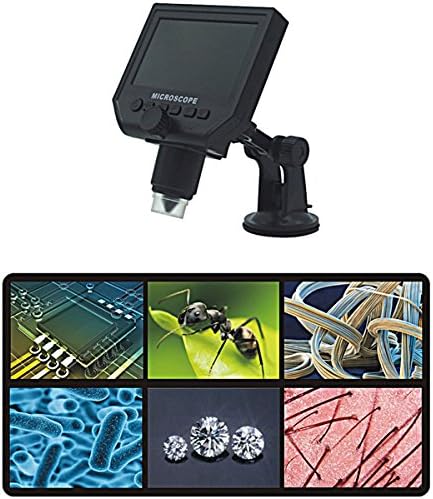
Figure 2: The Mustool G600 Digital Portable Microscope detached from its stand, showcasing the device's compact design and the adjustable stand.

Figure 3: The Mustool G600 Digital Portable Microscope display, illustrating various magnified views such as circuit components, an ant, textile fibers, bacteria, diamonds, and hair strands.

פיגורע 4: פראָנט view of the Mustool G600 Digital Portable Microscope mounted on its suction cup stand, highlighting the 4.3-inch LCD screen and control buttons.

פיגורע 5: זייַט view of the Mustool G600 Digital Portable Microscope, illustrating the adjustable arm of the stand and the microscope's lens assembly.

פיגורע 6: דערציען view of the Mustool G600 Digital Portable Microscope, showing the various ports for power, data, and Micro SD card insertion.
פּעקל אינהאַלט
ביטע איבערצייגן אז אלע זאכן וואס זענען אויסגערעכנט אונטן זענען אריינגערעכנט אין אייער פעקל. אויב עפעס זאכן פעלן אדער זענען געשעדיגט, ביטע קאנטאקטירט קאסטומער סופארט.
- 1 x Mustool G600 LCD Digital Microscope
- 1 x EU Plug Power supply (Note: Adapter may vary by region)
- 1 x Data line (USB cable)
- 1 x Multi-functional support (Stand)
- 1 x User’s manual (This document)
סעטאַפּ
טשאַרדזשינג די באַטאַרייע
Before first use, fully charge the microscope's built-in Li-ion battery.
- Connect the provided power supply to the microscope's charging port.
- שטעקט אריין די מאַכט צושטעל אין אַ נאָרמאַל עלעקטרישע ווענטיל.
- די טשאַרדזשינג אינדיקאַטאָר ליכט וועט זיך אָנצינדן. אַמאָל גאָר אָנגעלאָדן, קען די ליכט טוישן קאָליר אָדער זיך אויסלעשן.
- א פולע אָפּצאָל גיט בערך 6 שעה פון קעסיידערדיק אָפּעראַציע.
אַסעמבאַלינג די סטאַנד
The multi-functional support allows for stable positioning of the microscope.
- Attach the microscope unit to the adjustable arm of the stand. Ensure it is securely fastened.
- Place the suction cup base on a clean, flat, non-porous surface. Press down firmly on the suction cup lever to secure the stand.
- Adjust the arm and microscope angle as needed for your viewינג טעמע.
Inserting a Micro SD Card (Optional)
To save images and videos, insert a Micro SD card (up to 64GB, not included).
- Locate the Micro SD card slot on the side or back of the microscope unit.
- Gently insert the Micro SD card with the gold contacts facing down (or as indicated by the slot diagram) until it clicks into place.
- צו אַרויסנעמען, שטופּ די קאַרטל ווידער אַרײַן ביז זי שפּרינגט אַרויס.
אַפּערייטינג ינסטראַקשאַנז
מאַכט אויף / אַוועק
דריקן און האַלטן די מאַכט button (usually marked with a power symbol) for a few seconds to turn the microscope on or off. The LCD screen will illuminate.
אַדזשאַסטינג מאַגניפיקאַטיאָן און פאָקוס
The microscope offers 1x to 600x continuous magnification.
- Place the object you wish to observe directly under the microscope lens.
- דרייען די גרויסע פאָקוס קנופּ (typically located on the side of the microscope body) to bring the image into sharp focus on the LCD screen.
- Adjust the distance between the lens and the object (object distance: 15mm to infinity) using the stand's adjustment mechanisms to achieve the desired magnification and clarity.
אַדזשאַסטינג געפירט ברייטנאַס
The microscope is equipped with 8 adjustable high-brightness LEDs.
געפינען די געפירט ברייטנאַס קאָנטראָל (often a small knob or button) on the microscope body. Rotate or press it to increase or decrease the illumination on your subject.
קאַפּטשערינג בילדער און ווידיאס
To capture still images or record videos, ensure a Micro SD card is inserted.
- בשעת viewing your subject, press the מאָדע button to switch between photo mode, video mode, and playback mode.
- אין פאָטאָ מאָדע, דריק די OK / כאַפּן קנעפּל צו נעמען אַ בילד.
- In video mode, press the OK / כאַפּן button to start recording. Press it again to stop recording.
- קאַפּטשערד files זענען געראטעוועט צו די מיקראָ סד קאָרט.
מעניו נאַוויגאַציע
ניצן די מעניו button to access settings and options.
ניצן די אַרויף / אַראָפּ or לינקס / רעכט פײַל קנעפּלעך צו נאַוויגירן דורך מעניו אָפּציעס.
דרוק די OK קנעפּל צו באַשטעטיקן סאַלעקשאַנז.
Common settings include resolution (1080P, 720P, VGA), language, date/time, and auto-off timer.
וישאַלט
רייניקונג
To ensure clear viewing and extend the life of your microscope:
- Gently wipe the LCD screen with a soft, lint-free cloth. For stubborn smudges, slightly dampווישט דעם שטאָף מיט וואַסער אָדער אַ פאַרשטעלן רייניגער.
- Use a soft brush or air blower to remove dust from the lens. For smudges on the lens, use a specialized lens cleaning solution and cloth.
- Clean the microscope body with a dry or slightly damp שטאָף. דו זאלסט נישט נוצן אַברייסיוו קלינערז אָדער סאָלוואַנץ.
סטאָרידזש
When not in use, store the microscope in a cool, dry place, away from direct sunlight and extreme temperatures.
Keep the lens covered to prevent dust accumulation.
באַטערי קער
צו פאַרלענגערן די באַטאַרייע לעבן:
- פֿאַרמײַדט אָפֿט פֿולשטענדיק אויסצולאָדן די באַטעריע.
- אויב איר לייגט עס אויף פאר א לענגערע צייט, לאדט אויף די באטעריע ביז בערך 50% קאפאציטעט.
- Recharge the battery every few months if not in use to prevent deep discharge.
טראָובלעשאָאָטינג
| פּראָבלעם | מעגלעך סיבה | לייזונג |
|---|---|---|
| Microscope does not turn on. | באַטערי איז דיפּליטיד. | טשאַרדזשינג די באַטאַרייע מיט די צוגעשטעלט מאַכט צושטעלן. |
| דאָס בילד איז פֿאַרשוואָמען. | Incorrect focus or object distance. | Adjust the focus knob and/or the distance between the lens and the object. |
| Screen is too dark/bright. | LED brightness not adjusted. | Adjust the LED brightness control. |
| קען נישט ראַטעווען בילדער/ווידעאָס. | קיין מיקראָ SD קאַרטל איז נישט אַרײַנגעשטעלט אָדער די קאַרטל איז פול/פאַרדאָרבן. | Insert a Micro SD card, ensure it has sufficient space, or try formatting the card (this will erase all data). |
| Microscope turns off automatically. | Auto turn-off function is enabled or battery is low. | Charge the battery. Check menu settings to adjust or disable the auto turn-off timer. |
אויב די פראבלעם בלייבט נאך פרובירן די לייזונגען, ביטע קאנטאקטירט קאסטומער סופארט.
ספּעסאַפאַקיישאַנז
| שטריך | דעטאַל |
|---|---|
| מאָדעל | Mustool G600 |
| ווייַז | 4.3 אינטש הד לקד אַרויסווייַזן |
| פּיקסעל | HD 3.6MP CCD |
| האַכלאָטע | 1080 פּ, 720 פּ, ווגאַ |
| פאַרגרעסערונג | 1-600x (Continuous) |
| אָבדזשעקט דיסטאַנסע | 15mm - infinity |
| ליכט מקור | 8 Adjustable High Brightness LEDs |
| סטאָרידזש שטיצן | Micro SD card up to 64GB (Not included) |
| מאַכט מקור | געבויט-אין לי-יאָן באַטאַרייע |
| באַטערי לעבן | Approx. 6 hours continuous working |
| אַוטאָ קער-אַוועק | יא |
| שפּראַך שטיצן | English, Spanish, Russian, Korean, Japanese, Thai, Hebrew, Portuguese, German, French, Italian, Turkish, Czech, Chinese |
| מאַטעריאַל | Glass/Glass-like (Lens), Other components as per design |
| קאָליר | שוואַרץ |
| UPC | 783050248461 |
וואָראַנטי און שטיצן
The Mustool G600 Digital Portable Microscope comes with a standard manufacturer's warranty. Please refer to the warranty card included in your package for specific terms and conditions.
For technical support, troubleshooting assistance beyond this manual, or warranty claims, please contact Mustool customer service through the retailer where you purchased the product or visit the official Mustool webפּלאַץ.
Please have your product model (G600) and purchase information ready when contacting support.