
1. הקדמה
Thank you for choosing the Fitfiu Fitness BEST-100 Exercise Bike. This manual provides essential information for the safe assembly, operation, and maintenance of your new fitness equipment. Please read this manual thoroughly before use and retain it for future reference.
The Fitfiu Fitness BEST-100 is designed for moderate home exercise, featuring a 5kg inertia flywheel and 8 resistance levels. Its compact design makes it suitable for various indoor spaces.

Image 1.1: The Fitfiu Fitness BEST-100 Exercise Bike, showcasinג זײַן קאָמפּאַקטן דיזײַן און רויט און שוואַרץ קאָליר סכעמע.
2. זיכערקייַט אינפֿאָרמאַציע
Before using this exercise bike, please observe the following safety precautions:
- באַראַטנ זיך דיין דאָקטער איידער איר אָנהייבן קיין געניטונג פּראָגראַם.
- האַלטן קינדער און פּעץ אַוועק פון די ויסריכט בעשאַס נוצן.
- Place the exercise bike on a flat, stable surface. Ensure adequate space around the equipment.
- קאָנטראָלירט דעם וועלאָסיפּעד פֿאַר לויזע אָדער געשעדיגטע טיילן פֿאַר יעדן באַנוץ. ניצט נישט אויב קיין קאָמפּאָנענטן זענען קאָמפּראָמיטירט.
- טראָגט פּאַסיקע ספּאָרט קליידער און שיך. פֿאַרמייַדט לויזע קליידער וואָס קענען זיך פֿאַרהאַנגען אין באַוועגלעכע טיילן.
- נישט איבערשטייגן דעם מאקסימום באַניצער וואָג פון 100 ק"ג (220 פונט).
- הער אויף צו טאָן געניטונגען גלייך אויב איר פילט זיך שוואַך, שווינדלדיק, אָדער דערפאַרט ווייטיק.
- This product is intended for home use only, not for commercial or institutional settings.
3. פּעקל אינהאַלט
ביטע באַשטעטיקן אַז אַלע קאָמפּאָנענטן זענען פאַראַן אין דער פּאַקעט:
- 1x Fitfiu Fitness BEST-100 Exercise Bike (Red)
- 1x ינסטרוקטיאָן מאַנואַל
- 1x Assembly Kit (includes necessary tools and fasteners)
אויב עס פעלט אדער זענען געשעדיגט אין טיילן, ביטע קאנטאקטירט קאסטומער סופארט גלייך.
4. סעטאַפּ און אַסעמבלי
Follow these steps to assemble your Fitfiu Fitness BEST-100 Exercise Bike:
- אָפּלייגן קאַמפּאָונאַנץ: נעמט פֿאָרזיכטיק אַרויס אַלע טיילן פֿון דער פּאַקעט און לייגט זיי אויס אויף אַ ריינער, גלאַטער ייבערפֿלאַך. קאָנטראָלירט די ליסטע פֿון אינהאַלט פֿון דער פּאַקעט.
- צוטשעפּען סטאַביליזאַטאָרן: Secure the front and rear stabilizer bars to the main frame using the provided bolts and washers. Ensure they are tightened firmly for stability.
- ינסטאַלירן פּעדאַלז: Identify the left (L) and right (R) pedals. Thread the left pedal counter-clockwise and the right pedal clockwise into their respective crank arms. Tighten securely with a wrench.
- מאָנטירן זיצפּאָסטן און זיצפּלאַץ: Insert the seat post into the main frame and adjust to your desired height. Secure it with the quick-release lever or knob. Attach the seat to the seat post.
- Assemble Handlebar Post and Handlebars: Connect the handlebar post to the main frame. Attach the handlebars to the handlebar post, ensuring all cables (if any) are properly routed and not pinched.
- פֿאַרבינדן קאַנסאָול: If applicable, connect the wires from the main frame to the LCD console. Mount the console onto the handlebar assembly.
- לעצט טשעק: Before first use, double-check all bolts, nuts, and connections to ensure they are tight and secure.
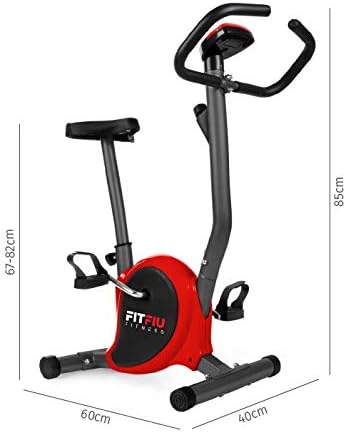
Image 4.1: Dimensions of the Fitfiu Fitness BEST-100 Exercise Bike (60 x 40 x 85 cm), useful for planning placement and assembly.
5. אַפּערייטינג ינסטרוקטיאָנס
5.1 צופּאַסן דעם זיץ
To adjust the seat height, loosen the quick-release lever or knob on the seat post. Raise or lower the seat to a comfortable position where your leg is slightly bent at the knee when the pedal is at its lowest point. Securely tighten the lever or knob.

Image 5.1: The comfortable seat of the exercise bike, designed for extended use.
5.2 אַדזשאַסטינג קעגנשטעל
The Fitfiu Fitness BEST-100 features 8 levels of magnetic resistance. To increase resistance, turn the resistance knob clockwise. To decrease resistance, turn the knob counter-clockwise. Start with a low resistance level and gradually increase as your fitness improves.
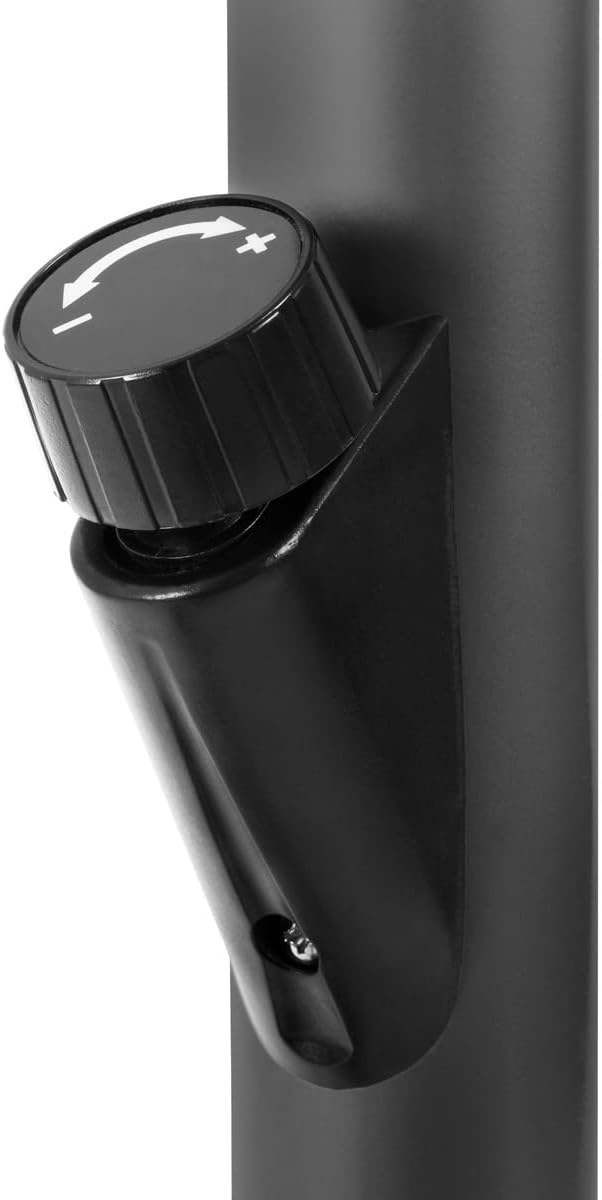
Image 5.2: The resistance knob, allowing users to select from 8 levels of magnetic resistance.
5.3 ניצן דעם LCD דיספּלעי
The multi-functional LCD display tracks your workout data. It typically shows:
- גיכקייַט: איצטיקע סייקלינג גיכקייט.
- צייט: די געדויער פון אייער טרענירונג.
- דיסטאַנסע: Total distance covered during the session.
- קאַלאָריעס: עסטימאַטעד קאַלאָריעס פארברענט.
Refer to the specific console manual (if provided separately) for detailed instructions on mode selection and resetting values.

Image 5.3: The pedals with adjustable straps and the protective cover for the flywheel mechanism.
6. וישאַלט
רעגולערע אויפהאלטונג גאראנטירט די לאנגעוויטי און זיכערע אפעראציע פון אייער געניטונג בייק:
- רייניקונג: ווישן אַראָפּ די בייק מיט אַדamp טוך נאך יעדן באניץ צו באזייטיגן שווייס און שטויב. פארמיידט שווארצע רייניגער.
- דורכקוק: קאָנטראָלירט פּעריִאָדיש אַלע באָלץ, ניסלעך און באַוועגלעכע טיילן פֿאַר פעסטקייט. פֿעסטציִען אַלע לויזע פֿעסטערס.
- שמירן: Moving parts generally do not require lubrication. If you notice any squeaking or friction, consult customer support.
- סטאָרידזש: האַלט דאָס וועלאָסיפּעד אין אַ טרוקענעם, קילן אָרט אַוועק פון דירעקטער זון און עקסטרעמע טעמפּעראַטורן.
7. טראָובלעשאָאָטינג
דאָ זענען עטלעכע געוויינטלעכע פּראָבלעמען און זייערע מעגלעכע לייזונגען:
| פּראָבלעם | מעגלעך סיבה | לייזונג |
|---|---|---|
| דער וועלאָסיפּעד איז נישט סטאַביל אָדער וואַקלט זיך. | נישט גלייכע ייבערפלאַך; פרייַ סטאַביליזאַטאָר באָלץ. | Ensure bike is on a flat surface. Tighten all stabilizer bolts. Adjust leveling caps if present. |
| פּעדאַלן זענען שווער צו דרייען אָדער מאַכן ראַש. | Resistance set too high; loose pedal or crank arm. | Decrease resistance. Check and tighten pedals and crank arms. |
| LCD display is not working. | באַטעריעס זענען טויט אָדער נישט ריכטיק אינסטאַלירט; אַ לויזע פֿאַרבינדונג. | Replace batteries. Check all cable connections to the console. |
| סקוויקינג אָדער גרינדינג נויזיז. | Loose parts; friction in moving components. | Inspect and tighten all bolts and nuts. If noise persists, contact customer support. |
If you encounter issues not listed here or if solutions do not resolve the problem, please contact Fitfiu Fitness customer support.
8. ספּעסאַפאַקיישאַנז
| שטריך | דעטאַל |
|---|---|
| מאָדעל נאָמען | בעסט-100 |
| סאָרט | Fitfiu Fitness |
| קאָליר | רויט |
| מאַטעריאַל | אַללוי סטיל |
| Inertia Flywheel | 5 קג |
| קעגנשטעל מעקאַניזאַם | מאַגנעטיק |
| קעגנשטעל לעוועלס | 8 |
| דרייוו סיסטעם | גאַרטל |
| ווייַז פאַנגקשאַנז | גיכקייַט, צייט, דיסטאַנסע, קאַלאָריעס |
| מאַקסימום באַניצער וואָג | 100 קג |
| פּראָדוקט דימענשאַנז (L x W x H) | 60 X 40 X 85 סענטימעטער |
| פּראָדוקט וואָג | 9 קג |
| מאַכט מקור (דיספּליי) | באַטעריע געטריבן (באַטעריעס נישט אַרייַנגערעכנט) |
9. וואָראַנטי און שטיצן
Fitfiu Fitness products are manufactured to high-quality standards and are covered by a limited warranty. Please refer to the warranty card included with your purchase for specific terms and conditions.
For technical assistance, missing parts, or warranty claims, please contact Fitfiu Fitness customer support through their official website or the retailer where the product was purchased. Please have your model number (BEST-100) and proof of purchase ready.
קאָנטאַקט אינפֿאָרמאַציע:
- Webפּלאַץ: www.fitfiufitness.com (עקסampלע, פאַקטיש URL קען זיין אַנדערש)
- בליצפּאָסט: support@fitfiufitness.com (עקסampל)