
הקדמה
Thank you for choosing the Technoline WS 8006 Radio-Controlled Wall Clock. This device provides precise timekeeping, calendar functions, temperature display, and indoor humidity monitoring. Its large, high-contrast display ensures excellent readability. This manual will guide you through the setup, operation, and maintenance of your new clock.
זיכערקייַט אינפֿאָרמאַציע
- לייענען די ינסטראַקשאַנז קערפאַלי איידער איר נוצן די מיטל.
- האַלטן דעם מאַנואַל פֿאַר צוקונפֿט רעפֿערענץ.
- שטעלט נישט אויס דעם אפאראט צו עקסטרעמע טעמפעראטורן, דירעקטע זונשייַן, אדער הויכע הומידיטי.
- ויסמיידן דראַפּינג אָדער אונטערטעניק די מיטל צו שטאַרק ימפּאַקץ.
- Use only the specified battery type (2 x AA 1.5V). Ensure correct polarity.
- אַראָפּנעמען באַטעריז אויב די מיטל וועט נישט זיין געוויינט פֿאַר אַ לאַנג צייַט.
- דו זאלסט נישט מישן אַלט און נייַ באַטעריז אָדער פאַרשידענע טייפּס פון באַטעריז.
- Do not attempt to repair or modify the device yourself. Contact qualified personnel for service.
פּעקל אינהאַלט
ביטע קאָנטראָלירט אַז אַלע זאכן זענען פאַראַן און אין גוטן צושטאַנד:
- 1 x Technoline WS 8006 Radio-Controlled Wall Clock
- 2 x AA 1.5V Batteries (Please verify packaging for battery inclusion)
- 1 x אינסטרוקציע מאַנואַל (דאָס דאָקומענט)
פּראָדוקט איבערview
פראָנט ווייַז

בילד 1: פראָנט view of the Technoline WS 8006 clock. The upper section displays the radio-controlled time with seconds. The lower section shows temperature, date (day-month), day of the week, and humidity percentage.
- צייט ווייַז: Large digits for hours, minutes, and seconds. Includes radio signal icon.
- טעמפּעראַטור ווייַז: Current indoor temperature in °C or °F.
- דאַטע ווייַז: Day and month.
- Day of Week Display: In multiple languages.
- הומידיטי ווייַז: Indoor humidity percentage (% RH).
דערציען טאַפליע און קאָנטראָלס

בילד 2: דערציען view of the Technoline WS 8006 clock. This image shows the battery compartment, foldable stand, and control buttons labeled SET, ALARM, UP/DOWN arrows, WAVE, and SNOOZE.
- SET קנעפּל: גייט אריין אין סעטטינג מאָדע.
- ALARM קנעפּל: Activates/deactivates alarm and enters alarm setting mode.
- UP (▲) / DOWN (▼) Buttons: Adjust values in setting mode.
- WAVE Button: Manually initiates DCF signal search.
- SNOOZE קנעפּל: Activates snooze function when alarm sounds.
- באַטערי אָפּטייל: Holds 2 x AA 1.5V batteries.
- פאָלדאַבאַל שטאַנד: For tabletop use.
- Wall Mount Holes: For wall installation.
סעטאַפּ
1. באַטאַרייע ייַנמאָנטירונג
- עפֿנט דעם דעקל פֿונעם באַטעריע־אָפּטייל אויף דער הינטערשטער זײַט פֿונעם זייגער.
- Insert 2 x AA 1.5V batteries, ensuring correct polarity (+ and -).
- נאָענט די דעקן פון די באַטאַרייע אָפּטייל.
Upon battery insertion, the clock will automatically begin searching for the DCF-77 radio signal. This process may take several minutes. The radio signal icon will flash during the search.
2. DCF Signal Reception
- Place the clock in an area with good reception, away from electronic interference (e.g., TVs, computers).
- Once the signal is received, the time and date will be automatically set, and the radio signal icon will appear solid on the display.
- The DCF-77 signal originates from Frankfurt, Germany, and has a range of approximately 1500 km.
- Daylight Saving Time (DST) changes are automatically adjusted.
If the signal is not received within 10 minutes, you may need to manually set the time or try relocating the clock.
אַפּערייטינג ינסטראַקשאַנז
מאַנועלע צייט און דאַטע באַשטעטיקן
If the DCF signal is not available or you wish to set the time manually:
- דריקן און האַלטן די שטעלן button for approximately 3 seconds to enter manual setting mode. The setting item will flash.
- ניצן די אַרויף (▲) or אַראָפּ (▼) קנעפּלעך צו סטרויערן די ווערט.
- דרוק שטעלן again to confirm the setting and move to the next item.
- The setting sequence typically includes: Time Zone, 12/24 Hour Format, Hour, Minute, Year, Month, Day, Temperature Unit (°C/°F), Day of Week Language.
- דרוק שטעלן repeatedly until all settings are confirmed, or wait 15 seconds for the clock to automatically exit setting mode.
צייט זאָנע באַשטעטיקן
If you are outside the standard DCF-77 reception area but still wish to use the radio-controlled time with an offset:
- In manual setting mode (see above), navigate to the Time Zone setting.
- ניצן די אַרויף (▲) or אַראָפּ (▼) buttons to set the desired time zone offset (e.g., +1 for one hour ahead, -1 for one hour behind).
- באַשטעטיקן מיט שטעלן.
שרעק פֿונקציע
- דרוק די שרעק קנעפּל איין מאל צו ווייזן די אַלאַרם צייט.
- דריקן און האַלטן די שרעק button for 3 seconds to enter alarm setting mode. The alarm hour will flash.
- ניצן די אַרויף (▲) or אַראָפּ (▼) קנעפּלעך צו סטרויערן די אַלאַרם שעה. דריק שרעק צו באַשטעטיקן.
- Adjust the alarm minute using אַרויף (▲) or אַראָפּ (▼). דרוק שרעק צו באַשטעטיקן.
- צו אַקטיווירן אָדער דעאַקטיווירן דעם אַלאַרם, דריק די שרעק button briefly when the current time is displayed. An alarm icon will appear/disappear on the display.
סנאָאָזע פֿונקציע
- ווען דער שרעק סאָונדס, דריקן די SNOOZE קנעפל צו עס צייטווייליג שטיל מאכן. דער אלארם וועט ווידער קלינגען נאך בערך 5 מינוט.
- To stop the alarm completely, press any other button (e.g., שרעק, שטעלן).
טעמפּעראַטור איינהייט אויסוואַל (°C/°F)
To switch between Celsius and Fahrenheit for temperature display:
- אין נאָרמאַל צייט אַרויסווייַזן מאָדע, דריקן די אַראָפּ (▼) button briefly. The temperature unit will toggle between °C and °F.
Day of Week Language Selection
The day of the week can be displayed in five languages: German, English, French, Spanish, Italian, Dutch, Danish.
- In manual setting mode, navigate to the language setting.
- ניצן די אַרויף (▲) or אַראָפּ (▼) קנעפּלעך צו אויסקלײַבן אײַער בילכער שפּראַך.
- באַשטעטיקן מיט שטעלן.
וישאַלט
רייניקונג
- רייניקט דעם זייגער מיט א ווייכן, דamp שטאָף.
- Do not use abrasive cleaners or solvents, as they may damage the display or casing.
- Ensure no water enters the device.
באַטערי פאַרבייַט
- When the display becomes dim or the clock functions erratically, it's time to replace the batteries.
- פֿאָלגט די באַטעריע אינסטאַלאַציע טריט אין דער "סעטאַפּ" סעקציע.
- Always replace both batteries with new AA 1.5V batteries.
- פּאָטער פון געוויינט באַטעריז לויט די היגע רעגיאַליישאַנז.
טראָובלעשאָאָטינג
| פּראָבלעם | מעגלעך סיבה | לייזונג |
|---|---|---|
| קיין דיספּלעי אָדער טונקעל דיספּלעי | באַטעריז זענען טויט אָדער ינסערטאַד פאַלש. | Replace batteries with new AA 1.5V batteries, ensuring correct polarity. |
| די צייט איז נישט ריכטיג אדער ווערט נישט אויטאמאטיש איינגעשטעלט | Poor DCF-77 signal reception due to location or interference. | Relocate the clock to an area with better reception, away from electronic devices. Manually set the time if necessary. Initiate a manual signal search using the כוואַליע קנעפּל. |
| שרעק טוט נישט געזונט | Alarm is not activated or alarm volume is too low (if adjustable). | Ensure the alarm icon is displayed. Check alarm settings. (Note: This model has a crescendo alarm, not adjustable volume). |
| Temperature/Humidity readings seem inaccurate | די זייגער ווערט געשטעלט לעבן א היץ-קוואל, א ווענטיל, אדער אין דירעקטער זון. | Move the clock to a location with stable ambient conditions. Allow time for readings to stabilize. |
ספּעסאַפאַקיישאַנז
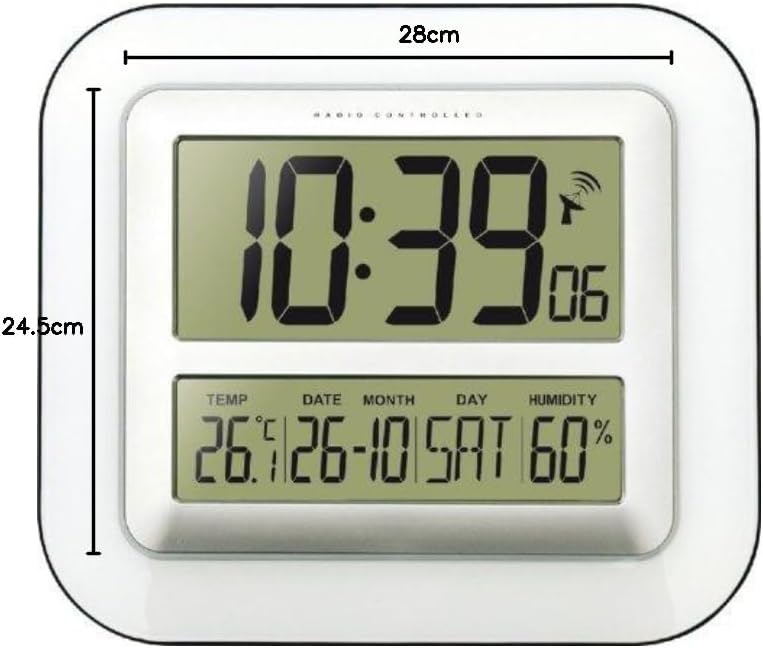
בילד 3: Dimensions of the Technoline WS 8006 clock, showing a width of 28 cm and a height of 24.5 cm.
- מאָדעל: Technoline WS 8006
- דימענשאַנז (L x W x H): 24.5 X 3.81 X 28 סענטימעטער (9.65 X 1.5 X 11 אינטשעס)
- וואָג: 800 גראַמז (1.76 לבס)
- מאַכט מקור: 2 x AA 1.5V באַטעריעס
- צייט אפשטעל: DCF-77 Radio-controlled with manual setting option
- צייט ווייַז: 12/24 hour format, seconds display
- קאַלענדאַר: Day, Month, Year, Day of week in multiple languages (German, English, French, Spanish, Italian, Dutch, Danish)
- טעמפּעראַטור קייט: 0°C צו 50°C (32°F צו 122°F)
- הומידיטי ראַנג: Displayed as % RH (Indoor climate control)
- שרעק: Yes, with 5-minute snooze function (Crescendo alarm)
- מאָונטינג: Wall mountable or tabletop with foldable stand
- מאַטעריאַל: אַקרילאָניטרילע בוטאַדיענע סטירענע (אַבס)
- קאָליר: ווייַס
וואָראַנטי און שטיצן
Technoline products are designed for reliability and performance. For specific warranty information, please refer to the warranty card included with your purchase or contact your retailer. For technical support or inquiries, please visit the official Technoline webפּלאַץ אָדער קאָנטאַקט זייער קונה סערוויס אָפּטיילונג.
איר קענען געפֿינען מער אינפֿאָרמאַציע אין: www.technoline.eu