
1. הקדמה
The Marshall MG10G is a compact 10-watt solid-state guitar amplifier designed for practice and home use. It features two channels (Clean and Overdrive), a Contour control for tone shaping, an auxiliary input for connecting external audio devices, and a headphone output for silent practice. This manual provides essential information for the safe and effective operation of your MG10G ampליפער.
2. זיכערקייַט אינפֿאָרמאַציע
WARNING: SHOCK HAZARD. DO NOT OPEN. TO REDUCE THE RISK OF FIRE OR ELECTRIC SHOCK DO NOT REMOVE COVER. NO USER-SERVICEABLE PARTS INSIDE. REFER SERVICING TO QUALIFIED SERVICE PERSONNEL.
שטענדיק ענשור די amplifier is connected to a grounded power outlet. Do not expose the amplifier to rain or moisture. Disconnect the power cord before cleaning or if the unit will be unused for extended periods. Ensure adequate ventilation around the ampליפער.
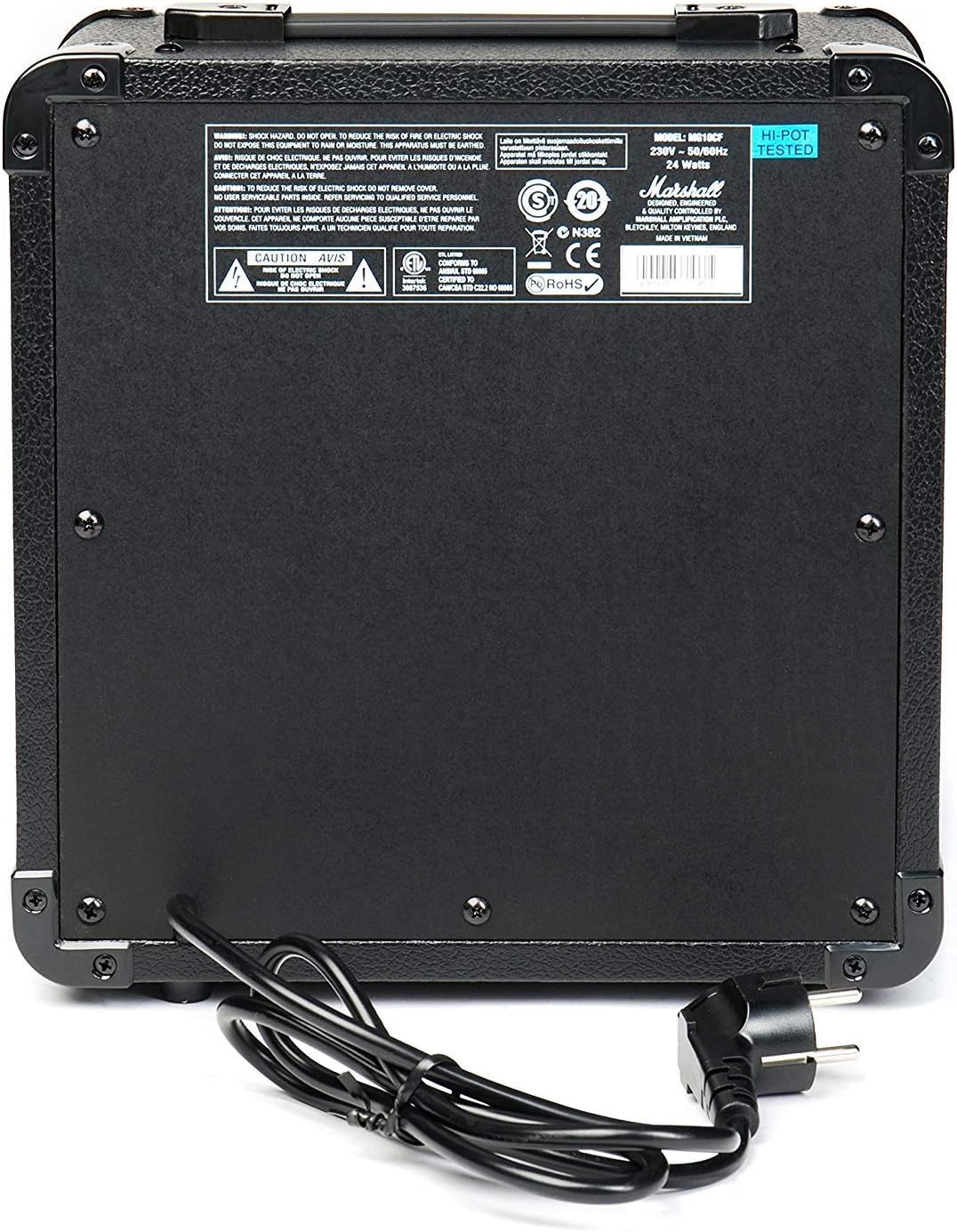
Figure 2.1: Rear panel of the MG10G amplifier, displaying safety warnings and power specifications.
3. פּראָדוקט איבערview
The MG10G amplifier features a straightforward control layout for ease of use. Familiarize yourself with the front panel controls and rear panel connections before operation.

Figure 3.1: Front panel of the MG10G ampליפער.
פראָנט פּאַנעל קאָנטראָלס:
- איינגאבע: 1/4" jack for connecting your electric guitar.
- ריין באַנד: Controls the volume of the Clean channel.
- קאַנאַל סעלעקט: Button to switch between Clean and Overdrive channels.
- OVERDRIVE GAIN: Adjusts the amount of distortion on the Overdrive channel.
- OVERDRIVE VOLUME: Controls the volume of the Overdrive channel.
- קאָנטור: Shapes the mid-range frequencies of your tone. Turning it clockwise scoops the mids, while counter-clockwise adds mids.
- MP3/LINE IN: 3.5mm jack for connecting external audio sources (e.g., MP3 player, phone).
- העאַדפאָנעס: 3.5mm jack for connecting headphones for silent practice. Connecting headphones mutes the main speaker.
- מאַכט: אן/אויס קנעפל פאר די ampליפער.
דערציען פּאַנעל קאַנעקשאַנז:
- מאַכט ינפּוט: Connects the supplied power cable to a suitable mains power supply.
4. סעטאַפּ
- פאַרזיכערן די amplifier's POWER switch is in the OFF position.
- Connect the power cable to the POWER INPUT on the rear panel of the amplifier and then to a grounded electrical outlet.
- Connect your electric guitar to the אַרייַנשרייַב jack on the front panel using a standard 1/4" instrument cable.
- If desired, connect an external audio device (e.g., MP3 player) to the MP3/LINE IN jack using a 3.5mm stereo cable.
- If desired, connect headphones to the כעדפאָונז jack for silent practice.
- קער די ריין באַנד און אָווערדריווע באַנד controls to their minimum settings (fully counter-clockwise).
- באַשטימען די ampליפיער ס מאַכט to the ON position. The power indicator light will illuminate.
5. אַפּערייטינג ינסטרוקטיאָנס
5.1 Clean Channel
To use the Clean channel, ensure the סעלעקטירן דעם קאַנאַל button is disengaged (out position). Adjust the ריין באַנד control to achieve your desired output level. This channel provides a clear, un-distorted guitar tone.
5.2 Overdrive Channel
To engage the Overdrive channel, press the סעלעקטירן דעם קאַנאַל button (in position). Use the OVERDRIVE GAIN control to adjust the amount of distortion, from a subtle crunch to a heavier, saturated sound. The אָווערדריווע באַנד control sets the output level for this channel.
5.3 Tone Shaping with Contour
די קאָנטור control allows you to sculpt the mid-range frequencies of your tone. Experiment with this control to find your preferred sound:
- ווענדן קאָנטור clockwise will scoop the mid-range, often resulting in a more modern, aggressive tone.
- ווענדן קאָנטור counter-clockwise will boost the mid-range, providing a warmer, fuller sound that can help your guitar cut through a mix.
5.4 Using MP3/LINE IN
פֿאַרבינדט אַן עקסטערנעם אַודיאָ מיטל צום MP3/LINE IN jack. The volume of the external device is controlled by its own volume output. This feature allows you to play along with backing tracks or music.
5.5 כעדפאָון רעזולטאַט
צאַפּן כעדפאָונז אין די כעדפאָונז jack for silent practice. The amplifier's main speaker will be muted automatically. Adjust the volume using the respective channel volume controls (Clean or Overdrive) or the volume control on your external audio device if using the MP3/LINE IN.
6. וישאַלט
- רייניקונג: דיסקאַנעקט די amplifier from the power supply before cleaning. Use a soft, dry cloth to wipe down the exterior. Do not use abrasive cleaners or solvents.
- סטאָרידזש: קראָם די ampלאָזט דעם ליפיער שטיין אין אַ טרוקענער, קילער סביבה, אַוועק פון דירעקטער זון און עקסטרעמע טעמפּעראַטורן.
- טראנספארטאציע: ווען טראַנספּאָרטינג די amplifier, ensure it is securely packed to prevent damage.
7. טראָובלעשאָאָטינג
| פּראָבלעם | מעגלעך סיבה | לייזונג |
|---|---|---|
| קיין געזונט פון רעדנער |
|
|
| שוואַך אָדער פאַרקרימט געזונט |
|
|
| קיין געזונט פון כעדפאָונז |
|
|
אויב די פראבלעם בלייבט נאך פרובירן די לייזונגען, ביטע קאנטאקט קוואליפיצירטע סערוויס פערסאנאל.
8. ספּעסאַפאַקיישאַנז

Figure 8.1: Dimensions of the MG10G ampליפער.
| שטריך | דעטאַל |
|---|---|
| מאָדעל נאָמען | MG10G |
| Ampליבער טיפּ | סאָליד שטאַט |
| רעזולטאַט מאַכט | 10 וואטס |
| רעדנער גרייס | 6.5 אינטשעס (16.51 סענטימעטער) |
| טשאַנאַלז | 2 (Clean, Overdrive) |
| קאָנטראָלס | Clean Volume, Channel Select, Overdrive Gain, Overdrive Volume, Contour, Power |
| ינפּוץ | 1/4" Guitar Input, 3.5mm MP3/Line In |
| אַוטפּוץ | 3.5 מם כעדפאָון רעזולטאַט |
| מאַכט מקור | Electric Cable (230V~50Hz, 24 Watts) |
| דימענשאַנז (די רענטגענ וו x ה) | 31.5 סענטימעטער X 19.8 סענטימעטער X 40 סענטימעטער |
| פּונקט וואָג | 5.13 קילאָגראַמס |
| מאַטעריאַל | מעטאַל, פּלאַסטיק |
| קאָליר | שוואַרץ |
| לאַנד פון אָריגין | כינע |
9. וואָראַנטי און שטיצן
9.1 וואָראַנטי אינפֿאָרמאַציע
This Marshall MG10G ampליפיער קומט מיט א 1-יאָר פאַבריקאַנט ס וואָראַנטי. Please retain your proof of purchase for warranty claims. The warranty covers manufacturing defects and malfunctions under normal use. It does not cover damage caused by misuse, accidents, unauthorized modifications, or normal wear and tear.
9.2 קונה שטיצן
For technical assistance, service, or warranty inquiries, please contact your authorized Marshall dealer or visit the official Marshall Ampליפיקאַטיאָן webזייטל פֿאַר שטיצע רעסורסן און קאָנטאַקט אינפֿאָרמאַציע.