
הקדמה
This manual provides comprehensive instructions for the setup, operation, maintenance, and troubleshooting of your Sharp EL-6490 32 KB Electronic Organizer. Please read this manual thoroughly before using your device to ensure proper function and longevity.
סעטאַפּ
ונפּאַקקינג
Carefully remove all components from the packaging. Ensure that the electronic organizer and any included accessories are present and undamaged. Retain the packaging for future storage or transport.
ייַנמאָנטירונג פון באַטאַרייע
- געפינט דעם דעקל פונעם באַטעריע־אָפּטייל אויף דער הינטערשטער זייט פונעם אַפּאַראַט.
- שלעפּט אָדער הייבט אויף דעם דעקל צו עפֿענען דעם אָפּטייל.
- Insert the required batteries (e.g., two AAA batteries, not included) according to the polarity indicators (+ and -) inside the compartment.
- לייג צוריק דעם דעקל פונעם באַטעריע־אָפּטייל, און זאָרג אַז עס קליקט זיכער אַרײַן.
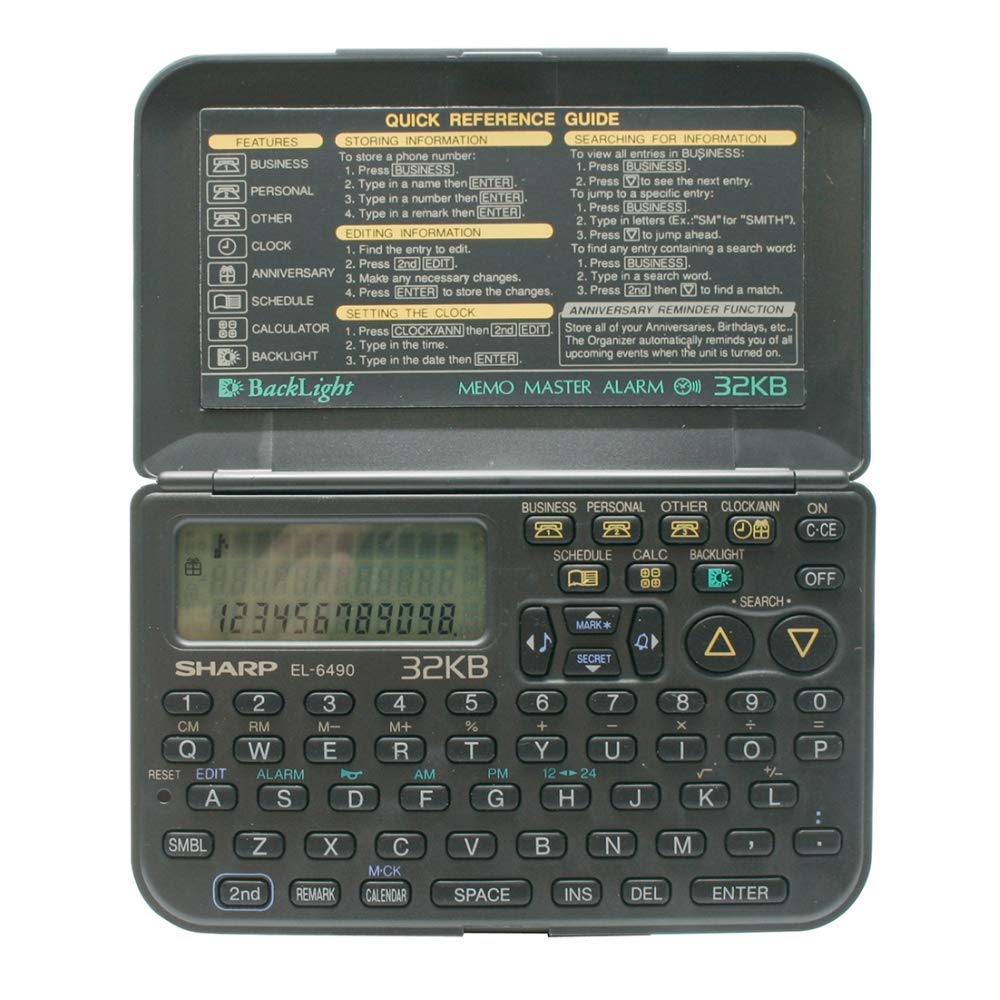
Image: The Sharp EL-6490 Electronic Organizer, showing the rear panel where the battery compartment is typically located.
ערשט מאַכט אויף
דרוק די ON/OFF button to power on the device. The display should illuminate, and you may be prompted to set the date and time.
באַשטעטיקן טאָג און צייט
- נאַוויגירן צו די SETTINGS menu using the arrow keys.
- אויסקלייַבן טאָג און צייט.
- Use the numeric keypad and arrow keys to enter the current date (MM/DD/YYYY) and time (HH:MM).
- Confirm your settings by pressing the אַרייַן or שטעלן קנעפּל.
אַפּערייטינג ינסטראַקשאַנז
יקערדיק נאַוויגאַציע
The EL-6490 features a directional keypad for navigating menus and a QWERTY keyboard for data entry. Use the MENU button to access main functions and the ESC קנעפּל צו צוריקקומען צו די פריערדיקע פאַרשטעלן.
אַרייַן דאַטן
To enter text or numbers, select the desired field and type using the QWERTY keyboard. Press יבעררוק for uppercase letters and SYM for symbols. Press אַרייַן צו באַשטעטיקן אַרייַנשרייַב.
Using the Calendar/Scheduler
- פון די הויפּט מעניו, אויסקלייַבן קאַלענדאַר or SCHEDULE.
- Use the arrow keys to navigate through days, weeks, or months.
- To add an event, select a date and press ADD or נייַ. Enter the event details, time, and any notes.
- Save the event by pressing SAVE.
ניצן די טעלעפאָן ספר
- אויסקלייַבן טעלעפאָן בוך פון די הויפּט מעניו.
- To add a new entry, press ADD. Enter the name, phone number, and any additional contact information.
- To search for an entry, use the search function or scroll through the list.
Using the Memo Function
- אַקסעס מעמאָ פון די הויפּט מעניו.
- Create a new memo by selecting NEW MEMO.
- Type your notes using the keyboard.
- Save the memo for future reference.
קאַלקולאַטאָר פֿונקציע
The EL-6490 includes a basic calculator. Select קאַלקולאַטאָר from the main menu. Use the numeric keys and operation symbols (+, -, *, /) to perform calculations. Press = פֿאַר דעם רעזולטאַט.
וישאַלט
רייניקונג
To clean the device, use a soft, dry cloth. For stubborn marks, slightly dampen the cloth with water. Do not use harsh chemicals, abrasive cleaners, or solvents, as these can damage the display or casing.
באַטערי פאַרבייַט
When the battery indicator appears on the display, replace the batteries promptly to avoid data loss. Follow the battery installation steps outlined in the סעטאַפּ section. It is recommended to replace all batteries at the same time.
סטאָרידזש
If storing the device for an extended period, remove the batteries to prevent leakage and potential damage. Store in a cool, dry place away from direct sunlight and extreme temperatures.
טראָובלעשאָאָטינג
| פּראָבלעם | מעגלעך סיבה | לייזונג |
|---|---|---|
| די מיטל טוט נישט מאַכט אויף. | טויטע אדער נישט ריכטיק אינסטאלירטע באַטעריעס. | קאָנטראָלירט די פּאָלאַריטעט פון די באַטעריעס. פאַרבייטן מיט פרישע באַטעריעס. |
| דער עקראַן איז ליידיק אָדער טונקל. | Low battery power; contrast setting. | Replace batteries. Adjust display contrast in the settings menu. |
| Data is lost or corrupted. | Batteries removed for too long; critical battery level. | Ensure batteries are always present. Replace batteries promptly when low. |
| די קנעפּלעך רעאַגירן נישט. | Dust or debris under keys; device malfunction. | Clean the keyboard area. Try removing and reinserting batteries to reset. If problem persists, contact support. |
ספּעסאַפאַקיישאַנז
| שטריך | דעטאַל |
|---|---|
| פאַבריקאַנט | שאַרף |
| מאָדעל | EL-6490 |
| זכּרון | 32 קב |
| פּראָדוקט דימענשאַנז | 0.02 X 0.14 X 0.19 סענטימעטער (0.008 X 0.055 X 0.075 אינטשעס) |
| פּראָדוקט וואָג | 200 ג (אומגעפער 7.05 אונס) |
| ASIN | B077YK7M3H |
| מאַכט מקור | Batteries (e.g., AAA, not included) |
וואָראַנטי און שטיצן
For warranty information and technical support, please refer to the warranty card included with your product or visit the official Sharp webזייטל. האַלט אייער קויף קוויטל ווי אַ באַווייַז פון קויפן פֿאַר וואָראַנטי קליימז.
אפיציעלע שאַרף Webפּלאַץ: global.sharp/products/calculator/support/