
הקדמה
This manual provides essential information for the safe and effective installation, use, and maintenance of your Vulcan 34886 TRUPER Steel Replacement Tray. This tray is specifically designed as a direct replacement for the TRUPER TS6-2W-OR wheelbarrow model. Please read these instructions thoroughly before proceeding with installation or use.
זיכערקייַט אינפֿאָרמאַציע
- Always wear appropriate personal protective equipment (PPE), such as work gloves and safety glasses, when handling the steel tray and tools.
- Ensure the wheelbarrow is stable and secured before attempting to remove the old tray or install the new one.
- Be aware of sharp edges on the steel tray during handling.
- האַלט קינדער און חיות אַוועק פון דער אַרבעט געגנט בעת די ינסטאַלירונג.
- Do not overload the wheelbarrow after installation; adhere to the original wheelbarrow's weight capacity.
פּעקל אינהאַלט
באַשטעטיקן אַז אַלע קאָמפּאָנענטן זענען פאַראַן און נישט געשעדיגט איידער איר הייבט אָן די אינסטאַלאַציע.
- 1 x Vulcan 34886 TRUPER Steel Replacement Tray
- Note: Mounting hardware is typically reused from the original wheelbarrow or purchased separately if needed.
סעטאַפּ און ינסטאַלירונג
This section details the steps for replacing your old wheelbarrow tray with the new Vulcan 34886 steel tray.
מכשירים פארלאנגט (ניט אַרייַנגערעכנט):
- אַדזשאַסטאַבאַל מוטער-שליסל אָדער כאָלעל שטעלן
- Screwdriver (if applicable for existing fasteners)
- אַרבעט גלאַווז
- זיכערקייַט ברילן
ינסטאַלירונג סטעפּס:
- Prepare the Wheelbarrow: Place the wheelbarrow on a flat, stable surface. If possible, elevate the wheelbarrow slightly to allow easier access to the underside.
- Remove the Old Tray: Carefully locate and remove all bolts, nuts, and washers securing the old tray to the wheelbarrow frame. Keep all hardware organized as it will likely be reused.
- Clean the Frame: Once the old tray is removed, inspect the wheelbarrow frame for any dirt, rust, or damage. Clean the frame as necessary.
- Position the New Tray: Carefully lift the Vulcan 34886 replacement tray and align it with the mounting holes on the wheelbarrow frame. It may be helpful to have a second person assist with this step.
- זיכער מאַכן דעם טאַץ: Insert the original bolts through the tray and frame holes. Hand-tighten the nuts and washers. Ensure all bolts are in place before fully tightening.
- לעצט טייטנינג: Systematically tighten all nuts and bolts using your wrench or socket set. Do not overtighten, but ensure all connections are secure to prevent wobbling during use.
- דורכקוקן: After installation, gently shake the wheelbarrow to confirm the tray is securely attached and stable.
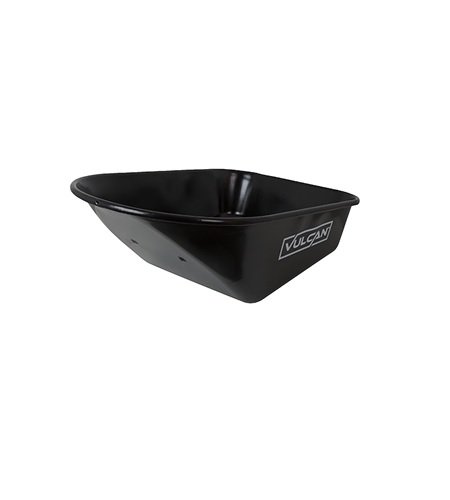
Image: Vulcan 34886 TRUPER Steel Replacement Tray. This image shows the steel tray, highlighting its robust construction and design suitable for wheelbarrow replacement.
אַפּערייטינג ינסטראַקשאַנז
Once the replacement tray is securely installed, the wheelbarrow can be used as intended. Follow these guidelines for optimal performance and safety:
- מאַסע פאַרשפּרייטונג: Distribute loads evenly within the tray to maintain balance and prevent tipping. Place heavier items towards the axle.
- וואָג קאַפּאַציטעט: Do not exceed the original manufacturer's recommended weight capacity for your TRUPER TS6-2W-OR wheelbarrow. Overloading can damage the wheelbarrow frame, wheels, or cause injury.
- מאַנוווערינג: Use caution when moving the wheelbarrow over uneven terrain or inclines.
- רייניקונג: The steel tray is designed for quick and easy cleanup. After each use, especially with wet or corrosive materials, rinse the tray with water and wipe it dry to prevent rust and material buildup.
וישאַלט
Regular maintenance will extend the life of your replacement tray and wheelbarrow.
- רייניקונג: Clean the tray thoroughly after each use. For stubborn dirt, use a stiff brush and mild detergent. Rinse completely.
- דורכקוק: Periodically inspect the tray for any signs of damage, dents, or rust. Check all bolts and nuts for tightness and re-tighten if necessary.
- פאַרהיטונג פון זשאַווער: While the steel tray is durable, prolonged exposure to moisture can lead to rust. Store the wheelbarrow in a dry area when not in use. If rust spots appear, clean them and apply a rust-inhibiting primer and paint.
- ייַזנוואַרג: If any mounting hardware becomes corroded or damaged, replace it with suitable, high-quality fasteners.
טראָובלעשאָאָטינג
אלגעמיינע פראבלעמען און זייערע לייזונגען.
- Tray does not fit:
- Ensure you have the correct model (Vulcan 34886) for your TRUPER TS6-2W-OR wheelbarrow.
- Check for any obstructions on the wheelbarrow frame.
- Verify that the tray is oriented correctly.
- Tray is wobbly after installation:
- Re-check all mounting bolts and nuts to ensure they are fully tightened.
- Inspect the wheelbarrow frame for any bends or damage that might prevent a secure fit.
- Rust appearing on the tray:
- Ensure the tray is cleaned and dried after each use.
- Store the wheelbarrow in a dry, covered area.
- For existing rust, clean the area thoroughly and apply a rust-inhibiting paint.
ספּעסאַפאַקיישאַנז
| שטריך | דעטאַל |
|---|---|
| פּראָדוקט מאָדעל נומער | 34886 |
| מאַטעריאַל | שטאָל |
| קאַמפּאַטאַבילאַטי | TRUPER TS6-2W-OR Wheelbarrow |
| פּראָדוקט דימענשאַנז | 38.5 X 25.5 X 16 אינטשעס |
| פּונקט וואָג | 17.65 פונט |
| פאַבריקאַנט | ווולקאַן |
וואָראַנטי אינפֿאָרמאַציע
This Vulcan replacement tray is manufactured to high-quality standards. For specific warranty details, please refer to the original purchase documentation or contact Vulcan customer support. Keep your proof of purchase for any warranty claims.
קונה שטיצן
If you have any questions regarding the installation, operation, or maintenance of your Vulcan 34886 TRUPER Steel Replacement Tray, please contact Vulcan customer support through their official webפּלאַץ אָדער די זיצער ווו די פּראָדוקט איז פּערטשאַסט.
ביטע האַלט אייער מאָדעל נומער (34886) גרייט ווען איר קאָנטאַקטירט שטיצע.