
1. הקדמה
Thank you for choosing the Massive Audio BP1000.1 V2 Blade Series Monoblock Car Ampליפיער. די מאַנואַל גיט וויכטיקע אינפֿאָרמאַציע פֿאַר דער ריכטיקער אינסטאַלאַציע, אָפּעראַציע און וישאַלט פֿון אייער ampליפיער. ביטע ליינט דעם מאַנואַל גרינטלעך איידער איר פּרוּווט אינסטאַלירן אָדער אָפּערירן צו ענשור אָפּטימאַל פאָרשטעלונג און זיכערקייט.
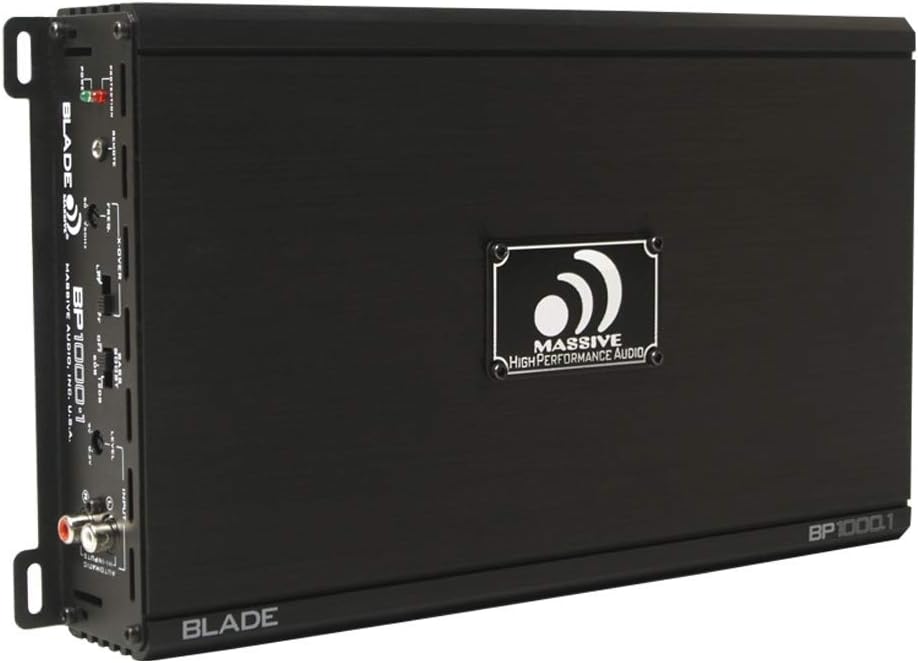
בילד 1.1: אויבן view of the Massive Audio BP1000.1 V2 Blade Series Monoblock Car Ampלײַכטער, ווײַזןasing its sleek black chassis and branding.
1.1 זיכערקייַט פּריקאָשאַנז
- Always disconnect the vehicle's battery negative terminal before starting any installation.
- זיכער מאַכן אַז אַלע וויירינג איז ריכטיק ראָוטאַד און סיקיורד צו פאַרמייַדן שאָדן אָדער קורץ קרייזן.
- Use appropriate gauge wiring for power, ground, and speaker connections as specified.
- בארג די ampדער ליפיער זיכער אין א פלאץ וואס ערלויבט גענוג ווענטילאציע און איז באשיצט פון פייכטקייט און איבעריגע היץ.
- דו זאלסט נישט אַרבעטן די amplifier if it is damaged or malfunctioning. Refer to the troubleshooting section or contact support.
2. שליסל פֿעיִקייטן
The Massive Audio BP1000.1 V2 Blade Series Monoblock Amplifier is designed for high-performance car audio systems. Key features include:
- 1000 Watts Max Power Output.
- 2 Ohm Stable operation.
- Class A/B Monoblock design for efficient power delivery.
- Variable Low Pass Filter (LPF) for precise subwoofer integration.
- Adjustable Bass Boost for enhanced low-frequency response.
- High-level inputs for integration with factory head units.
- Protection circuitry against thermal overload, short circuits, and over/under voltage.
3. סעטאַפּ און ייַנמאָנטירונג
3.1 מאָנטירן די Ampליפער
קלייבט אויס א מאָנטירונג אָרט וואָס איז טרוקן, גוט ווענטילירט, און זיכער. פֿאַרמייַדט מאָנטירן די amplifier directly on carpet or in enclosed spaces that restrict airflow. Ensure sufficient space around the ampליפיער פֿאַר קאָאָלינג.
- שטעלן די amplifier in the desired location and mark the mounting holes.
- Drill pilot holes if necessary, ensuring no wires or fuel lines are damaged.
- זיכער די ampליפיער ניצנדיק די צוגעשטעלטע מאַונטינג שרויפן.
3.2 וויירינג קאַנעקשאַנז
Proper wiring is crucial for performance and safety. Refer to the diagram below for connection points.

Image 3.1: Rear connection panel of the amplifier, showing power, ground, remote, and speaker terminals.
3.2.1 Power, Ground, and Remote Connections
- Power (12V): Connect a heavy-gauge power cable (e.g., 4 AWG) directly from the positive terminal of the vehicle's battery to the amplifier's +12V terminal. Install an in-line fuse (not supplied) within 18 inches of the battery.
- ערד (GND): Connect a heavy-gauge ground cable (e.g., 4 AWG) from the amplifier's GND terminal to a clean, unpainted metal surface of the vehicle chassis. The ground point should be as short as possible.
- Remote (REM IN/OUT): פֿאַרבינדט אַ ווײַט־אויפֿנעמונג־דראָט פֿון אײַער הויפּט־אַפּאַראַטס ווײַט־אויסגאַנג צום amplifier's REM IN terminal. This wire signals the ampליפיער צו דרייען אויף און אויס מיט אייער הויפט יוניט.
3.2.2 רעדנער קאַנעקשאַנז
פֿאַרבינדט אײַער סאַבוואָפֿער(ס) צו די amplifier's speaker terminals. Ensure the total impedance of the connected speakers is 2 Ohms or higher for stable operation. Observe correct polarity (+ to + and - to -).
3.2.3 אַרייַנשרייַב קאַנעקשאַנז
- RCA Inputs (Low-Level): אויב אייער קאָפּ־איינהייט האט RCA פּרע־אַויטס, פֿאַרבינדט זיי צו די amplifier's RCA INPUTs (L and R).
- הויך-מדרגה ינפּוץ: If your head unit does not have RCA pre-outs, use the high-level input connector. Connect the speaker wires from your head unit to the corresponding terminals on the high-level input harness.
4. אַפּערייטינג ינסטרוקטיאָנס
די amplifier features several controls to fine-tune its performance. Refer to the control panel image below.
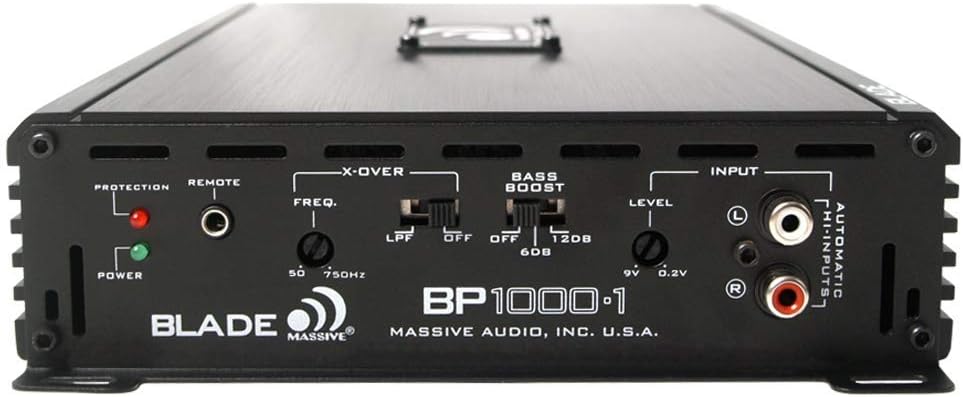
Image 4.1: Front control panel of the amplifier, detailing the crossover, bass boost, and level adjustments.
4.1 Level Control (Gain)
The LEVEL control (also known as gain) matches the amplifier's input sensitivity to the output of your head unit. Start with the level control at minimum. Gradually increase it until you hear distortion, then back off slightly. This is not a volume control.
4.2 Crossover (LPF)
The LPF (Low Pass Filter) control allows you to set the upper frequency limit for the amplifier's output. This is essential for subwoofers, ensuring they only reproduce low frequencies. Adjust the FREQ. knob between 50Hz and 750Hz to blend the subwoofer output with your main speakers.
4.3 באַס בוסט
The BASS BOOST switch provides an adjustable boost to low frequencies. You can select OFF, 6dB, or 12dB boost. Use this feature sparingly and adjust carefully to avoid distortion or damage to your speakers.
4.4 אַרייַנשרייַב סעלעקציע
די amplifier automatically detects whether RCA or high-level inputs are connected. Ensure only one type of input is used at a time.
5. וישאַלט
The Massive Audio BP1000.1 V2 ampדער ליפיער דאַרף מינימאַלע אויפהאלטונג. פאָלגט די גיידליינז צו ענשור לאַנגלעבעדיקייט:
- האַלטן די ampדער ליפיער איז ריין און פריי פון שטויב און שמוץ. ניצט א ווייכן, טרוקענעם שטאָף פארן רייניגן.
- Ensure proper ventilation. Periodically check that the cooling fins are not obstructed.
- רעגולער קאָנטראָלירן אַלע וויירינג קאַנעקשאַנז פֿאַר שטרענגקייט און קעראָוזשאַן.
- ויסמיידן ויסשטעלן די ampליפיער צו עקסטרעם טעמפּעראַטורעס אָדער נעץ.
6. טראָובלעשאָאָטינג
אויב איר דערפאַרונג ישוז מיט דיין ampלייפיער, באַראַטן זיך מיט דער פאלגנדער טאבעלע פֿאַר געוויינטלעכע פּראָבלעמען און לייזונגען.
| פּראָבלעם | מעגלעך סיבה | לייזונג |
|---|---|---|
| קיין מאַכט / Ampלייפיער טוט זיך נישט אן |
|
|
| קיין סאָונד רעזולטאַט |
|
|
| פאַרקרימט סאָונד |
|
|
| Amplifier Overheating / Protection Light On |
|
|
7. ספּעסאַפאַקיישאַנז
Technical specifications for the Massive Audio BP1000.1 V2 Monoblock Ampלייבער:
| שטריך | באַשרייַבונג |
|---|---|
| סאָרט | Massive Audio |
| מאָדעל נומער | BP1000.1V2 |
| נומער פון טשאַנאַלז | 1 (מאָנאָבלאָק) |
| רעזולטאַט מאַכט | 1000 וואטס (מאַקס) |
| Minimum Stable Impedance | 2 אָהמס |
| Voltage (Minimum Supply) | 12 וואלטס |
| Voltage (Maximum Supply) | 9 Volts (Note: This specification appears inconsistent with typical car audio systems. Refer to product documentation for operational voltagE קייט.) |
| מאַונטינג טיפּ | ייבערפלאַך בארג |
| פּונקט וואָג | 6.18 פונט |
| פּעקל דימענשאַנז | 15.2 X 8.15 X 2.95 אינטשעס |
| UPC | 623169631122 |
8. וואָראַנטי און שטיצן
For warranty information, technical support, or service inquiries, please contact Massive Audio directly or refer to their official webזייטל. האַלט אייער קויף קוויטל ווי אַ באַווייַז פון קויפן פֿאַר קיין וואָראַנטי קליימז.
פֿאַר ווייַטער הילף, באַזוכן די Massive Audio Store on Amazon.