
1. הקדמה
This manual provides essential information for the safe and efficient operation of your Rigol DS1104Z-S Plus 100 MHz Digital Oscilloscope. Please read this manual thoroughly before using the instrument to ensure proper functionality and to prevent damage. The Rigol DS1104Z-S Plus is a 4-channel digital storage oscilloscope designed for precise signal analysis with a 100 MHz bandwidth and a 1 GSa/s real-time sampדי קורס.
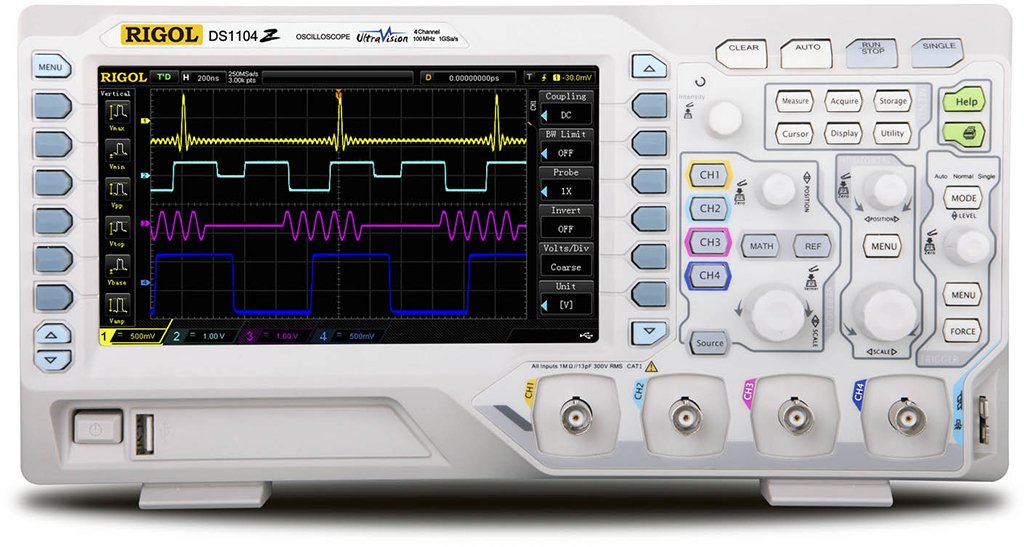
Figure 1: Rigol DS1104Z-S Plus Digital Oscilloscope. This image shows the front panel of the oscilloscope with its display, control knobs, and input channels.
2. זיכערקייַט אינפֿאָרמאַציע
שטענדיק אָבסערווירן די פאלגענדע זיכערהייט מיטלען צו פאַרמייַדן שאָדן און שעדיקן צו די ינסטרומענט:
- מאַכט מקור: Connect the instrument only to a power source with the specified voltagE און אָפטקייַט.
- גראָונדינג: זיכער מאַכן אַז די אינסטרומענט איז ריכטיק געערדט צו פאַרמייַדן עלעקטרישע קלאַפּ.
- ווענטילאַטיאָן: בלאָקירט נישט די ווענטילאַציע עפענונגען. זאָרגט פֿאַר גענוג לופט־פֿלוס אַרום דעם אינסטרומענט.
- סוויווע: Operate the oscilloscope in a dry, well-ventilated area, away from direct sunlight, high temperatures, and excessive dust.
- פּראָבעס: Use only probes designed for the specified voltagE און אָפטקייַט רייטינגז.
- סערוויס: איבערגעבן אלע סערוויסינג צו קוואַליפֿיצירטע סערוויס פּערסאָנעל. פּרוּווט נישט צו פאַרריכטן דעם אינסטרומענט אַליין.
- רייניקונג: אָפּשטעקן די מאַכט איידער רייניקונג. ניצן אַ ווייכן, דamp שטאָף. דו זאלסט נישט נוצן אַברייסיוו קלינערז אָדער סאָלוואַנץ.
3. פּעקל אינהאַלט
באַשטעטיקן אַז דיין פּעקל כּולל די פאלגענדע זאכן:
- Rigol DS1104Z-S Plus Digital Oscilloscope
- מאַכט שנור
- Passive Probes (4 units)
- וסב קאַבלע
- שנעל גייד
- Resource CD (User Manual, Programming Manual, Software)
4. פּראָדוקט איבערview
The Rigol DS1104Z-S Plus features a user-friendly interface and robust design for various measurement applications.
4.1 פראָנט פּאַנעל
The front panel includes the display, control knobs, function buttons, and input connectors for channels 1-4.
- ווייַז פאַרשטעלן: Shows waveforms, measurement results, and menu options.
- ווערטיקאַלע קאָנטראָלן: סטרויערן וואָלtage per division and position for each channel.
- האָריזאָנטאַלע קאָנטראָלן: Adjust time per division and horizontal position.
- טריגער קאָנטראָלס: Set trigger level, mode, and type.
- פונקציע קנעפּלעך: Access various menus such as Acquire, Measure, Storage, Utility, etc.
- קאַנאַל איינגאַבעס (CH1-CH4): BNC connectors for probe connection.
4.2 דערציען פּאַנעל
The rear panel provides power input, USB host/device ports, and LAN port for connectivity.
- אַק מאַכט אַרייַנשרייַב: פֿאַר פֿאַרבינדן דעם עלעקטרישן שנור.
- וסב האָסט פּאָרט: פֿאַר פֿאַרבינדן USB סטאָרידזש דעוויסעס.
- יו-עס-בי דעווייס פּאָרט: For connecting to a PC.
- לאַן פּאָרט: פֿאַר נעץ קאָנעקטיוויטי און ווײַט קאָנטראָל.
5. סעטאַפּ
5.1 מאַכט קאַנעקשאַן
- זיכער מאַכן אַז דער מאַכט קנעפל אויף דער הינטערשטער פּאַנעל איז אין דער אויסגעלאָשן פּאָזיציע.
- פֿאַרבינדט דעם צוגעשטעלטן מאַכט שנור צום AC מאַכט אַרייַנגאַנג אויף דער הינטערשטער פּאַנעל פֿון דעם אָסילאָסקאָפּ.
- שטעקט אריין דעם אנדערן עק פונעם עלעקטרישן שנור אין א געערדטן AC עלעקטרישן ווענטיל.
5.2 זאָנד קאַנעקשאַן
- Connect the BNC connector of a passive probe to one of the input channels (CH1, CH2, CH3, or CH4) on the front panel.
- Connect the probe's ground clip to the circuit's ground reference.
- Set the attenuation ratio on the probe to match the setting on the oscilloscope (e.g., 1X or 10X).
5.3 ערשט מאַכט אויף
- Press the power switch on the rear panel to the ON position.
- The oscilloscope will perform a self-test and display the Rigol logo.
- After startup, the default waveform display will appear.
6. אַפּערייטינג ינסטרוקטיאָנס
This section covers basic operations for acquiring and analyzing waveforms.
6.1 גרונטלעכע כוואַליעפאָרם אַרויסווייַזונג
- ווערטיקאַלע וואָג (וואָלץ/דיוו): Use the vertical scale knob for the active channel to adjust the voltagE סענסיטיוויטי.
- ווערטיקאַל שטעלע: Use the vertical position knob to move the waveform up or down on the screen.
- האָריזאָנטאַלע וואָג (SEC/DIV): Use the horizontal scale knob to adjust the time base.
- האָריזאָנטאַלע פּאָזיציע: Use the horizontal position knob to shift the waveform left or right.
6.2 טריגערינג
Triggering stabilizes repetitive waveforms and captures single-shot events.
- טריגער מדרגה: Adjust the trigger level knob to set the voltage point at which the trigger occurs.
- Trigger Menu: דרוק די טריגער מעניו button to configure trigger type (Edge, Pulse, Video, etc.), source, and slope.
- טריגער מאָדע: Select between Auto, Normal, and Single modes.
6.3 מעסטונג פונקציעס
The oscilloscope offers various automatic measurement functions.
- דרוק די מאָס button to display the measurement menu.
- Select desired measurements such as Vpp, Vmax, Vmin, Freq, Period, Rise Time, etc.
- The results will be displayed on the screen.
6.4 Saving Data
Waveforms and settings can be saved to internal memory or a USB storage device.
- דרוק די סטאָרידזש קנעפּל.
- Select the storage type (Waveform, Setup, Image) and destination (Internal, USB).
- Follow the on-screen prompts to save the data.
7. וישאַלט
7.1 רייניקונג
To maintain the instrument's appearance and performance:
- דיסקאַנעקט די מאַכט שנור איידער רייניקונג.
- ניצן אַ ווייך שטאָף דampened with mild detergent and water to clean the exterior.
- ניצט נישט קיין שאַרפע רייניקונגס-מיטלען, סאָלווענטן אדער שטרענגע כעמיקאַלן.
- זיכער מאַכן אַז קיין פליסיקייט זאָל נישט אַרײַן אין דעם געצייַג.
7.2 קאַלאַבריישאַן
The oscilloscope is factory calibrated. For optimal performance, periodic calibration by qualified service personnel is recommended, typically every 1-2 years, depending on usage.
7.3 סטאָרידזש
When not in use for extended periods, store the oscilloscope in a dry, dust-free environment within the specified operating temperature range.
8. טראָובלעשאָאָטינג
This section lists common problems and their solutions. If the problem persists, contact Rigol customer support.
| פּראָבלעם | מעגלעך סיבה | לייזונג |
|---|---|---|
| קיין אַרויסווייַזן נאָך מאַכט אויף | Power cord not connected; Power switch off; Faulty power outlet | Check power cord connection; Ensure power switch is ON; Test power outlet with another device |
| קיין כוואַליעפאָרמע געוויזן | Probe not connected; Incorrect channel settings; Trigger level incorrect; Input signal too small/large | Connect probe to active channel; Adjust vertical scale and position; Adjust trigger level; Check input signal source |
| נישט-סטאַבילע כוואַליעפאָרם | Incorrect trigger settings; Noisy signal | Adjust trigger level and mode; Check signal source for noise; Use averaging acquisition mode |
| Cannot save data to USB | USB drive not formatted correctly; USB drive full; USB drive faulty | Format USB drive to FAT32; Delete unnecessary files; Try a different USB drive |
9. ספּעסאַפאַקיישאַנז
Key technical specifications for the Rigol DS1104Z-S Plus Digital Oscilloscope:
- באַנדווידט: 100 מהז
- טשאַנאַלז: 4 אַנאַלאָג טשאַנאַלז
- פאַקטיש צייט Sampדי קורס: ביז 1 גסאַ/סעק.
- זכּרון טיפקייַט: 12 Mpts (Standard), 24 Mpts (Optional)
- כוואַליעפאָרם כאַפּן קורס: ביז 30,000 wfms/s
- ווייַז: 7-inch TFT LCD (800x480 resolution)
- ווערטיקאַלע סענסיטיוויטי: 1 mV/div ביז 10 V/div
- צייט באַזע קייט: 2 נ״ס/דיװ ביז 50 ס״ס/דיװ
- טריגער טיפן: Edge, Pulse, Video, Slope, Alternate, Runt, Window, Delay, Setup/Hold, Nth Edge
- צובינד: USB Host, USB Device, LAN, Pass/Fail, Trigger Out
- מאַכט מקור: קאָרדעד עלעקטריק
- נומער וואָג: 1 קילאָגראַמס
- נאָכקומען: CE
10. וואָראַנטי און שטיצן
Rigol Technologies provides a standard warranty for its products. For detailed warranty terms and conditions, please refer to the warranty card included with your product or visit the official Rigol website. For technical support, service, or inquiries, please contact your local Rigol distributor or Rigol customer service. Contact information can typically be found on the Rigol website or in the documentation provided with your oscilloscope.
באַאַמטער Webפּלאַץ: www.rigol.com