
1. הקדמה
א דאנק פארן קויפןasing the R-Music Linky RM31038 Bluetooth Speaker. This manual provides essential information for setting up, operating, and maintaining your speaker. Please read these instructions carefully before use and retain them for future reference.
2. פּעקל אינהאַלט
זיכער מאַכן אַז אַלע זאכן זענען פאַראַן אין פּעקל:
- R-Music Linky RM31038 Bluetooth Speaker
- באַניצער מאַנואַל (דעם דאָקומענט)
- (Note: Charging cable and AUX cable are typically included but not explicitly listed in the provided "whats_in_the_box" data.)
3. פּראָדוקט פֿעיִקייטן
- סאָליד און לייטווייט פּלאַן פֿאַר פּאָרטאַביליטי.
- Dual speakers with 6W (2x3W) output.
- בלועטוט קאנעקטיוויטי פאר ווייערלעס אודיא סטרימינג.
- Wireless range up to 10 meters (33 feet).
- Integrated microphone for hands-free calling.
- Multiple input options: USB, TF (MicroSD) card, and 3.5mm AUX jack.
- Supports MP3 audio format.
- איינגעבויטע ריטשאַרדזשאַבאַל ליטהיום-יאָן באַטאַרייע.
4. קאָנטראָלן און פּאָרטן

בילד 1: אויבן View with Control Buttons
This image displays the top surface of the R-Music Linky RM31038 Bluetooth Speaker, highlighting the control panel. From left to right, the buttons are typically: Mode (M), Previous Track/Volume Down (-), Play/Pause/Call (▶/▌), Next Track/Volume Up (+). The R-MUSIC logo is visible on the right.
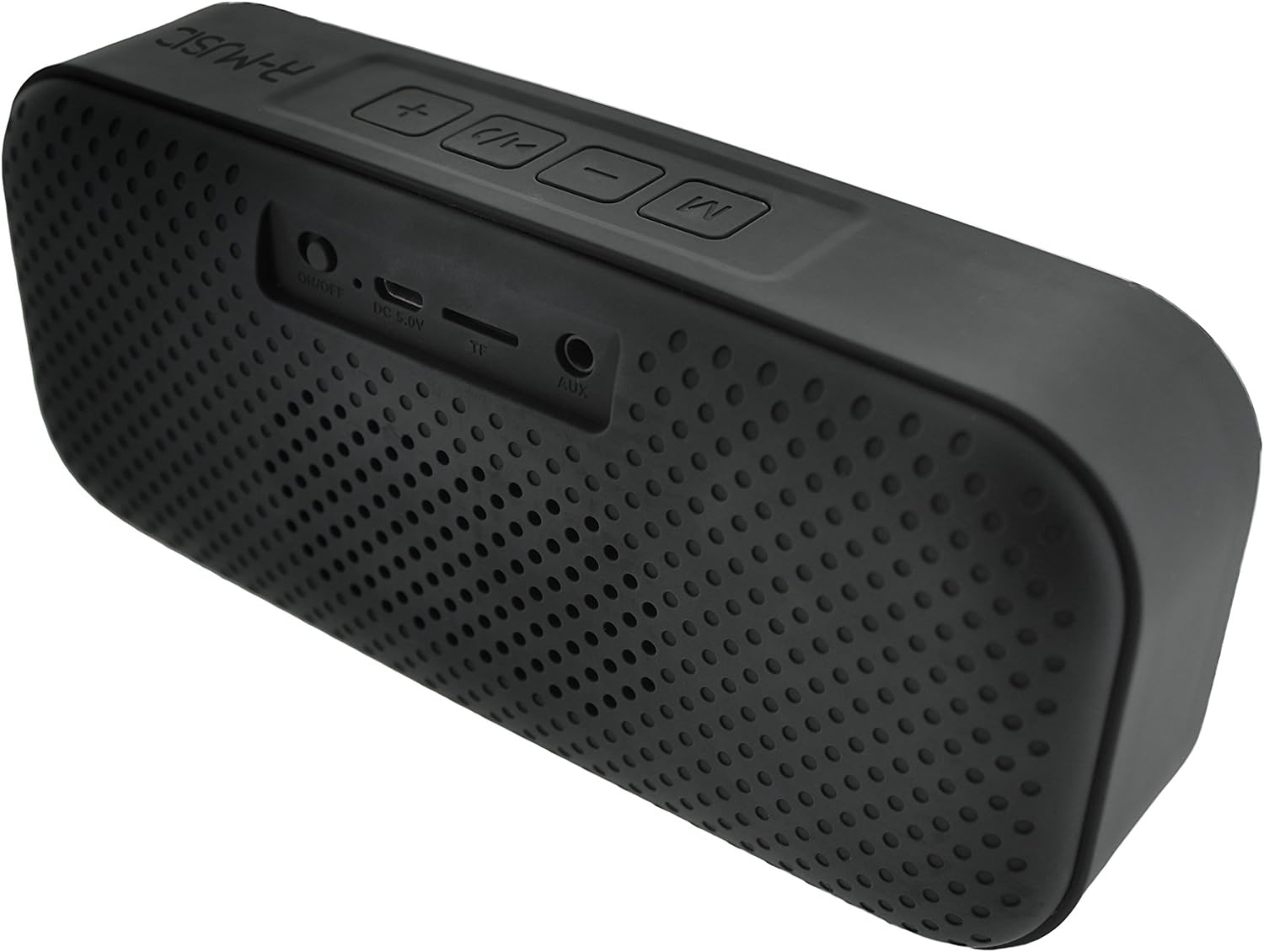
בילד 2: דערציען View with Input Ports
This image shows the rear panel of the R-Music Linky RM31038 Bluetooth Speaker, detailing the various input ports. From left to right, these include: ON/OFF switch, DC 5V charging port (Micro USB), TF (MicroSD) card slot, and AUX (3.5mm audio) input.
Control Button Functions:
- M (מאָדע) קנעפּל: Press to switch between Bluetooth, USB, TF Card, and AUX modes.
- - (Volume Down / Previous Track) Button:
- קורץ דריקן: פֿאַרקלענערן די באַנד.
- Long press: Go to the previous track.
- ▶/▌ (Play/Pause / Call) Button:
- Short press: Play or pause music.
- Short press (during incoming call): Answer call.
- Short press (during call): End call.
- Long press: Reject incoming call.
- צוויי מאָל דריקן: ווידעררופן די לעצטע נומער.
- + (Volume Up / Next Track) Button:
- קורץ דריקן: פֿאַרגרעסערן די באַנד.
- Long press: Go to the next track.
פּאָרט פאַנגקשאַנז:
- אויף/אַוועק באַשטימען: מאַכט אָן אָדער אויס דעם רעדנער.
- DC 5V (Micro USB) Port: פֿאַר אָפּלאָדן די רעדנער'ס אינערלעכע באַטאַרייע.
- TF (מיקראָSD) קאַרטל שפּעלטל: Insert a MicroSD card with MP3 audio files פֿאַר פּלייבאַק.
- AUX (3.5 מ"מ) אריינגאנג: פֿאַרבינדט עקסטערנע אַודיאָ דעוויסעס מיט אַ 3.5 מם אַודיאָ קאַבל.
5. סעטאַפּ
5.1 אויפלאָדן דעם רעדנער
- Connect the Micro USB charging cable to the DC 5V port on the speaker.
- Connect the other end of the cable to a USB power adapter (5V, not included) or a computer's USB port.
- The charging indicator light will illuminate (color may vary, typically red) to show that the speaker is charging.
- Charging typically takes approximately 3 hours for a full charge.
- The indicator light will turn off or change color (e.g., blue) once fully charged.
באַמערקונג: פֿאַר אַן אָפּטימאַלן באַטאַרייע לעבן, זאָל מען גאָר אויפֿלאָדן דעם רעדנער איידער מען ניצט עס צום ערשטן מאָל.
5.2 פּאַוערינג אויף / אַוועק
- To power on: Slide the ON/OFF switch to the "ON" position. A power-on tone will sound, and the LED indicator will flash (typically blue).
- To power off: Slide the ON/OFF switch to the "OFF" position. A power-off tone will sound, and the LED indicator will turn off.
6. אַפּערייטינג ינסטרוקטיאָנס
6.1 בלועטאָאָטה פּערינג
- Ensure the speaker is powered on and in Bluetooth mode (the LED indicator will flash rapidly, indicating it's ready for pairing). If not, press the M (Mode) button to switch to Bluetooth mode.
- אויף אייער מאָבילער מיטל (סמאַרטפאָן, טאַבלעט, אאז"וו), אַקטיווירט בלועטוט און זוכט פֿאַר פֿאַראַן דעוויסעס.
- אויסקלייבן "LINKY"פון דער ליסטע פון געפונענע דעווייסעס.
- Once paired, the speaker will emit a confirmation tone, and the LED indicator will glow solid blue.
- איר קענט איצט שפּילן אַודיאָ פֿון אייער דעווייס דורך דעם רעדנער.
באַמערקונג: The speaker will automatically attempt to reconnect to the last paired device when powered on, if the device is within range and has Bluetooth enabled.
6.2 Playing Music (Bluetooth, USB, TF Card, AUX)
- בלועטאָאָטה מאָדע: After successful pairing, play music from your connected device. Use the speaker's + און - buttons for volume control and track navigation, or control directly from your device.
- וסב מאָדע: אַרייַנלייגן אַ וסב בליץ פאָר מיט mp3 files into the USB port. The speaker will automatically switch to USB mode and begin playback. If not, press the M קנעפּל צו אויסקלייַבן וסב מאָדע.
- TF קאַרד מאָדע: Insert a MicroSD (TF) card containing MP3 files into the TF card slot. The speaker will automatically switch to TF card mode and begin playback. If not, press the M button to select TF card mode.
- AUX מאָדע: Connect an external audio device (e.g., MP3 player, laptop) to the AUX port using a 3.5mm audio cable. Press the M button to switch to AUX mode. Audio playback will be controlled by the connected device.
6.3 הענט-פריי רופן
ווען פארבונדן דורך בלועטוט צו א סמאַרטפאָון:
- ענטפֿערן אַ רוף: When a call comes in, the music will pause. Short press the ▶/▌ קנעפּל צו ענטפֿערן דעם רוף.
- ענדיקן אַ רוף: During a call, short press the ▶/▌ קנעפּל צו ענדיקן דעם רוף.
- פארווארפן א רוף: When a call comes in, long press the ▶/▌ קנעפּל צו אָפּוואַרפן דעם רופן.
- רידיאַלינג: טאָפּל דריקן די ▶/▌ קנעפּל צו רידיאַל די לעצטע נומער גערופן.
7. וישאַלט
- רייניקט דעם רעדנער מיט אַ ווייכן, טרוקענעם שטאָף. ניצט נישט קיין שרײַבנדיקע רייניגערס אדער סאָלווענטן.
- פֿאַרמײַדט אויסשטעלן דעם רעדנער צו עקסטרעמע טעמפּעראַטורן, דירעקטע זונשײַן, אָדער הויכע פֿײַכטקייט.
- טונקט נישט אריין דעם רעדנער אין וואַסער אָדער קיין אַנדערע פליסיקייטן.
- האַלט דעם רעדנער אין אַ קיל, טרוקן אָרט ווען עס איז נישט אין באַנוץ פֿאַר לענגערע פּעריאָדן.
- Charge the battery at least once every three months to maintain battery health if not used regularly.
8. טראָובלעשאָאָטינג
| פּראָבלעם | מעגלעך לייזונג |
|---|---|
| דער רעדנער גייט נישט אן. | זיכער מאַכן אַז די באַטאַרייע איז אָנגעלאָדן. פֿאַרבינדט דעם רעדנער צו אַ מאַכט מקור מיטן USB קאַבל. |
| קענען ניט פאַרבינדן מיט בלועטאָאָטה מיטל. |
|
| קיין קלאַנג אָדער נידעריקע וואָלומען. |
|
| נעבעך געזונט קוואַליטעט. |
|
9. ספּעסאַפאַקיישאַנז
| שטריך | דעטאַל |
|---|---|
| מאָדעל נומער | RM31038 |
| סאָרט | R-Music |
| רעזולטאַט מאַכט | 2 x 3W (6W total) |
| אָפטקייַט ענטפער | 100 הערץ - 18 קילאָהרץ |
| SNR (Signal-to-Noise Ratio) | 55 דבאַ |
| באַטערי טיפּ | ליטהיום-יאָן פּאָלימער |
| באַטאַרייע קאַפּאַציטעט | 1200 mAh - 3.7 V |
| טשאַרדזשינג צייט | בעערעך. 3 שעה |
| פּלייַבאַקק צייט | אומגעפער 5 שעה (ביי מיטלמעסיגע וואליום) |
| בלועטאָאָטה קייט | אַרויף צו 10 מעטער (33 פֿיס) |
| דימענסיעס (L X W X H) | 188 X 83 X 52 מם |
| וואָג | 431 ג |
| שטיצט אַודיאָ פֿאָרמאַטירונגען | mp3 |
| אַרייַנשרייַב פּאָרץ | USB, TF (MicroSD) Card, 3.5mm AUX |
| ספּעציעלע פֿעיִקייטן | Integrated Microphone, Hands-free Calling |
10. וואָראַנטי אינפֿאָרמאַציע
This R-Music Linky RM31038 Bluetooth Speaker comes with a 24-חודש וואָראַנטי פֿון דעם קויפֿדאַטום. די וואָראַנטי דעקט פֿאַבריקאַציע חסרונות און אַרבעט אונטער נאָרמאַל נוצן. עס דעקט נישט שעדיקן געפֿירט דורך אומרעכט נוצן, אַקסאַדענטן, נישט-אָטעריזירטע מאָדיפֿיקאַציעס, אָדער נאָרמאַל טראָגן און טרער. ביטע האַלטן דיין קויפֿבאַווייַז פֿאַר וואָראַנטי קליימז.
11. שטיצן
For further assistance, technical support, or warranty inquiries, please contact R-Music customer service. Refer to the product packaging or the retailer's webפּלאַץ פֿאַר קאָנטאַקט דעטאַילס.