
1. הקדמה
This manual provides essential instructions for the safe and efficient installation, operation, and maintenance of your CTOUCH Wallom 10080250 Electric Wall Mount. This electric wall mount is designed to provide a flexible mounting solution for interactive displays ranging from 139.7 cm (55 inches) to 218.4 cm (86 inches).
Please read this manual thoroughly before installation and use, and retain it for future reference. Improper installation or operation may result in damage to the product, display, or personal injury.
2. סעטאַפּ אינסטרוקציעס
The CTOUCH Wallom 10080250 electric wall mount is designed for straightforward installation. It comes largely pre-assembled in its packaging, allowing for installation by a single person in approximately 20 minutes.
2.1 אויספּאַקן און קאָמפּאָנענט קאָנטראָל
Carefully remove all components from the packaging. Verify that all parts are present and undamaged. Refer to the packing list for a complete inventory.
2.2 מאָונטינג די אַפּאַראַט
Select a suitable wall location capable of supporting the combined weight of the mount and your display. Ensure the wall material is appropriate for secure fastening. Use appropriate wall anchors and screws (not included, unless specified in packaging) for your wall type.
- Position the pre-assembled wall mount against the desired wall location.
- Mark the drilling points accurately.
- Drill pilot holes as required for your chosen fasteners.
- Securely attach the wall mount to the wall. Ensure it is level and firmly fixed.
- Attach your CTOUCH display (139.7 cm to 218.4 cm) to the mount according to the display's specific mounting instructions.
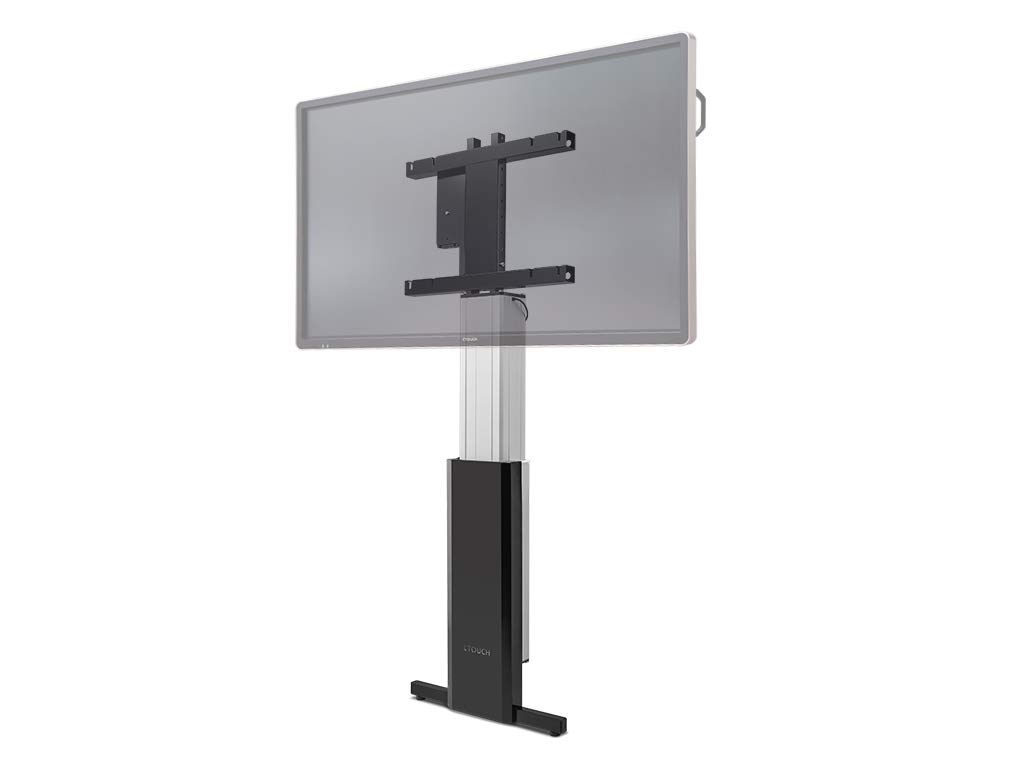
Figure 1: The CTOUCH Wallom 10080250 Electric Wall Mount supporting an interactive display. This image illustrates the product's appearance when installed.
3. אַפּערייטינג ינסטרוקטיאָנס
The electric wall mount is operated using a three-button remote control, allowing for precise height adjustments.
3.1 רימאָוט קאָנטראָל פאַנגקשאַנז
- אַרויף קנעפּל: Press to raise the display.
- אַראָפּ קנעפּל: Press to lower the display.
- זכּרון קנעפּל: Use this button to set and recall preferred height positions. Consult the remote control's specific instructions for programming memory settings.
3.2 Adjusting Display Height
The mount allows for significant vertical travel, from a low position of 30 cm (bottom edge of an 86-inch screen) to a maximum height that optimizes reach for various users and applications.
- Ensure the power cable is securely connected to a power outlet.
- Use the Up or Down buttons on the remote control to move the display to your desired height.
- Release the button when the display reaches the desired position.
- To save a frequently used height, follow the instructions provided with your remote control for setting memory presets.
4. וישאַלט
Regular maintenance ensures the longevity and safe operation of your electric wall mount.
- רייניקונג: Use a soft, dry cloth to clean the exterior surfaces of the mount. Avoid abrasive cleaners or solvents.
- דורכקוק: קאָנטראָלירט פּעריִאָדיש אַלע מאַונטינג שרויפן און פֿאַרבינדונגען צו זיכער מאַכן אַז זיי בלייבן פֿעסט און זיכער.
- קאַבלע פאַרוואַלטונג: Ensure all cables are neatly routed and not pinched or strained during height adjustments.
- שמירן: The moving parts are factory-lubricated and generally do not require additional lubrication. If unusual noises occur, contact support.
5. טראָובלעשאָאָטינג
This section addresses common issues you might encounter with your CTOUCH Wallom 10080250 electric wall mount.
| פּראָבלעם | מעגלעך סיבה | לייזונג |
|---|---|---|
| Mount does not move. | No power supply. Remote control batteries are dead. Overload protection activated. | Check power connection. Replace remote control batteries. Disconnect power for 10 minutes to reset overload protection. |
| ומגעוויינטלעך ראַש בעשאַס אָפּעראַציע. | Loose components. Obstruction in the movement path. | Inspect for loose screws or obstructions. Ensure cables are not interfering. If noise persists, contact support. |
| די ווײַטקאָנטראָל רעאַגירט נישט. | Batteries are dead or incorrectly inserted. Remote control out of range. | Replace batteries. Ensure line of sight to the mount's receiver. |
If you encounter issues not listed here or if problems persist after attempting the suggested solutions, please contact CTOUCH customer support.
6. ספּעסאַפאַקיישאַנז
| שטריך | דעטאַל |
|---|---|
| סאָרט | CTOUCH |
| מאָדעל נומער | 10080250 |
| קאָמפּאַטיבלע פאַרשטעלן סיזעס | 139.7 cm (55 inches) to 218.4 cm (86 inches) |
| הייך אַדדזשוסטמענט ראַנגע | From 30 cm (bottom edge of 86-inch screen) to maximum reach |
| קאָנטראָל מעטאָד | Three-button remote control |
| פֿאַרזאַמלונג | פאַר-פארזאמלט פֿאַר שנעל ינסטאַלירונג |
| לאַנד פון אָריגין | נעטהערלאַנדס |
7. וואָראַנטי און שטיצן
For warranty information, please refer to the documentation provided with your purchase or visit the official CTOUCH webזייטל. ספּעציפֿישע וואָראַנטי טערמינען קענען זיין אַנדערש לויט געגנט און הענדלער.
- ספּער טיילן: אינפֿאָרמאַציע וועגן די פֿאַרפֿיגבאַרקייט פֿון רעזערוו טיילן איז דערווײַל נישט פֿאַרפֿיגבאר.
- ווייכווארג דערהייַנטיקונגען: אינפֿאָרמאַציע וועגן גאַראַנטירטע ווייכווארג דערהייַנטיקונגען איז דערווייל נישט בנימצא.
- קונה שטיצן: For technical assistance, troubleshooting beyond this manual, or warranty claims, please contact CTOUCH customer support directly. Contact details can typically be found on the manufacturer's webפּלאַץ.