
הקדמה
This manual provides comprehensive instructions for the proper setup, operation, and maintenance of your TRACEABLE 3127 Digital Tally Counter. This device is designed for reliable 5-digit counting in various applications, featuring a bench-mounting design for stable placement.
פּראָדוקט איבערview
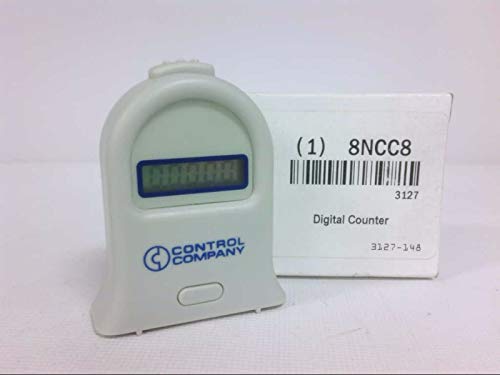
פיגורע 1: The TRACEABLE 3127 Digital Tally Counter. This image displays the TRACEABLE 3127 Digital Tally Counter, a compact, light-colored device with a digital display and a single button. The device features the 'CONTROL COMPANY' logo. It is shown next to its product packaging, which indicates 'Digital Counter', model number '3127', and additional identifiers '1 8NCC8' and '3127-148'.
The TRACEABLE 3127 is a robust digital tally counter, ideal for applications requiring precise counting. Its 5-digit display ensures clear readability, and the bench-mounting design provides stability during use. The device is manufactured by TRACEABLE.
סעטאַפּ
- אויספּאַקן: Carefully remove the tally counter from its packaging. Inspect the device for any signs of damage.
- אָרט: Position the counter on a stable, flat surface suitable for bench mounting. Ensure the display is clearly visible and the operating button is easily accessible.
- מאַכט (אויב אָנווענדלעך): While specific battery information is not provided, most digital counters of this type operate on small button-cell batteries. If the display is not active, check for a battery compartment and install new batteries according to polarity markings.
אַפּערייטינג ינסטראַקשאַנז
- מאַכט אויף: The device typically powers on automatically when a button is pressed or when batteries are installed.
- Incrementing the Count: Press the large button located on the front of the device to increment the count by one. Each press will advance the 5-digit display.
- Resetting the Count: To reset the counter to zero, locate the smaller, recessed reset button (often on the side or bottom, or a long press of the main button). Use a pointed object (like a pen tip) if it is a recessed button, or follow specific instructions if a long press of the main button is required. The display will return to '00000'.
- Maximum Count: The counter can display up to 99999. After reaching this number, it will typically roll over to '00000' upon the next increment.
וישאַלט
- רייניקונג: Wipe the counter with a soft, dry cloth. For stubborn dirt, a slightly damp מען קען ניצן אַ שטאָף, און עס זאָל גלייך טריקענען. מען ניצט נישט קיין שרײַבנדיקע רייניגערס אדער סאָלווענטן.
- באַטערי פאַרבייַט: If the display becomes dim or unresponsive, replace the batteries. Refer to the battery compartment for the correct battery type and polarity. Dispose of old batteries responsibly.
- סטאָרידזש: האַלט דאָס אַפּאַראַט אין אַ קיל, טרוקן אָרט אַוועק פון דירעקט זונשייַן און עקסטרעמע טעמפּעראַטורן ווען עס איז נישט אין באַנוץ פֿאַר לענגערע פּעריאָדן.
טראָובלעשאָאָטינג
- די אַרויסווייַזן איז ליידיק: קאָנטראָלירט די באַטעריע אינסטאַלאַציע און זיכערט זיך אַז די באַטעריעס זענען פריש.
- Counter not incrementing: Ensure the button is being pressed firmly and completely. If the issue persists, the internal mechanism may require service.
- Counter not resetting: Ensure the reset procedure (e.g., pressing the recessed button or long-pressing the main button) is followed correctly.
ספּעסאַפאַקיישאַנז
| שטריך | באַשרייַבונג |
|---|---|
| מאָדעל נומער | 3127 |
| סאָרט | טרייסאַבאַל |
| טיפּ | Digital Tally Counter |
| ציפֿער קאַפּאַציטעט | 5 דידזשאַץ |
| מאַונטינג | באַנק מאַונטינג |
| פּונקט וואָג | 1.12 אונסעס |
| פּעקל דימענשאַנז | 1 X 1 X 1 אינטשעס |
| פאַבריקאַנט | טרייסאַבאַל |
| ASIN | B076C8RWK7 |
וואָראַנטי און שטיצן
For warranty information, please refer to the documentation included with your product or contact TRACEABLE customer support directly. Specific warranty terms may vary.
For technical assistance or further inquiries, please contact the manufacturer or your authorized dealer. Keep your model number (3127) and purchase date available when seeking support.