
הקדמה
This manual provides detailed instructions for the installation, operation, and maintenance of your Acoustic Audio PSW500-12 Home Theater Powered 12" LFE Subwoofer. Please read this manual thoroughly before using the product to ensure proper setup and optimal performance. Retain this manual for future reference.
זיכערקייַט אינסטרוקציעס
אָבסערווירן די פאלגענדע זיכערהייט מיטלען צו פאַרמייַדן עלעקטרישע קלאַפּ, פייַער אָדער שעדיקן צו די אַפּאַראַט:
- מאַכט מקור: Connect the subwoofer only to a standard US 110V grounded wall outlet.
- ווענטילאַטיאָן: Ensure adequate ventilation around the subwoofer. Do not block any ventilation openings.
- וואַסער און נעץ: שטעלט נישט אויס דעם אַפּאַראַט צו רעגן, פייכטקייט, אדער איבערגעטריבענע הומידיטי. שטעלט נישט קיין זאכן אָנגעפילט מיט פליסיקייטן, ווי וואַזעס, אויף דעם אַפּאַראַט.
- היץ קוואלן: האַלט דעם סאַבוווּפער אַוועק פון היץ קוועלער ווי ראַדיאַטאָרן, היץ רעגיסטערס, אויוון, אָדער אַנדערע היץ-פּראָדוצירנדיקע אַפּפּליאַנסעס.
- רייניקונג: נעמט ארויס דעם אַפּאַראַט פֿון דער וואַנט־ווענטיל איידער איר רייניגט. ניצט אַ טרוקענעם שטאָף פֿאַר רייניגן.
- סערוויס: דו זאלסט נישט פּרווון צו דינען דעם פּראָדוקט זיך. קאָנטאַקט אַלע קוואַלאַפייד סערוויס פּערסאַנעל.
- אָרט: שטעלט דעם סאַבוואָאָפער אויף אַ סטאַבילער, גלייכער ייבערפלאַך כּדי צו פאַרהיטן אַז ער זאָל נישט פאַלן.
פּעקל אינהאַלט
באַשטעטיקן אַז אַלע זאכן זענען פאַראַן אין פּעקל:
- Acoustic Audio PSW500-12 Powered Subwoofer
- 9-foot Dual RCA/LFE Cable
- RCA "Y" Adapter
- ינסטרוקטיאָן מאַנואַל (דעם דאָקומענט)

Image: The subwoofer, a 9-foot dual RCA/LFE cable, an RCA "Y" adapter, and the user manual are included in the package.
פּראָדוקט איבערview
פראָנט View

בילד: פראָנט view of the subwoofer with its black acoustically transparent grille and the Acoustic Audio logo at the bottom.
הינטערשטע פּאַנעל קאָנטראָלס און קאַנעקשאַנז

Image: Rear panel of the subwoofer displaying the power switch, power input, LFE/Line inputs, High Level inputs/outputs, Phase control, Gain control, and Crossover frequency control.
The PSW500-12 subwoofer features a high-current, 500-watt amplifier driving a 12-inch front-firing woofer. Key controls and connections on the rear panel include:
- LFE/Line Inputs: RCA inputs for connecting to a home theater receiver's subwoofer output.
- High Level Inputs/Outputs: Speaker wire terminals for connecting to a stereo receiver or ampליפער.
- געווינען קאָנטראָל: Adjusts the subwoofer's output volume.
- קראָססאָווער קאָנטראָל: Adjusts the upper frequency limit (40-140 Hz) for seamless integration with main speakers.
- פאַסע קאָנטראָל: A 0-180 degree switch to match the subwoofer's phase with other speakers.
- אַוטאָ ON/OFF: Signal sensing feature to automatically turn the subwoofer on/off.
- מאַכט סוויטש: הויפּט מאַכט קאָנטראָל פֿאַר די אַפּאַראַט.
דנאָ View און דימענשאַנז

בילד: אונטן view of the subwoofer, highlighting the bass reflex port and vibration-absorbing feet.
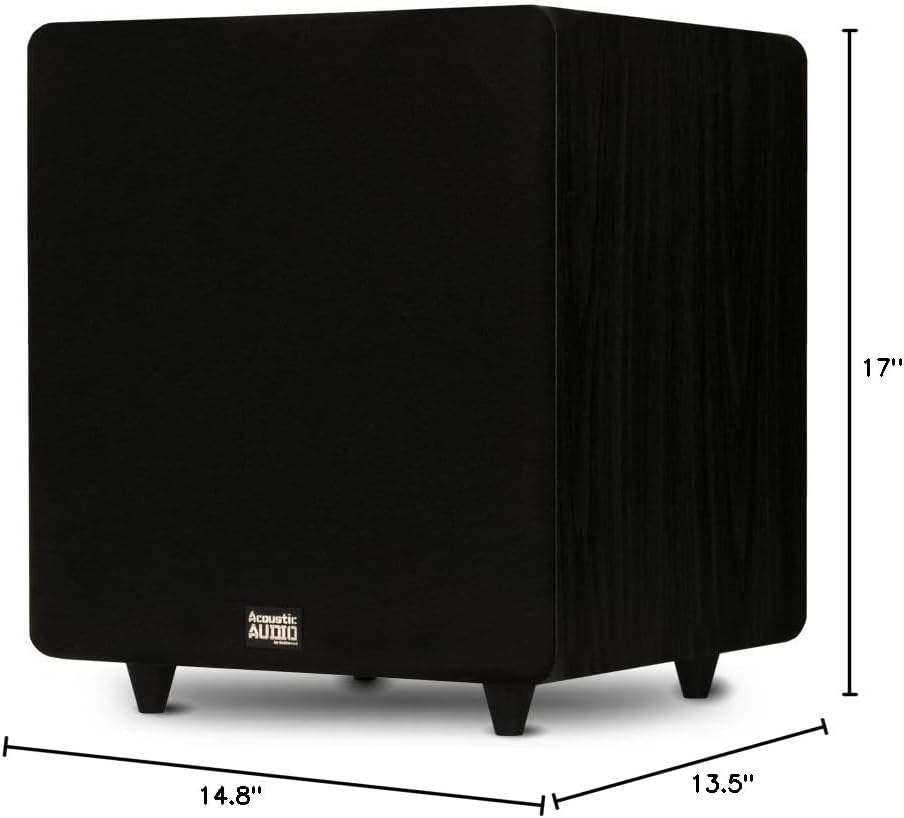
Image: Diagram showing the dimensions of the subwoofer: 17 inches (Height), 14.8 inches (Width), and 13.5 inches (Depth).
סעטאַפּ
פּלייסמאַנט
The placement of your subwoofer can significantly affect its performance. Experiment with different locations to find the best sound for your room. Generally, placing the subwoofer in a corner can enhance bass output, while placing it along a wall can provide a more balanced response. Ensure the subwoofer is placed on a stable surface and has adequate space for ventilation.
קאַנעקשאַן אָפּציעס
There are two primary ways to connect your PSW500-12 subwoofer to your audio system:
- LFE/RCA Input (Recommended for Home Theater Receivers):
If your home theater receiver has a dedicated "Subwoofer Out" or "LFE Out" RCA jack, use the supplied RCA cable to connect this output on your receiver to the "LFE IN" or "LINE IN" (L or R) jack on the subwoofer's rear panel. If using a single RCA cable, you can use the supplied "Y" adapter to split the signal for both L and R inputs on the subwoofer for potentially stronger signal, though connecting to just one (L or R) is often sufficient for LFE.
- High Level Input (For Stereo Receivers/Amplifiers without Subwoofer Out):
אויב דיין ופנעמער אָדער amplifier does not have a dedicated subwoofer output, you can connect the subwoofer using the "High Level Input" terminals. Connect the speaker outputs from your receiver/amplifier to the "Hi Level Input" terminals on the subwoofer. Then, connect the "Hi Level Output" terminals on the subwoofer to your main speakers. Ensure correct polarity (+ to + and - to -) for all connections.
מאַכט קאַנעקשאַן
Once audio connections are made, plug the subwoofer's power cord into a standard US 110V grounded wall outlet. Ensure the power switch on the rear panel is in the "OFF" position before plugging it in.
אַפּערייטינג ינסטראַקשאַנז
ערשט מאַכט אויף
After all connections are secure, flip the power switch on the rear panel to the "ON" position. The subwoofer features an Auto ON/OFF function, which will activate the subwoofer when an audio signal is detected and put it into standby mode after a period of inactivity.
אַדזשאַסטינג קאָנטראָלס
- געווינען קאָנטראָל: Start with the Gain control set to its minimum position. Play some audio and slowly increase the Gain until the subwoofer's output blends smoothly with your main speakers. Avoid setting the gain too high, as this can lead to distorted bass.
- Crossover Control (40-140 Hz): This control determines the highest frequency the subwoofer will reproduce.
- If your receiver has a built-in bass management system (e.g., LFE output), set the subwoofer's crossover control to its maximum (140 Hz) or bypass position, and manage the crossover frequency through your receiver's settings.
- If your receiver does not have bass management, adjust the crossover control to match the low-frequency capabilities of your main speakers. For smaller bookshelf speakers, a higher crossover frequency (e.g., 80-100 Hz) might be appropriate. For larger floor-standing speakers, a lower frequency (e.g., 40-60 Hz) may be suitable. The goal is a seamless transition between the subwoofer and main speakers.
- Phase Control (0-180 degrees): This switch helps to ensure that the subwoofer's sound waves are in sync with your main speakers.
- Play music with a strong, consistent bass line.
- Toggle the phase switch between 0 and 180 degrees.
- Choose the setting that produces the loudest and most impactful bass at your listening position.
וישאַלט
Proper maintenance ensures the longevity and performance of your subwoofer.
- רייניקונג: Disconnect the power cord before cleaning. Use a soft, dry cloth to wipe the cabinet. Do not use liquid cleaners or aerosol sprays, as they may damage the finish or internal components.
- גריל: The acoustically transparent grille is removable. If it becomes dusty, gently brush it or use a low-power vacuum cleaner with a soft brush attachment.
- ווענטילאַטיאָן: קאָנטראָלירט פּעריִאָדיש אַז די ווענטילאַציע עפענונגען זענען נישט פֿאַרשטאָפּט דורך שטויב אָדער שמוץ.
טראָובלעשאָאָטינג
אויב איר האָט פּראָבלעמען מיט אייער סאַבוואָאָפער, זעט די פאלגענדע געוויינטלעכע פּראָבלעמען און לייזונגען:
| פּראָבלעם | מעגלעך סיבה | לייזונג |
|---|---|---|
| קיין קלאַנג פֿון סאַבוואָפֿער |
|
|
| פארדרייטע אדער בומיגע באס |
|
|
| שוואַך אָדער דין באַס |
|
|
| Subwoofer turns off unexpectedly |
|
|
ספּעסאַפאַקיישאַנז
| שטריך | דעטאַל |
|---|---|
| מאָדעל נומער | PSW500-12 |
| סאָרט | אַקוסטיש אַודיאָ דורך גאָלדוואָאָד |
| רעדנער טיפּ | Powered סובוואָאָפער |
| וואָאָפער דיאַמעטער | 12 אינטשעס |
| שפּיץ מאַכט רעזולטאַט | 500 וואטס |
| אָפטקייַט ענטפער | 24 הערץ - 250 הערץ |
| ימפּידאַנס | 8 אָהמס |
| קאַנעקטיוויטי טעכנאָלאָגיע | RCA, Wired (High Level) |
| קראָססאָווער קאָנטראָל | Adjustable 40 - 140 Hz |
| פאַסע קאָנטראָל | 0 - 180 Degrees |
| ספּעציעלע פֿעיִקייטן | Signal Sensing Auto ON/OFF, Bass Boost |
| אָפּצוימונג מאַטעריאַל | מדף האָלץ |
| קאָליר | שוואַרץ |
| מאַכט מקור | Corded Electric (110V US Standard) |
| דימענשאַנז (H X W X D) | 17" x 14.75" x 13.5" |
| פּונקט וואָג | 29 פונט |
וואָראַנטי אינפֿאָרמאַציע
This Acoustic Audio PSW500-12 Subwoofer comes with a לימיטעד וואָראַנטי. For specific details regarding the warranty period, coverage, and terms, please refer to the warranty card included with your product or contact Acoustic Audio by Goldwood customer support.
שטיצן
If you require further assistance or have questions not covered in this manual, please contact Acoustic Audio by Goldwood customer support. You can typically find contact information on the manufacturer's webוועבזייטל אדער אויף דער פּראָדוקט פּאַקאַדזשינג.
For more information about Acoustic Audio by Goldwood products, visit their official store: Acoustic Audio by Goldwood Store


