
Propel Zipp Nano 2.0
Propel Zipp Nano 2.0 Drone User Manual
Model: Zipp Nano 2.0
בראַנד: פּראָפּעל
1. הקדמה
This manual provides essential information for the safe and effective operation of your Propel Zipp Nano 2.0 Drone. Please read this manual thoroughly before operating the drone to ensure proper usage and to prevent damage or injury.
The Propel Zipp Nano 2.0 is a high-performance 2.4 GHz indoor/outdoor drone designed for stable flight and exciting aerial maneuvers. It features a built-in 6-axis gyroscopic chip for stability, multiple speed settings, and the ability to perform 360-degree stunt rolls.
2. זיכערקייַט פּריקאָשאַנז
Always prioritize safety when operating the drone. Failure to follow these guidelines may result in injury or damage to the drone or property.
- Do not operate the drone near people, animals, or obstacles.
- Keep hands, hair, and loose clothing away from rotating propellers.
- זיכער מאַכן אַז די דראָון איז גאָר אויפגעלאָדן איידער יעדן פלי.
- פליט נישט אין שטארקע ווינטן אדער שלעכטע וועטער באדינגונגען.
- Supervise children during operation. This product contains small parts and is not suitable for children under 3 years due to choking hazard.
- Do not attempt to modify or repair the drone yourself. Contact customer support for assistance.

Image: Back of the product packaging, highlighting features and a warning about small parts.
3. פּעקל אינהאַלט
באַשטעטיקן אַז אַלע זאכן זענען פאַראַן אין דיין פּעקל:
- Propel Zipp Nano 2.0 Drone (Red)
- 2.4 GHz Digital Remote Control
- וסב טשאַרדזשינג קאַבלע
- Spare Replacement Parts (Propellers)

Image: The Propel Zipp Nano 2.0 Drone and its remote control visible within the clear retail packaging.
4. סעטאַפּ
4.1 אויפלאָדן די דראָון באַטאַרייע
The drone is powered by an internal rechargeable battery. Use the provided USB charging cable to charge the drone.
- פֿאַרבינדט דעם קליינעם עק פֿונעם USB טשאַרדזשינג קאַבל צום דראָון'ס טשאַרדזשינג פּאָרט.
- Connect the large end of the USB charging cable to a USB power source (e.g., computer USB port, USB wall adapter).
- די טשאַרדזשינג אינדיקאַטאָר ליכט אויף די USB קאַבל וועט אָנצינדן בעת טשאַרדזשינג און זיך אויסלעשן ווען עס איז גאָר אויפגעלאָדן.
- אויפלאָדן נעמט געוויינטלעך אַרום 30-45 מינוט. איבערלאָדן נישט.
4.2 אינסטאלירן באַטעריעס פֿאַר ווײַטקאָנטראָל
The remote control requires 2 "AAA" batteries (not included).
- געפֿינען די באַטאַרייע אָפּטייל אויף די צוריק פון די ווייַט קאָנטראָל.
- עפענען די באַטאַרייע אָפּטייל דעקן.
- Insert 2 "AAA" batteries, ensuring correct polarity (+/-).
- פאַרמאַכן די באַטאַרייע אָפּטייל דעקן סיקיורלי.

Image: The remote control for the Propel Zipp Nano 2.0 Drone, showing its various buttons and joysticks.
4.3 צוזאמענשטעלן דעם דראָון און ווײַטקאָנטראָל
צו שאַפֿן אַ פֿאַרבינדונג צווישן דעם דראָון און דעם ווײַטקאָנטראָל:
- שטעלן די דראָון אויף אַ פלאַך, גלייַך ייבערפלאַך.
- Turn on the drone by sliding the power switch. The drone's LED lights will flash.
- קער אויף די ווייַט קאָנטראָל.
- דריק דעם לינקן דזשויסטיק (טראטל) אינגאנצן ארויף, און דערנאך ציט עס אינגאנצן אראפ.
- The drone's LED lights will turn solid, indicating successful pairing.
5. אפערירן דעם דראָון
5.1 פלי קאָנטראָלס
מאַכט זיך באַקאַנט מיט די אויסלייג און פונקציעס פון דער ווײַטקאָנטראָל:
- לינקער דזשויסטיק (גאז/גיי):
- Push up to increase altitude (throttle).
- Push down to decrease altitude.
- דריק לינקס/רעכטס צו דרייען דעם דראָון (יאַו).
- רעכטער דזשויסטיק (פּיטש/ראָלל):
- דריק ארויף/אראפ צו גיין פאראויס/צוריק (פּיטש).
- דריק לינקס/רעכטס צו באַוועגן לינקס/רעכטס (ראָולן).
- גיכקייַט קנעפּל: Cycles through 3 different speed settings (slow, medium, high).
- Stunt Button: Press to initiate 360-degree stunt rolls (see 5.4).
- T-Mode Button: Activates T-Mode for beginner pilots, providing more stable and controlled flight.
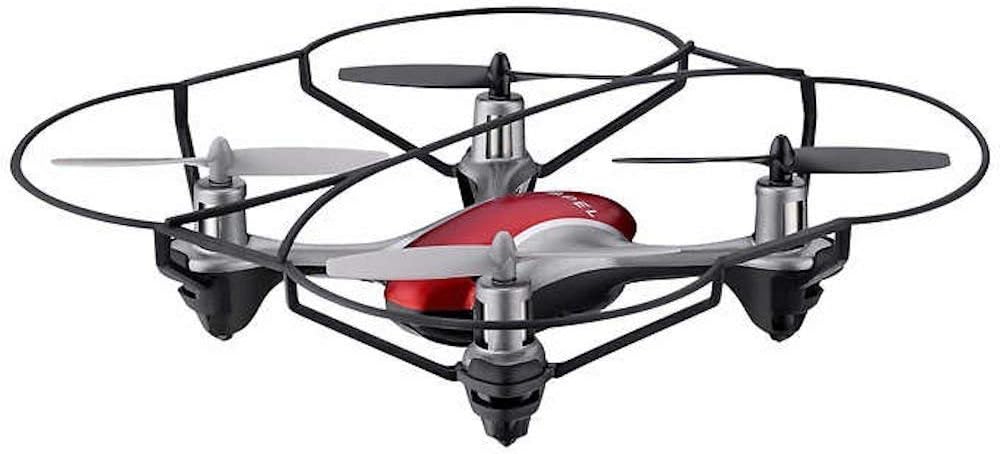
Image: The Propel Zipp Nano 2.0 Drone, showcasing its compact design and propeller guards.
5.2 אויפשטייג און לאַנדונג
- נעמען אַוועק: After pairing, slowly push the left joystick (throttle) up to lift off.
- לאַנדינג: Slowly pull the left joystick (throttle) down until the drone lands gently.
5.3 הייך האַלטן
The Zipp Nano 2.0 features an air pressure sensor that helps lock altitude in mid-air, making it easier to control and hover stably.
5.4 360-Degree Stunt Rolls
To perform a stunt roll:
- Ensure the drone is flying at a sufficient height (at least 6-8 feet).
- Press the dedicated Stunt Button on the remote control.
- Immediately push the right joystick in the desired direction (forward, backward, left, or right) to execute the roll.

בילד: א ווינקלדיקע view of the Propel Zipp Nano 2.0 Drone, highlighting its sleek design and protective frame.
6. וישאַלט
- רייניקונג: Use a soft, dry cloth to clean the drone and remote control. Do not use harsh chemicals or water.
- פּראָפּעלער פאַרבייַט: If propellers become damaged, replace them with the provided spare parts. Carefully remove the damaged propeller and snap the new one into place, ensuring correct orientation.
- סטאָרידזש: When not in use, store the drone and remote control in a cool, dry place away from direct sunlight.
7. טראָובלעשאָאָטינג
| פּראָבלעם | מעגלעך סיבה | לייזונג |
|---|---|---|
| די דראָון רעאַגירט נישט אויף ווײַטקאָנטראָל. | Not paired, low drone battery, low remote control batteries. | Re-pair the drone and remote. Charge drone battery. Replace remote control batteries. |
| דראָון פליט אומגלייך אדער דריפט. | Not calibrated on a level surface, damaged propeller, strong wind. | Ensure drone is placed on a flat surface for pairing. Check for damaged propellers and replace if necessary. Fly in calm conditions. |
| Drone does not lift off. | Low drone battery, propellers not spinning correctly. | Charge drone battery fully. Check for obstructions around propellers. |
8. ספּעסאַפאַקיישאַנז
| שטריך | דעטאַל |
|---|---|
| סאָרט | פּראָפּעל |
| מאָדעל נאָמען | Propel 2.4 ghz (Zipp Nano 2.0) |
| קאַנעקטיוויטי טעכנאָלאָגיע | Radio Frequency (2.4 GHz) |
| אַפּעריישאַנאַל קייט | אַרויף צו 200 פֿיס |
| גיראָסקאָפּע | Built-in 6-axis gyroscopic chip |
| גיכקייַט סעטטינגס | 3 (Slow, Medium, High) |
| ספּעציעלע פֿעיִקייטן | 360-degree stunt rolls, Altitude Hold, T-Mode for beginners |
| מאַטעריאַל טיפּ (s) | Plastic, Carbon Fibre |
| פּראָדוקט דימענשאַנז | 13.97 X 3.81 X 13.97 סענטימעטער |
| פּונקט וואָג | 453.59 ג (1 פונט) |
| קאָליר | רויט |
| בקיעס מדרגה | אָנהייבער |
9. וואָראַנטי און שטיצן
Propel offers unlimited replacement parts for one year from the date of purchase. For warranty claims, technical support, or to order replacement parts, please refer to the contact information provided on the product packaging or the official Propel webפּלאַץ.
האַלט אייער קויף קוויטל ווי אַ באַווייַז פון קויפן פֿאַר גאַראַנטיע צוועקן.
Ask a question about this manual
Ask about setup, troubleshooting, compatibility, parts, safety, or missing instructions. Manuals+ will review the question and use this page’s manual context to help answer it.