
הקדמה
א דאנק פארן קויפןasing the Max Power MPD125L Karaoke DJ Speaker System. This portable 12-inch speaker system is designed to deliver powerful sound and vibrant LED lighting for your entertainment needs. It features a built-in rechargeable battery, multiple connectivity options including USB, SD, AM/FM radio, and Bluetooth, along with a strong ampליפיער פֿאַר אַן יממערסיווע אַודיאָ דערפאַרונג.
Please read this manual thoroughly before operating the device to ensure proper use, optimal performance, and to prevent damage.
זיכערקייַט אינפֿאָרמאַציע
- שטעלט נישט אויס דעם אַפּאַראַט צו רעגן אָדער פייכטקייט כּדי צו פאַרמייַדן פייער אָדער עלעקטרישע קלאַפּן.
- נישט עפענען דעם סיasinז. עס זענען נישטאָ קיין טיילן וואָס דער באַניצער קען סערוויסן אינעווייניק. לאָזט איבער אַלע סערוויסינג צו קוואַליפֿיצירטע פּערסאָנעל.
- שטעלט דעם אַפּאַראַט אויף אַ סטאַבילער, גלאַטער ייבערפלאַך כּדי צו פאַרהיטן עס פון פאַלן.
- האַלט דעם אַפּאַראַט אַוועק פון דירעקטער זונשייַן, היץ קוועלער און צו פיל שטויב.
- זיכער מאַכן אַז די ווענטילאַציע איז ריכטיק. נישט פאַרשפּאַרן די ווענטילאַציע עפענונגען.
- ניצן בלויז די מאַכט אַדאַפּטער סאַפּלייד מיט די אַפּאַראַט.
- אָפּשטעקן די אַפּאַראַט בעשאַס בליץ סטאָרמז אָדער ווען אַניוזד פֿאַר לאַנג פּיריאַדז.
- ויסמיידן פּלייסינג שווער אַבדזשעקץ אויף די מאַכט שנור.
- Do not insert any objects into the unit's openings.
פּעקל אינהאַלט
ביטע קאָנטראָלירט אַז אַלע זאכן זענען פאַראַן און אין גוטן צושטאַנד:
- Max Power MPD125L Karaoke DJ Speaker System
- ווירעלעסס מיקראָפאָן
- ווירעלעסס רימאָוט קאָנטראָל
- מאַכט אַדאַפּטער/טשאַרדזשינג קאַבל
- באַניצער מאַנואַל (דעם דאָקומענט)
פּראָדוקט פֿעיִקייטן
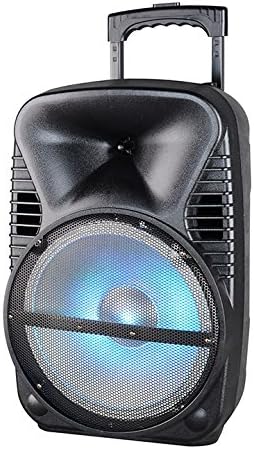
בילד: פראָנט view of the Max Power MPD125L Karaoke DJ Speaker System. It is a black, portable speaker with a retractable handle on top and wheels at the bottom. The front features a large speaker grille with blue LED lights illuminating the woofer, indicating its active state.
- פּאָרטאַטיוו פּלאַן: 12-inch speaker with built-in retractable handle and wheels for easy transport.
- שטאַרק אַודיאָ: 4000W peak power output for loud and clear sound with good bass.
- געבויט-אין קריקאָנלאָדלעך באַטערי: Provides up to 4 hours of continuous playback. (Battery size: 12V/2.6A)
- LED Dance Lights: Integrated LED lights that flash, transforming any room into a disco club.
- עטלעכע קאַנעקטיוויטי אָפּציעס:
- בלועטאָאָטה: Wireless streaming from compatible devices (laptops, smartphones).
- וסב שפּעלטל: פֿאַר שפּילן אַודיאָ fileס פֿון וסב דרייווז.
- סד שפּעלטל: פֿאַר שפּילן אַודיאָ fileס פון SD קארטלעך.
- AM/FM ראַדיאָ: Built-in tuner for radio broadcasts.
- קאַראַאָקע פאַנגקשאַנאַליטי: Includes a wireless microphone for karaoke sessions.
- Full-Function Wireless Remote Control: פֿאַר באַקוועם אָפּעראַציע פון אַ ווייַטקייט.
- ימפּעדאַנסע: 4 אָהמס.
- אָפטקייַט ענטפער: 40 Hz - 20 kHz.
סעטאַפּ
1. טשאַרדזשינג די ספּיקער
- Locate the DC input port on the speaker (usually on the rear panel).
- Connect the supplied power adapter to the DC input port.
- צאַפּן די מאַכט אַדאַפּטער אין אַ נאָרמאַל עלעקטריקאַל ווענטיל.
- The charging indicator light (if present) will illuminate, typically red, during charging and turn green when fully charged.
- Allow approximately 4-6 hours for a full charge before first use. The speaker can be used while charging.
2. דראָטלאָז מיקראָפאָן סעטאַפּ
- Insert appropriate batteries (not included, usually AA) into the wireless microphone.
- Turn on the microphone. It should automatically pair with the speaker.
- Adjust the microphone volume knob on the speaker's control panel to your desired level.
3. רימאָוט קאָנטראָל סעטאַפּ
- Insert appropriate batteries (not included, usually AAA) into the wireless remote control.
- Point the remote control towards the speaker's IR receiver (usually on the front panel or near the controls) to operate.
אַפּערייטינג ינסטראַקשאַנז
1. מאַכט אויף / אויסגעלאשן
Locate the Power switch (usually a rocker switch) on the speaker's control panel. Flip it to the "ON" position to power on the speaker. Flip it to "OFF" to power off.
2. מאָדע סעלעקציע
Press the "MODE" button on the control panel or remote control to cycle through available input modes: Bluetooth, USB, SD, FM Radio, AM Radio, AUX (if available).
3. בלועטאָאָטה פּערינג
- Turn on the speaker and select Bluetooth mode. The speaker will typically announce "Bluetooth Mode" or display "BT" and enter pairing mode (indicated by a flashing Bluetooth indicator).
- On your smartphone, tablet, or laptop, enable Bluetooth and search for new devices.
- Select "MPD125L" (or similar name) from the list of available devices.
- Once paired, the speaker will confirm with an audible tone or a solid Bluetooth indicator light. You can now play audio wirelessly.
4. יו-עס-בי/ס-די ווידערשפּיל
- Insert a USB flash drive or SD card (pre-loaded with MP3 or compatible audio fileס) אין דעם באטרעפנדיקן שפּאַלט.
- The speaker should automatically switch to USB/SD mode and begin playing the first track. If not, press the "MODE" button to select USB or SD mode.
- Use the Play/Pause, Next Track, and Previous Track buttons on the control panel or remote to navigate.
5. AM/FM ראַדיאָ אָפּעראַציע
- Select FM or AM radio mode using the "MODE" button.
- Press and hold the Play/Pause button (often labeled "SCAN") to automatically scan and save available radio stations.
- Use the Next Track and Previous Track buttons to switch between saved stations.
- Extend the telescopic antenna (if present) for better reception.
6. קאַראַאָקע פונקציע
Ensure the wireless microphone is powered on and paired. Play your desired music through any input mode (Bluetooth, USB, etc.). Speak or sing into the microphone. Adjust the microphone volume and echo effects (if available) using the dedicated knobs on the control panel.
7. LED Dance Lights
The LED lights typically activate automatically when the speaker is powered on. There may be a dedicated button (e.g., "LIGHT" or "LED") on the control panel or remote to toggle them on/off or change patterns.
8. באַנד קאָנטראָל
Adjust the master volume using the main volume knob on the speaker's control panel or the volume buttons on the remote control.
וישאַלט
- רייניקונג: ניצט אַ ווייכע, טרוקענע שטאָף צו ווישן די אויסערלעכע זייט פון דעם רעדנער. ניצט נישט פליסיקע רייניקונגס-מיטלען אדער שרײַבנדיקע כעמיקאַלן.
- סטאָרידזש: ווען נישט אין באַנוץ פֿאַר לענגערע פּעריאָדן, זאָל מען דעם רעדנער אַוועקלייגן אין אַ קיל, טרוקן אָרט, אַוועק פֿון דירעקטער זון און עקסטרעמע טעמפּעראַטורן.
- באַטערי זאָרגן: To prolong battery life, avoid fully discharging the battery frequently. Recharge the battery at least once every 3 months if not in regular use.
- ווענטילאַטיאָן: Ensure the speaker's ventilation openings are clear of dust and debris to prevent overheating.
טראָובלעשאָאָטינג
| פּראָבלעם | מעגלעך סיבה | לייזונג |
|---|---|---|
| דער רעדנער גייט נישט אן. | באַטערי איז דיפּליטיד. שטראָם קאַבל נישט ריכטיק פארבונדן. | Connect the speaker to a power outlet and allow it to charge. Ensure the power cable is securely plugged into both the speaker and the outlet. |
| קיין קלאַנג פֿון רעדנער. | די באַנד איז צו נידעריק. אומרעכטע איינגאַבע מאָדע אויסגעקליבן. Device not properly connected (Bluetooth/USB/SD). | פאַרגרעסערן די בעל באַנד. Press the "MODE" button to select the correct input. Re-pair Bluetooth device, re-insert USB/SD, or check AUX cable connection. |
| די בלוטוט דעווייס וועט זיך נישט פארבינדן. | Speaker not in pairing mode. Device too far from speaker. בלועטוט אויף דעם דעווייס איז אויסגעלאשן. | Ensure speaker is in Bluetooth mode and indicator is flashing. רוקט דעם אפאראט נענטער צום רעדנער (אינערהאלב 10 מעטער). געבן בלועטאָאָטה אויף דיין מיטל. |
| מיקראָפאָן טוט נישט אַרבעטן. | Microphone is off or batteries are dead. מיקראָפאָן וואָלומען איז צו נידעריק. | Turn on the microphone and replace batteries if necessary. Increase the microphone volume knob on the speaker. |
| ראַדיאָ אָפּטראָג איז נעבעך. | שוואַך סיגנאַל. אַנטענע נישט אויסגעשטרעקט. | Relocate the speaker to an area with better signal. פאַרלענגערן די טעלאַסקאָפּיק אַנטענע גאָר. |
ספּעסאַפאַקיישאַנז
| מאָדעל נומער | MPD125L |
| סאָרט | מאַקסימום מאַכט |
| שפּיץ מאַכט רעזולטאַט | 4000 וואטס |
| ימפּידאַנס | 4 אָהמס |
| אָפטקייַט ענטפער | 40 הערץ - 20 קילאָהערץ |
| באַטאַרייע גרייס | 12V / 2.6A |
| באַטערי לעבן | אַרויף צו 4 שעה |
| פּראָדוקט דימענשאַנז (L x W x H) | 33.02 X 38.1 X 58.42 סענטימעטער (13 X 15 X 23 אינטשעס) |
| פּראָדוקט וואָג | 15.88 קג (35 לבס) |
| קאַמפּאַטאַבאַל דעוויסעס | לאַפּטאַפּ, סמאַרטפאָנע |
| קאַנעקטער טיפּ | וסב |
| UPC | 703510623201 |
וואָראַנטי און שטיצן
פֿאַר וואָראַנטי אינפֿאָרמאַציע און טעכנישע שטיצע, ביטע זען די דאָקומענטאַציע וואָס איז צוגעשטעלט געוואָרן ביים קויפן אָדער קאָנטאַקט דיין הענדלער. האַלט דיין באַווייַז פון קויפן פֿאַר קיין וואָראַנטי קליימז.
For further assistance or inquiries, please visit the official MAX POWER webפּלאַץ אָדער קאָנטאַקט זייער קונה סערוויס אָפּטיילונג.