
1. הקדמה
א דאנק פארן קויפןasing the Riptunes Portable CD Player with AM/FM Radio, Model CDB204. This device is designed for portable audio playback, offering versatile options including CD playback, AM/FM radio reception, and auxiliary input for external audio sources. Please read this manual thoroughly before operating the unit to ensure proper use and to maximize your listening experience.

Image 1.1: Riptunes Portable CD Player (Model CDB204) with an external device connected.
2. זיכערקייַט אינפֿאָרמאַציע
- שטעלט נישט אויס דעם אַפּאַראַט צו רעגן אָדער פייכטקייט כּדי צו פאַרמייַדן פייער אָדער עלעקטרישע קלאַפּן.
- דו זאלסט נישט עפענען די קאַבינעט. אָפּשיקן סערוויסינג בלויז צו קוואַלאַפייד פּערסאַנעל.
- פֿאַרמײַדט צו שטעלן דעם אַפּאַראַט לעבן היץ־קוואַלן ווי ראַדיאַטאָרן, היץ־רעגיסטערס, אויוון אָדער אַנדערע אַפּאַראַטן וואָס פּראָדוצירן היץ.
- ניצן בלויז אַטאַטשמאַנץ / אַקסעסעריז ספּעסיפיעד דורך דער פאַבריקאַנט.
- אָפּשטעקן דעם אַפּאַראַט בעשאַס בליץ סטאָרמז אָדער ווען אַניוזד פֿאַר לאַנג פּיריאַדז.
- אַוועקוואַרפן באַטעריעס ריכטיק, לויט די לאָקאַלע רעגולאַציעס. נישט אויסשטעלן באַטעריעס צו איבערגעטריבענער היץ.
3. פּעקל אינהאַלט
ביטע קאָנטראָלירט אַז די פאלגענדע זאכן זענען אַרייַנגערעכנט אין דיין פּעקל:
- Riptunes Portable CD Player (Model CDB204)
- אַק מאַכט אַדאַפּטער
- ינסטראַקשאַנז מאַנואַל
4. פּראָדוקט איבערview
Familiarize yourself with the controls and features of your Riptunes Portable CD Player.
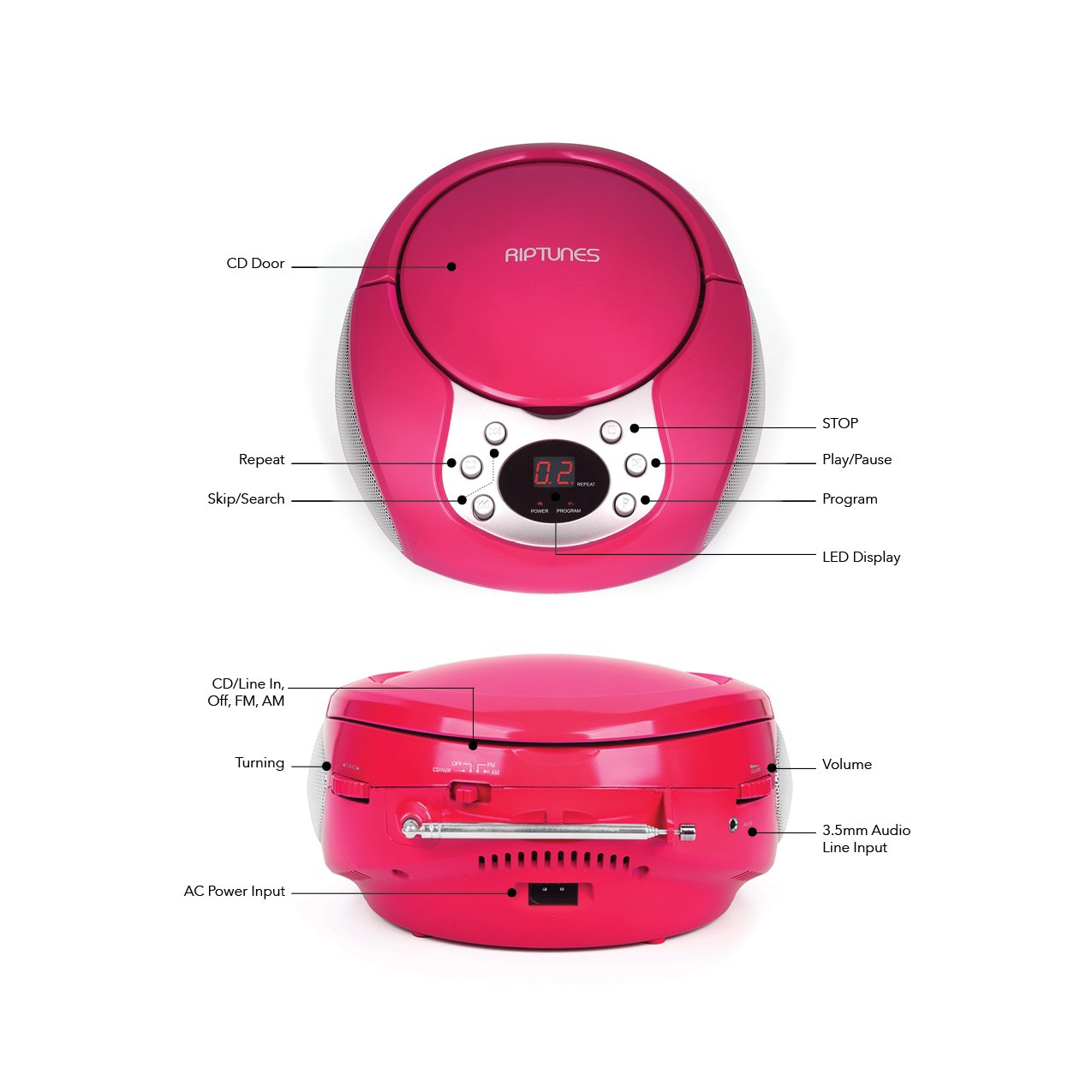
Image 4.1: Front and Side Panel Controls and Ports.
פראָנט פּאַנעל קאָנטראָלס:
- סי-די טיר: Open to insert or remove a CD.
- געפֿירט ווייַז: Shows track number, radio frequency, or mode.
- POWER/PROGRAM Button: Press to turn the unit on/off. In CD mode, press to program tracks.
- PLAY/PAUSE (►/−−) Button: Press to start or pause CD playback.
- שטאָפּ (■) קנעפּל: Press to stop CD playback.
- SKIP/SEARCH (◀◀ / ►►) Buttons: Press to skip tracks on a CD. Hold to search within a track. In radio mode, press to tune.
- REPEAT קנעפּל: Press to repeat the current track or all tracks on a CD.
Side Panel Controls/Ports:
- FUNCTION Switch (CD/Line In-Off, FM, AM): Selects the operating mode (CD/Aux, FM Radio, AM Radio) and turns the unit off.
- וואָלומען דיאַל: אַדזשאַסץ די אַודיאָ רעזולטאַט מדרגה.
- טונינג רעדל: Adjusts the radio frequency in AM/FM mode.
- AUX IN דזשאַק: פֿאַרבינדט עקסטערנע אַודיאָ דעוויסעס מיט אַ 3.5 מם אַודיאָ קאַבל.
- AC POWER INPUT Jack: פֿאַרבינדט דעם צוגעשטעלטן AC מאַכט אַדאַפּטער.
- FM אַנטענע: פֿאַרלענגערן פֿאַר אָפּטימאַלער FM ראַדיאָ אָפּנאַם.
5. סעטאַפּ
5.1 אנשטעלן דעם איינהייט
The Riptunes Portable CD Player can be powered by either the included AC adapter or by batteries.
AC מאַכט אָפּעראַציע:
- Ensure the FUNCTION switch is in the 'OFF' position.
- Insert the small end of the AC adapter into the AC POWER INPUT jack on the side of the unit.
- Plug the other end of the AC adapter into a standard AC wall outlet (120V ~ 60Hz).
באַטערי אָפּעראַציע:
פֿאַר פּאָרטאַטיוו נוצן, דאַרף די אַפּאַראַט 6 x 'C' גרייס באַטעריעס (נישט אַרייַנגערעכנט).
- Ensure the FUNCTION switch is in the 'OFF' position.
- געפינען די באַטאַרייע אָפּטייל אויף די דנאָ פון די אַפּאַראַט.
- Open the battery compartment cover by sliding it off.
- Insert 6 'C' size batteries, observing the correct polarity (+/-) as indicated inside the compartment.
- פאַרבייַטן די באַטאַרייע אָפּטייל דעקן סיקיורלי.

Image 5.1: Battery Compartment on the underside of the unit.
5.2 אַנטענע אַדזשאַסטמענט
For optimal FM radio reception, fully extend the telescopic FM antenna located on the side of the unit. For AM reception, the unit has a built-in antenna, so no external adjustment is needed, but you may need to reposition the unit for better signal.

Image 5.2: Unit with FM antenna extended.
6. אַפּערייטינג ינסטרוקטיאָנס
6.1 סי פּלייבאַק
- Slide the FUNCTION switch to the 'CD/Line In-Off' position.
- Press the 'OPEN' button on the CD door to open it.
- Place a CD into the compartment with the label side facing up.
- Close the CD door firmly. The LED display will show '00' or the total number of tracks.
- Press the PLAY/PAUSE (►/−−) button to start playback. The track number will appear on the display.
- Adjust the VOLUME dial to your desired listening level.
- To pause playback, press the PLAY/PAUSE (►/−−) button. Press again to resume.
- To stop playback, press the STOP (■) button.
- To skip to the next track, press the SKIP/SEARCH (►►) button.
- To go back to the beginning of the current track, press the SKIP/SEARCH (◀◀) button once. Press twice to go to the previous track.
- To search rapidly forward or backward within a track, hold down the respective SKIP/SEARCH button.
- איבערחזרן פֿונקציע: Press the REPEAT button once to repeat the current track. Press again to repeat all tracks. Press a third time to cancel repeat mode.
- פּראָגראַם פֿונקציע: While the CD is stopped, press the PROGRAM button. The display will flash. Use the SKIP/SEARCH buttons to select your desired track, then press PROGRAM again to confirm. Repeat for up to 20 tracks. Press PLAY/PAUSE to start programmed playback.
6.2 AM/FM ראַדיאָ אָפּעראַציע
- Slide the FUNCTION switch to either 'FM' or 'AM' position.
- פֿאַר FM אָפּנאַם, פֿאַרלענגערט די טעלעסקאָפּישע אַנטענע גאָר.
- Rotate the TUNING dial on the side of the unit to select your desired radio station. The frequency will be displayed on the LED screen.
- Adjust the VOLUME dial to your desired listening level.
- For optimal AM reception, you may need to rotate the entire unit to find the best signal.
6.3 הילפס־איינגאנג (AUX IN)
- Slide the FUNCTION switch to the 'CD/Line In-Off' position.
- Connect one end of a 3.5mm audio cable (not included) to the AUX IN jack on the side of the unit.
- Connect the other end of the audio cable to the headphone jack or line-out jack of your external audio device (e.g., smartphone, MP3 player).
- Turn on your external audio device and start playback.
- Adjust the VOLUME dial on the Riptunes unit and the volume on your external device to achieve the desired sound level.
7. וישאַלט
- רייניקונג: ווישט אָפּ דעם אַפּאַראַט מיט אַ ווייכן, טרוקענעם שטאָף. ניצט נישט קיין שרײַבנדיקע רייניגער אָדער סאָלווענטן.
- CD באַהאַנדלונג: Handle CDs by their edges. Keep them clean and free of scratches. Use a soft, lint-free cloth to wipe CDs from the center outwards.
- סטאָרידזש: ווען נישט אין באַנוץ פֿאַר לענגערע פּעריאָדן, אַרויסנעמען די באַטעריעס און לאַגערן די אַפּאַראַט אין אַ קיל, טרוקן אָרט אַוועק פון דירעקט זונשייַן און עקסטרעמע טעמפּעראַטורן.
8. טראָובלעשאָאָטינג
| פּראָבלעם | מעגלעך סיבה | לייזונג |
|---|---|---|
| קיין מאַכט | AC adapter not connected; Batteries depleted or incorrectly inserted; FUNCTION switch in 'OFF' position. | Ensure AC adapter is securely plugged in; Replace batteries or check polarity; Slide FUNCTION switch to 'CD/Line In-Off', 'FM', or 'AM'. |
| סי-די שפּילט נישט | CD inserted incorrectly; CD is dirty or scratched; CD door not closed; FUNCTION switch not in 'CD/Line In-Off' mode. | Insert CD with label side up; Clean or replace CD; Close CD door firmly; Set FUNCTION switch to 'CD/Line In-Off'. |
| נעבעך ראַדיאָ אָפּטראָג | FM antenna not extended; Unit position. | Fully extend FM antenna; Reposition the unit for better signal. |
| No sound from AUX IN | Audio cable not connected properly; External device volume too low; FUNCTION switch not in 'CD/Line In-Off' mode. | Check audio cable connections; Increase volume on external device; Set FUNCTION switch to 'CD/Line In-Off'. |
9. ספּעסאַפאַקיישאַנז
- מאָדעל: CDB204
- מאַכט מקור: AC 120V ~ 60Hz אדער 6 x 'C' גרייס באַטעריעס (DC 9V)
- CD קאַמפּאַטאַבילאַטי: קאָמפּאַקטדיסק, סי-ר / רוו
- ראַדיאָ פריקוואַנסיז: עפעם, AM
- קאַנעקטיוויטי: 3.5 מם AUX IN
- דימענשאַנז (בעערעך): 12.48 X 11.46 X 7.09 אינטשעס (31.7 X 29.1 X 18 סענטימעטער)
- וואָג (בעערעך): 2.68 פונט (1.22 קג)
10. וואָראַנטי און שטיצן
Riptunes products are designed for reliability and performance. For warranty information, technical support, or customer service inquiries, please refer to the contact information provided with your purchase documentation or visit the official Riptunes webזייטל. ביטע באַהאַלטן אייער קויפן באַווייַז פֿאַר וואָראַנטי קליימז.