
הקדמה
This manual provides essential information for the installation, operation, and maintenance of your Proxicast High Gain 10 dBi Universal Wide-Band 4G / LTE, 5G & WiFi Omni-Directional Outdoor Antenna. This antenna is designed to improve signal strength and speed for various cellular broadband services and Wi-Fi networks.

Figure 1: Proxicast High Gain Omni-Directional Antenna (Model ANT-126-002)
פּראָדוקט איבערview
The Proxicast ANT-126-002 is an omni-directional antenna designed for outdoor use. It supports a wide frequency range, making it compatible with 4G LTE, 5G Sub-6 cellular services, and Wi-Fi. Its robust construction ensures durability in various weather conditions.
- אָפטקייַט קייט: 600 - 6000 מעגהערץ
- געווינס: 10 דבי
- קאַנעקטער טיפּ: N-ווייַבלעך
- קאַנסטראַקשאַן: Weather and impact resistant ABS radome
- מאָונטינג: Includes stainless steel 2-way pole/wall mounting bracket

Figure 2: Antenna compatibility with 5G, LTE, and WiFi networks.

Figure 3: Integrated N-Female connector for coaxial cable attachment.
סעטאַפּ און ינסטאַלירונג
Proper installation is crucial for optimal performance. The antenna comes with a versatile mounting bracket for pole or wall installation.
וואָס איז אין די קעסטל:
- 1 x Proxicast Omni-Directional Antenna
- 1 רענטגענ ל בראַקאַץ
- 2 x U Bolts
- 4 רענטגענ וואַשערס
- 4 רענטגענ לאַק וואַשערס
- 4 רענטגענ ניסלעך

Figure 4: Included mounting hardware for the antenna.
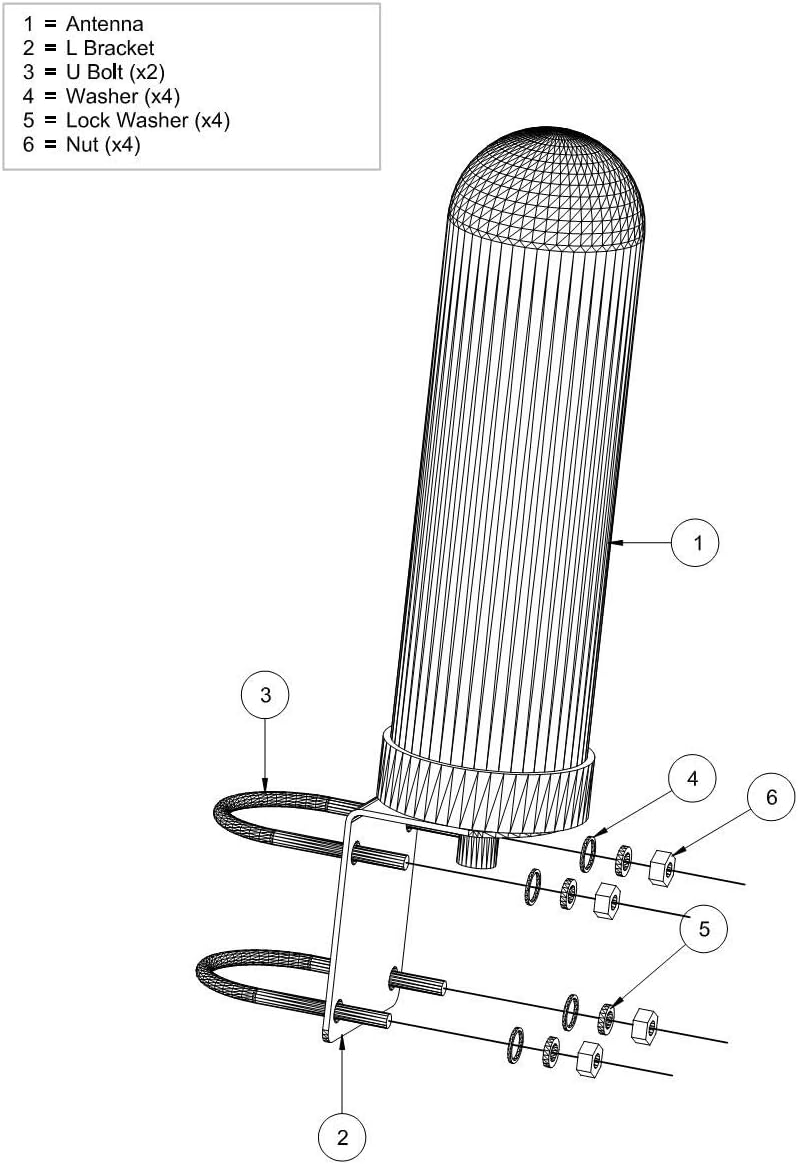
פיגורע 5: עקספּלאָדעד view of antenna and mounting components.
מאַונטינג אינסטרוקציעס:
- קלייַבן אָרט: Select an outdoor location with a clear line of sight to cellular towers or Wi-Fi access points. Consider mounting on a pole or wall.
- צוזאַמענשטעלן קלאַמער: Attach the L-bracket to the antenna using the provided nuts and washers.
- זיכערע אַנטענע:
- For pole mounting: Use the U-bolts to secure the L-bracket to a mast (mast sold separately).
- For wall mounting: Use appropriate screws (not included) to secure the L-bracket directly to a sturdy wall surface.
- קאָננעקט קאָאַקסיאַל קאַבלע: Connect a 50 Ohm coaxial cable (not included) to the N-Female connector on the antenna. Ensure the connection is tight and weatherproofed.
- רוט קאַבל: Route the coaxial cable to your cellular modem, router, or radio device.
וויכטיק באַמערקונג: This antenna must be connected via a 50 Ohm coaxial cable to an existing cellular modem/router/radio device. It does not improve signal for cell phones or other devices not directly wired to the antenna.
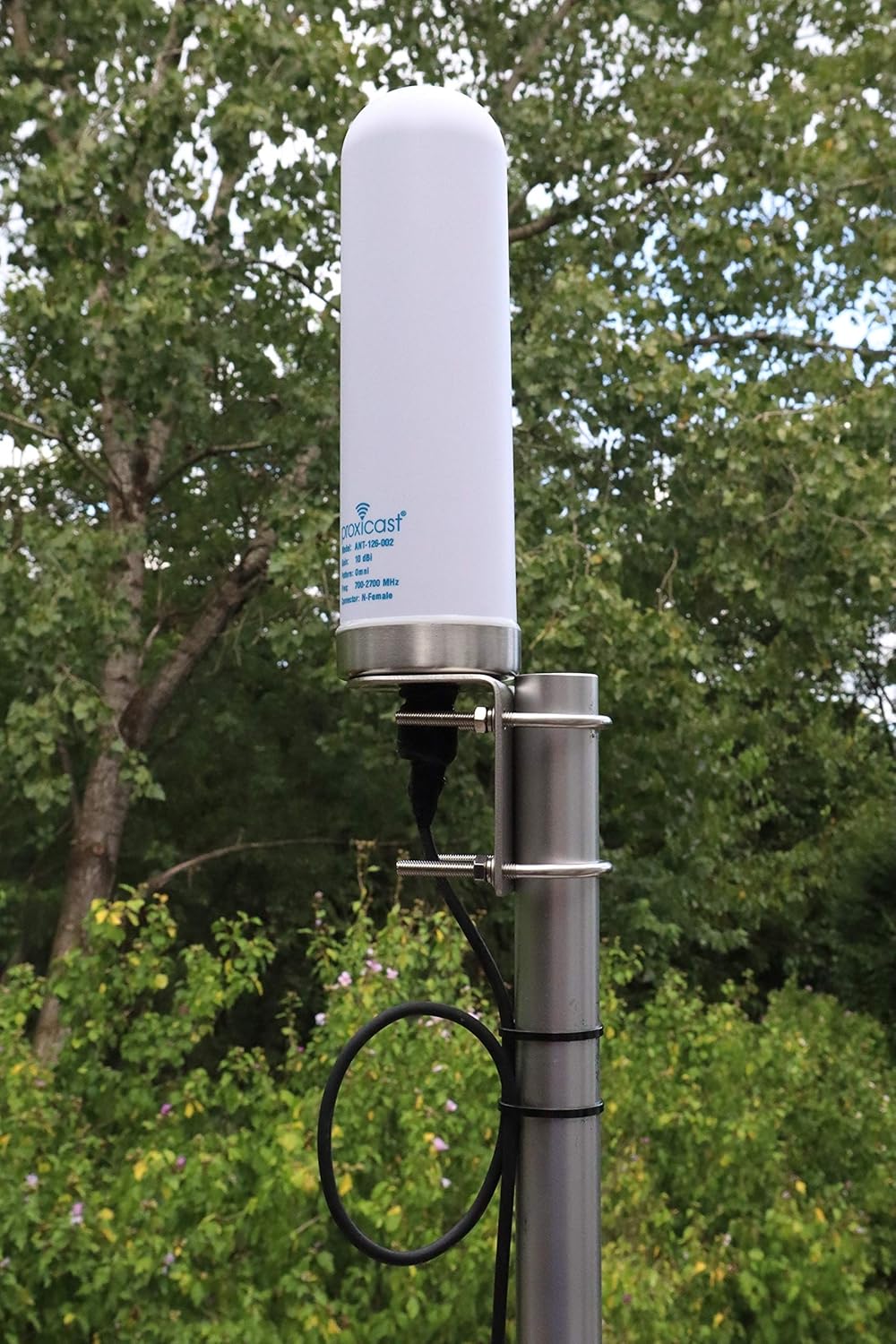
פיגורע 6: עקסample of the antenna mounted on an outdoor pole.
אַפּערייטינג פּרינסאַפּאַלז
The Proxicast ANT-126-002 is an omni-directional antenna, meaning it receives and transmits signals in a 360-degree pattern around its axis. This makes it suitable for locations where the exact direction of the signal source is unknown or where signals may come from multiple directions.
It is designed to enhance the signal strength and data throughput for compatible devices by providing a higher gain connection to cellular and Wi-Fi networks. The antenna's wideband capability ensures compatibility across various frequency bands used by major carriers like Verizon, AT&T, T-Mobile, Telus, Bell Canada, Rogers, and DigiCel.
ווידעא 1: א קורצע איבערבליקview of the Proxicast 10 dBi Wide-Band Omni Antenna, showcasinג זײַן דיזײַן און פֿעיִקייטן.
וישאַלט
The Proxicast antenna is built for outdoor durability with a weather and impact resistant ABS radome. Minimal maintenance is required.
- פּעריאָדיש דורכקוק: Annually inspect the antenna and its mounting hardware for any signs of wear, corrosion, or loosening. Ensure all connections remain secure.
- רייניקונג: If necessary, gently clean the antenna's exterior with a soft, damp שטאָף. ויסמיידן ניצן האַרב קעמיקאַלז אָדער אַברייסיוו מאַטעריאַלס.
- קאַבלע אָרנטלעכקייַט: Check the coaxial cable for any damage, kinks, or degradation of the outer jacket. Ensure weatherproof seals at connectors are intact.
טראָובלעשאָאָטינג
If you experience issues with signal improvement, consider the following troubleshooting steps:
- טשעק קאַנעקשאַנז: Ensure the 50 Ohm coaxial cable is securely connected to both the antenna's N-Female port and your modem/router/radio device. A loose connection can significantly degrade performance.
- קאַבלע טיפּ: Verify that you are using a 50 Ohm coaxial cable. Using a 75 Ohm cable (common for TV) will result in poor performance.
- Required Adapters: If your device uses a different connector type (e.g., SMA), ensure you are using the correct 50 Ohm adapter (e.g., N Male to SMA Female). Incorrect adapters can cause signal loss.
- אַנטענע אָרט: Experiment with different mounting locations and heights. Even small changes in position can impact signal reception, especially if obstructions are present.
- דיווייס קאַמפּאַטאַבילאַטי: Confirm that your modem/router/radio device is configured to use an external antenna and is compatible with the antenna's frequency range.
- סיגנאַל מקור: While omni-directional, performance can still be affected by distance to the nearest cell tower or Wi-Fi access point.
If problems persist after following these steps, contact Proxicast customer support for further assistance.
ספּעסאַפאַקיישאַנז
| שטריך | דעטאַל |
|---|---|
| מאָדעל נומער | אַנט-126-002 |
| סאָרט | פּראָקסיקאַסט |
| אַנטענע טיפּ | 4G/LTE, 5G, WiFi Omni-Directional Wideband Antenna |
| אָפטקייַט ראַנגע | 600 - 6000 מעגהערץ |
| שפּיץ געווינען | 10 דבי |
| ימפּידאַנס | 50 Ohm |
| קאַנעקטער טיפּ | N-ווייַבלעך |
| פּראָדוקט דימענשאַנז | 3 X 3 X 10.6 אינטשעס (7.6 X 7.6 X 26.9 סענטימעטער) |
| פּונקט וואָג | 1 פונט (0.45 קג) |
| קאָליר | ווייַס |
| ספּעציעלע פֿעיִקייטן | 360 Degree, High Gain, Multidirectional, Signal Booster, Wireless |

Figure 7: Physical dimensions of the Proxicast antenna.

Figure 8: Detailed technical drawing showing antenna dimensions.

Figure 9: Antenna performance verified through independent lab testing.
וואָראַנטי און שטיצן
For information regarding product warranty, please refer to the official Proxicast website or contact their customer service directly. Protection plans may also be available for purchase separately.
קונה שטיצן: If you require technical assistance or have questions about your Proxicast antenna, please visit the Proxicast Store on Amazon אָדער זייער באַאַמטער webפּלאַץ פֿאַר קאָנטאַקט אינפֿאָרמאַציע.