
1. הקדמה
Thank you for choosing the Andoer Mini 49-LED Camera Video Light. This compact and versatile lighting solution is designed to enhance your photography and videography with bright, dimmable illumination. Featuring 49 high-quality LED beads, a 6000K color temperature, and a CRI of ≥90, it provides natural and soft white light. Its design includes multiple hot shoe bases for interlocking with other lights and a standard hot shoe mount with a 1/4-inch thread for broad compatibility with cameras and light stands.

פיגורע 1.1: פראָנט view of the Andoer Mini 49-LED Camera Video Light.
2. זיכערקייַט אינפֿאָרמאַציע
Please read and understand all safety precautions before using this product to prevent damage or injury.
- שטעלט נישט אויס דעם אפאראט צו וואסער אדער איבעריגע הומידיטי.
- Avoid direct eye exposure to the LED light, as it can be very bright.
- Do not attempt to disassemble or modify the light. Repairs should only be performed by qualified personnel.
- Use only specified AA batteries. Ensure correct polarity when inserting batteries.
- אַרויסנעמען די באַטעריעס אויב די ליכט וועט נישט ווערן גענוצט פֿאַר אַ לענגערע צייט.
- האַלטן אויס פון דערגרייכן פון קינדער.
3. סעטאַפּ
3.1 באַטאַרייע ייַנמאָנטירונג
- געפינט דעם דעקל פון דעם באַטעריע־אָפּטייל אויף דער הינטערשטער זייט פון דער ליכט.
- רוק די דעקל עפענען.
- אַרײַנשטעלן צוויי (2) AA באַטעריעס, און זיכער מאַכן אַז די פּאָלאַריטעט (+/-) איז ריכטיק ווי אָנגעוויזן אין דעם אָפּטייל.
- פאַרמאַכן די באַטאַרייע אָפּטייל דעקן סיקיורלי.

Figure 3.1: Open battery compartment for AA battery installation.
3.2 אויפשטעלן די ליכט
The Andoer Mini 49-LED Camera Video Light offers versatile mounting options:
- On-Camera Hot Shoe: The light features a standard hot shoe mount at its base. Slide this mount into your camera's hot shoe slot and tighten the locking ring for a secure fit.
- 1/4-inch Thread: The hot shoe mount also includes a 1/4-inch thread, allowing it to be attached to light stands, tripods, or other accessories with a compatible screw.

Figure 3.2: The video light mounted on a DSLR camera's hot shoe.
3.3 Interlocking Multiple Lights
For enhanced lighting effects, multiple Andoer Mini 49-LED lights can be interlocked. The light is equipped with hot shoe bases on three sides (top, left, right).
- Mount the first light onto your camera or stand.
- Take a second light and slide its hot shoe mount into one of the hot shoe bases on the first light.
- Repeat for additional lights as needed.

Figure 3.3: Multiple lights interlocked for broader illumination.
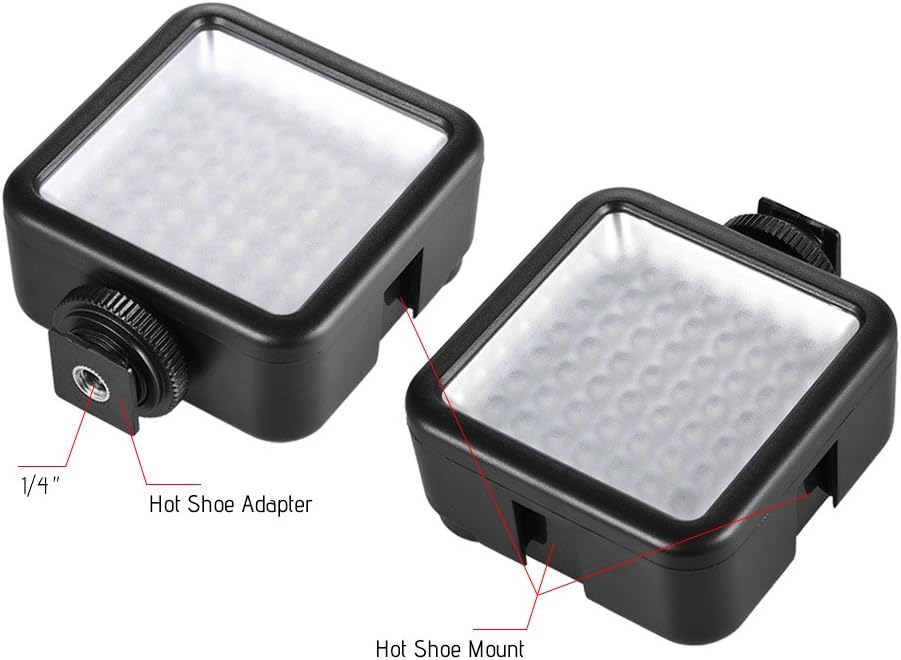
Figure 3.4: Detail of the hot shoe adapter and mount for interlocking.
4. אַפּערייטינג ינסטרוקטיאָנס
4.1 אײַנשטעלן/אויסשטעלן און ברייטקייט אדזשאַסטמענט
The light features a single rotary knob for both power control and brightness adjustment.
- מאַכט אויף: Rotate the knob clockwise from the 'OFF' position. The light will turn on at its lowest brightness setting.
- סטרויערן ברייטנאַס: Continue rotating the knob clockwise to increase brightness from 0% to 100%. Rotate counter-clockwise to decrease brightness.
- מאַכט אַוועק: Rotate the knob counter-clockwise until it clicks into the 'OFF' position.

Figure 4.1: The ON/Dimmer rotary knob on the back of the light.

Figure 4.2: Visual representation of 0-100% dimmable brightness.
5. וישאַלט
- רייניקונג: Use a soft, dry cloth to clean the exterior of the light. Do not use abrasive cleaners or solvents.
- סטאָרידזש: Store the light in a cool, dry place away from direct sunlight and extreme temperatures. Remove batteries if storing for extended periods.
- באַטערי זאָרגן: Replace batteries when the light output becomes dim or inconsistent. Dispose of used batteries responsibly according to local regulations.
6. טראָובלעשאָאָטינג
| פּראָבלעם | מעגלעך סיבה | לייזונג |
|---|---|---|
| ליכט טוט נישט קער אויף. | באַטעריעס זענען טויט אָדער נישט ריכטיק אַרײַנגעשטעלט. | קאָנטראָלירט די פּאָלאַריטעט פון די באַטעריעס. פאַרבייטן מיט פרישע AA באַטעריעס. |
| Light dims quickly or is inconsistent. | נידעריק באַטאַרייע מאַכט. | פאַרבייַטן מיט פריש אַאַ באַטעריז. |
| Light is not securely mounted. | Mounting knob/ring is loose. | Ensure the hot shoe locking ring is tightened. |
7. ספּעסאַפאַקיישאַנז
| שטריך | באַשרייַבונג |
|---|---|
| מאָדעל | W49 |
| געפירט קוואַנטיטי | 49 ברעקלעך |
| מאַכט רעזולטאַט | 5.5 וו |
| קאָליר טעמפּעראַטור | 6000K |
| CRI (קאָליר רענדערינג אינדעקס) | ≥90 |
| דימינג ראַנגע | 0% - 100% |
| מאַכט מקור | 2 קס אַאַ באַטעריז (ניט אַרייַנגערעכנט) |
| לעבן | אַרויף צו 50,000 שעה |
| מאַונטינג | Hot Shoe Mount, 1/4-inch Thread |
| פּראָדוקט דימענשאַנז | 3.15 X 1.22 X 2.56 אינטשעס (8 X 3.1 X 6.5 סענטימעטער) |
| פּונקט וואָג | 3.36 אונסעס (95.25 גראַמז) |

פיגור 7.1: פּראָדוקט דימענסיעס.
8. וואָראַנטי אינפֿאָרמאַציע
Specific warranty details for the Andoer Mini 49-LED Camera Video Light are typically provided at the point of purchase or within the product packaging. Please retain your proof of purchase for any warranty claims. For detailed warranty terms and conditions, please refer to the documentation included with your product or contact the seller/manufacturer directly.
9. שטיצן
If you encounter any issues or have questions regarding your Andoer Mini 49-LED Camera Video Light that are not covered in this manual, please contact the retailer from whom you purchased the product. Alternatively, you may visit the official Andoer website for further support and contact information.