
1. הקדמה
This manual provides essential information for the safe and effective operation, setup, and maintenance of your BMC RESmart GII Auto CPAP System E-20A-H with Humidifier. Please read this manual thoroughly before using the device and retain it for future reference. This device is intended for the treatment of Obstructive Sleep Apnea (OSA).
2. זיכערקייַט אינפֿאָרמאַציע
וויכטיק זיכערהייט וואָרנינגז:
- Always disconnect the device from the power supply before cleaning or performing any maintenance.
- דו זאלסט נישט ייַנטונקען די מיטל אין וואַסער אָדער קיין אנדערע פליסיק.
- Use only accessories and parts recommended by BMC.
- Keep the device away from direct sunlight, heat sources, and sharp objects.
- Consult your physician or healthcare provider if you experience any unusual symptoms or discomfort during use.
- דער מיטל איז נישט בדעה פֿאַר לעבן שטיצן.
3. פּראָדוקט איבערview
The BMC RESmart GII Auto CPAP System E-20A-H is an intelligent device designed for the treatment of Obstructive Sleep Apnea. It features an integrated humidifier for enhanced comfort.
שליסל קאַמפּאָונאַנץ:
- הויפּט אַפּאַראַט: Houses the motor, control electronics, and display.
- הומידיפיער: Integrated unit with dual water chambers for efficient humidification.
- 3.5-אינטש לקד ווייַז: Provides real-time information and access to settings.
- קאָנטראָל קנופּ: פֿאַר נאַוויגירן מעניוז און אַדזשאַסטירן סעטטינגס.
- לופט אָוטלעט: Connects to the CPAP tubing.
- מאַכט ינלעט: פֿאַר קאַנעקטינג די מאַכט אַדאַפּטער.
- SD Card Slot: For compliance data storage and retrieval (iCode II).
- SpO2 Kit Port (Optional): For real-time blood oxygen saturation and pulse rate monitoring.
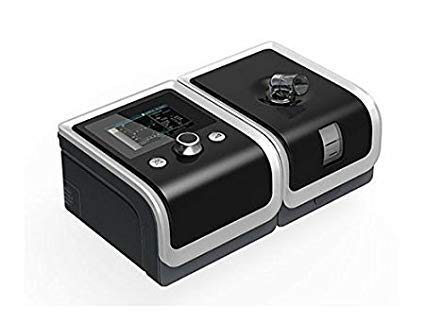
An image showing the BMC RESmart GII Auto CPAP device, featuring its main unit, control knob, and integrated humidifier. The device is black with a clear humidifier chamber visible.
4. סעטאַפּ
4.1 אַנפּאַקינג
- קערפאַלי באַזייַטיקן אַלע קאַמפּאָונאַנץ פון די פּאַקקאַגינג.
- Inspect the device and accessories for any signs of damage. Do not use if damaged.
4.2 קאַנעקטינג מאַכט
- Connect the power adapter to the power inlet on the back of the device.
- צאַפּן די מאַכט שנור אין אַ פּאַסיק עלעקטריקאַל ווענטיל.
4.3 Filling the Humidifier
- Open the humidifier chamber by sliding or lifting the cover.
- Fill the water chamber with distilled water up to the maximum fill line. Do not overfill.
- Close the humidifier chamber securely.
4.4 Connecting Tubing and Mask
- Connect one end of the CPAP tubing to the air outlet on the device.
- Connect the other end of the tubing to your prescribed CPAP mask.
- Fit the mask comfortably and securely according to its own instructions.
5. אַפּערייטינג ינסטרוקטיאָנס
5.1 Starting Therapy
- Ensure the device is properly set up and connected.
- שטעלן אויף דיין מאַסקע.
- Press the Start/Stop button (usually the control knob) to begin therapy. The device will automatically start delivering air.
5.2 אַדזשאַסטינג סעטטינגס
Use the control knob to navigate the menu on the 3.5-inch LCD display. Press the knob to select an option and rotate to adjust values.
- דרוק קייט: 4-20 cm H2O (Auto CPAP adjusts automatically within this range).
- Ramp צייט: Adjusts the time (0-60 minutes) for the pressure to gradually increase to the prescribed level.
- Humidification Level: Select from Off or levels 1-5 to control the humidity output.
- Reslex: Pressure relief feature (Off/1/2/3) for exhalation comfort.
- אַוטאָ אָנ / אַוועק: Can be enabled or disabled (Off by default).
5.3 Stopping Therapy
Press the Start/Stop button again to end therapy. The device will power down.
5.4 iCode II Data Retrieval
Compliance data is encoded by a QR code displayed on the device's screen. Use a compatible application to scan the QR code for quick data retrieval and monitoring.
6. וישאַלט
Regular cleaning and maintenance are crucial for the optimal performance and longevity of your device.
6.1 טעגלעך רייניקונג
- Humidifier Water Chamber: Empty any remaining water and rinse with distilled water. Allow to air dry.
- מאַסקע: Wipe down the mask cushion with a damp cloth or specialized CPAP wipes.
6.2 וויקלי רייניקונג
- Humidifier Water Chamber: Wash with mild soap and warm water. Rinse thoroughly and allow to air dry completely.
- CPAP טובינג: Wash with mild soap and warm water. Rinse thoroughly and hang to air dry.
- לופט פילטער: Inspect the reusable air filter (if applicable). If dirty, rinse under running water and allow to air dry. Replace disposable filters as recommended.
6.3 אַלגעמיינע קער
- ווישן די יקסטיריער פון די מיטל מיט אַדamp cloth. Do not use abrasive cleaners or immerse the device.
- Replace air filters regularly as per manufacturer recommendations or if visibly dirty.
7. טראָובלעשאָאָטינג
אויב איר טרעפט פּראָבלעמען, זעט די פאלגענדע געוויינטלעכע פּראָבלעמען און לייזונגען:
| פּראָבלעם | מעגלעך סיבה | לייזונג |
|---|---|---|
| קיין מאַכט | שטראָם שנור אפגעטיילט; שטראָם ארויסtage | Check power connections; Restore power supply |
| Air leak from mask | Mask not fitted correctly; Mask worn out | Adjust mask straps; Replace mask cushion or mask |
| Dry mouth/throat | Humidifier off or set too low; Water chamber empty | Increase humidification level; Refill water chamber |
| די מיטל איז טומלדיק | Air filter dirty or blocked; Device on an uneven surface | Clean or replace air filter; Place device on a stable, flat surface |
| Pressure feels too high/low | Incorrect pressure setting; Ramp feature active | Consult your physician for pressure adjustments; Wait for ramp צו פאַרענדיקן |
If the problem persists, contact your healthcare provider or the manufacturer's customer support.
8. ספּעסאַפאַקיישאַנז
| שטריך | באַשרייַבונג |
|---|---|
| מאָדעל | E-20A-H |
| מאָדע | CPAP / Auto |
| דרוק ראַנגע | 4-20 סענטימעטער ה 2 אָ |
| Pressure Increment | 0.5 סענטימעטער ה 2 אָ |
| Ramp צייט | 0-60 מינוט |
| רעסלעקס | אויסגעלאשן/1/2/3 |
| געזונט מדרגה | <30 dBA |
| Humidification Levels | אויסגעלאשן / 1-5 |
| ווייַז | 3.5-אינטש לקד |
| דימענשאַנז (LxWxH) | 170x196x118mm (device) / 290x196x134mm (with H60 humidifier) |
| וואָג | <1.5kg (device) / <2.5kg (with H60 humidifier) |
| מאַכט צושטעלן | Input Range 100-240V AC, 50/60 Hz, 2.0 A max |
| דאַטאַ סטאָרידזש | SD Card (iCode II) |
| לאַנד פון אָריגין | כינע |
9. וואָראַנטי און שטיצן
For warranty information, please refer to the documentation provided with your purchase or contact your retailer. For technical support, service, or questions regarding your BMC RESmart GII Auto CPAP System, please contact the seller or the manufacturer directly.