
1. הקדמה
This manual provides essential information for the safe and efficient operation of your SUNNYSKY MPPT-60AI Solar Charge Controller. Please read it thoroughly before installation and use. This controller is designed to optimize power harvesting from solar panels to charge various battery types, including Sealed, Gel, Flooded, and Lithium batteries, across 12V, 24V, 36V, and 48V systems.

פיגורע 1.1: פראָנט view of the SUNNYSKY MPPT-60AI Solar Charge Controller.
ווידעא 1.1: איבערview of the SUNNYSKY MPPT Solar Charge Controller.
2. וויכטיק סאַפעטי אינפֿאָרמאַציע
אָבסערווירן די פאלגענדע זיכערהייט מיטלען בעת ינסטאַלירונג און אָפּעראַציע:
- פּוו פאַרקערט פּאָולעראַטי שוץ
- PV קורץ-קרייז שוץ
- PV over current alarm protection
- באַטערי אָוווערטשאַרדזש שוץ
- באַטערי איבער אָפּזאָגן שוץ
- באַטערי פאַרקערט פּאָולעראַטי שוץ
- מאַסע קורץ קרייַז שוץ
- לאָוד אָווערלאָוד שוץ
- קאָנטראָללער אָוווערכיטינג שוץ
Always ensure proper wiring and adhere to local electrical codes to prevent damage or injury.
3. פּראָדוקט פֿעיִקייטן
- סיסטעם וואָלtage Auto-Identification: Automatically detects 12V/24V/48V system voltages.
- הויך PV אינפוט באַנדtage: Supports a maximum PV input voltagE פון 170V.
- Wide MPPT Working Range: Optimal MPPT voltage ranges: DC18V-DC120V (12V system), DC30V-DC120V (24V system), DC65V-DC150V (48V system).
- באַטערי קאַמפּאַטאַבילאַטי: Compatible with Lead-acid (Sealed, AGM, Gel, Flooded) and Lithium batteries. Parameters can be set for specific lithium battery characteristics.
- Efficient Tracking: Maximum Power Point Tracking (MPPT) rate ≥99%, maximum conversion rate >98%.
- Power & Current Limiting: Auto control system limits charging power and current to prevent exceeding rated values.
- Display & Monitoring: Features an LCD display to show daily power generation and current curves.
4. פּעקל אינהאַלט
ביים עפענען דעם פעקל, זיכער מאכן אז אלע זאכן זענען דא און נישט באשעדיגט:
- SUNNYSKY MPPT-60AI Solar Charge Controller
- באַניצער מאַנואַל
- מאַונטינג קלאַמערן און שרויפן
- טעמפּעראַטור סענסאָר קאַבלע
- Communication Cable (if included with specific model)

Figure 4.1: SUNNYSKY MPPT-60AI Solar Charge Controller and accessories.
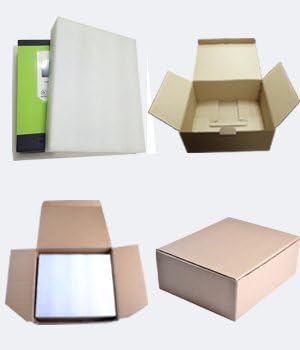
פיגור 4.2: פּראָדוקט פּאַקאַדזשינג.
5. סעטאַפּ און ייַנמאָנטירונג
5.1. מאָנטירן דעם קאָנטראָללער
Choose a suitable, well-ventilated location away from direct sunlight and high temperatures. Ensure adequate clearance around the unit for proper airflow. Use the provided mounting brackets and screws to securely attach the controller to a vertical surface.
5.2. וויירינג קאַנעקשאַנז
Follow the wiring sequence carefully to avoid damage:
- Connect the battery cables to the controller first. Ensure correct polarity (positive to positive, negative to negative).
- Connect the solar panel cables to the controller. Ensure correct polarity.
- Connect any DC load devices to the load terminals.
Always connect the battery before the solar panels. Reverse polarity can damage the controller.

Figure 5.1: Connection terminals for solar, battery, and load.
Video 5.1: Sunnysky Solar MPPT Charge Controller charging status page.
6. אַפּערייטינג ינסטרוקטיאָנס
6.1. על-סי-די דיספּלעי און נאַוויגאַציע
The LCD display provides real-time information about your solar system. Use the MENU, UP, DOWN, and ENTER buttons to navigate through the display screens and adjust settings.

Figure 6.1: LCD display and button functions.
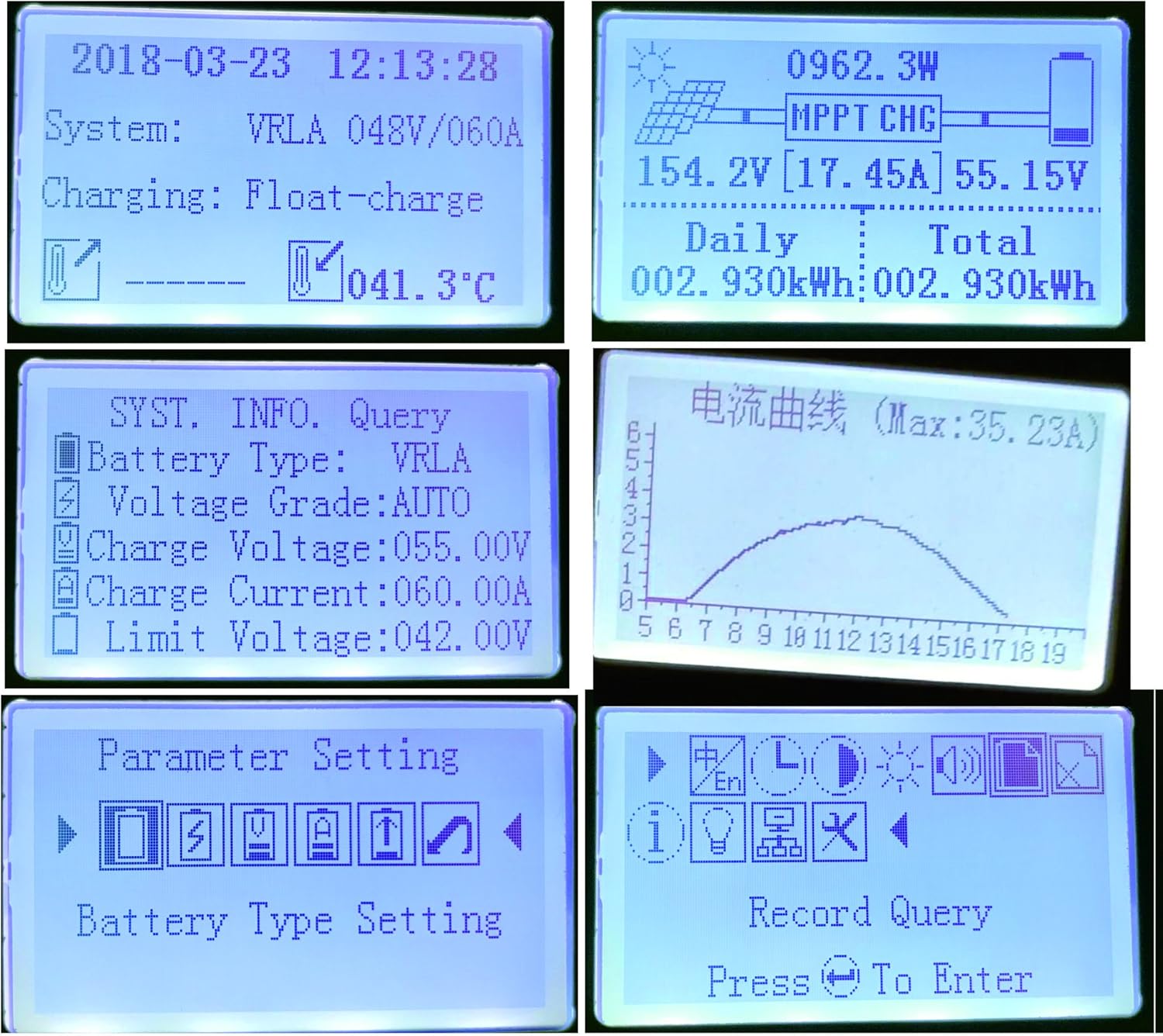
פיגורע 6.2: עקסamples of LCD display content.
Video 6.1: Sunnysky Solar MPPT Solar Controller Display content.
6.2. באַטעריע טיפּ סעטטינגס
The controller supports various battery types. It is crucial to select the correct battery type in the settings to ensure optimal charging and prolong battery life. For Lithium batteries, specific parameters can be adjusted.
6.3. לאַסט קאָנטראָל
The controller features DC load output. You can manage the load settings through the display interface.
Video 6.2: MPPT solar controller current and power curve.
7. וישאַלט
- רעגולער קאָנטראָלירן אַלע וויירינג קאַנעקשאַנז פֿאַר שטרענגקייט און קעראָוזשאַן.
- האַלט דעם קאָנטראָללער ריין און פריי פון שטויב און שמוץ.
- Ensure proper ventilation around the unit to prevent overheating, especially during high power operation.
- מאָניטאָרירט דעם LCD דיספּלעי פֿאַר קיין טעות קאָודז אָדער ומגעוויינטלעכע לייענונגען.
8. טראָובלעשאָאָטינג
אויב איר טרעפט פּראָבלעמען, זעט די פאלגענדע געוויינטלעכע פּראָבלעמען און לייזונגען:
- LCD does not light up: קאָנטראָלירט די באַטאַריע פֿאַרבינדונגען און זיכערט זיך אַז די באַטאַריע איז פֿול מיט וואַסערtage איז אין די אַפּערייטינג קייט.
- קיין טשאַרדזשינג: Verify solar panel connections, ensure sufficient sunlight, and check for any PV over-current or reverse polarity warnings.
- Load not working: Check load connections, ensure the load is not overloaded, and verify load settings on the controller.
- איבערהייצונג: Ensure adequate ventilation and clear any obstructions around the cooling fins.
Video 8.1: Comparison of SUNNYSKY controller and other controllers.
9. ספּעסאַפאַקיישאַנז
| שטריך | ווערט |
|---|---|
| מאָדעל נומער | MPPT-60AI |
| סאָרט | SUNNYSKY |
| קראַנט רייטינג | 60 א |
| סיסטעם וואָלtage | 12V/24V/36V/48V אַוטאָ |
| מאַקס פּוו ינפּוט וואָלtage | 170V |
| MPPT Best Working Voltage Range (12V) | DC18V-DC120V |
| MPPT Best Working Voltage Range (24V) | DC30V-DC120V |
| MPPT Best Working Voltage Range (48V) | DC65V-DC150V |
| מאַקס PV אַרייַנגאַנג מאַכט (12V) | 840 וו |
| מאַקס PV אַרייַנגאַנג מאַכט (24V) | 1700 וו |
| מאַקס PV אַרייַנגאַנג מאַכט (36V) | 2500 וו |
| מאַקס PV אַרייַנגאַנג מאַכט (48V) | 3400 וו |
| סופּפּאָרטעד באַטאַרייע טייפּס | Sealed, AGM, Gel, Flooded, Lithium |
| ווייַז טיפּ | לקד |
| אַפּערייטינג טעמפּעראַטור | 25 Degrees Celsius (optimal) |
| פּראָדוקט דימענשאַנז | 9.84 X 2.95 X 7.09 אינטשעס |
| פּונקט וואָג | 5.72 פונט (2.6 קילאָגראַמס) |
| מאַטעריאַל | Plastic And Metal |
10. וואָראַנטי און שטיצן
For warranty information and customer support, please refer to the official SUNNYSKY store or contact their customer service directly. Keep your purchase receipt for warranty claims.
Visit the official SUNNYSKY Store: SUNNYSKY Solar Store