
DÖRR 204473
Dörr 204473 8 MP Snapshot IR TFT Trail Camera
באַניצער ינסטרוקטיאָן מאַנואַל
הקדמה
Thank you for choosing the Dörr 204473 8 MP Snapshot IR TFT Trail Camera. This camera is designed for versatile surveillance, offering high-quality images and videos both day and night. Its robust, weatherproof design makes it ideal for outdoor use, capturing wildlife or monitoring property with its motion detection capabilities. Please read this manual carefully before operating the camera to ensure proper use and to maximize its performance.
זיכערקייַט אינפֿאָרמאַציע
- שטעלט נישט אויס די קאַמעראַ צו עקסטרעמע טעמפּעראַטורן אדער דירעקטע זונשייַן פֿאַר לאַנגע פּעריאָדן.
- Ensure the battery compartment is securely closed to maintain water resistance.
- Use only recommended battery types (AA batteries). Do not mix old and new batteries, or different types of batteries.
- האַלט די קאַמעראַ אַוועק פון שטאַרקע מאַגנעטישע פעלדער.
- פרובירט נישט צו צענעמען אדער מאדיפיצירן די קאמערא. דאס וועט בטל מאכן די גאראנטיע.
- אַוועקוואַרפן באַטעריעס און עלעקטראָנישע קאָמפּאָנענטן פאַראַנטוואָרטלעך לויט די לאָקאַלע רעגולאַציעס.
פּראָדוקט איבערview
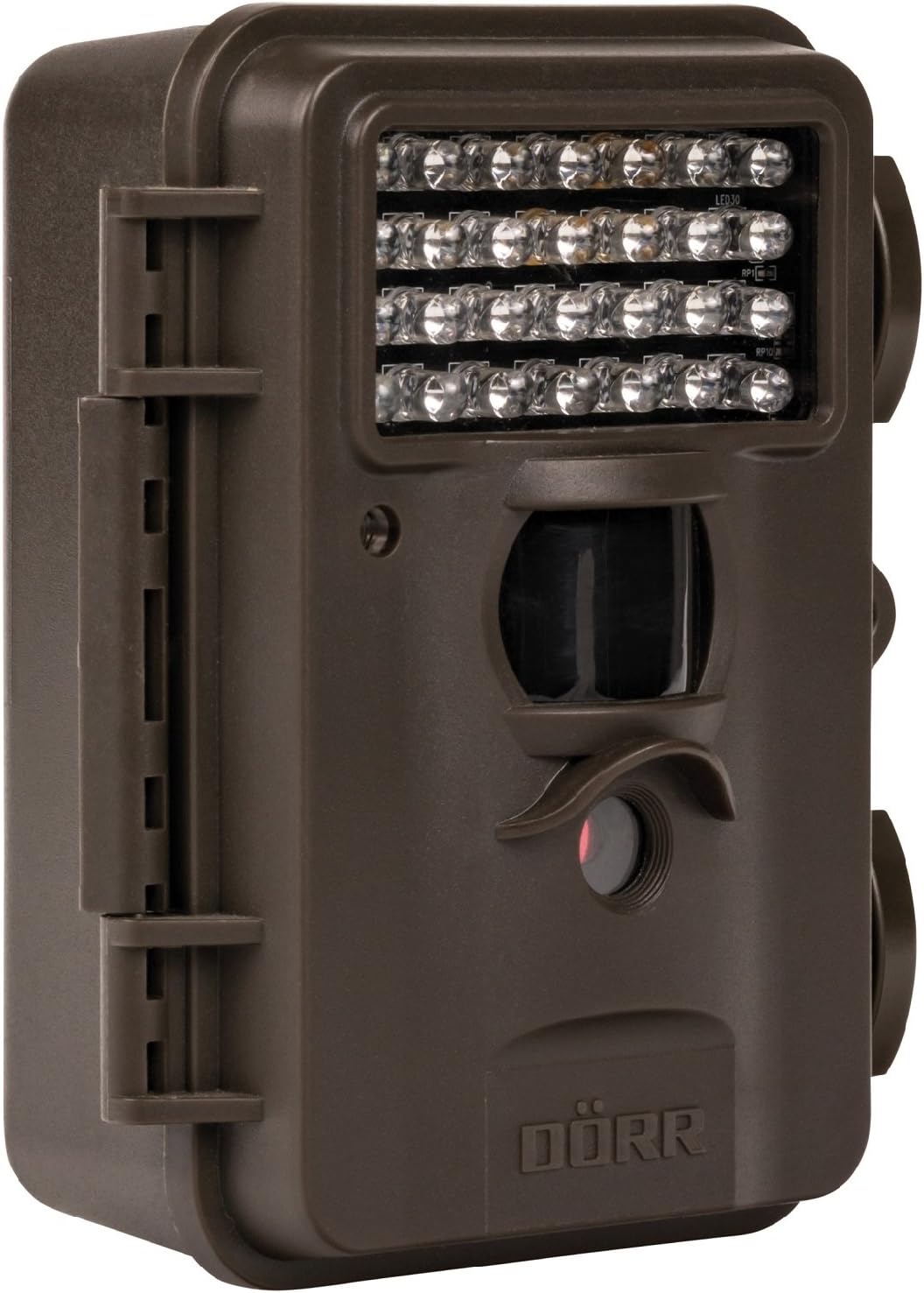
This image displays the front of the Dörr 204473 Trail Camera. Visible features include the array of 28 infrared LEDs at the top, the passive infrared (PIR) motion sensor below the LEDs, and the camera lens at the bottom. The camera has a rugged, dark brown, weatherproof casing with a latch on the left side.
The Dörr 204473 camera features a compact and durable design. Key components include:
- ינפרערעד לעדס: 28 nearly invisible LEDs for night illumination up to 15 meters.
- PIR באַוועגונג סענסאָר: Detects movement to trigger photo or video capture.
- אַפּאַראַט לענס: Captures 8MP still images and video.
- TFT ווייַז: For menu navigation and viewing captured media (located inside the camera).
- Control Keypad: For setting up and operating the camera.
- וועטערפּרוף האָוסינג: Protects the camera from environmental elements.
סעטאַפּ
1. באַטאַרייע ייַנמאָנטירונג
- Open the camera housing latch on the side.
- געפינען די באַטאַרייע אָפּטייל.
- Insert 4 or 8 AA batteries, ensuring correct polarity (+/-).
- פאַרמאַכן די באַטאַרייע אָפּטייל דעקן סיקיורלי.
2. סד קאַרד ינסטאַללאַטיאָן
- With the camera housing open, locate the SD/SDHC card slot.
- Insert an SD/SDHC memory card (up to 32 GB) into the slot until it clicks into place. Ensure the card is inserted in the correct orientation.
- צו אַרויסנעמען, שטופּ די קאַרטל לײַכט אַרײַן ביז זי שפּרינגט אַרויס.
3. מאָונטינג די קאַמעראַ
The camera can be mounted using a strap or a wall mount. Ensure the camera is positioned to capture the desired area without obstructions. The mounting type is wall mount.
- רימען מאַונטינג: Thread the provided strap through the slots on the back of the camera and secure it around a tree or pole.
- וואַנט מאָונטינג: Use appropriate screws and anchors (not included) to secure the camera to a wall or flat surface.
אַפּערייטינג ינסטראַקשאַנז
1. פּאָווערינג אויף / אויסגעלאשן
- To power on, slide the power switch to the 'ON' position.
- צו אויסלאָשן, רוקט דעם מאַכט קנעפּל צו דער 'אויס' פּאָזיציע.
2. מעניו נאַוויגאַציע
Once powered on, the TFT display will activate. Use the keypad buttons (UP, DOWN, LEFT, RIGHT, OK, MENU) to navigate through the settings menu. The menu is available in English and German.
3. באַשטעטיקן טאָג און צייט
- Enter the menu and navigate to 'Date/Time' settings.
- Use the navigation buttons to set the current date and time.
- Confirm with 'OK'. Each captured image will display the time, date, and temperature in °C.
4. Photo/Video Modes and Settings
The camera supports both still image and video capture. Adjust settings such as resolution, trigger interval, and burst mode via the menu.
- רעזאלוציע: Set to 8MP for still images.
- Trigger Time: The camera has a fast trigger time of 1.3 seconds.
- באַוועגונג דעטעקשאַן: Configure the sensitivity of the PIR sensor.
- נאַכט זעאונג: The 28 IR LEDs automatically activate in low light conditions for night vision up to 15 meters.
5. Viewing Files
איר קענען view captured photos and videos directly on the camera's TFT display or by connecting the camera to a computer via USB (cable not included) or by inserting the SD card into a card reader.
וישאַלט
- רייניקונג: ניצט אַ ווייכע, טרוקענע שטאָף צו רייניקן די קאַמעראַ לענס און קעסטל. ניצט נישט קיין שרײַבנדיקע רייניגערס אדער סאָלווענטן.
- באַטערי זאָרגן: אַרויסנעמען באַטעריעס אויב די קאַמעראַ וועט נישט ווערן גענוצט פֿאַר אַ לענגערע צייט צו פאַרמייַדן ליקאַדזש.
- סטאָרידזש: האַלט די קאַמעראַ אין אַ קיל, טרוקן אָרט אַוועק פון דירעקט זונשייַן ווען נישט אין באַנוץ.
טראָובלעשאָאָטינג
| פּראָבלעם | מעגלעך סיבה | לייזונג |
|---|---|---|
| די אַפּאַראַט מאַכט נישט אויף | נידעריגע אדער טויטע באַטעריעס; אומרעכטע באַטעריע פּאָלאַריטעט. | פאַרבייַטן באַטעריעס; זיכער מאַכן די ריכטיקע פּאָלאַריטעט. |
| קיין בילדער/ווידעאָס נישט קאַפּטשערד | SD card full or not inserted correctly; motion sensor blocked or sensitivity too low. | Insert/replace SD card; format SD card; clear sensor path; increase sensor sensitivity. |
| שלעכטע בילד קוואַליטעט ביינאכט | Subject too far from camera; IR LEDs obstructed. | Ensure subject is within 15m range; clear any obstructions from IR LEDs. |
| קאַמעראַ דעטעקטירט נישט באַוועגונג | PIR sensor sensitivity too low; camera positioned incorrectly. | Increase PIR sensitivity; reposition camera for optimal detection angle. |
ספּעסאַפאַקיישאַנז
| שטריך | דעטאַל |
|---|---|
| סאָרט | DÖRR |
| מאָדעל נומער | 204473 |
| עפעקטיוו נאָך האַכלאָטע | 8 מפּ |
| עפעקטיוו ווידעא האַכלאָטע | 8 מפּ |
| נאַכט וויזשאַן ראַנגע | 15 מעטער |
| נומער פון יר לעדס | 28 |
| טריגגער צייט | 1.3 סעקונדעס |
| סטאָרידזש | SD/SDHC Memory Card (up to 32 GB) |
| מאַכט מקור | 4x or 8x AA Batteries |
| קאָליר | שוואַרץ |
| מאַטעריאַל | מעטאַל |
| נומער דימענשאַנז (L X W X H) | 10 X 7 X 12.2 סענטימעטער |
| וואַסער קעגנשטעל מדרגה | וואָטערפּרוף |
| מאַונטינג טיפּ | וואנט בארג |
| רעקאַמענדיד אַפּפּליקאַטיאָנס | Motion Detection, Night Vision |
וואָראַנטי און שטיצן
For warranty information and technical support, please refer to the documentation provided with your purchase or visit the official Dörr webזייטל. האַלט דיין קויפן באַווייַז פֿאַר קיין וואָראַנטי קליימז.
Ask a question about this manual
Ask about setup, troubleshooting, compatibility, parts, safety, or missing instructions. Manuals+ will review the question and use this page’s manual context to help answer it.