
הקדמה
This manual provides instructions for the installation, operation, and maintenance of the Black Box SERVSWITCH EC USB Server Cable, Model EHN9000U-0006. This 6-foot (1.8-meter) cable is designed to connect a server to a KVM switch, providing both USB and VGA connectivity.
זיכערקייַט אינפֿאָרמאַציע
Please read and understand all safety instructions before using this product. Failure to follow these instructions may result in damage to the product or connected equipment.
- Do not expose the cable to excessive moisture or extreme temperatures.
- Avoid bending or kinking the cable sharply, as this can damage internal wires.
- Ensure all connections are secure before powering on equipment.
- Disconnect power from devices before connecting or disconnecting cables.
פּעקל אינהאַלט
באַשטעטיקט אַז אייער פּעקל כּולל די פאלגענדע זאַך:
- 1 x Black Box SERVSWITCH EC USB Server Cable (EHN9000U-0006)
פּראָדוקט איבערview
The Black Box SERVSWITCH EC USB Server Cable is a specialized cable designed for KVM (Keyboard, Video, Mouse) applications. It integrates VGA video and USB keyboard/mouse signals into a single cable for streamlined connectivity between a server and a KVM switch.
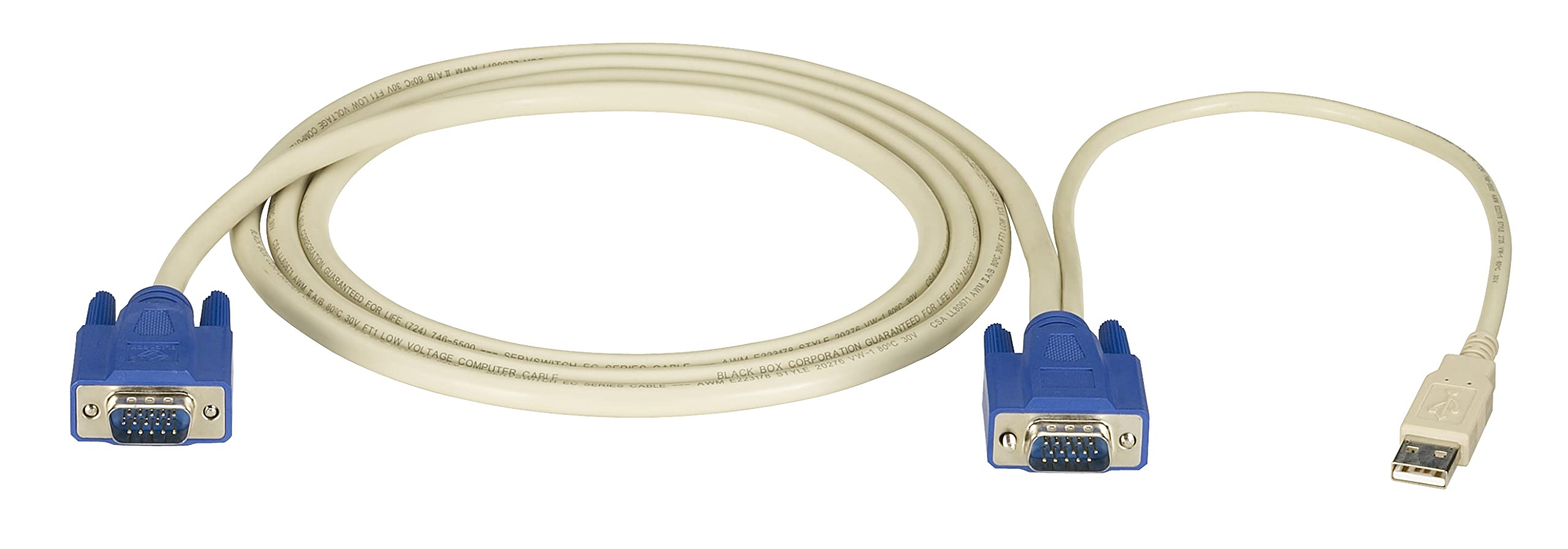
בילד: Black Box SERVSWITCH EC USB Server Cable. This image displays the 6-foot cable with its distinct VGA (HD-15) and USB connectors, designed for server-to-KVM switch connections.
שליסל פֿעיִקייטן:
- אינטעגרירטע קאָנעקטיוויטי: Combines VGA video and USB data into one cable.
- לענג: 6 פֿיס (1.8 מעטער) פֿאַר פלעקסיבלע פּלייסמאַנט.
- קאַמפּאַטאַבילאַטי: Designed for use with Black Box SERVSWITCH KVM systems.
- פלעכט-פֿרײַער דיזײַן: Helps prevent tangles and simplifies cable management.
סעטאַפּ
- מאַכט אַוועק דעוויסעס: Ensure both the server and the KVM switch are powered off before making any connections.
- Connect to Server: Locate the VGA output port and an available USB port on your server. Connect the corresponding VGA (HD-15 male) and USB (Type-A male) connectors of the EHN9000U-0006 cable to these ports on the server.
- Connect to KVM Switch: Locate the KVM port on your KVM switch designated for the server. Connect the combined VGA (HD-15 female) and USB (Type-A female) end of the EHN9000U-0006 cable to the KVM switch's input port. Ensure a secure fit for both connectors.
- מאַכט אויף: Once all connections are secure, power on the KVM switch, then power on the server.
אַפּערייטינג
Once the cable is properly connected and devices are powered on, the KVM switch should detect the connected server. Use the KVM switch's controls (buttons, hotkeys, or OSD) to switch to the server connected via this cable. You should then have control over the server's video, keyboard, and mouse.
- Refer to your KVM switch's user manual for specific instructions on switching between connected servers.
- Ensure the KVM switch is configured to recognize the USB keyboard and mouse signals.
וישאַלט
The Black Box SERVSWITCH EC USB Server Cable requires minimal maintenance. Follow these guidelines to ensure longevity:
- רייניקונג: Use a soft, dry cloth to wipe the cable and connectors. Do not use liquid cleaners or solvents.
- סטאָרידזש: When not in use, store the cable in a cool, dry place, away from direct sunlight and extreme temperatures. Avoid tight coiling to prevent internal damage.
- האַנדלינג: Always grasp the connector housing when plugging or unplugging the cable. Avoid pulling on the cable itself.
טראָובלעשאָאָטינג
| פּראָבלעם | מעגלעך סיבה | לייזונג |
|---|---|---|
| ניט קיין ווידעא אַרויסווייַזן | Loose VGA connection; Incorrect KVM port selected; Server video output issue. | Ensure VGA connectors are fully seated and secured. Select the correct KVM port. Check server's video output directly. |
| קלאַוויאַטור/מויז רעאַגירט נישט | Loose USB connection; KVM switch USB emulation issue; Server USB port issue. | Ensure USB connectors are fully seated. Verify KVM switch USB settings. Test server USB ports with another device. |
| ינטערמיטאַנט קאַנעקטיוויטי | Damaged cable; Loose connections; Electrical interference. | Inspect cable for visible damage. Re-seat all connections. Ensure cable is not near strong electromagnetic sources. |
ספּעסאַפאַקיישאַנז
- מאָדעל: EHN9000U-0006
- סאָרט: שוואַרץ באָקס
- קאַבלע טיפּ: וסב, ווגאַ
- Connector Type (Server End): HD-15 Male (VGA), USB Type-A Male
- Connector Type (KVM End): HD-15 Female (VGA), USB Type-A Female
- לענג: 6 פֿיס (1.8 מעטער)
- קאָליר: שוואַרץ / רויט
- ספּעציעלע שטריך: טאַנגלע פֿרייַ
- קאַמפּאַטאַבאַל דעוויסעס: Server (with VGA and USB ports)
- פּראָדוקט דימענשאַנז: 5 x 0.5 x 5 אינטשעס (אומגעפערע פּאַקאַדזשינג דימענסיעס)
- נומער וואָג: 8.4 אונס (0.24 קילאָגראַמס)
- UPC: 822088018322
וואָראַנטי און שטיצן
For warranty information and technical support, please refer to the official Black Box webזייטל אדער קאנטאקט זייער קאסטומער סערוויס דעפארטמענט. האלט אייער קויף קוויטל פאר גאראנטיע טענות.
שוואַרץ באָקס Webפּלאַץ: www.blackbox.com