
1. פּראָדוקט איבערview
The Fender Monterey Bluetooth Speaker delivers clear, powerful audio with a design inspired by classic Fender amplifiers. This speaker is engineered for high-fidelity sound reproduction, featuring 120 watts of power, two woofers, and two tweeters. It supports audio streaming via Bluetooth and direct connection through a 3.5mm auxiliary jack or RCA inputs.
פיגורע 1: פראָנט view of the Fender Monterey Bluetooth Speaker, showcasing its classic amplifier-inspired grille and Fender logo.
2. וואָס איז אין דער קעסטל
באַשטעטיקט אַז אַלע זאכן וואָס זענען אויסגערעכנט אונטן זענען אַרייַנגערעכנט אין אייער פּעקל:
- Fender Monterey Bluetooth Speaker
- 3.5 מם אַגזיליערי קאַבלע
- רקאַ קאַבלע
- מאַכט קאַבלע
3. סעטאַפּ גייד
3.1 מאַכט קאַנעקשאַן
- Ensure the speaker's volume control is set to minimum before connecting power.
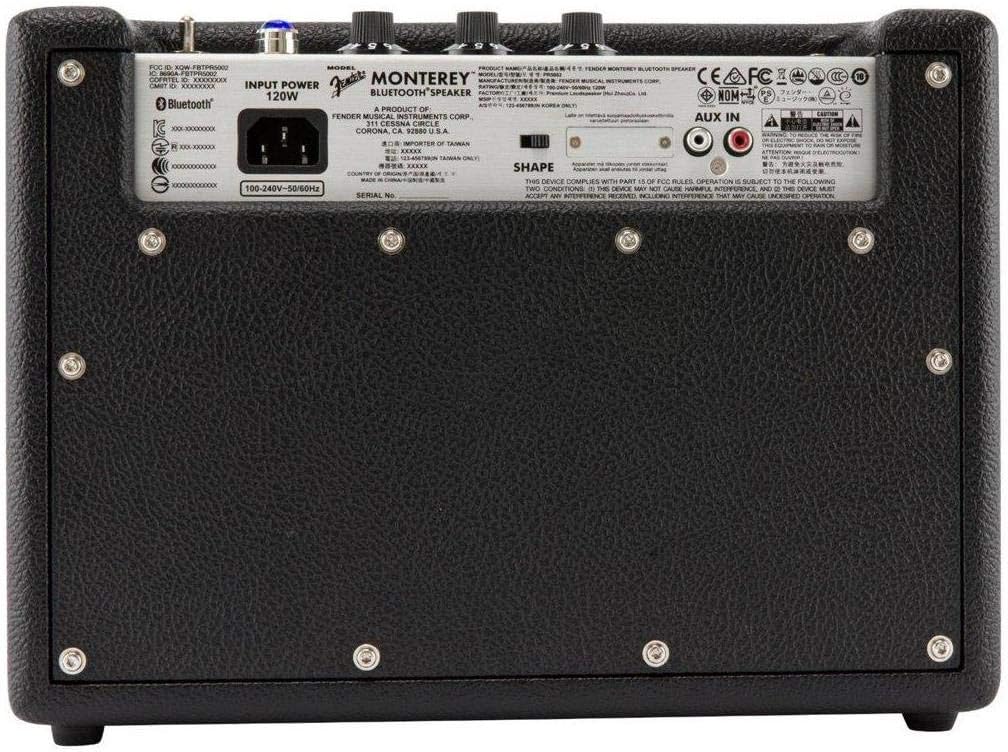
- Connect the supplied power cable to the AC input on the rear panel of the speaker.
- שטעקט אריין דעם אנדערן עק פונעם עלעקטרישן קאבל אין א פאסיגע וואנט-אויסגאבע (100-240V, 50/60Hz).
- Flip the power switch on the top panel to the "ON" position. The speaker will emit a chime indicating it is powered on.
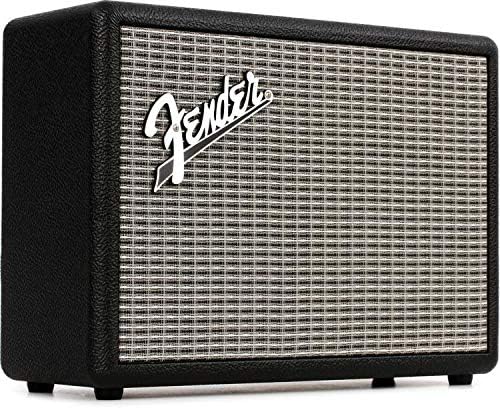
Figure 2: Rear panel of the Fender Monterey speaker, showing the power input and auxiliary connections.
3.2 בלועטאָאָטה פּערינג
- With the speaker powered on, press the PAIR button on the top panel. The Bluetooth indicator light will begin to flash, indicating it is in pairing mode.
- On your audio device (smartphone, tablet, computer), navigate to the Bluetooth settings.
- Select "Fender Monterey" from the list of available devices.
- Once successfully paired, the Bluetooth indicator light on the speaker will turn solid blue, and a confirmation chime will sound.
3.3 Auxiliary Input Connection
For devices without Bluetooth, use the provided 3.5mm auxiliary cable or RCA cable.
- 3.5mm Aux: Connect one end of the 3.5mm cable to your audio device's headphone jack and the other end to the מיני input on the speaker's top panel.
- רקאַ: Connect the RCA cable to your audio device's RCA outputs and the other end to the RCA inputs on the speaker's rear panel.
Select the appropriate source (בלועטאָאָטה, מיני, אָדער RCA) ניצן די מקור קנעפּל אויף די שפּיץ טאַפליע.

Figure 3: Top panel controls of the Fender Monterey speaker, including Volume, Treble, Bass, Source, and Pair buttons.
4. אַפּערייטינג ינסטרוקטיאָנס
4.1 אַודיאָ ווידערשפּיל
- Ensure your audio source is connected and selected (Bluetooth, Mini, or RCA).
- Start playing audio from your connected device.
- סטרויערן די באַנד knob on the speaker's top panel to your desired listening level.
4.2 טאָן קאָנטראָלס
The Fender Monterey speaker features dedicated controls for customizing your sound:
- טרעבל: Adjusts the high-frequency response of the audio. Turn clockwise for brighter sound, counter-clockwise for warmer sound.
- באַס: Adjusts the low-frequency response of the audio. Turn clockwise for more bass, counter-clockwise for less bass.
- SHAPE: A toggle switch located on the rear panel. This control modifies the overall tonal character, offering different sound profiles. Experiment with both positions to find your preferred sound.
5. וישאַלט
- רייניקונג: Use a soft, dry cloth to clean the speaker's exterior. Avoid abrasive cleaners, solvents, or sprays that may damage the finish.
- סטאָרידזש: ווען נישט אין באַנוץ פֿאַר לענגערע פּעריאָדן, זאָל מען דעם רעדנער האַלטן אין אַ קיל, טרוקן אָרט, אַוועק פֿון דירעקטער זון און עקסטרעמע טעמפּעראַטורן.
- ווענטילאַטיאָן: זאָרגט פֿאַר געהעריקע ווענטילאַציע אַרום דעם רעדנער צו פֿאַרמייַדן איבערהיצונג. פֿאַרשטאָפּט נישט קיין ווענטילאַציע עפענונגען.
- פליסיק ויסשטעלן: Keep the speaker away from liquids. In case of accidental spills, immediately disconnect power and allow it to dry completely before re-use.
6. טראָובלעשאָאָטינג
קיין מאַכט
- Ensure the power cable is securely connected to both the speaker and a working wall outlet.
- Verify the power switch on the top panel is in the "ON" position.
- קאָנטראָלירט צי די וואַנט אַוטלעט אַרבעט דורך אַרײַנשטעקן אַן אַנדער דעוויס.
קיין געזונט
- Confirm the correct audio source (Bluetooth, Mini, or RCA) is selected using the מקור קנעפּל.
- פאַרגרעסערן די באַנד knob on the speaker and the volume on your connected audio device.
- If using Bluetooth, ensure the device is properly paired and connected. Try re-pairing if necessary.
- If using auxiliary inputs, ensure cables are fully inserted and not damaged.
בלועטאָאָטה פּערינג ישוז
- Ensure the speaker is in pairing mode (flashing Bluetooth indicator). Press the PAIR button if it's not flashing.
- Move your audio device closer to the speaker to ensure it's within range.
- Turn off and on the Bluetooth function on your audio device.
- If the speaker was previously paired with another device, disconnect it from that device first.
7. טעכניש ספּעסאַפאַקיישאַנז
| מאָדעל נומער | 6960200000 |
| סאָרט | פענדער |
| רעזולטאַט וואָסtage | 120 וואטס |
| רעדנער קאָנפיגוראַטיאָן | Two woofers, two tweeters |
| קאַנעקטיוויטי | Bluetooth, 3.5mm Auxiliary Input, RCA Input |
| פּראָדוקט דימענשאַנז (ד רענטגענ וו רענטגענ ה) | 9.3" x 16.8" x 14.6" (23.6 ס״מ x 42.7 ס״מ x 37.1 ס״מ) |
| פּונקט וואָג | 18.6 פונט (8.44 קג) |
| קאָליר | שוואַרץ |
| פאַבריקאַנט | פענדער מוזיקאַלישע אינסטרומענטן קאָרפּ. |
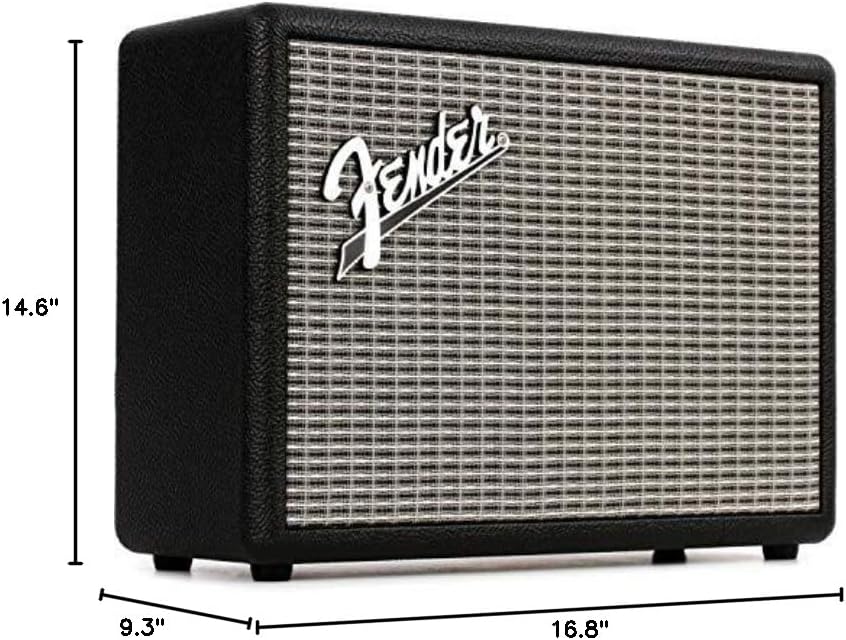
Figure 4: Dimensions of the Fender Monterey Bluetooth Speaker.
8. וואָראַנטי און שטיצן
For warranty information, product registration, or technical support, please refer to the official Fender website or contact Fender customer service. Keep your proof of purchase for warranty claims.
אָנליין רעסורסן: www.fender.com