
1. פּראָדוקט איבערview
The LaiPuDuo 11-Key RF Mini Wireless Remote LED Controller is designed for controlling single-color LED strip lights operating on DC5-24V. This compact and lightweight controller utilizes 433MHz radio frequency (RF) signals, allowing for control without direct line-of-sight. It features 8 dynamic modes, 10-level speed adjustment, and 10-level static brightness adjustment, making it a versatile solution for various lighting applications.
וואָס איז אַרייַנגערעכנט
- געפֿירט קאָנטראָללער
- ווייַט קאָנטראָל
2. פֿעיִקייטן
- רעזולטאַט קראַנט: <6A (each circuit), DC5-24V.
- ווירעלעסס קאָנטראָל: 11-button RF wireless remote control operating at 433MHz.
- זכּרון פֿונקציע: Features automatic shutdown memory, retaining the last setting.
- ווערסאַטאַל אַפּלאַקיישאַן: Compatible with various LED lights including LED source, LED strips (3528, 5050, COB), wall washer lights, and glass curtain wall lights.
- דינאַמיש מאָדעס: Includes 8 kinds of monochrome dynamic models (e.g., flash blasting, breathing, strobe, flicker).
- גיכקייט אַדזשאַסטמאַנט: 10 levels of dynamic speed adjustment.
- ברייטנאַס אַדזשאַסטמאַנט: Single-channel static 10-level brightness adjustment.
- גרינג צו נוצן: Compact, lightweight, intuitive button design, easy to wire and operate.
- רימאָוט ראַנגע: Offers control from a long distance, with signal penetration through walls and doors.
3. ספּעסאַפאַקיישאַנז
| באַשרייַבונג | ווערט |
|---|---|
| פּראָדוקט דימענשאַנז | 4.96 X 3.31 X 0.39 אינטשעס |
| פּונקט וואָג | 1.23 אונסעס |
| נומער מאָדעל נומער | 11key RF Mini |
| סאָרט | LaiPuDuo |
| ספּעציעלע שטריך | ווייַט קאָנטראָל |
| קאָליר | ווייַס / שוואַרץ |
| מאַקס נומער פון שטיצט דעוויסעס | 1 |
| קאַמפּאַטאַבאַל דעוויסעס | געפירט לamps, LED strips (3528, 5050, COB) |
| פאַבריקאַנט | Shenzhen LPD Co.,Ltd |
4. סעטאַפּ אינסטרוקציעס
4.1 קאַנעקטינג די קאָנטראָללער
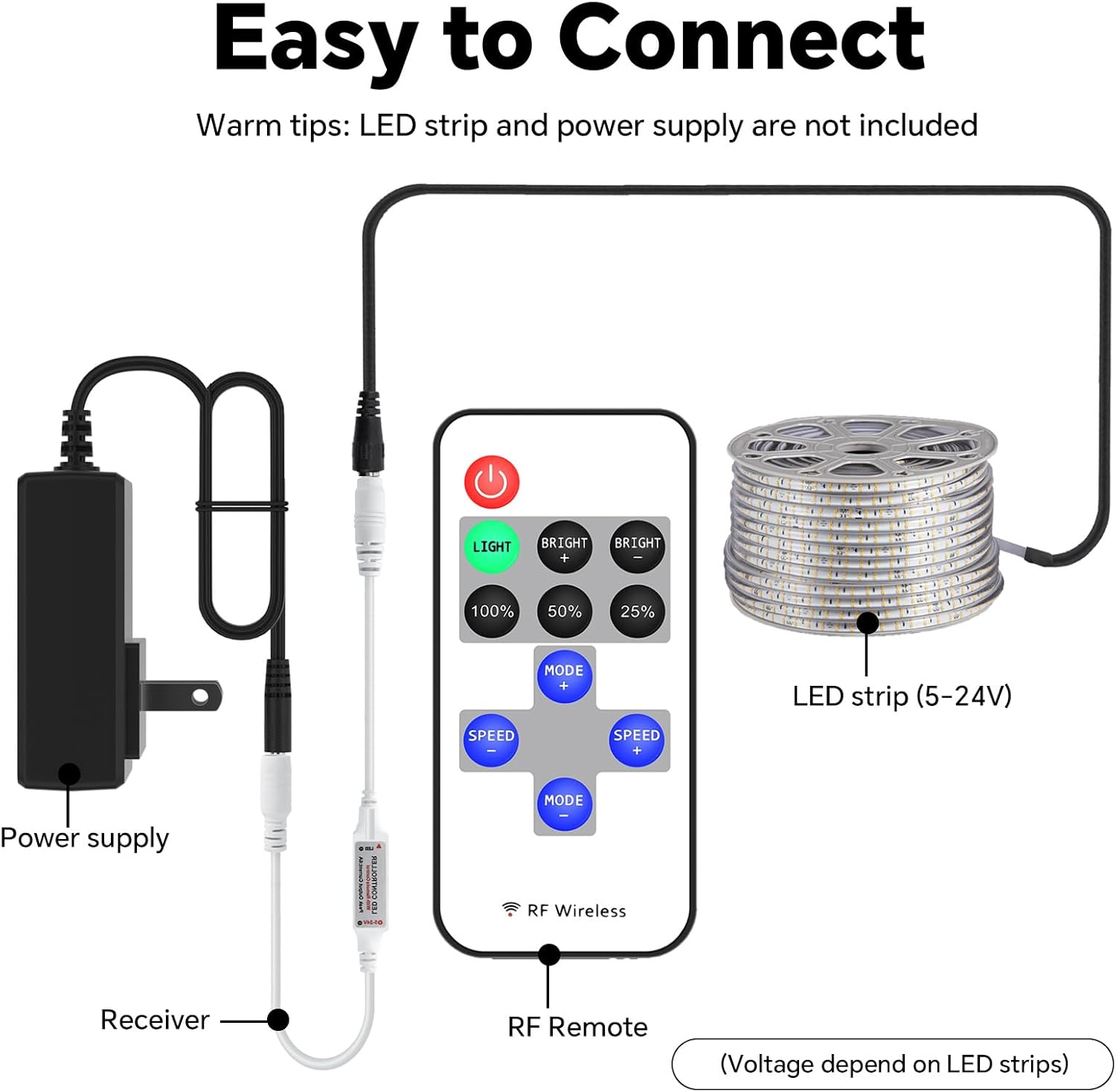
Follow these steps to connect your LED controller system. Ensure all components are compatible with DC5-24V power. The LED strip and power supply are not included with this controller.
- Connect your DC5-24V power supply to the input side of the LED controller receiver.
- Connect your single-color LED strip light to the output side of the LED controller receiver.
- פאַרזיכערן אַז אַלע קאַנעקשאַנז זענען זיכער איידער אַפּלייינג מאַכט.
4.2 פּערינג די רימאָוט קאָנטראָל
The remote control is typically pre-paired with the receiver. If re-pairing is necessary or if the remote is unresponsive, follow the instructions in the video below.
5. אַפּערייטינג ינסטרוקטיאָנס
5.1 רימאָוט קאָנטראָל פאַנגקשאַנז
The 11-key RF Mini Remote provides intuitive control over your LED strip lights. Refer to the diagram below for button identification and their respective functions.

- מאַכט קנעפּל (רויט): Turns the LED lights On or Off.
- LIGHT Button (Green): Activates the static lighting function.
- BRIGHT + / BRIGHT - Buttons: Adjusts the brightness level of the static light.
- 100% / 50% / 25% Buttons: Sets the static brightness to predefined levels.
- MODE + / MODE - Buttons: Cycles through the 8 dynamic lighting modes.
- SPEED + / SPEED - Buttons: Adjusts the speed of the active dynamic lighting mode (10 levels).
5.2 ברייטנאַס אַדזשאַסטמאַנט
You can precisely control the brightness of your LED lights using the dedicated brightness buttons or the '+' and '-' controls. The remote offers 10 levels of brightness adjustment for static light.

5.3 Dynamic Modes and Speed
The controller features 8 distinct dynamic modes, such as flashing, breathing, and strobing effects. Use the 'MODE +' and 'MODE -' buttons to switch between these modes. The 'SPEED +' and 'SPEED -' buttons allow you to adjust the speed of the selected dynamic mode across 10 different levels.

6. וישאַלט
6.1 באַטערי פאַרבייַט
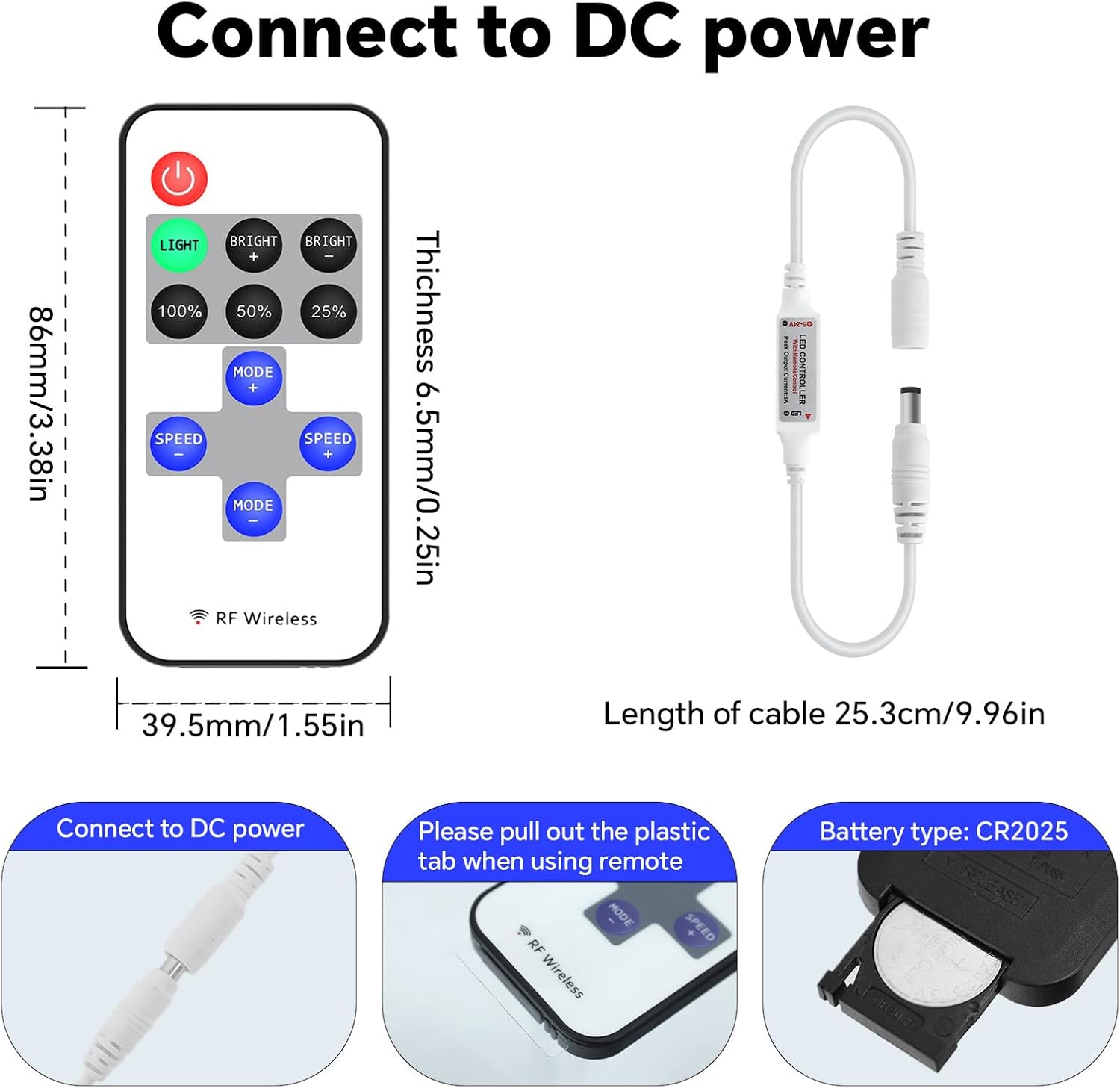
The remote control is powered by a CR2025 coin cell battery. If the remote's range decreases or it becomes unresponsive, the battery may need replacement.
- געפֿינען די באַטאַרייע אָפּטייל אויף די צוריק פון די ווייַט קאָנטראָל.
- Slide open the battery tray or use a small tool to gently pry it open.
- אַראָפּנעמען די אַלט CR2025 באַטאַרייע.
- אַרייַנלייגן אַ נייַ CR2025 באַטאַרייע מיט די positive (+) זייַט פייסינג אַרויף.
- פאַרמאַכן די באַטאַרייע אָפּטייל סיקיורלי.
7. טראָובלעשאָאָטינג
- ליכטער רעאַגירן נישט: Check if the remote control battery needs replacement. Ensure the plastic tab has been removed from the battery compartment. Verify all power and LED strip connections are secure.
- צייטווייליגע קאנטראל: Ensure the remote is within effective range. While RF technology allows for signal penetration, extreme distances or dense obstacles may affect performance.
- ליכטער צינדן זיך נישט אָן: Confirm the power supply is functioning correctly and providing the appropriate voltage (DC5-24V). Check the LED strip for any damage.
- Incorrect light behavior: If the lights are not behaving as expected, try re-pairing the remote control as shown in the setup video.
8. וויכטיק אינפֿאָרמאַציע
8.1 זיכערקייַט גיידליינז
- Do not expose the controller or remote to moisture or extreme temperatures.
- פאַרזיכערן די מאַכט צושטעלן וואָלtage matches the controller's requirements (DC5-24V).
- Avoid short-circuiting the connections.
- האַלטן אויס פון דערגרייכן פון קינדער.
- אַוועקוואַרפן באַטעריעס פאַראַנטוואָרטלעך לויט די לאָקאַלע רעגולאַציעס.
8.2 וואָראַנטי און שטיצן
For warranty information, technical support, or further assistance, please refer to the product packaging or contact the manufacturer directly through their official webפּלאַץ אָדער קונה דינסט טשאַנאַלז.