
1. הקדמה
The AVerMedia AM310 is a plug-and-play USB microphone designed for high-quality audio recording. It is suitable for various applications including podcasting, streaming, gaming, and vocal performances. This manual provides detailed instructions for setting up, operating, and maintaining your AM310 microphone to ensure optimal performance.

Figure 1: AVerMedia AM310 USB Microphone
2. פּראָדוקט איבערview
2.1 שליסל פֿעיִקייטן
- Driver-Free and Plug-and-Play: Easy setup on PC or Mac without additional driver installation.
- Cardioid Condenser Microphone: Records sound sources directly in front of the microphone, providing detailed and clear audio.
- 3.5 מם כעדפאָון דזשאַק: Allows real-time audio monitoring or playback of computer audio.
- ינטעגראַטעד קאָנטראָלס: Features a volume knob and mute button for convenient audio management.
2.2 קאַמפּאָונאַנץ
Familiarize yourself with the main components of your AM310 microphone:

Figure 2: Labeled components of the AM310 USB Microphone
- LED ינדיקאַטאָר: Displays microphone status (Blue: Powered on, Red: Muted).
- כעדפאָון באַנד קנעפּל: Adjusts the volume for the connected headphones.
- בארג: Connects the microphone to the base or other compatible stands.
- Base and Shaft: Provides stable support for the microphone.
- Headphone Mode Switch: Toggles between PC Audio Playback and Microphone Monitoring.
- 3.5 מם כעדפאָון דזשאַק: Output for connecting headphones.
3. סעטאַפּ
The AVerMedia AM310 is designed for quick and easy setup. Follow these steps to get started:
- צוזאַמענשטעלן דעם מיקראָפאָן: Attach the microphone unit to the provided base and shaft. Ensure it is securely fastened.
- פאַרבינדן צו קאָמפּיוטער: Plug the USB cable from the AM310 microphone into an available USB port on your PC or Mac. The microphone is driver-free and will be automatically recognized by your operating system.
- פאַרבינדן כעדפאָונז (אפציאָנעל): If you wish to monitor your audio, plug your 3.5mm headphones into the headphone jack on the microphone.
- אויסקלייבן ווי איינגאַבע מיטל: In your computer's sound settings, select the AVerMedia AM310 as your default audio input device.

Figure 3: Connection diagram for AM310 USB Microphone

Figure 4: AM310 compatibility with Mac and Windows operating systems
3.1 סעטאַפּ ווידעא גייד
For a visual guide on setting up and using your AVerMedia AM310 microphone, please watch the official product video below.
Video 1: AVerMedia AM310 USB Microphone Overview און סעטאַפּ
4. אַפּערייטינג ינסטרוקטיאָנס
4.1 Adjusting Volume and Muting
The AM310 features an integrated volume knob and mute button for easy control:
- באַנד קנעפּל: Rotate the knob to adjust the headphone output volume.
- שטיל קנעפּל: Press the knob to mute or unmute the microphone. The LED indicator will change from blue (powered on) to red (muted) when activated.

Figure 5: Volume knob and LED indicator
4.2 כעדפאָון מאָניטאָרינג
The 3.5mm headphone jack allows you to monitor your audio in two modes:
- PC Audio Playback: Slide the switch to the 'PC' position to hear audio playing from your computer through your headphones.
- מיקראָפאָן מאָניטאָרינג: Slide the switch to the 'MONITOR' position to hear your own voice in real-time through your headphones, which is useful for adjusting your speaking volume and clarity.

Figure 6: Headphone mode switch (PC/Monitor)

Figure 7: User utilizing the AM310 for streaming with headphones
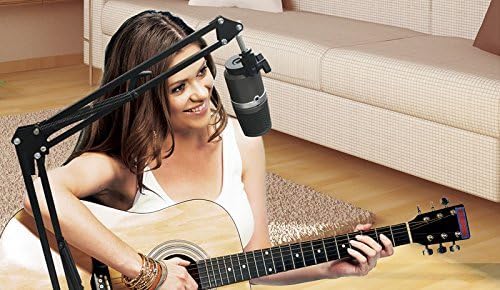
Figure 8: User recording music with the AM310 microphone
5. ספּעסאַפאַקיישאַנז
Below are the technical specifications for the AVerMedia AM310 USB Microphone:
| שטריך | באַשרייַבונג |
|---|---|
| טיפּ | Uni-directional Condenser Microphone |
| פּאָליאַר מוסטער | קאַרדיאָס |
| Sample קורס | 48 כז |
| ביסל קורס | 16-ביסל |
| מאַכט פארלאנגט | USB (5V DC) |
| סענסיטיוויטי | -60 ± 5 dB (at 1 kHz) |
| אָפטקייַט ענטפער | 20-20,000 הז |
| אַודיאָ סענסיטיוויטי | 60 דעציבעלן |
| ימפּידאַנס | 600 אָהמס |
| סיגנאַל-צו-נויז ראַטיאָ | 80 דב |
| ייַזנוואַרג פּלאַטפאָרמע | PC |
| נומער פון טשאַנאַלז | 1 |
| קאַנעקטיוויטי טעכנאָלאָגיע | וסב |
| קאַנעקטער טיפּ | וסב |
| פּונקט וואָג | 1.03 פונט |
| פּראָדוקט דימענשאַנז | 10 X 4 X 6 אינטשעס |
| מאַטעריאַל | אַלומינום |
6. טראָובלעשאָאָטינג
If you encounter issues with your AVerMedia AM310 microphone, please refer to the following common troubleshooting steps:
- קיין קלאַנג אַרייַנגאַנג:
- Ensure the microphone is securely plugged into a USB port.
- Verify that the AM310 is selected as the default input device in your computer's sound settings.
- Check if the microphone is muted (red LED indicator). Press the volume knob to unmute.
- Try a different USB port or a different computer to isolate the issue.
- נידעריק באַנד:
- Adjust the input gain for the microphone in your computer's sound settings or recording software.
- Ensure you are speaking directly into the front of the microphone, as it has a cardioid polar pattern.
- Static or Noise:
- Ensure the USB cable is not damaged and is properly connected.
- Avoid placing the microphone near sources of electromagnetic interference (e.g., power cables, unshielded electronics).
- Consider using a pop filter to reduce plosive sounds and a shock mount to minimize vibrations.
- קאָפּהערער מאָניטאָרינג פּראָבלעמען:
- Check the headphone volume knob on the microphone.
- Verify the Headphone Mode Switch is set to the desired position (PC or MONITOR).
- Ensure your headphones are fully plugged into the 3.5mm jack.
7. וישאַלט
To ensure the longevity and optimal performance of your AVerMedia AM310 USB Microphone, follow these maintenance guidelines:
- רייניקונג: Use a soft, dry cloth to clean the exterior of the microphone. Avoid using liquid cleaners or solvents, as they may damage the finish or internal components.
- סטאָרידזש: ווען ניט אין נוצן, קראָם די מיקראָפאָן אין אַ קיל, טרוקן אָרט אַוועק פון דירעקט זונשייַן און עקסטרעם טעמפּעראַטורעס.
- האַנדלינג: Handle the microphone with care. Avoid dropping it or subjecting it to strong impacts, which can damage the sensitive internal components.
- קאַבלע זאָרגן: בייגט אדער קנייטשט נישט דעם USB קאבל צו שטארק. כאַפּט שטענדיק דעם פּלאָג, נישט דעם קאבל, ווען איר ציט עס אָפּ.
8. וואָראַנטי און שטיצן
For warranty information, technical support, or further assistance with your AVerMedia AM310 USB Microphone, please visit the official AVerMedia webפּלאַץ אָדער קאָנטאַקט זייער קונה שטיצן.
איר קענט געפֿינען מער אינפֿאָרמאַציע און שטיצע רעסורסן בײַ דער AVerMedia Store.


