
1. הקדמה
The Focal Shape 50 is a versatile monitoring loudspeaker designed for professional audio environments. It offers extended low-frequency response and precise control, making it suitable for rooms up to 130 sq ft (12 sq m). This manual provides essential information for the proper setup, operation, and maintenance of your Shape 50 studio monitor.

פיגור 1.1: פראָנט-זייט view of the Focal Shape 50 Studio Monitor, showcasing its dark walnut finish and speaker components.
2. פּעקל אינהאַלט
Before proceeding with installation, please verify that all components are present in the packaging:
- Focal Shape 50 Studio Monitor (1 unit)
- מאַכט שנור
- באַניצער מאַנואַל (דעם דאָקומענט)
3. סעטאַפּ
3.1 פּלייסמאַנט
The Shape 50 monitor is designed to be placed near a wall due to its port-less design. For optimal listening, position the monitor at a distance of approximately 30 inches (80 cm) from your listening position. Ensure the monitors are placed symmetrically in your room to achieve a balanced stereo image.
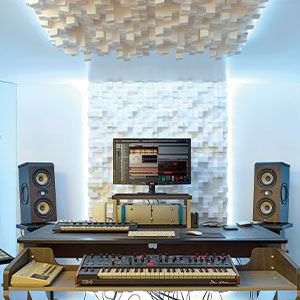
פיגורע 3.1: עקסample of a studio setup with two Focal Shape 50 monitors positioned for optimal sound monitoring.
3.2 קאַנעקשאַנז
Connect your audio source to the Shape 50 monitor using an RCA cable. Ensure all connections are secure before powering on the unit.
- אַודיאָ אַרייַנשרייַב: Use the RCA input for connecting your audio interface or mixer.
- מאַכט: Connect the provided power cord to the monitor's power inlet and then to a suitable electrical outlet.

Figure 3.2: Rear panel of the Focal Shape 50, showing the RCA input, power connection, and various adjustment controls.
3.3 מאַונטינג
The Shape 50 includes threads for ceiling and wall mount fastening. Mounting accessories are not supplied and must be purchased separately. Consult a professional for proper installation of wall or ceiling mounts.
4. אַפּערייטינג ינסטרוקטיאָנס
4.1 פּאַוערינג אויף / אַוועק
To power on the monitor, ensure all audio connections are made, then connect the power cord and flip the power switch located on the rear panel. To power off, reverse this process.
4.2 אַדזשאַסטינג סעטטינגס
The Shape 50 features numerous settings on its rear panel for optimal integration into various acoustic environments and for accurate control of sound reproduction. These include adjustments for high-frequency, mid-frequency, and low-frequency response, allowing you to tailor the sound to your specific room and preferences.
4.3 Flexible Listening Position
The monitor's low directivity tweeter design allows for a flexible listening position, providing consistent sound quality even when slightly off-axis from the monitor.
5. וישאַלט
To ensure the longevity and optimal performance of your Focal Shape 50 monitors, follow these maintenance guidelines:
- רייניקונג: Use a soft, dry cloth to clean the exterior surfaces of the monitor. Avoid abrasive cleaners or solvents.
- ווענטילאַטיאָן: Ensure adequate airflow around the monitor to prevent overheating. Do not block the ventilation openings.
- סוויווע: Operate the monitor in a stable environment, away from extreme temperatures, humidity, and direct sunlight.
6. טראָובלעשאָאָטינג
If you encounter issues with your Focal Shape 50 monitor, refer to the following common troubleshooting steps:
- קיין קול:
- Check if the monitor is powered on and the power cord is securely connected.
- Verify that the audio source is active and connected correctly to the monitor's input.
- Ensure the volume levels on both the monitor and the audio source are appropriately set.
- פאַרקרימט סאָונד:
- Reduce the input level from your audio source to prevent clipping.
- Check all cables for damage or loose connections.
- Ensure the monitor's rear panel settings are not causing excessive boosting of certain frequencies.
- זומענדיק אדער זומענדיק גערויש:
- Ensure all audio cables are properly shielded.
- Try connecting the monitor to a different power outlet, preferably on a different circuit.
- Check for nearby electronic devices that might be causing interference.
If the issue persists after attempting these steps, please contact Focal customer support.
7. ספּעסאַפאַקיישאַנז
| שטריך | באַשרייַבונג |
|---|---|
| סאָרט | פאָקאַל |
| מאָדעל נאָמען | פאָרעם 50 |
| מאָדעל נומער | 3544059801524D001 |
| רעדנער טיפּ | מאָניטאָר |
| רעדנער מאַקסימום רעזולטאַט מאַכט | 1000 וואטס |
| אָפטקייַט ענטפער | 35000 הז |
| קאַנעקטיוויטי טעכנאָלאָגיע | RCA |
| אַודיאָ רעזולטאַט מאָדע | סטערעאָ, סוראַונד |
| מאַונטינג טיפּ | Wall Mount (accessories not supplied) |
| אָפּצוימונג מאַטעריאַל | וועלשענער נוס |
| סובוואָאָפער דיאַמעטער | 5 אינטשעס |
| וואָאָפער דיאַמעטער | 5 אינטשעס |
| קאָליר | טונקל וועלשענער נוס |
| נומער דימענשאַנז (ד רענטגענ וו רענטגענ ה) | 9.5"ד רענטגענ 12.3"וו רענטגענ 7.5"ה |
| פּונקט וואָג | 14.33 פונט |
| מאַכט מקור | קאָרדעד עלעקטריק |
| נומער פון אַודיאָ טשאַנאַלז | 2.0 |
| קאַמפּאַטאַבאַל דעוויסעס | סמאַרטפאָון, טאַבלעט, MP3 שפּילער, דעסקטאָפּ, טעלעוויזיע, פּראָיעקטאָר, לאַפּטאָפּ |
8. וואָראַנטי אינפֿאָרמאַציע
The Focal Shape 50 Studio Monitor is covered by a 2-יאָר פאַבריקאַנט ס וואָראַנטי פֿון דעם קויפֿדאַטום. די וואָראַנטי דעקט חסרונות אין מאַטעריאַלן און אַרבעט אונטער נאָרמאַלן באַנוץ. עס דעקט נישט קיין שאָדן פֿאַראורזאַכט דורך אומרעכטן באַנוץ, אומגליקן, נישט-אָטעריזירטע מאָדיפֿיקאַציעס, אָדער אומרעכטע אינסטאַלאַציע.
Please retain your proof of purchase for warranty claims. For detailed warranty terms and conditions, refer to the official Focal webפּלאַץ אָדער קאָנטאַקט קונה שטיצן.
9. שטיצן
For technical assistance, troubleshooting beyond this manual, or warranty inquiries, please contact Focal customer support through their official webזייטל אדער די קאָנטאַקט אינפֿאָרמאַציע וואָס איז צוגעשטעלט מיט אייער פּראָדוקט דאָקומענטאַציע.
אָנליין רעסורסן: Visit the official Focal webזייטל פֿאַר פּראָדוקט רעגיסטראַציע, אָפֿט געשטעלטע פֿראַגעס, און נאָך שטיצע מאַטעריאַלן.