
1. הקדמה
Thank you for choosing the ARCHEER Bamboo Cell Phone Stand with Sound Amplifier. This manual provides essential information for the proper setup, operation, and maintenance of your new device. This stand is designed to securely hold your smartphone while naturally amplifying its audio output through its unique bamboo construction.
2. פּראָדוקט פֿעיִקייטן
- מאָדערן פּלאַן: Crafted from natural bamboo, this stand offers an aesthetic addition to any desk or nightstand.
- נאַטירלעך סאָונד Ampליפיקאַטיאָן: Utilizes the acoustic properties of bamboo to naturally amplify your phone's audio, providing clearer and more pleasant sound without electronic components.
- Enhanced Audio Volume: Increases audio output by approximately 10 decibels, offering a more appropriate volume for personal listening without disturbing others.
- הענט-פריי Viewינג: Provides a stable and comfortable viewing angle for watching videos, making video calls, or browsing content.
3. פּעקל אינהאַלט
- 1 x ARCHEER Bamboo Cell Phone Stand with Sound Ampליפער
4. סעטאַפּ
The ARCHEER Bamboo Cell Phone Stand requires no assembly. Simply place it on a stable, flat surface.
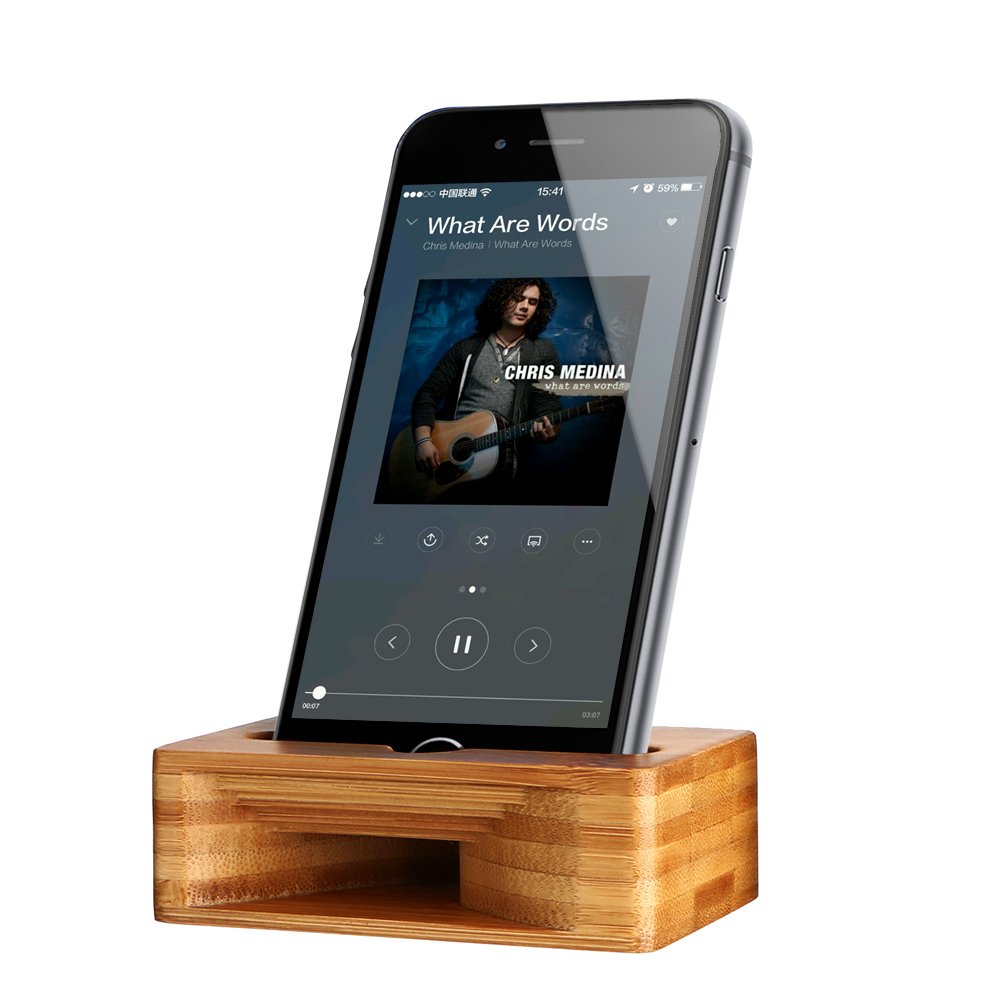
Image: The ARCHEER Bamboo Cell Phone Stand, ready for use. The stand features a slot for a smartphone and a curved chamber for sound ampליפיקאַטיאָן.
To use, gently place your smartphone into the designated slot on the stand. Ensure the phone's speaker is aligned with the stand's internal sound channel for optimal amplification. The stand is designed to hold most smartphones securely.
5. אַפּערייטינג ינסטרוקטיאָנס
Once your smartphone is placed in the stand, its audio output will be naturally amplified. No power source or Bluetooth connection is required. The stand functions passively, enhancing the sound through its acoustic design.
- For Audio Playback: Play music, podcasts, or audio from videos as you normally would on your smartphone. The stand will enhance the volume and clarity.
- For Hands-Free Calls: Position your phone in the stand during video calls or speakerphone calls for stable viewing and improved audio.
6. וישאַלט
To ensure the longevity and appearance of your bamboo stand, follow these simple maintenance guidelines:
- רייניקונג: Wipe the stand with a soft, dry cloth. For light cleaning, a slightly damp א שטאָף קען גענוצט ווערן, און גלייך דערנאָך מיט א טרוקענעם שטאָף.
- ויסמיידן האַרב קעמיקאַלז: Do not use abrasive cleaners, solvents, or harsh chemicals, as these can damage the bamboo finish.
- סטאָרידזש: Store the stand in a dry environment, away from direct sunlight or extreme temperature changes, to prevent warping or cracking of the bamboo.
7. טראָובלעשאָאָטינג
If you encounter any issues with your ARCHEER Bamboo Cell Phone Stand, please refer to the following common solutions:
- Phone Not Stable: Ensure your smartphone is centered and fully seated within the stand's slot. Remove any bulky phone cases that might prevent proper seating.
- Sound Not Amplified Effectively: Verify that your phone's speaker is aligned with the sound channel of the stand. Some phone models have speakers located differently; adjust the phone's position slightly if needed. Ensure your phone's volume is turned up.
- שטאַנד וואָבלס: זיכער מאַכן אַז דער שטאַנד איז געשטעלט אויף אַ גאָר גלאַטער און סטאַבילער ייבערפלאַך.
8. ספּעסאַפאַקיישאַנז
| מאָדעל נומער | 4326547433 |
| סאָרט | ARCHEER |
| מאַטעריאַל | Natural Bamboo Wood |
| קאַמפּאַטאַבאַל דעוויסעס | סמאַרטפאָנעס |
| מאַונטינג טיפּ | טעלעפאָנירן בארג |
| פּונקט וואָג | 3.34 אונסעס (בעערעך 94.7 גראַמז) |
| פּעקל דימענשאַנז | 4.84 X 3.15 X 0.87 אינטשעס (12.3 X 8 X 2.2 סענטימעטער) |
9. וואָראַנטי און שטיצן
For information regarding warranty coverage, product support, or to address any further questions not covered in this manual, please contact ARCHEER customer service through the retailer where the product was purchased or visit the official ARCHEER webפּלאַץ.