
הקדמה
This manual provides detailed instructions for the setup, operation, and maintenance of your Intex Wi-Fi HD Camera, model IT-101. Please read this manual thoroughly before using the device to ensure proper functionality and safety.
פּראָדוקט איבערview
The Intex Wi-Fi HD Camera IT-101 is a compact security camera designed for monitoring. It features HD video resolution, night vision capabilities, and Wi-Fi connectivity for remote access.
שליסל פֿעיִקייטן:
- הד ווידעא האַכלאָטע: Captures video at 1280x720 pixels (720p) with a frame rate of 25 frames per second.
- ברייט לענס View: Features a 77-degree lens view angle for broader coverage.
- נאַכט זעאונג: Equipped with Infrared LED illumination for clear night vision up to 10 meters.
- סד קאָרט שטיצן: Supports up to 64GB SD card for local storage.
- ווירעלעסס קאַנעקטיוויטי: Connects via Wi-Fi for remote monitoring through mobile or computer applications.
- קאַמפּאַטאַבילאַטי: Supports Android and iOS operating systems.
פּעקל אינהאַלט:
- Intex Wi-Fi HD Camera IT-101
- מאַכט אַדאַפּטער (DC 5V/1A)
- באַניצער מאַנואַל (דעם דאָקומענט)
- מאַונטינג אַקסעסעריז (אויב אַרייַנגערעכנט)
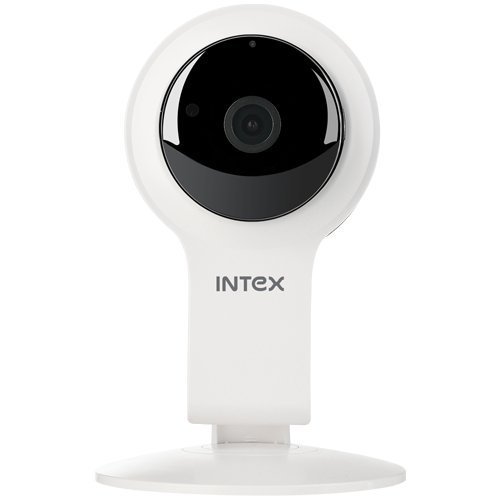
פיגורע 1: פראָנט view of the Intex Wi-Fi HD Camera IT-101. This image shows the camera lens and the main body of the device.
סעטאַפּ
1. מאַכט אויף די אַפּאַראַט:
- Connect the provided DC 5V/1A power adapter to the camera's power input port.
- צאַפּן די מאַכט אַדאַפּטער אין אַ נאָרמאַל עלעקטריקאַל ווענטיל.
- The camera will power on, and an indicator light will illuminate (refer to the camera's physical indicators for specific light behavior).
2. Installing an SD Card (Optional):
To enable local video recording, an SD card (up to 64GB) can be installed.
- Locate the SD card slot on the camera (consult the camera's physical design for exact location).
- Gently insert the SD card into the slot with the contacts facing the correct direction until it clicks into place.
- To remove, press the SD card inward until it springs out.
3. Connecting to Wi-Fi and Mobile App:
The camera requires a mobile application for initial setup and remote viewing. The specific app name is not provided in the product details, please refer to the packaging or a quick start guide for the correct app to download from your device's app store (Android/iOS).
- Download and install the designated mobile application on your smartphone or tablet.
- Open the application and create an account or log in if you already have one.
- Follow the in-app instructions to add a new device. This typically involves scanning a QR code on the camera or manually entering its device ID.
- Connect the camera to your home Wi-Fi network through the app. Ensure your Wi-Fi network is 2.4GHz, as 5GHz networks may not be supported.
- Once connected, the camera's indicator light will change (e.g., solid blue), and you should see the live feed in the app.
אַפּערייטינג ינסטראַקשאַנז
לעבן View:
Access the live video feed from your camera through the mobile application. This allows real-time monitoring of the camera's view.
רעקאָרדינג:
- מאַנואַל רעקאָרדינג: Most applications offer a manual record button to start and stop video recording directly to your phone or the installed SD card.
- סקעדזשולד רעקאָרדינג: Configure recording schedules within the app to automatically record at specific times.
- רעקאָרדינג פון באַוועגונג דעטעקטיאָן: Enable motion detection in the app settings. The camera will automatically record when motion is detected within its field of view.
פּלייבאַק:
רעקאָרדעד פאָtage stored on the SD card can be accessed and played back through the mobile application. Navigate to the "Playback" or "History" section within the app.
נאַכט זעאונג:
The camera automatically switches to night vision mode in low-light conditions. The Infrared LED illuminates the area, allowing for clear black and white video capture up to 10 meters.
סעטטינגס:
The mobile application provides various settings to customize your camera's operation, including:
- Video quality adjustment
- סענסיטיוויטי פון באַוועגונג דיטעקשאַן
- אָנזאָג סעטטינגס
- צייט און דאַטע סינגקראַנאַזיישאַן
- SD card management (formatting, viewing storage)
וישאַלט
- רייניקונג: ניצט אַ ווייכע, טרוקענע שטאָף צו רייניקן די קאַמעראַ לענס און קערפּער. פֿאַרמייַדט ניצן שטרענגע כעמיקאַלן אָדער אַברייסיוו מאַטעריאַלן.
- Firmware דערהייַנטיקונגען: Periodically check the mobile application for available firmware updates for your camera. Keeping the firmware updated ensures optimal performance and security.
- סד קאַרד מאַנאַגעמענט: Regularly back up important recordings from your SD card. Consider formatting the SD card periodically through the app to maintain performance.
- ינווייראַנמענאַל טנאָים: Ensure the camera is operated within its specified temperature and humidity ranges. The camera is not water-resistant, so avoid exposure to moisture.
טראָובלעשאָאָטינג
די אַפּאַראַט איז נישט פּאַוערינג:
- Ensure the power adapter is securely connected to both the camera and a working electrical outlet.
- Verify that the power adapter is the correct DC 5V/1A model.
ניט געקענט צו פאַרבינדן צו Wi-Fi:
- Confirm your Wi-Fi network is 2.4GHz. The camera may not support 5GHz networks.
- זיכער מאַכן אַז די קאַמעראַ איז אין דער ראַנגע פון דיין Wi-Fi ראַוטער.
- קאָנטראָלירט אַז די Wi-Fi פּאַראָל וואָס איז אַרייַנגעגעבן געוואָרן אין דער אַפּ איז ריכטיק.
- Restart your Wi-Fi router and the camera, then attempt to reconnect.
- If issues persist, try resetting the camera to factory defaults (refer to the camera's physical buttons or app for reset option).
קיין ווידעא פיד אין אַפּ:
- באַשטעטיקן אַז די קאַמעראַ איז אנגעצינדן און פארבונדן צו Wi-Fi.
- קאָנטראָלירט אייער אינטערנעט פֿאַרבינדונג אויף אייער מאָבילן מיטל.
- Close and reopen the mobile application.
- Ensure the camera's privacy mode (if available) is not activated.
SD Card Not Recording or Recognized:
- זיכער מאַכן אַז די SD קאַרטל איז ריכטיק אַרײַנגעשטעלט.
- Verify the SD card is not full. Format it through the app if necessary (this will erase all data).
- Check if the SD card is damaged. Try a different compatible SD card.
- Confirm that recording settings (manual, scheduled, motion detection) are properly configured in the app.
ספּעסאַפאַקיישאַנז
| שטריך | דעטאַל |
|---|---|
| מאָדעל נאָמען | IT-101 |
| בילד סענסאָר | H42 1/4 CMOS Sensor |
| ווידעא קאַפּטורע רעסאָלוטיאָן | 1280x720 Pixels (720p HD) |
| ראַם קורס | 25 fps |
| לענס View ווינקל | 77 דיגריז |
| לענס טיפּ | 3.6 mm, Zoom |
| פאָקוס טיפּ | אַוטאָ פאָקוס |
| נאַכט זעאונג דיסטאַנסע | 10 meters (Infrared LED Illumination) |
| טאָג / נאַכט מאָדע | Yes (Automatic switching) |
| קאַנעקטיוויטי טעכנאָלאָגיע | ווירעלעסס (ווי-פי) |
| סד קאָרט שטיצן | אַרויף צו 64 גיגאבייט |
| Video Supported Format | ה.264, מפּ4 |
| שטיצט בילד פֿאָרמאַטירונג | JPEG |
| אַפּערייטינג סיסטעם קאַמפּאַטאַבילאַטי | אַנדרויד, יאָס |
| מאַכט צושטעלן | DC 5V/1A |
| גראָב וואָג | 260ג |
| קאָליר | ווייַס |
| וואַסער קעגנשטעל מדרגה | ניט וואַסער קעגנשטעליק |
| בילד סטאַביליזאַטיאָן | ניין |
וואָראַנטי און שטיצן
For warranty information and technical support, please refer to the documentation included with your purchase or visit the official Intex webזייטל. האַלט דיין קויפן באַווייַז פֿאַר וואָראַנטי קליימז.
פאַבריקאַנט: ינטעקס
סאָרט: ינטעקס