
1. הקדמה
This manual provides comprehensive instructions for the setup, operation, and maintenance of your Anderic RR7096T Thermostatic Remote Control. This remote is designed as a direct replacement for original Hampton Bay and Harbor Breeze ceiling fan remotes, specifically those with FCC IDs such as CHQ7096T, UC7096T, CHQ8BF7096T, and CHQ8BT7096T.
The RR7096T offers control over fan speeds, light functions (including dimming), and thermostatic settings. It is important to note that this remote operates only the down-lights of a ceiling fan and does not include a 'Reverse' key for fan direction. For proper light dimming functionality, incandescent bulbs are required.
2. זיכערקייַט אינפֿאָרמאַציע
- האַלטן באַטעריז אויס פון דערגרייכן פון קינדער.
- דו זאלסט נישט מישן אַלט און נייַ באַטעריז, אָדער פאַרשידענע טייפּס פון באַטעריז.
- פּאָטער פון געוויינט באַטעריז לויט די היגע רעגיאַליישאַנז.
- Avoid exposing the remote control to extreme temperatures, moisture, or direct sunlight.
3. פּעקל אינהאַלט
באַשטעטיקן אַז דיין פּעקל כּולל די פאלגענדע זאכן:
- Anderic RR7096T Thermostatic Remote Control
- וואנט בארג קלאַמער
- Two screws for wall mount installation
4. סעטאַפּ
4.1. באַטאַרייע ייַנמאָנטירונג
- אַראָפּנעמען די באַטאַרייע אָפּטייל דעקן אויף די צוריק פון די ווייַט קאָנטראָל.
- אַרײַנשטעלן פֿיר (4) AAA באַטעריעס, און זיכער מאַכן אַז די פּאָלאַריטעט (+/-) איז ריכטיק.
- פאַרבייַטן די דעקן פון די באַטאַרייע אָפּטייל.
4.2. Dip-Switch Matching
The RR7096T remote control operates by matching its dip-switch settings to those of your ceiling fan's receiver. This is the primary method of pairing the remote with your fan.
- Locate the dip-switches inside the battery compartment of your new RR7096T remote.
- Identify the dip-switches on your existing ceiling fan receiver or original remote control. The receiver is typically located in the ceiling fan's canopy.
- Carefully match the position of the dip-switches (ON/OFF or UP/DOWN) on the new RR7096T remote to the exact pattern of your fan's receiver or original remote.
- Once the dip-switches are matched, the remote should operate your ceiling fan without further programming.

פיגורע 1: Back of the Anderic RR7096T remote control, illustrating the battery compartment and the internal dip-switches that must be matched to your ceiling fan receiver for proper operation.
4.3. וואַנט בארג ינסטאַלירונג
The included wall mount bracket allows for convenient storage of your remote control.
- Choose a suitable location on a wall, away from direct heat or moisture.
- Use the two provided screws to securely attach the wall mount bracket to the wall.
- Slide the remote control into the bracket for storage.
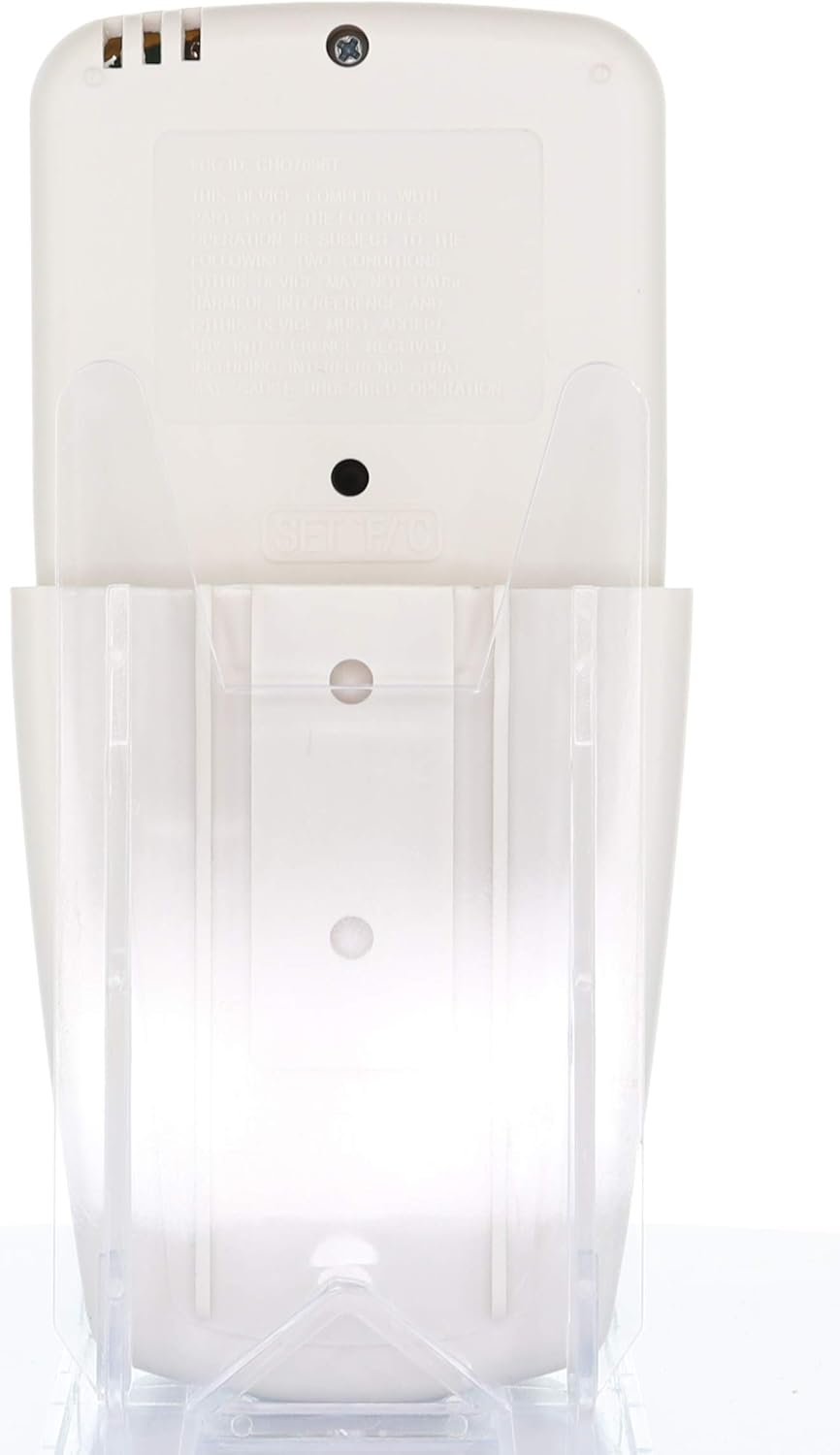
פיגורע 2: The Anderic RR7096T remote control securely placed in its transparent wall mount bracket, demonstrating how it can be stored when not in use.
5. אַפּערייטינג ינסטרוקטיאָנס
The Anderic RR7096T remote control features a clear LCD display and dedicated buttons for various functions. Refer to the image below for button identification.

פיגורע 3: פראָנט view of the Anderic RR7096T remote control, displaying its LCD screen and various control buttons for fan and light functions.
5.1. פאָכער קאָנטראָל
- פאָכער אויף/אַוועק: Press the blue fan button to cycle through fan speeds (Low, Medium, High) and turn the fan off.
- FAN AUTO: Activates the thermostatic fan control. The fan will automatically adjust its speed based on the room temperature and your set temperature.
- פאָכער טיימער: Sets a timer for the fan to operate for a specified duration.
- TEMP./SET HOUR (Up/Down Arrows): Adjusts the desired temperature for FAN AUTO mode or sets the hour for timer functions.
5.2. ליכט קאָנטראָל
- ליכט אויף / אַוועק / דימינג: Press the yellow light button to turn the down-lights on or off. Hold the button to dim or brighten the lights.
- LIGHT TIMER: Sets a timer for the light to turn off after a specified duration.
- LIGHT DELAY: Activates a delay for the light to turn off, allowing time to exit the room.
וויכטיק באַמערקונג: This remote control is designed to operate only the down-lights of your ceiling fan. It will not control separate up-lights if your fan is equipped with them. For proper dimming functionality, ensure your fan uses incandescent bulbs.
6. וישאַלט
6.1. באַטערי פאַרבייַט
When the remote's display becomes dim or its response time slows, it is time to replace the batteries. Follow the battery installation steps in Section 4.1.
6.2. רייניקונג
ווישט אָפּ די ווײַטקאָנטראָל מיט אַ ווייכן, טרוקענעם שטאָף. ניצט נישט קיין שרײַבנדיקע רייניקונגס־מיטלען און טונקט נישט אײַן די ווײַטקאָנטראָל אין וואַסער.
7. טראָובלעשאָאָטינג
- ווייַט ניט ריספּאַנדינג:
- קאָנטראָלירן די באַטאַרייע לעוועלס און פאַרבייַטן אויב נייטיק.
- Verify that the dip-switches in the remote match the settings of your ceiling fan receiver (refer to Section 4.2).
- Ensure there are no obstructions between the remote and the fan receiver.
- Lights not dimming properly:
- Confirm that your ceiling fan uses incandescent bulbs. LED or CFL bulbs may not dim correctly with this remote.
- Fan not operating at desired speed in AUTO mode:
- Check the set temperature on the remote's display and adjust using the TEMP./SET HOUR buttons.
8. ספּעסאַפאַקיישאַנז
| מאָדעל נאָמען | RR7096T |
| סאָרט | אַנדעריק |
| קאָליר | העלפאַנדביין |
| מאַכט מקור | באַטאַרייע פּאַוערד (4 אַאַאַ באַטעריז פארלאנגט) |
| פּראָדוקט דימענשאַנז | 1"ד רענטגענ 3"וו רענטגענ 6"ה |
| פּונקט וואָג | 4.8 אונסעס |
| קאָנטראָל מעטאָד | ווייַט |
| Compatible FCC IDs | CHQ7096T, UC7096T, CHQ8BF7096T, CHQ8BT7096T |
| אַרייַנגערעכנט קאַמפּאָונאַנץ | Remote control, Wall mount bracket (with two screws) |
9. וואָראַנטי אינפֿאָרמאַציע
The Anderic RR7096T Thermostatic Remote Control comes with a 1-יאָר פאַרבייַט וואָראַנטי. Please retain your proof of purchase for warranty claims. For details on how to claim your warranty, refer to the manufacturer's official webפּלאַץ אָדער קאָנטאַקט זייער קונה שטיצן.
10. שטיצן
For further assistance, troubleshooting tips, or to inquire about compatible receivers (such as UC7067FCRX or UC70960TX if needed), please visit the official Anderic website or contact their customer support department. Contact information can typically be found on the product packaging or the manufacturer's webפּלאַץ.