
הקדמה
Thank you for choosing the Atlanta Digital LCD Radio Alarm Clock, Model 1882-0. This compact and easy-to-use alarm clock features a clear LCD display, temperature indication, and a radio-controlled time function for automatic synchronization. This manual provides detailed instructions for setup, operation, and maintenance to ensure optimal performance.
זיכערקייַט אינפֿאָרמאַציע
- באַטערי זיכערקייַט: Use only the specified battery type. Ensure correct polarity (+/-) when inserting batteries. Do not mix old and new batteries, or different types of batteries. Remove batteries if the device will not be used for an extended period. Dispose of used batteries responsibly according to local regulations.
- אָרט: Place the clock on a stable, flat surface. Avoid direct sunlight, extreme temperatures, high humidity, or dusty environments.
- רייניקונג: ניצט נישט קיין שרײַבנדיקע רייניגערס אדער סאָלווענטן. ווישט אָפּ מיט אַ ווייכן, טרוקענעם שטאָף.
- וואַסער ויסשטעלן: This device is not waterproof. Avoid exposure to water or other liquids.
פּעקל אינהאַלט
- Atlanta Digital LCD Radio Alarm Clock (Model 1882-0)
- ינסטרוקטיאָן מאַנואַל (דעם דאָקומענט)
- (Batteries are typically not included and must be purchased separately)
פּראָדוקט איבערview
מאַכט זיך באַקאַנט מיט די הויפּט קאָמפּאָנענטן און קאָנטראָלס פון אייער וועקער זייגער.

פיגורע 1: פראָנט View. This image displays the front of the Atlanta Digital LCD Radio Alarm Clock. The large LCD screen shows the current time (10:40), radio control signal indicator, DST indicator, alarm time (6:00), and temperature (24.6°C). Below the screen are three buttons: "TIME", "ALARM", and "+ / -". A red snooze/light button is visible on the top edge.
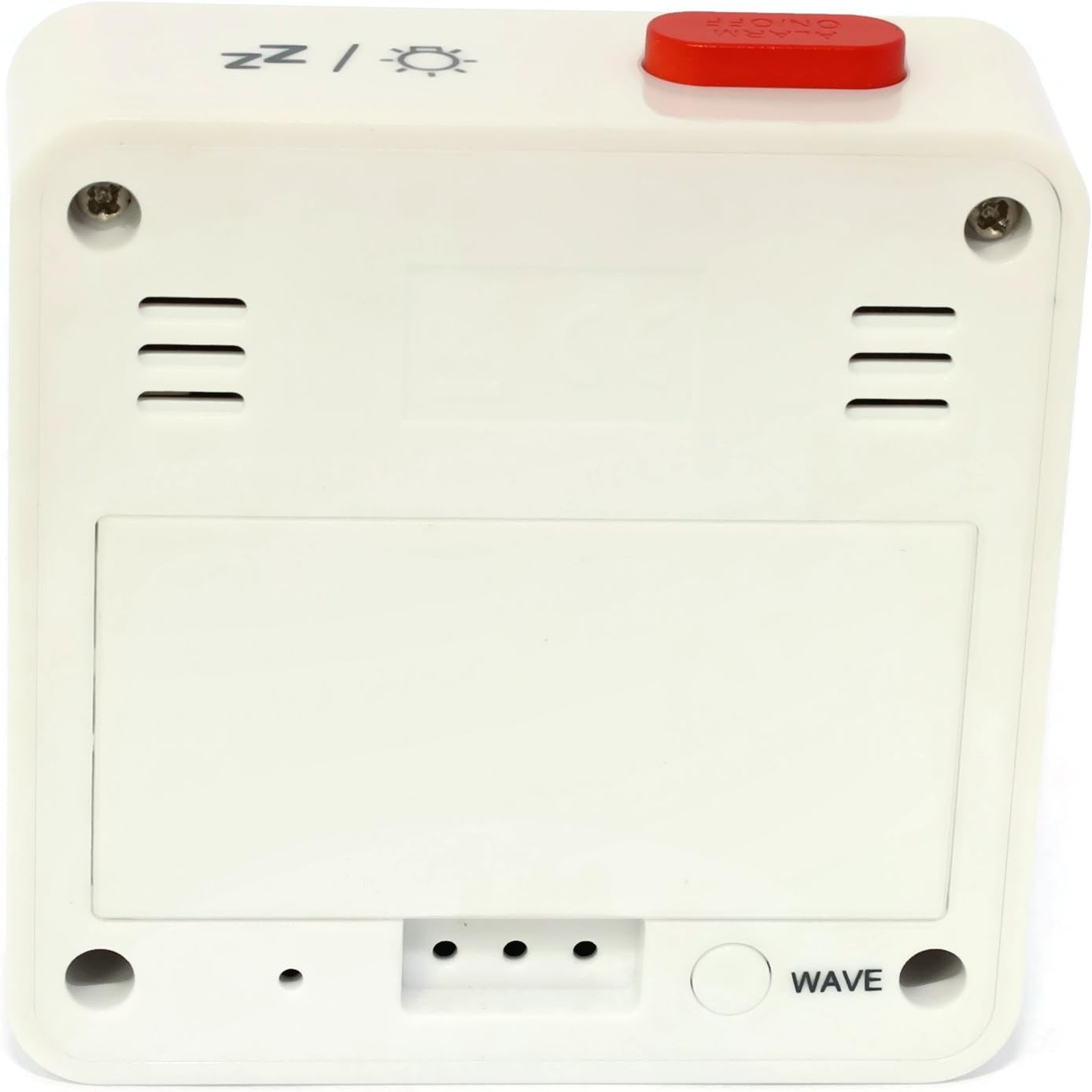
פיגורע 2: צוריק View. This image shows the back of the Atlanta Digital LCD Radio Alarm Clock. The large rectangular cover for the battery compartment is prominent. Below it, a circular "WAVE" button is visible, used for manual radio signal reception. Ventilation slots are present on both sides of the upper back panel.
Controls and Display Elements:
- LCD ווייַז: Shows time, alarm time, temperature, and radio control status.
- TIME קנעפּל: Used to set the current time manually.
- ALARM קנעפּל: Used to set and activate/deactivate the alarm.
- + / - קנעפּלעך: Used to adjust values (time, alarm) and potentially toggle settings.
- SNOOZE / LIGHT Button (Top): Activates snooze function during an alarm; illuminates the display backlight.
- WAVE Button (Back): Initiates manual radio signal reception for time synchronization.
- Battery Compartment (Back): Holds the required batteries.
סעטאַפּ
1. באַטאַרייע ייַנמאָנטירונג
- עפֿנט דעם דעקל פֿונעם באַטעריע־אָפּטייל וואָס געפֿינט זיך אויף דער הינטערשטער זײַט פֿונעם זייגער (זעט בילד 2).
- Insert the required batteries (e.g., 2x AAA, not included) according to the polarity markings (+ and -) inside the compartment.
- פאַרמאַכן די באַטאַרייע אָפּטייל דעקן סיקיורלי.
- The clock will power on and attempt to receive the radio-controlled time signal.
2. Initial Time Synchronization (Radio Control)
Upon battery insertion, the clock will automatically search for the radio time signal. This process may take several minutes. During this time, a signal icon (e.g., ((()))) וועט בליץ אויף די אַרויסווייַזן.
- For best reception, place the clock near a window and away from electronic devices that may cause interference.
- Once the signal is successfully received, the time will be set automatically, and the signal icon will appear solid.
- If the signal is not received after a few minutes, press the כוואַליע button on the back of the clock to initiate a manual search.
3. Manual Time Setting (If Radio Control is Unavailable)
- דריקן און האַלטן די צייט קנעפּל פֿאַר אַרום 3 סעקונדעס ביז די שעה ציפֿערן אָנהייבן צו בלינקען.
- ניצן די + or - קנעפּלעך צו סטרויערן די שעה.
- דרוק די צייט קנעפּל נאכאמאל צו באשטעטיגן די שעה און אריבערגיין צו די מינוט איינשטעלונג.
- ניצן די + or - קנעפּלעך צו סטרויערן די מינוט.
- דרוק די צייט קנעפּל נאך אמאל צו באשטעטיגן און ארויסגיין פון צייט איינשטעלונג מאָדע.
אַפּערייטינג ינסטראַקשאַנז
1. באַשטעטיקן די שרעק
- דריקן און האַלטן די שרעק button for approximately 3 seconds until the alarm hour digits begin to flash.
- ניצן די + or - קנעפלעך צו סטרויערן די געוואונטשענע וועקער שעה.
- דרוק די שרעק button again to confirm the hour and move to the alarm minute setting.
- ניצן די + or - buttons to adjust the desired alarm minutes.
- דרוק די שרעק button once more to confirm and exit alarm setting mode.
2. אַקטיווירן/דעאַקטיווירן דעם אַלאַרם
- דריקן קורץ אויף די שרעק button to toggle the alarm on or off.
- When the alarm is active, an alarm icon (e.g., a bell symbol) will appear on the display.
- ווען דער שרעק סאָונדס, דריקן די סנאָוז / ליכט button on top to activate the snooze function. The alarm will sound again after a few minutes.
- To turn off the alarm completely, press any other button (e.g., צייט, שרעק, +, -) or let it sound for its full duration.
3. באַקלייט פונקציע
דרוק די סנאָוז / ליכט button on the top of the clock to illuminate the display for a few seconds, allowing for easy viewאין נידעריק ליכט באדינגונגען.
4. טעמפּעראַטורע ווייַז
The clock continuously displays the ambient temperature. The unit of temperature (Celsius or Fahrenheit) may be switchable by a dedicated button or a combination of existing buttons (refer to specific model variations if applicable, otherwise it defaults to Celsius as shown in the image).
וישאַלט
רייניקונג
- Wipe the clock's exterior with a soft, dry, lint-free cloth.
- Do not use liquid cleaners, aerosol sprays, or abrasive materials, as these can damage the finish or internal components.
באַטערי פאַרבייַט
- When the display becomes dim or the clock functions erratically, it is time to replace the batteries.
- פֿאָלגט די באַטעריע אינסטאַלאַציע טריט וואָס זענען אויסגעשריבן אין דער "סעטאַפּ" סעקציע.
- Ensure proper disposal of old batteries.
טראָובלעשאָאָטינג
| פּראָבלעם | מעגלעך סיבה | לייזונג |
|---|---|---|
| דער עקראַן איז ליידיק אָדער טונקל. | באַטעריז זענען טויט אָדער ינסערטאַד פאַלש. | פאַרבייַטן באַטעריעס, זיכער מאַכן אַז די פּאָלאַריטעט איז ריכטיק. |
| די צייט איז נישט ריכטיק. | Poor radio signal reception or manual time not set. | Move the clock to a location with better reception (near a window). Press the כוואַליע button for manual synchronization. If still incorrect, set the time manually. |
| דער אַלאַרם קלינגט נישט. | דער אַלאַרם איז נישט אַקטיוויזירט אָדער פאַלש געשטעלט. | Ensure the alarm icon is visible on the display. Recheck alarm time settings. |
| די סנוז פונקציע ארבעט נישט. | Alarm was turned off instead of snoozed. | זייט זיכער אז איר דריקט דעם סנאָוז / ליכט button when the alarm sounds, not other buttons. |
ספּעסאַפאַקיישאַנז
- מאָדעל: 1882-0
- סאָרט: אַטלאַנטאַ
- קאָליר: ווייַס
- מאַטעריאַל: פּלאַסטיק
- ווייַז טיפּ: דיגיטאַל לקד
- דימענשאַנז (L x W x H): 6.5 x 2.1 x 6.5 ס״מ (אומגעפער 2.56 x 0.83 x 2.56 אינטשעס)
- וואָג: 65 גראַם (אומגעפער 2.29 אונסעס)
- מאַכט מקור: Battery powered (e.g., 2x AAA, not included)
- ספּעציעלע פֿעיִקייטן: Temperature Display, Alarm, Radio-Controlled Time, Backlight, Snooze
- בדעה באנוץ: דרינענדיק
וואָראַנטי און שטיצן
Specific warranty information for your Atlanta product may vary by region and retailer. Please refer to the documentation provided at the time of purchase or visit the official Atlanta webזייטל פֿאַר דעטאַלירטע וואָראַנטי טערמינען און באדינגונגען.
For technical support or inquiries, please contact your retailer or the manufacturer's customer service department. Contact information can typically be found on the product packaging or the official brand webפּלאַץ.
Note: Information regarding spare parts availability is not provided by the manufacturer.