
הקדמה
א דאנק פארן קויפןasing the Ezonetronics 1DIN Car Stereo, Model RM-CW9601. This unit features a 7-inch retractable touchscreen, Bluetooth connectivity, FM radio, and multimedia playback capabilities. This manual provides essential information for installation, operation, and maintenance to ensure optimal performance and user satisfaction. Please read this manual thoroughly before using the product.
זיכערקייַט אינפֿאָרמאַציע
- ניצט נישט דעם אַפּאַראַט אויף אַ וועג וואָס זאָל אייך אָפּלענקן פֿון פֿאָרן. שטעלט שטענדיק אין פֿאָרויס זיכערקייט אויף דער גאַס.
- Ensure proper installation by a qualified professional to prevent damage to the unit or vehicle.
- פֿאַרמײַדט אויסשטעלן דעם אַפּאַראַט צו עקסטרעמע טעמפּעראַטורן, דירעקטע זונשײַן פֿאַר פֿאַרלענגערטע פּעריאָדן, אָדער פֿײַכטקייט.
- פרובירט נישט צו צענעמען אדער מאדיפיצירן דעם איינהייט. דאס קען בטל מאכן די גאראנטיע און שאפן זיכערהייט ריזיקעס.
- Keep the volume at a level that allows you to hear external traffic sounds.
פּעקל אינהאַלט
באַשטעטיקן אַז אַלע זאכן זענען פאַראַן אין פּעקל:
- Ezonetronics 1DIN Car Stereo Unit (RM-CW9601)
- מאַכט און רעדנער וויירינג כאַרניס
- ווייַט קאָנטראָל
- באַניצער מאַנואַל (דעם דאָקומענט)
- Mounting Accessories (brackets, screws)
- אפציאנאל: הינטערשטעview Camera (if included in your specific package)
פּראָדוקט איבערview
The Ezonetronics RM-CW9601 features a single DIN chassis with a motorized retractable 7-inch touchscreen display. The front panel includes essential controls and ports for easy access.

פיגורע 1: פראָנט view of the Ezonetronics RM-CW9601 car stereo, illustrating the 7-inch screen in both retracted and extended positions, along with front panel controls and ports.
פראָנט פּאַנעל קאָנטראָלס און פּאָרץ:
- מאַכט / מאָדע קנעפּל: Press to turn on/off, short press to change mode.
- באַנד קנעפּל: Rotate to adjust volume. Press to mute/unmute.
- וסב פּאָרט: פֿאַר מעדיע ווידערשפּיל פֿון USB דרייווס.
- SD Card Slot: For media playback from SD cards.
- AUX אַרייַנשרייַב: 3.5 מ״מ דזשעק פֿאַר עקסטערנע אַודיאָ דעוויסעס.
- באַשטעטיק קנעפּל: Small button to reset the unit (requires a pointed object).
- Screen Retract/Extend Button: Controls the motorized screen movement.
סעטאַפּ
1. ינסטאַלירונג
The RM-CW9601 is designed for a standard 1DIN car stereo opening. Professional installation is highly recommended. Ensure the vehicle's battery is disconnected before starting installation.
- Remove the existing car stereo from the dashboard.
- Connect the wiring harness to the vehicle's wiring.
- Secure the unit into the dashboard using the provided mounting brackets and screws.
- Reconnect the vehicle's battery and test the unit.
2. וויירינג דיאַגראַמע (אַלגעמיין)
Refer to the detailed wiring diagram included with your product packaging for specific connections. Below are common connections:
- געל דראָט: קאָנסטאַנט 12V (באַטעריע)
- רויט דראָט: סוויטשט 12V (אַקסעסאָרי/איגנישאַן)
- שוואַרץ דראָט: ערד
- מאַראַנץ דראָט: Illumination (Optional)
- בלוי דראָט: מאַכט אַנטענע / Ampלייפיער ווײַט־אײַנצושטעלן
- רעדנער ווירעס: Connect to vehicle speakers (e.g., White/White-Black for Front Left, Grey/Grey-Black for Front Right, Green/Green-Black for Rear Left, Purple/Purple-Black for Rear Right).
- ריווערס קאַמעראַ אַרייַנשרייַב: פאַרבינדן צו די הינטןview camera video output and reverse trigger wire.
- שטיר-ראד קאנטראל אריינגאנג: Connect to vehicle's steering wheel control wires (if applicable).

פיגורע 2: Illustration of USB connection points, relevant for media input and smartphone integration.
אַפּערייטינג ינסטראַקשאַנז
1. יקערדיק אָפּעראַציע
- מאַכט אויף / אַוועק: דריק דעם מאַכט קנעפּל אויף דער פראָנט פּאַנעל אָדער ווייַט קאָנטראָל.
- באַנד אַדזשאַסטמאַנט: Rotate the volume knob or use the remote control.
- מאָדע סעלעקציע: Short press the power/mode button to cycle through available modes (Radio, USB, SD, Bluetooth, AUX, CarPlay/Android Auto).
- פאַרשטעלן קאָנטראָל: Use the dedicated button to retract or extend the 7-inch display.
2. בלועטאָאָטה פֿונקציע
The unit supports Bluetooth for hands-free calling and wireless audio streaming.
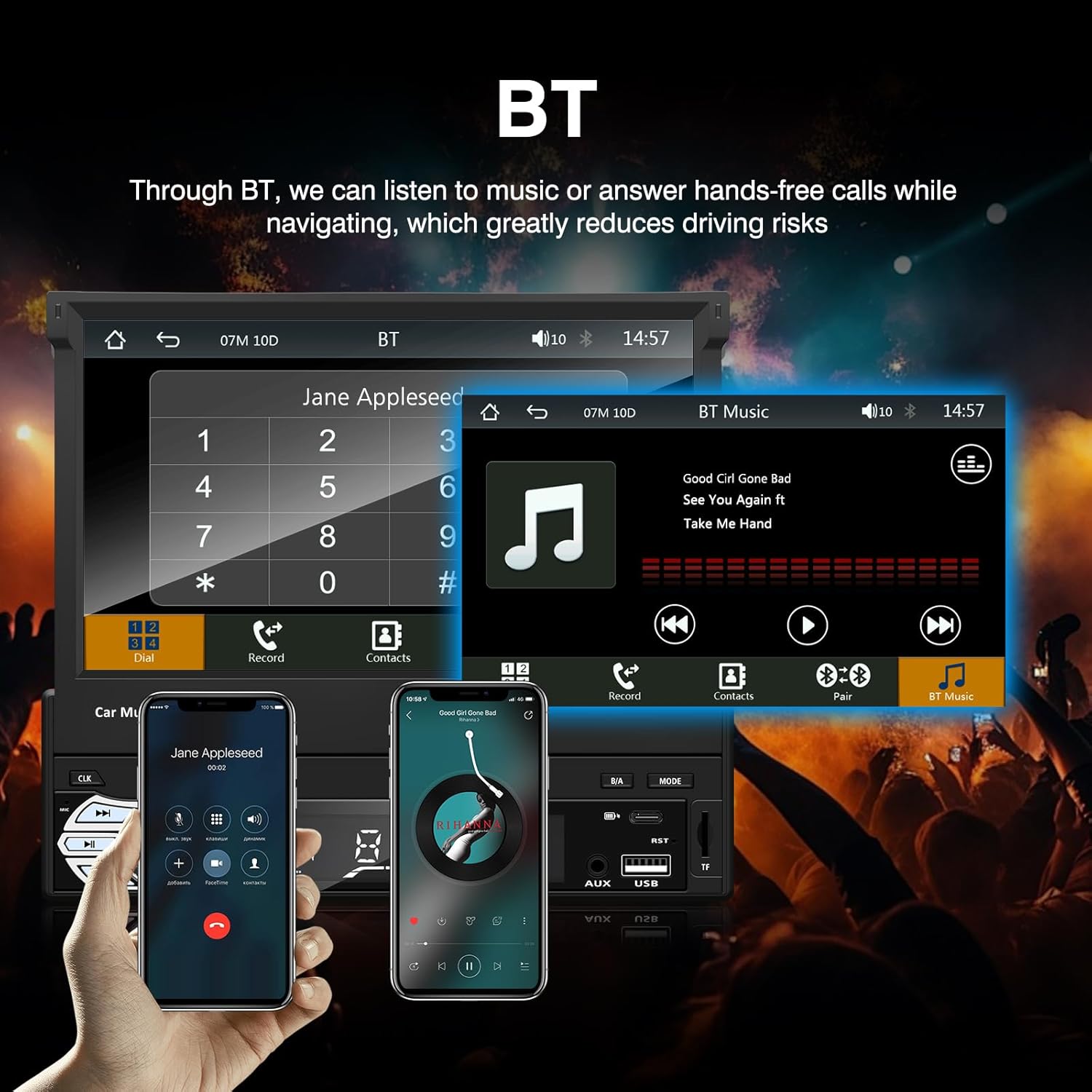
פיגורע 3: Bluetooth interface for hands-free calls and music streaming, showing a dial pad and music controls.
- פּאָרינג: געבן בלועטאָאָטה אויף דיין רירעוודיק מיטל. זוכן פֿאַר available devices and select "Ezonetronics" or similar. Enter PIN "0000" if prompted.
- הענט-פריי רופן: Once paired, you can make and receive calls directly through the car stereo. Use the touchscreen or remote to dial, answer, or end calls.
- אַודיאָ סטרימינג (A2DP): Play music from your paired device wirelessly. Control playback (play/pause, skip) from the car stereo or your device.
3. USB/SD Media Playback
Insert a USB drive or SD card into the respective slot. The unit will automatically switch to USB/SD mode and begin playing compatible media files.

פיגורע 4: Icons indicating support for Bluetooth, Auxiliary input, TF (SD) Card, and USB connections for media playback.
- Supported formats include RM, RMVB, ASF, MKV, DIVX, MPEG4, AVI, VOB for video, and MP3/MP4 for audio.
- נאַוויגירן דורך פאָלדערס און files using the touchscreen interface.
4. עפעם ראַדיאָ
Access the FM radio mode to listen to local broadcasts.

פיגורע 5: FM Radio interface with frequency display and equalizer settings for audio customization.
- אַוטאָ סקאַן: Automatically search and save strong stations.
- מאַנואַל טונינג: Fine-tune frequencies using the touchscreen.
- פּרעסעץ: Save your favorite stations for quick access (up to 18 preset stations).
5. Apple CarPlay / Android Auto
Connect your compatible smartphone via USB to access Apple CarPlay or Android Auto features directly on the stereo's display.

פיגורע 6: Wired Apple CarPlay interface, displaying phone applications like navigation, music, and messages on the car stereo screen.

פיגורע 7: Wired Android Auto interface, displaying Android applications like Google Maps, Spotify, and phone calls on the car stereo screen.
- Ensure your phone has CarPlay or Android Auto enabled.
- Use a high-quality USB cable for a stable connection.
- Access navigation, music, messages, and other compatible apps safely while driving.
6. שפּיגל לינק
Mirror Link allows you to display your smartphone's screen content directly onto the car stereo's display via a USB data cable.

פיגורע 8: Mirror Link function demonstrating a smartphone screen being projected onto the car stereo display.
- Connect your smartphone to the USB port using a data cable.
- Follow the on-screen prompts on both the stereo and your phone to establish the connection.
- Note: Functionality may vary depending on your smartphone model and operating system.
7. דערציעןview אַפּאַראַט אַרייַנשרייַב
ווען אַ הינטערשטערview camera is connected and the vehicle is shifted into reverse, the stereo automatically displays the camera feed.

פיגורע 9: Reversing display showing the view from a rearview camera with parking assistance lines, providing an intuitive aid for parking.
- פאַרזיכערן די דערציעןview camera is properly installed and connected to the dedicated input.
- The display will automatically switch to the camera view when the reverse gear is engaged.
8. שטיר-ראד קאנטראל
The unit supports connection to your vehicle's existing steering wheel controls for convenient operation. Refer to your vehicle's manual and the stereo's wiring diagram for proper connection and configuration.
וישאַלט
- רייניקונג די פאַרשטעלן: ניצט אַ ווייכע, לינט-פֿרייע שטאָף צו פֿאָרזיכטיק ווישן דעם טאָוטשסקרין. ניצט נישט קיין שרײַבנדיקע רייניגערס אדער סאָלווענטן.
- אַלגעמיינע רייניקונג: ווישט די אויסערליכע זייט פון דעם אַפּאַראַט מיט אַ טרוקענעם, ווייכן שטאָף.
- ויסמיידן ליקווידס: שפריצט נישט פליסיקייטן גלייך אויף דעם אַפּאַראַט.
- טעמפּעראַטור: Avoid prolonged exposure to extreme heat or cold, which can affect the unit's lifespan.
טראָובלעשאָאָטינג
| פּראָבלעם | מעגלעך סיבה | לייזונג |
|---|---|---|
| דער אַפּאַראַט טוט נישט מאַכט אויף. | נישט ריכטיגע וויירינג; דורכגעבלאָזן פיוז; פּראָבלעם מיט דער באַטעריע פון דעם אויטאָ. | Check power connections (Yellow, Red, Black wires). Inspect vehicle fuses. Ensure battery is charged. |
| קיין געזונט. | קול צו נידעריג; שטום אַקטיוויזירט; נישט ריכטיקע רעדנער וויירינג. | Increase volume. Check if mute is active. Verify speaker connections. |
| בלועטוט קאנעקט נישט. | Bluetooth not enabled on phone; Incorrect pairing process. | Ensure phone's Bluetooth is on and discoverable. Re-attempt pairing. |
| USB/SD media not playing. | ניט געשטיצט file format; Corrupted media; Drive/card not inserted correctly. | טשעק file formats. Try a different USB drive/SD card. Ensure proper insertion. |
| דערציעןview camera not displaying. | Camera not connected; Reverse trigger wire not connected. | Verify camera video input and reverse trigger wire connection. |
If problems persist, consult a qualified technician or contact customer support.
ספּעסאַפאַקיישאַנז
- סאָרט: EZoneTronics
- מאָדעל נומער: RM-CW9601
- קאָליר: שוואַרץ
- פאַרשטעלן: 7-inch Capacitive Touchscreen, Retractable
- קאַנעקטיוויטי טעכנאָלאָגיע: Bluetooth, USB, SD, AUX, RCA
- בלועטאָאָטה: Integrated Bluetooth 2.0 with A2DP/Hands-free
- קאַמפּאַטאַבאַל דעוויסעס: סמאַרטפאָנע
- אַודיאָ רעזולטאַט מאָדע: סטערעאָ
- ווידעא ענקאָודינג שטיצע: RM, RMVB, ASF, MKV, DIVX, MPEG4, AVI, VOB
- וסב / סד שטיצן: Up to 32GB max.
- ספּעציעלע פֿעיִקייטן: Touchscreen, Steering Wheel Control Support, Rear Camera Input, Apple CarPlay, Android Auto, Mirror Link
- פאַבריקאַנט: Rhythm Electronics Limited
וואָראַנטי און שטיצן
This product comes with a limited manufacturer's warranty.
- הויפּט אַפּאַראַט וואָראַנטי: 12 months for defective items (excluding damaged or misused items after receipt).
- אַקסעסעריז וואָראַנטי: 3 months for accessories.
For warranty claims or technical support, please contact your retailer or the manufacturer directly. Keep your purchase receipt as proof of purchase.