
Angrox RM-ED047
Angrox Universal Remote Control User Manual
מאָדעל: RM-ED047
1. הקדמה
This manual provides essential information for the proper use and maintenance of your Angrox Universal Remote Control. Designed for seamless compatibility with a wide range of Sony Bravia TVs, this remote offers a reliable and straightforward replacement for your original or damaged remote.
The Angrox remote control is engineered for ease of use, requiring no complex programming or setup. Simply insert batteries, and it's ready to operate your Sony TV.
2. פּראָדוקט איבערview
The Angrox Universal Remote Control is a high-quality, compact, and non-slip device designed for comfortable handling and stable performance. It features a larger transmission range compared to many standard remotes, ensuring reliable operation from a distance.

בילד 2.1: פאָרנט און הינטן view of the Angrox Universal Remote Control, showcasinג זײַן ערגאָנאָמישן פּלאַן און קנעפּל אויסלייג.

Image 2.2: Multiple views of the remote control, highlighting its slim profile and textured back for a secure grip.
שליסל פֿעיִקייטן:
- וניווערסאַל קאַמפּאַטאַבילאַטי: 100% compatible with all Sony TV and Sony Bravia remotes.
- קיין פּראָגראַממינג פארלאנגט: Ready to use right out of the box after battery insertion.
- ערגאָנאָמיק פּלאַן: Small size and compact, with a non-slip surface for practical handling.
- סטאַביל פאָרשטעלונג: Offers a larger transmission range for reliable control.
- דוראַבאַל קאַנסטראַקשאַן: Made from ABS material for enhanced safety and durability.

בילד 2.3: נאָענט־אַרויף view emphasizing the remote's safety features, durable construction, and use of ABS material.
Compatible Sony TV Models:
This remote is compatible with a wide range of Sony TV models, including but not limited to:
- KDL-40BX420, KDL-40BX421, KDL-22BX320, KDL-22BX321, KDL-32R300B, KDL-32BX320, KDL-32BX321, KDL-32BX420, KDL-32BX421, KDL-40BX421, KDL-40BXB, KDL-421, KDL-46BX420, KDL-46BX421, KDL-55BX520
- KDL-65X830B, KDL-70W830B, KDL-70W840B, KDL-70W850B, KDL-70XX70XX, XBR-40B, 9X850B, XBR-55X850B, XBR-55X900B, XBR-65X850B, XBR-65X900B, XBR-65X950B, XBR-70X850B, XBR-79X900B, XBR-800B, 5X950B
- KDL-19MB4000, KDL-19M4000, KDL-22L4000, KDL-32L4000, KDL-37L4000, KDL-40S4100

Image 2.4: The remote control positioned next to a modern Sony TV, visually confirming its compatibility with Sony LED and LCD televisions.
3. סעטאַפּ
The Angrox Universal Remote Control is designed for immediate use with compatible Sony TVs. No complex programming or pairing procedures are required.
אַרייַנלייגן באַטעריז:
- געפֿינען די באַטאַרייע אָפּטייל אויף די צוריק פון די ווייַט קאָנטראָל.
- רוקט דעם באַטעריע דעקל אַראָפּ אָדער אין דער ריכטונג וואָס ווערט אָנגעוויזן דורך אַ פײַל צו עס עפֿענען.
- אַרײַנשטעלן צוויי (2) AAA באַטעריעס (נישט אַרײַנגערעכנט), און זיכער מאַכן אַז די פּאָזיטיוו (+) און נעגאַטיוו (-) טערמינאַלן זענען ריכטיק אויסגעשטעלט מיט די מאַרקירונגען אינעווייניק אין דעם אָפּטייל.
- פֿאַרמאַכט דעם באַטעריע דעקל דורך עס צוריקצורוקן אין פּלאַץ ביז עס קליקט זיכער.
Once batteries are inserted, the remote control is ready to operate your Sony TV. It is recommended to use new, high-quality alkaline batteries for optimal performance and longevity.

בילד 3.1: דעטאַלירט view of the remote's battery compartment, illustrating the correct orientation for inserting two AAA batteries.
4. אַפּערייטינג ינסטרוקטיאָנס
The Angrox Universal Remote Control functions identically to the original Sony TV remote. All buttons are pre-programmed to perform their standard functions.
יקערדיק אָפּעראַציע:
- מאַכט קנעפּל: Press to turn your TV on or off.
- נומער קנעפּלעך (0-9): ניצן צו גלייך אריינלייגן קאַנאַל נומערן.
- קאַנאַל אַרויף/אַראָפּ (CH +/-): Navigate through channels sequentially.
- באַנד אַרויף / אַראָפּ (VOL +/-): Adjust the TV's volume level.
- שטיל קנעפּל: Mute or unmute the TV's audio.
- Navigation Pad (Arrow Buttons & Enter): Use to navigate menus and select options.
- היים קנעפּל: Access the TV's main menu or smart TV interface.
- אַרייַנגאַנג/מקור קנעפּל: באַשטימען צווישן פאַרשידענע אַרייַנשרייַב קוואלן (HDMI, AV, עטק).
- פּלייבאַק קאָנטראָלס: Buttons for Play, Pause, Stop, Fast Forward, Rewind, etc., for media playback.
Ensure there is a clear line of sight between the remote control and your TV's infrared receiver for optimal signal transmission. The remote offers a stable signal and sensitive buttons for a responsive user experience.

Image 4.1: A hand demonstrating the use of the remote control, highlighting its long-distance capability, fine workmanship, signal stabilization, and sensitive buttons.
5. וישאַלט
Proper maintenance will ensure the longevity and optimal performance of your Angrox Universal Remote Control.
רייניקונג:
- Wipe the remote control regularly with a soft, dry cloth.
- פֿאַר שווערן שמוץ, אַ ביסל דampווישט דעם שטאָף מיט וואַסער אָדער אַ מילדן, נישט-שרייַבנדיקן רייניגער. שפּריצט נישט רייניגער גלייך אויף דער ווײַטקאָנטראָל.
- פֿאַרמײַדט די נוצן פֿון שאַרפֿע כעמיקאַלן, סאָלווענטן, אָדער אַברייזיווע רייניקונג פּאַדס, ווײַל די קענען שאַטן די ייבערפֿלאַך אָדער אינעווייניקסטע קאָמפּאָנענטן פֿון דער ווײַטקאָנטראָל.
באַטערי פאַרבייַט:
Replace batteries when the remote's responsiveness decreases or it stops functioning. Always replace both batteries at the same time with new ones of the same type (AAA). Refer to Section 3 for battery insertion instructions.
סטאָרידזש:
האַלט די ווײַטקאָנטראָל אין אַ קיל, טרוקן אָרט אַוועק פון דירעקט זונשייַן, עקסטרעמע טעמפּעראַטורן און הויכע הומידיטי. אויב די ווײַטקאָנטראָל וועט נישט ווערן גענוצט פֿאַר אַ לענגערע צייט, איז עס ראַטזאַם צו אַרויסנעמען די באַטעריעס צו פאַרמייַדן ליקאַדזש.
6. טראָובלעשאָאָטינג
If you encounter issues with your Angrox Universal Remote Control, please refer to the following common problems and solutions:
| פּראָבלעם | מעגלעך סיבה | לייזונג |
|---|---|---|
| ווײַטקאָנטראָל רעאַגירט נישט. | טויטע אדער נישט ריכטיק אריינגעשטעלטע באַטעריעס. | קאָנטראָלירט די אָרענטאַציע פון די באַטעריעס. פאַרבייטן מיט נייע AAA באַטעריעס. |
| די ווײַטקאָנטראָל האט באַגרענעצטע ראַנגע אָדער אַ צייטווייליגע רעאַקציע. | Weak batteries, obstruction, or remote too far from TV. | Replace batteries. Ensure clear line of sight to TV's IR receiver. Move closer to the TV. |
| געוויסע קנעפּלעך אַרבעטן נישט. | Dirt or debris under the button, or internal malfunction. | Clean the remote surface. If problem persists, contact support. |
| די ווײַט קאָנטראָלירט נישט די טעלעוויזיע. | נישט-קאמפאטיבלע טעלעוויזיע מאָדעל. | Verify your TV model is listed in the compatible models section (Section 2). |
7. ספּעסאַפאַקיישאַנז
| שטריך | דעטאַל |
|---|---|
| מאָדעל נאָמען | RM-ED047 |
| סאָרט | אַנגראָקס |
| קאַמפּאַטאַבאַל דעוויסעס | Sony Televisions (various models, see Section 2) |
| קאַנעקטיוויטי טעכנאָלאָגיע | ינפרערעד (IR) |
| מאַקסימום קייט | 10 מעטער |
| נומער פון קנעפּלעך | 50 |
| קאָנטראָללער טיפּ | ווייַט קאָנטראָל |
| באַטעריז פארלאנגט | 2 X AAA (ניט אַרייַנגערעכנט) |
| פּראָדוקט דימענשאַנז (L x W x H) | 19.99 X 4.78 X 1.98 סענטימעטער |
| פּונקט וואָג | 82 ג |
| ספּעציעלע פֿעיִקייטן | Universal, Non-slip design |
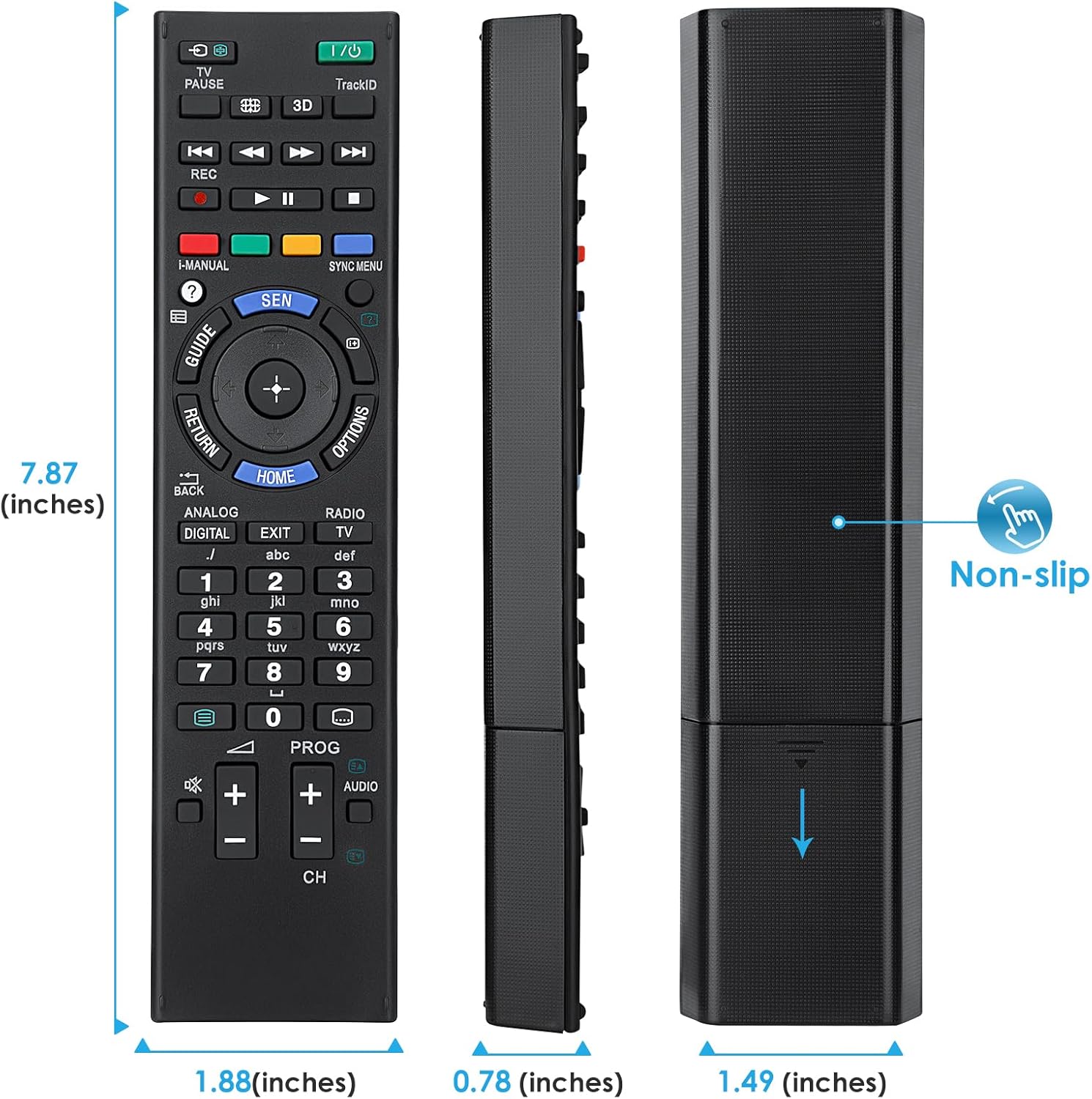
Image 7.1: Visual representation of the remote control's dimensions (length, width, thickness), providing precise measurements for reference.
8. וואָראַנטי און שטיצן
וואָראַנטי אינפֿאָרמאַציע:
This Angrox Universal Remote Control comes with a 60-טאָג וואָראַנטי פֿון דעם קויפֿדאַטום. די וואָראַנטי דעקט פֿאַבריקאַציע־דעפֿעקטן און גאַראַנטירט אַז דער פּראָדוקט פֿונקציאָנירט ווי באַשריבן אונטער נאָרמאַלן באַנוץ. ביטע באַהאַלטן אייער קויפֿבאַווײַז פֿאַר וואָראַנטי־קליימז.
קונה שטיצן:
For any questions, concerns, or technical assistance not covered in this manual, please contact the retailer or the manufacturer's customer support. Provide your product model number (RM-ED047) and a detailed description of the issue to facilitate faster service.
Ask a question about this manual
Ask about setup, troubleshooting, compatibility, parts, safety, or missing instructions. Manuals+ will review the question and use this page’s manual context to help answer it.