
הקדמה
This manual provides essential information for the installation, operation, maintenance, and troubleshooting of your NVIDIA 699-51030-0501-101 graphics card. This component is designed for desktop computer systems to enhance graphics processing capabilities. Please read this manual thoroughly before proceeding with installation or use.
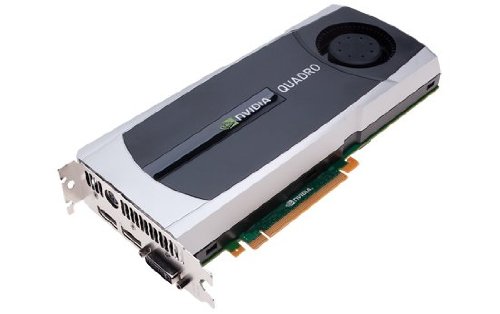
Image: NVIDIA 699-51030-0501-101 Graphics Card. This image displays the graphics card from an angled perspective, showing the cooling fan, heatsink, and the PCIe connector.
זיכערקייַט גיידליינז
היט די פאלגענדע זיכערהייט מיטלען צו פאַרמייַדן שעדיקן צו דעם פּראָדוקט אָדער שאָדן צו זיך:
- שטענדיק אָפּשטעקן די מאַכט פֿון אייער קאָמפּיוטער איידער איר אינסטאַלירט אָדער אַראָפּנעמט קיין קאָמפּאָנענטן.
- טראָגט אַן אַנטי-סטאַטישן האַנטגעלענק-רימען אָדער רירט אָפט אָן אַן געערדטן מעטאַלן אָביעקט צו אָפּלאָדן סטאַטישע עלעקטריע.
- האַלט אָן די גראַפיקס קאַרטל ביי די ברעגן כּדי נישט צו אָנרירן סענסיטיווע קאָמפּאָנענטן.
- זאָרגט פֿאַר געהעריקע ווענטילאַציע אין אייער קאָמפּיוטער קעסטל כּדי צו פֿאַרמייַדן איבערהיצונג.
- האַלטן די פּראָדוקט אַוועק פון נעץ און עקסטרעם טעמפּעראַטורעס.
סעטאַפּ
1. פאַר-אינסטאַלאַציע קאָנטראָלן
- Verify your power supply unit (PSU) has sufficient wattage and appropriate connectors for the graphics card.
- Ensure your motherboard has an available PCI Express (PCIe) x16 slot.
- Confirm your computer case has adequate space for the graphics card dimensions.
- זאַמלען די נויטיקע מכשירים: פיליפּס קאָפּ שרויפנציער, אַנטי-סטאַטיש האַנטגעלענק רימען (רעקאָמענדירט).
2. ייַזנוואַרג ייַנמאָנטירונג
- מאַכט אַוועק און דיסקאַנעקט: שליסט אויס אייער קאמפיוטער אינגאנצן און ציט ארויס דעם עלעקטרישן שנור פון דער וואנט-אויסגאבע.
- אפענער קעיס: אַראָפּנעמען די זייט פּאַנעל פון דיין קאָמפּיוטער קעסטל צו צוטריט די מאָטהערבאָאַרד.
- געפינען PCIe סלאָט: אידענטיפיצירט א פאראן PCI Express x16 סלאט אויף אייער מאדערבאארד. דאס איז געווענליך דער לענגסטער סלאט.
- אַראָפּנעמען דעם דעקל פון דעם שפּאַלט: Remove the metal slot cover(s) from the back of your computer case corresponding to the PCIe slot you will use.
- אַרײַנשטעלן גראַפיקס קאַרטל: Carefully align the graphics card with the PCIe slot. Press down firmly and evenly on both ends of the card until it is fully seated in the slot. You should hear a click from the retention clip.
- זיכערע קאַרטל: Secure the graphics card to the computer case using the screw(s) removed from the slot cover(s).
- פאַרבינדן מאַכט (אויב אָנווענדלעך): If your graphics card requires additional power, connect the appropriate PCIe power cables from your PSU to the graphics card. This model (NVIDIA 699-51030-0501-101) may not require external power, but always check the card itself for connectors.
- שליסן פאַל: טוישט אויס די זייט-פאנעל פון אייער קאמפיוטער קעיס.
- Reconnect Peripherals: Reconnect your monitor cable to one of the display outputs on the new graphics card. Reconnect all other peripherals and the power cord.
3. דרייווער ינסטאַלירונג
- מאַכט אויף: קער אויף דיין קאָמפּיוטער.
- דאַונלאָוד דרייווערס: Navigate to the official NVIDIA webפּלאַץ (www.nvidia.com/drivers) and download the latest drivers compatible with your NVIDIA 699-51030-0501-101 graphics card and operating system.
- ינסטאַלירן דריווערס: Run the downloaded driver installer and follow the on-screen instructions. It is recommended to perform a clean installation if prompted.
- ריסטאַרט: ריסטאַרט אייער קאָמפּיוטער נאָך דעם ווי די דרייווער אינסטאַלאַציע איז פֿאַרטיק.
אַפּערייטינג
Once installed and drivers are updated, your NVIDIA 699-51030-0501-101 graphics card will automatically handle graphics processing for your system. You can verify its operation through your operating system's device manager or NVIDIA Control Panel.
- NVIDIA קאָנטראָל פּאַנעל: Access the NVIDIA Control Panel (usually via right-click on desktop or through Windows Control Panel) to adjust display settings, 3D settings, and monitor various aspects of your graphics card.
- דרייווער דערהייַנטיקונגען: קאָנטראָלירט רעגולער די NVIDIA website for driver updates to ensure optimal performance and compatibility with new software and games.
וישאַלט
געהעריגע אויפהאלטונג גאראנטירט די לאנגעוויטי און אפטימאלע פערפארמאנס פון אייער גראפיקס קארטל.
- באַזייַטיקונג פון שטויב: Periodically (e.g., every 6-12 months), power off and unplug your computer. Open the case and use compressed air to gently clear dust from the graphics card's heatsink and fan. Hold the fan blades to prevent over-spinning during cleaning.
- ינווייראַנמענאַל טנאָים: Operate your computer in a clean, dry, and well-ventilated environment. Avoid extreme temperatures and humidity.
טראָובלעשאָאָטינג
אויב איר טרעפט פּראָבלעמען, זעט די פאלגענדע געוויינטלעכע טראָובלעשווטינג טריט:
- קיין אַרויסווייַז רעזולטאַט:
- זיכער מאַכן אַז דער מאָניטאָר קאַבל איז זיכער פארבונדן צו דער גראַפיקס קאַרטל און דעם מאָניטאָר.
- באַשטעטיקן אַז דער מאָניטאָר איז איינגעשטעלט צו דער ריכטיקער אינפוט מקור.
- Check if the graphics card is fully seated in its PCIe slot.
- If applicable, ensure all PCIe power connectors are securely attached.
- פּרוביר מיט אַן אַנדער מאָניטאָר אָדער קאַבל אויב מעגלעך.
- שאָפער ישוז:
- Reinstall the latest drivers from the NVIDIA webפּלאַץ.
- Try rolling back to a previous driver version if issues started after an update.
- Use Display Driver Uninstaller (DDU) in Safe Mode to completely remove old drivers before installing new ones.
- פּראָבלעמען מיט פאָרשטעלונג (נידעריק FPS, שטאַמלען):
- זיכער מאַכן אַז דרייווערס זענען אַרויף צו דאַטע.
- Check for overheating using monitoring software (e.g., MSI Afterburner, HWMonitor). Clean dust if necessary.
- Verify that your system meets the minimum requirements for the applications or games you are running.
- טשעק די מאַכט צושטעלן אַפּאַראַט (PSU) וואָסtage; an insufficient PSU can cause performance issues.
- System Instability (Crashes, Blue Screens):
- Check for driver conflicts or corruption.
- Monitor temperatures to rule out overheating.
- Ensure the graphics card is properly seated and secured.
- לויפט זכּרון דיאַגנאָסטיק מכשירים צו קאָנטראָלירן פֿאַר ראַם פּראָבלעמען.
טעכניש ספּעסאַפאַקיישאַנז
Key specifications for the NVIDIA 699-51030-0501-101 graphics card:
| מאָדעל נומער | NVIDIA 699-51030-0501-101 |
| סאָרט | נווידיאַ |
| גראַפיקס קאָופּראַסעסער | NVIDIA 699-51030 |
| גראַפיקס פּראַסעסער פאַבריקאַנט | נווידיאַ |
| קאַמפּאַטאַבאַל דעוויסעס | דעסקטאָפּ |
| ASIN | B01NBI92VC |
| ערשטער דאַטע בנימצא | 8טן דעצעמבער 2016 |
וואָראַנטי און שטיצן
This NVIDIA graphics card is covered by the manufacturer's standard warranty. For specific warranty terms, duration, and to register your product, please refer to the official NVIDIA website or contact NVIDIA customer support directly.
For technical assistance, driver downloads, and further support resources, visit the official NVIDIA support portal:
- NVIDIA Support: www.nvidia.com/support