
1. הקדמה
The Tunturi Functional Fitness Interval Timer is designed to assist you in various fitness activities, including CrossFit, Tabata, and general interval training. This device functions as both an interval timer and a stopwatch, offering customizable settings for your workout routines. Please read this manual thoroughly to ensure proper use and to maximize the benefits of your timer.
2. זיכערקייַט אינפֿאָרמאַציע
היט די פאלגענדע זיכערהייט גיידליינז צו פאַרמייַדן שעדיקן צו די מיטל אָדער פערזענלעכע שאָדן:
- האַלט דעם אַפּאַראַט אַוועק פון וואַסער און איבעריקער נעץ.
- שטעלט נישט אויס דעם אפאראט צו עקסטרעמע טעמפעראטורן אדער דירעקטער זון פאר לענגערע צייטן.
- Use only the specified battery type (1x AAA 1.5V).
- Ensure correct battery polarity when inserting.
- אַראָפּנעמען באַטעריז אויב די מיטל וועט נישט זיין געוויינט פֿאַר אַ לאַנג צייַט.
- פרובירט נישט צו עפענען אדער פאררעכטן דעם אפאראט אליין. קאנטאקטירט קאסטומער סופארט פאר הילף.
- אַוועקוואַרפן באַטעריעס און דעם אַפּאַראַט לויט די לאָקאַלע רעגולאַציעס.
3. פּעקל אינהאַלט
באַשטעטיקן אַז אַלע זאכן זענען פאַראַן אין פּעקל:
- Tunturi Functional Fitness Interval Timer (Model 14TUSCF036)
- באַניצער מאַנואַל (דעם דאָקומענט)
- 1x AAA 1.5V Battery (may be pre-installed or included separately)
4. פּראָדוקט איבערview
Familiarize yourself with the components of your interval timer.
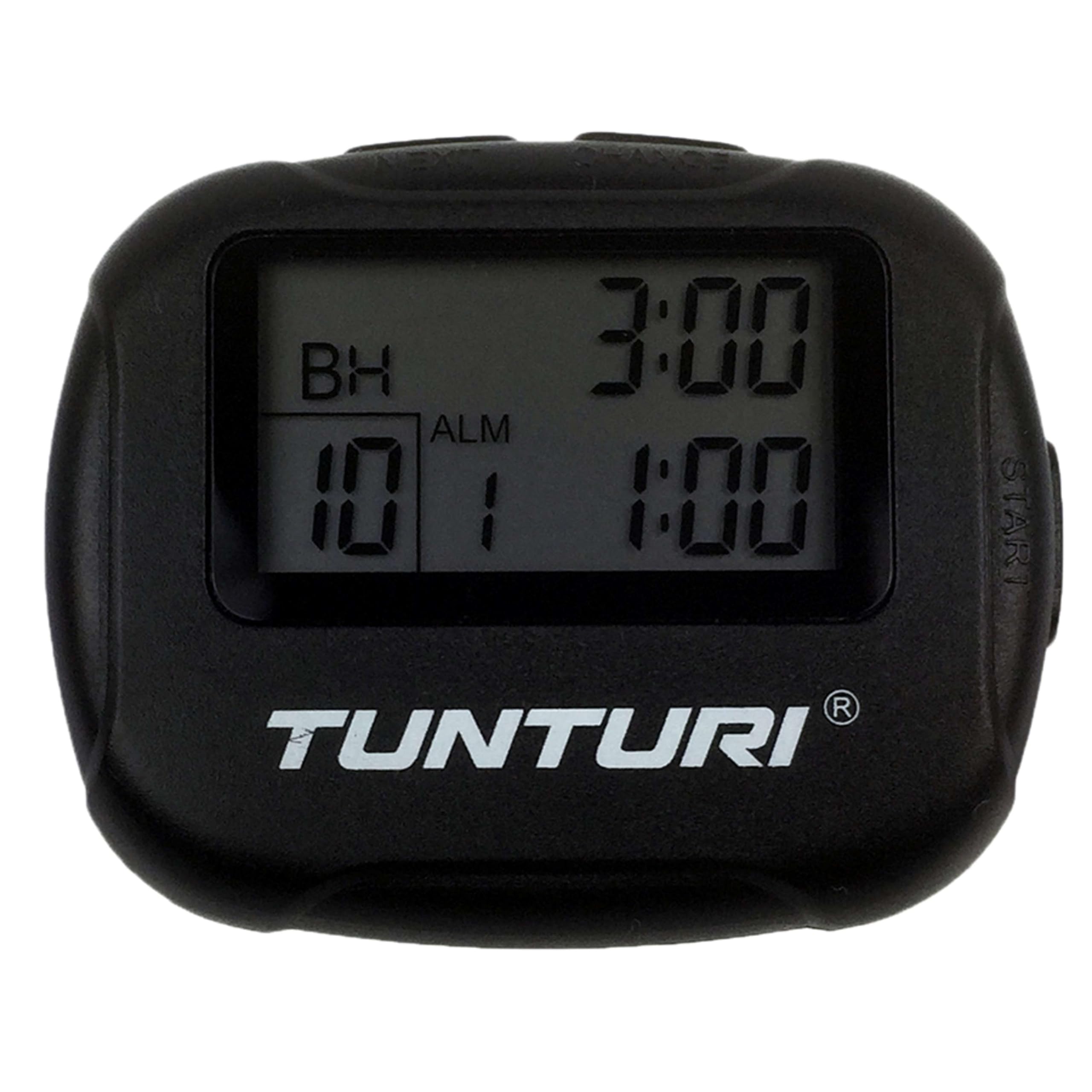
פיגורע 4.1: פראָנט view of the Tunturi Interval Timer, displaying the screen and primary control buttons.
The timer features a clear digital display and intuitive buttons for navigation and setting adjustments. It includes a sturdy clip for attachment to clothing or equipment.

פיגורע 4.2: זייַט view of the timer, showing the robust clip for secure attachment.
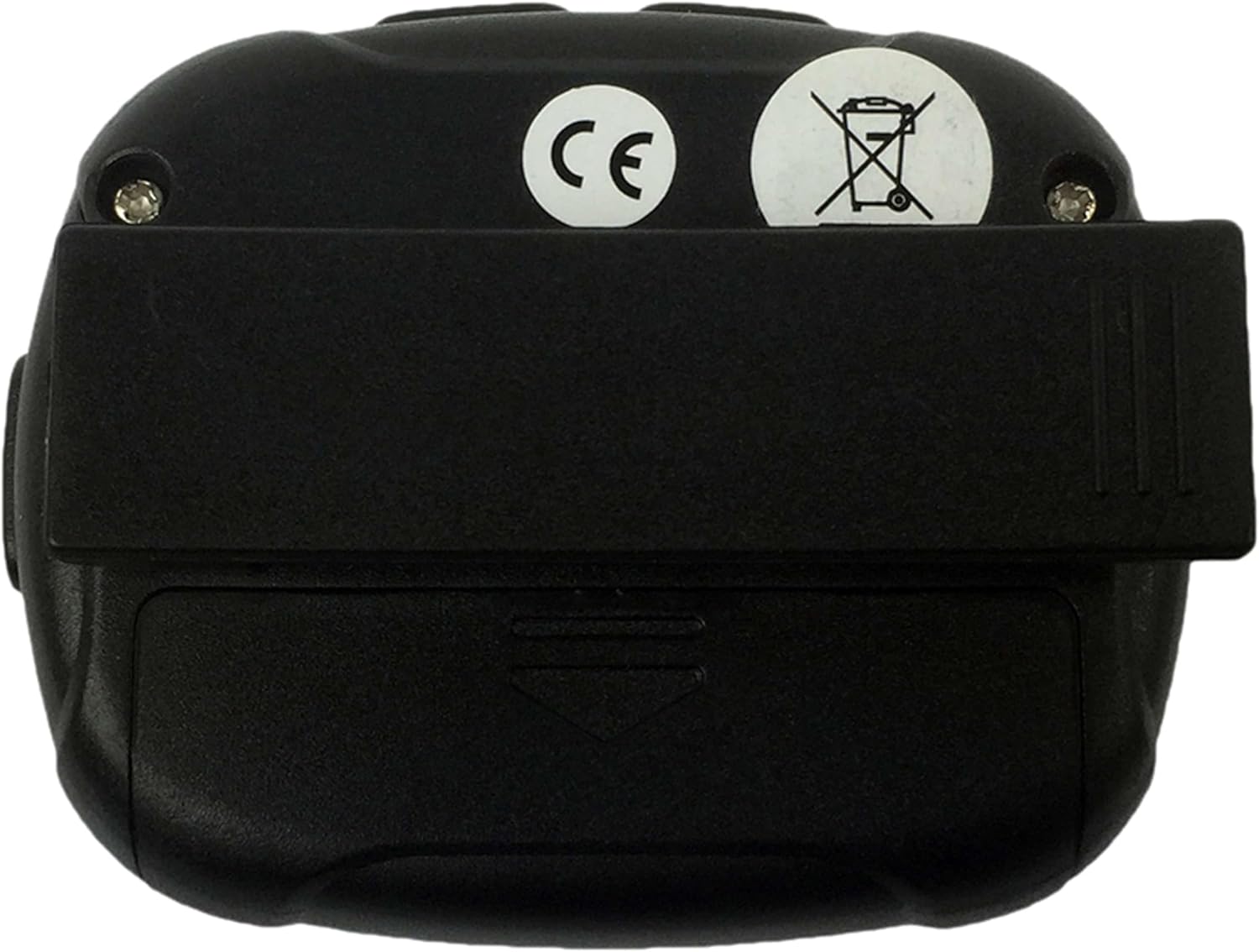
פיגורע 4.3: דערציען view of the timer, illustrating the battery compartment cover and the clip's pivot point.
קנעפּל פאַנגקשאַנז:
- DIRECTIONS: Switches between Interval Timer mode and Stopwatch mode. Also used to confirm settings.
- אָנהייב / האַלטן: Initiates or pauses the timer/stopwatch.
- UP (▲): Increases values during setting adjustments.
- DOWN (▼): Decreases values during setting adjustments.
5. סעטאַפּ
5.1 באַטאַרייע ייַנמאָנטירונג
- Locate the battery compartment on the back of the timer (refer to Figure 4.3).
- Use a small screwdriver or coin to gently open the battery cover.
- Insert one AAA 1.5V battery, ensuring the correct polarity (+/-) as indicated inside the compartment.
- Replace the battery cover and secure it firmly.
- The timer should power on automatically or can be turned on using the MODE button.
6. אַפּערייטינג ינסטרוקטיאָנס
6.1 מאַכט אויף / אַוועק
- To power on, press any button. The timer will typically display the last used mode or a default setting.
- The timer will automatically enter a low-power sleep mode after a period of inactivity to conserve battery. Press any button to wake it up.
6.2 Setting Interval Timer Mode
- דרוק די מאָדע button repeatedly until "TIMER" or a similar indicator for interval mode is displayed.
- דריקן און האַלטן די מאָדע button to enter setting mode. The first adjustable parameter (e.g., Workout Time) will flash.
- ניצן די אַרויף (▲) און אַראָפּ (▼) buttons to adjust the desired workout duration (up to 99 minutes 59 seconds).
- דרוק מאָדע to confirm and move to the next setting (e.g., Rest Time).
- Adjust the rest duration using אַרויף (▲) און אַראָפּ (▼).
- דרוק מאָדע to confirm and move to the number of repetitions (2-99).
- Adjust the number of repetitions using אַרויף (▲) און אַראָפּ (▼).
- דרוק מאָדע to confirm all settings and exit setting mode.
- דרוק אָנהייב / האַלטן to begin the interval sequence. The timer will count down the workout time, then the rest time, and repeat for the set number of repetitions.
- During an interval, press אָנהייב / האַלטן to pause, and press again to resume.
- צו באַשטעטיק די טייַמער, דריקן און האַלטן אָנהייב / האַלטן בשעת פּאָוזד.
6.3 Using Stopwatch Mode
- דרוק די מאָדע button repeatedly until "STOPWATCH" or a similar indicator is displayed. The display should show 00:00:00.
- דרוק אָנהייב / האַלטן to begin timing. The stopwatch will count up.
- דרוק אָנהייב / האַלטן נאכאמאל צו פּויזירן די סטאָפּוואַטש.
- צו נעמענ זיכ ווידער, דריקן אָנהייב / האַלטן.
- To reset the stopwatch to zero, press and hold אָנהייב / האַלטן while it is paused.
6.4 Alarm and Vibration
The timer provides an audible alarm or vibration to signal the end of an interval or a completed request. Specific settings for alarm/vibration may be available in the setup menu, typically toggled using the UP/DOWN buttons when the alarm icon is flashing during setup.
7. וישאַלט
7.1 רייניקונג
- Wipe the timer with a soft, dry cloth.
- פֿאַר פאַרביסן שמוץ, נוצן אַ ביסל דamp שטאָף און מילד זייף, דעמאָלט טרוקן ונ דורך.
- ניצט נישט קיין שאַרפע רייניקונגס-מיטלען, סאָלווענטן אדער שטרענגע כעמיקאַלן.
7.2 סטאָרידזש
- Store the timer in a cool, dry place away from direct sunlight.
- אויב איר לאָזט עס אָפּ פֿאַר אַ לענגערע צײַט, נעמט אַרויס די באַטעריע כּדי צו פֿאַרמײַדן ליקאַדזש.
8. טראָובלעשאָאָטינג
| פּראָבלעם | מעגלעך סיבה | לייזונג |
|---|---|---|
| Timer does not turn on. | Dead or incorrectly inserted battery. | Check battery polarity. Replace battery with a fresh AAA 1.5V battery. |
| דער עקראַן איז טונקל אָדער פליקערט. | נידעריק באַטאַרייע מאַכט. | Replace battery with a fresh AAA 1.5V battery. |
| די קנעפּלעך זענען נישט ריספּאַנדינג. | Device frozen or battery issue. | Remove and reinsert the battery. If problem persists, replace battery. |
| Interval settings do not save. | Settings not confirmed correctly. | Ensure you press the MODE button to confirm each setting and exit the setting mode. |
9. ספּעסאַפאַקיישאַנז
- סאָרט: Tunturi
- מאָדעל: 14TUSCF036
- קאָליר: שוואַרץ
- מאַטעריאַל: גומע
- מאַכט מקור: 1x AAA 1.5V Battery
- Max Interval Time: 99 מינוט 59 סעקונדעס
- איבערחזרן: 2-99
- ינטערוואַלז: 1-2 (Workout/Rest)
- GTIN (גלאבאלע האנדל נומער נומער): 08717842025994
- ASIN: B01MXM3GW7
10. וואָראַנטי
Tunturi products are manufactured to high-quality standards. This product comes with a standard manufacturer's warranty against defects in materials and workmanship. Please refer to the warranty card included with your purchase or visit the official Tunturi webוועבזייטל פֿאַר דעטאַלירטע וואָראַנטי טערמינען און באַדינגונגען ספּעציפֿיש פֿאַר אייער געגנט.
11. שטיצן
For technical assistance, troubleshooting beyond this manual, or warranty claims, please contact Tunturi customer support. Contact information can typically be found on the official Tunturi webוועבזייטל אדער אויף אייער פּראָדוקט פּאַקאַדזשינג.
Webפּלאַץ: www.tunturi.com
Please have your model number (14TUSCF036) and purchase date ready when contacting support.