
1. הקדמה
This manual provides comprehensive instructions for the Angrox Universal Remote Control, models RM-YD103 and RM-YD102. This remote is designed as a replacement for various Sony Bravia HDTV, LCD, LED, and 3D Smart TV models. Please read this manual carefully to ensure proper setup and operation of your new remote control.
2. פּראָדוקט איבערview
The Angrox Universal Remote Control is a high-grade replacement remote, offering stable performance and a comfortable grip. It is designed to function without any programming or complex setup, directly replacing your original Sony remote.
שליסל פֿעיִקייטן:
- קיין פּראָגראַממינג פארלאנגט: Ready to use out of the box after battery installation.
- ערגאָנאָמיק פּלאַן: Compact size with silicone rubber buttons for easy grip and comfortable use.
- סטאַביל פאָרשטעלונג: Ensures reliable operation and a farther transmitting distance.
- גאַנץ פאַנגקשאַנאַליטי: Replaces damaged or old remotes, covering all functions of the original.
קאַמפּאַטאַבילאַטי:
This remote control is compatible with a wide range of Sony Bravia TV models, including but not limited to:
- KDL-32W700B, KDL-40W590B, KDL-40W600B, KDL-42W700B
- KDL46HX750, KDL46HX751, KDL46HX850
- KDL-48W590B, KDL-48W600B, KDL-50W700B
- KDL55HX750, KDL55HX751, KDL55HX850, KDL-55W700B
- KDL-60W610B, KDL-60W630B
- RMYD073, VSX30, VSX31
- XBR55HX950, XBR-55X800B, XBR65HX950, XBR-65X800B
It also replaces other Sony remote models such as RM-YD102, RM-YD028, RM-YD092, RM-YD065, RM-YD063, RM-YD040, RM-YD027, RM-YD026, RM-YD025, RM-YD024, RM-YD021, RM-YD018, RM-YD014, RM-YD005.

פיגור 1: פאָרנט, זייט, און הינטן views of the Angrox Universal Remote Control RM-YD103.
3. סעטאַפּ
3.1 באַטאַרייע ייַנמאָנטירונג
- געפֿינען די באַטאַרייע אָפּטייל אויף די צוריק פון די ווייַט קאָנטראָל.
- רוקט דעם דעקל פונעם באַטעריע־אָפּטייל אַראָפּ אָדער אין דער ריכטונג וואָס ווערט אָנגעוויזן דורך אַ פײַל צו עס עפֿענען.
- Insert two (2) AAA batteries (not included) into the compartment. Ensure the positive (+) and negative (-) terminals of the batteries match the diagrams inside the compartment.
- שטופּט צוריק דעם דעקל פון דעם באַטעריע־אָפּטייל ביז עס קליקט זיכער.
Note: Batteries are not included with the remote control and must be purchased separately.

Figure 2: The Angrox Universal Remote Control RM-YD103 held comfortably in hand.
3.2 ערשט נוצן
The Angrox Universal Remote Control requires no programming or setup. Once the batteries are correctly installed, it is ready for immediate use with your compatible Sony Bravia TV.
4. אַפּערייטינג ינסטרוקטיאָנס
Point the remote control directly at your Sony Bravia TV's infrared receiver. Press the desired buttons to control your television functions.
Common Button Functions:
- מאַכט: טורנס די טעלעוויזיע אויף אָדער אַוועק.
- איינגאבע: אויסקלייבט אריינגאנג קוועלער (HDMI, AV, אאז"וו).
- VOL +/-: אַדזשאַסץ די באַנד מדרגה.
- CH +/-: טוישט טעלעוויזיע קאַנאַלן.
- שטיל: שטומט אדער אנשטומט דעם טעלעוויזיע קלאַנג.
- נומער קנעפּלעך (0-9): Directly selects channels.
- נאַוויגאַציע פּאַד (אַרויף, אַראָפּ, לינקס, רעכטס, אַרייַן): נאַוויגירט מעניוז און סעלעקטירט אָפּציעס.
- היים: Accesses the TV's main menu or Smart TV interface.
- RETURN/BACK: קערט צו די פריערדיקע פאַרשטעלן אָדער מעניו.
- NETFLIX / DISCOVER / APPS: Direct access buttons for specific smart TV functions or applications.
- PLAY / PAUSE / STOP / PREV / NEXT: מעדיע פּלייבאַק קאָנטראָלס.
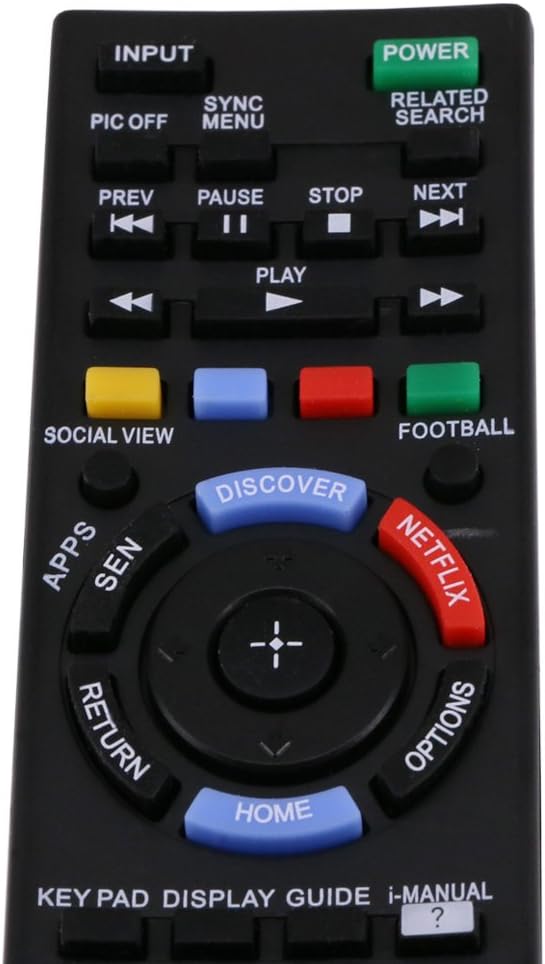
Figure 3: Close-up of the Angrox Universal Remote Control RM-YD103 buttons, highlighting common functions.

Figure 4: The Angrox Universal Remote Control RM-YD103 in active use with a Sony television.
5. וישאַלט
5.1 רייניקונג
צו רייניקן די ווײַטקאָנטראָל, ווישט עס אָפּ מיט אַ ווייכן, טרוקענעם שטאָף. פֿאַר שווערן שמוץ, ווישט עס אַ ביסלampen the cloth with water or a mild, non-abrasive cleaner. Avoid using harsh chemicals or abrasive materials, as these can damage the remote's surface or internal components.
5.2 באַטערי פאַרבייַט
Replace the batteries when the remote control's performance diminishes or it stops responding. Always replace both batteries at the same time with new AAA batteries. Do not mix old and new batteries, or different types of batteries, as this can lead to leakage or malfunction.
5.3 סטאָרידזש
If the remote control will not be used for an extended period, remove the batteries to prevent potential leakage and damage to the device.
6. טראָובלעשאָאָטינג
If you experience issues with your Angrox Universal Remote Control, please refer to the following common problems and solutions:
- Remote is not working:
- זיכער מאַכן אַז די באַטעריעס זענען ריכטיק אַרײַנגעשטעלט מיט דער ריכטיקער פּאָלאַריטעט (+/-).
- פאַרבייַטן אַלטע באַטעריעס מיט נייַע AAA באַטעריעס.
- Check if there is any obstruction between the remote and the TV's infrared receiver.
- Ensure you are within the effective range of the TV's IR receiver.
- Some buttons are not responding:
- This remote is designed to cover all original functions. If a specific button does not work, ensure your TV model supports that function with its original remote.
- Clean the remote control, especially around the unresponsive buttons, to remove any dirt or debris.
- Remote control range is reduced:
- טוישט די באַטעריעס. נידעריקע באַטעריע מאַכט קען רעדוצירן די עפעקטיווע ראַנגע פון די ווייַט קאָנטראָל.
- Ensure there are no strong light sources (like direct sunlight or bright fluorescent lights) interfering with the IR signal.
7. ספּעסאַפאַקיישאַנז
| שטריך | דעטאַל |
|---|---|
| מאָדעל | RM-YD103 |
| טיפּ | Universal Remote Control for Sony LED LCD Smart TV |
| קאָליר | שוואַרץ |
| מאַכט צושטעלן | 2 X AAA באַטעריז (ניט ינקלודעד) |
| קאַנעקטיוויטי טעכנאָלאָגיע | ינפרערעד |
| פּראָדוקט דימענשאַנז | Approx. 15.1 x 5 x 2.6 cm (5.9 x 1.9 x 1.02 inches) / 19.81 x 12.19 x 1.27 cm |
| וואָג | בעערעך. 97 ג |
| פאַבריקאַנט | אַנגראָקס |
8. וואָראַנטי אינפֿאָרמאַציע
The Angrox Universal Remote Control comes with a 60-טאָג וואָראַנטי פֿון דעם קויפֿדאַטום. די וואָראַנטי דעקט פֿאַבריקאַציע־דעפֿעקטן און גאַראַנטירט אַז דער פּראָדוקט פֿונקציאָנירט ווי באַשריבן אונטער נאָרמאַלן באַנוץ. ביטע באַהאַלטן אייער קויפֿבאַווײַז פֿאַר וואָראַנטי־קליימז.
9. שטיצן
For any issues not covered in this manual or for further assistance, please contact Angrox customer support. When contacting support, please provide your product model (RM-YD103 or RM-YD102) and a detailed description of the problem.
מיר זענען קאַמיטאַד צו ענשור דיין צופֿרידנקייט מיט אונדזער פּראָדוקטן.