
1. הקדמה
This manual provides essential instructions for the safe and efficient operation of your beFree Sound BFS-6445 Projection Party Light Dome Subwoofer Bluetooth Portable Speaker. Please read this manual thoroughly before using the product and retain it for future reference.
The beFree Sound BFS-6445 is a versatile portable speaker system featuring a 10-inch subwoofer, Bluetooth connectivity, USB/SD input, FM radio, and a unique projection light dome. It includes a wireless microphone and a remote control for enhanced functionality.
2. פּראָדוקט איבערview
2.1 שליסל פֿעיִקייטן
- 800 Watts Peak Power Output
- 10-inch Subwoofer for deep bass
- 7" x 4.5" LED Light Projection Dome
- בלועטאָאָטה ווירעלעסס קאַנעקטיוויטי
- USB and SD Card Input for media playback
- עפעם ראַדיאָ טונער
- Microphone and Guitar Inputs with priority switch
- Bass, Treble, Echo, Mic Volume, and Guitar Volume Controls
- Built-in Side Handles, Rolling Handle, and Wheels for portability
- Includes Wireless Microphone and Remote Control
2.2 רעדנער קאָמפּאָנענטן און קאָנטראָלס
Refer to the image below for a visual guide to the speaker's main components and control panel.

פיגורע 1: פראָנט view of the beFree Sound BFS-6445 speaker, showing the projection light dome, control panel, 10-inch subwoofer grille, and included wireless microphone and remote control. The inset images highlight the light dome's color variations (green, blue, red), USB/SD card slots, Bluetooth logo, and FM radio icon.
The control panel, located on the top front of the speaker, provides access to various functions including volume, input selection, equalization, and light dome control.
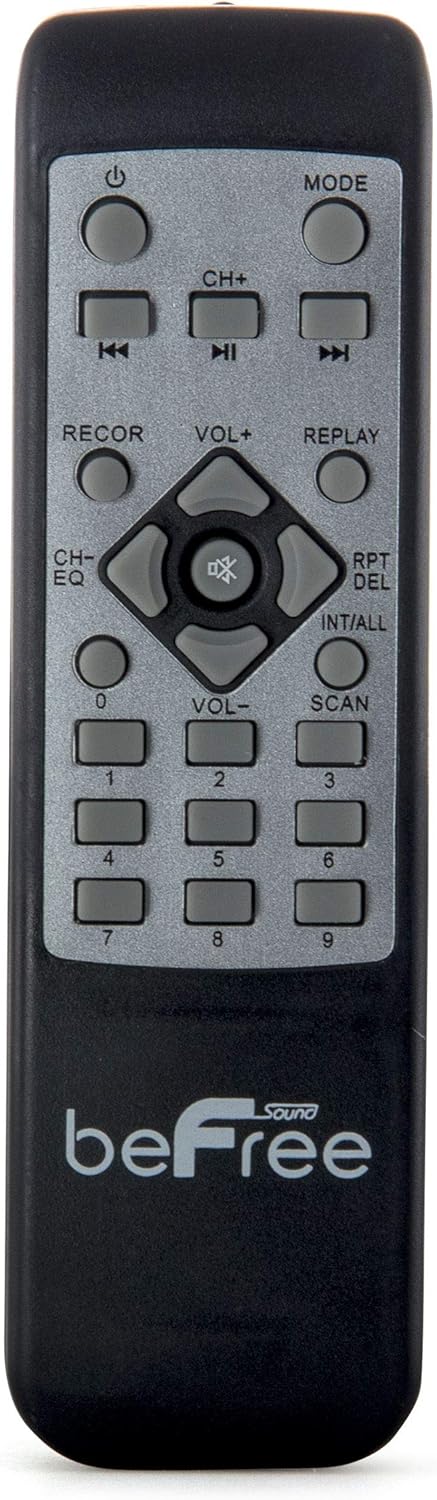
פיגורע 2: נאָענט-אַרויף view of the beFree Sound BFS-6445 remote control. It features buttons for power, mode selection, track navigation, volume adjustment, EQ, record, replay, scan, and numerical input.
The remote control allows for convenient operation of the speaker from a distance.
3. סעטאַפּ
3.1 אַנפּאַקינג און פּלייסמאַנט
- פֿאָרזיכטיק אַרויסנעמען דעם רעדנער און אַלע אַקסעסאָריעס פֿון דער פּאַקאַדזשינג.
- Place the speaker on a stable, flat surface. Ensure adequate ventilation around the unit.
- The speaker is equipped with rolling wheels and an extendable handle for easy transport.
3.2 מאַכט קאַנעקשאַן
- Connect the provided AC power cord to the speaker's AC input port (AC 100-240V, 50/60Hz).
- שטעקט אריין דעם אנדערן עק פונעם עלעקטרישן שנור אין א פאסיגע וואנט-אויסגאבע.
- The speaker can operate on AC power.
3.3 Battery Installation (Remote Control & Wireless Microphone)
- ווייַט קאָנטראָל: Open the battery compartment on the back of the remote control. Insert 2 x AAA batteries, ensuring correct polarity (+/-). Close the compartment.
- ווירעלעסס מיקראָפאָן: Open the battery compartment on the microphone. Insert 2 x AA batteries, ensuring correct polarity (+/-). Close the compartment.
4. אַפּערייטינג ינסטרוקטיאָנס
4.1 מאַכט אויף / אַוועק
דרוק די מאַכט button on the control panel or remote control to turn the speaker on or off.
4.2 איינגאַבע מאָדע אויסוואַל
דרוק די מאָדע button on the control panel or remote control to cycle through available input modes: Bluetooth, USB, SD, FM Radio, and AUX (if an external device is connected via audio input).
4.3 בלועטאָאָטה פּערינג
- Turn on the speaker and select בלועטאָאָטה mode using the MODE button. The display will indicate Bluetooth mode, and a pairing tone may sound.
- אַקטיווירן בלועטוט אויף אייער מאָביל מיטל (סמאַרטפאָן, טאַבלעט, אאז"וו).
- זוכן פֿאַר available Bluetooth devices. The speaker will appear as "beFree Sound BFS-6445" or similar.
- Select the speaker from the list to pair. Once paired, a confirmation tone will sound.
- איר קענט איצט שפּילן אַודיאָ פֿון אייער דעווייס דורך דעם רעדנער.
4.4 USB/SD קאַרטל ווידערשפּיל
- אַרײַנשטעלן אַ USB פלאַש דרייוו אָדער SD קאַרטל אין דעם ריספּעקטיוון שפּאַלט אויף דער קאָנטראָל פּאַנעל.
- דער רעדנער וועט זיך אויטאָמאַטיש איבערקערן צו USB אדער SD מאָדע און אָנהייבן שפּילן קאָמפּאַטיבלע אַודיאָ fileס. אויב נישט, דריק די מאָדע קנעפּל צו אויסקלייבן די ריכטיקע איינגאבע.
- ניצן די שפּיל / פּויזע, פרייַערדיק, און NEXT buttons on the control panel or remote to control playback.
4.5 FM ראַדיאָ אָפּעראַציע
- אויסקלייַבן עפעם ראַדיאָ mode using the MODE button.
- דריקן און האַלטן די יבערקוקן button (often the PLAY/PAUSE button) to automatically scan and save available FM stations.
- ניצן די פרייַערדיק און NEXT קנעפּלעך צו נאַוויגירן דורך די געראַטעוועטע סטאַנציעס.
4.6 מיקראָפאָן און גיטאַרע איינגאַבעס
- Connect a wired microphone to the מיק ינפּוט דזשאַק.
- פאַרבינדן אַ גיטאַרע צו די גיטאַר אַרייַנשרייַב דזשאַק.
- סטרויערן די MIC VOLUME און גיטאַר באַנד knobs on the control panel to set desired levels.
- ניצן די MIC PRIORITY SWITCH to enable or disable microphone priority. When enabled, the music volume will automatically lower when the microphone is in use.
- סטרויערן די ECHO knob for microphone echo effects.
4.7 Light Projection Dome
The speaker features an integrated LED light projection dome. Use the LIGHT POWER SWITCH on the control panel to turn the light dome on or off. The dome projects various colored patterns to enhance the ambiance.
4.8 אַודיאָ אַדזשאַסטמענט
ניצן די באַס און טרעבל knobs on the control panel to adjust the low and high frequencies of the audio output.
די הויפּט באַנד knob controls the overall output level of the speaker.
4.9 Using as Main or Passive Speaker
This speaker supports dual audio input/output, allowing it to be used in conjunction with another unit. Connect the audio output of one speaker to the audio input of another using an AV cable to amplify sound or create a stereo setup.
5. וישאַלט
5.1 רייניקונג
- שטענדיק ארויסנעמען דעם רעדנער פון דער עלעקטרישער ווענטיל איידער איר רייניגט.
- ניצט אַ ווייכן, טרוקענעם שטאָף צו ווישן די אויסערלעכע ייבערפלאַכן פון דעם רעדנער.
- ניצט נישט קיין שרײַבנדיקע רייניגער, וואַקסן אדער סאָלווענטן, ווײַל זיי קענען שאַטן די ענדיקונג.
- Keep the speaker grilles free of dust and debris.
5.2 סטאָרידזש
When not in use for extended periods, store the speaker in a cool, dry place, away from direct sunlight and extreme temperatures. If possible, use the original packaging for protection.
6. טראָובלעשאָאָטינג
| פּראָבלעם | מעגלעך סיבה | לייזונג |
|---|---|---|
| קיין מאַכט | Power cord not connected; outlet not active; power switch off. | Ensure power cord is securely connected. Check wall outlet with another device. Turn the speaker's power switch on. |
| קיין געזונט | Volume too low; incorrect input mode; device not paired (Bluetooth); media error (USB/SD). | Increase master volume. Select the correct input mode. Re-pair Bluetooth device. Check USB/SD card for compatible files and proper insertion. |
| בלועטאָאָטה איז נישט קאַנעקטינג | Speaker not in Bluetooth mode; device too far; interference; speaker already paired to another device. | זיכער מאַכן אַז דער רעדנער איז אין בלוטוט מאָדע. ריקט דעם מיטל נענטער צום רעדנער. מאַכט אויס אַנדערע בלוטוט דעוויסעס. דיסקאָנעקט זיך פון פריערדיקן מיטל. |
| מיקראָפאָן טוט נישט אַרבעטן | Microphone not powered; volume too low; incorrect input. | Check microphone batteries (if wireless) or connection (if wired). Increase MIC VOLUME. Ensure MIC PRIORITY switch is set correctly. |
| Light dome not working | Light power switch off. | Ensure the LIGHT POWER SWITCH is in the ON position. |
7. ספּעסאַפאַקיישאַנז
- רעדנער טיפּ: סובוואָאָפער
- רעדנער גרייס: 10 אינטשעס
- רעדנער מאַקסימום רעזולטאַט מאַכט: 800 וואטס
- קאַנעקטיוויטי טעכנאָלאָגיע: בלועטאָאָטה, וסב
- ספּעציעלע פֿעיִקייטן: Portable, Projection Light Dome, FM Radio, USB/SD Input, Microphone/Guitar Input
- קאָנטראָל אופֿן: Remote, On-unit controls
- מאַכט מקור: אַק 100-240 וו, 50/60 הז
- פּראָדוקט גרייסן (ד x ב x ה): 13.5" x 12.5" x 29.75"
- נומער וואָג: 30.3 פונט
- רימאָוט קאָנטראָל באַטעריז: 2 X AAA (אַרייַנגערעכנט)
- Wireless Microphone Batteries: 2 x AA (אַרייַנגערעכנט)
- מאָדעל נומער: BFS-6445
- UPC: 602573151884
8. וואָראַנטי און שטיצן
beFree Sound products are designed for reliability and performance. For warranty information, technical support, or service inquiries, please refer to the warranty card included with your purchase or contact beFree Sound customer service directly.
ביטע האַלטן דיין דערווייַז פון קויפן פֿאַר וואָראַנטי קליימז.