
Vanxse BX08
Vanxse CCTV HD 960H 8mm CS Lens Bullet Box Security Camera User Manual
מאָדעל: BX08
1. הקדמה
This manual provides detailed instructions for the installation, operation, and maintenance of your Vanxse CCTV HD 960H 8mm CS Lens Bullet Box Security Camera. Please read this manual thoroughly before use to ensure proper functionality and longevity of the product.
2. פּראָדוקט איבערview
2.1 פּראָדוקט פֿעיִקייטן
- 1/3 Color Super HAD CCD Effio-E processor with 1000TVL resolution.
- Equipped with an 8mm fixed CS lens for focused surveillance.
- 960H CCTV Bullet Box Camera design.
- Suitable for various environments including stores, homes, offices, and factories.
2.2 קאַמעראַ קאָמפּאָנענטן
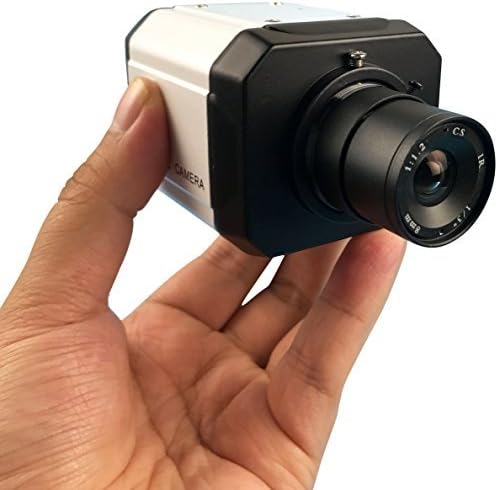
Figure 1: The Vanxse CCTV HD 960H Bullet Box Camera, held in a hand, highlighting its 8mm CS lens and robust casing.
3. טעכניש ספּעסאַפאַקיישאַנז
| שטריך | באַשרייַבונג |
|---|---|
| בילד סענסאָר | 1/3 Color Super HAD CCD Effio-E processor |
| טעלעוויזיע סיסטעם | NTSC video System |
| Effective Pixels (NTSC) | 976(H)x494(V) |
| לענס | Built-in 8mm Fixed CS Lens |
| האָריזאָנטאַל האַכלאָטע | 1000 טוול |
| מינימום יללומינאַטיאָן | 1.0Lux F=1.2 (0Lux with IR on) |
| ווידעא רעזולטאַט | 1.0Vp-p.75Ω. BNC Connector |
| אַגק (אָטאַמאַטיק געווינען קאָנטראָל) | אַוטאָ |
| ווייסע באַלאַנס | אַוטאָ |
| באַקלייט פאַרגיטיקונג | אַוטאָ |
| ויסשטעלן מאָדע | EE (Electronic Exposure) |
| עלעקטראָניש לאָדן | 1/60 - 1/100000 סעק. |
| מאַכט צושטעלן | DC12V2A |
| סינק. סיסטעם | אינערלעכער סינגקראַנאַזיישאַן |
| דימענסיעס (L X W X H) | 30 X 19.99 X 10.01 סענטימעטער |
| וואָג | 340 ג |
| מאָדעל נומער | BX08 |
| פאָרם פאַקטאָר | קויל |
| Voltage | 12 וואלטס |
| וואָסtage | 3 וואטס |
| קאַנעקטיוויטי פּראָטאָקאָל | Wi-Fi (for control, video via BNC) |
4. סעטאַפּ און ייַנמאָנטירונג
4.1 אַנפּאַקינג און דורכקוק
- קערפאַלי אַראָפּנעמען די אַפּאַראַט פון זייַן פּאַקקאַגינג.
- Inspect the camera for any visible damage.
- Verify that the camera unit is present.
4.2 מאָונטינג די אַפּאַראַט
- Select a suitable location for surveillance, ensuring a clear and unobstructed field of view.
- Securely mount the camera using appropriate hardware (not included). The bullet form factor is designed for versatile wall or ceiling mounting.
4.3 מאַכט קאַנעקשאַן
- Connect a DC12V2A power adapter (not included) to the camera's power input port.
- Ensure the power source is stable and matches the camera's voltagE און קראַנט באדערפענישן.
4.4 Video Output Connection
- Connect the camera's BNC video output connector to your DVR (Digital Video Recorder) or monitor using a BNC cable (not included).
- Ensure the connection is secure to prevent signal loss.
4.5 אָביעקטיוו אַדזשאַסטמאַנט
This model features a fixed 8mm CS lens, which does not require manual focus or zoom adjustment. The lens is pre-set for optimal performance at its specified focal length.

פיגור 2: א זייט view of the Vanxse CCTV HD 960H Bullet Box Camera, illustrating the lens assembly and the robust housing.
5. אַפּערייטינג ינסטרוקטיאָנס
5.1 יקערדיק אָפּעראַציע
- Once properly connected and powered, the camera will automatically begin capturing video.
- The camera features automatic gain control (AGC), white balance, backlight compensation, and electronic exposure (EE) for optimal image quality under varying light conditions without user intervention.
- The video output is in standard NTSC format, compatible with most DVRs and monitors supporting this standard.
6. רוטין וישאַלט
6.1 רייניקן די לינז
- Periodically clean the camera lens with a soft, lint-free cloth to ensure clear image quality. Avoid using abrasive cleaners or harsh chemicals, which can damage the lens coating.
6.2 Power Supply Check
- Regularly inspect the power adapter and all cable connections to ensure they are secure and free from damage. A stable power supply is crucial for consistent operation.
6.3 ענוויראָנמענטאַל קאַנסידעריישאַנז
- Protect the camera from extreme temperatures, direct water exposure (unless specifically rated for outdoor use), and physical impact. Ensure proper ventilation if installed in an enclosed space.
7. טראָובלעשאָאָטינג
7.1 No Image Display
- טשעק מאַכט: Ensure the DC12V2A power adapter is correctly connected to the camera and a functional power outlet.
- Check Video Connection: Verify that the BNC cable is securely connected between the camera and your DVR/monitor. Try a different cable if available.
- אַרייַנשרייַב סעלעקציע: Confirm your DVR or monitor is set to the correct video input channel for the camera.
7.2 שלעכטע בילד קוואַליטעט
- ריין לענס: Dust, smudges, or condensation on the lens can significantly degrade image quality. Clean the lens as described in the Maintenance section.
- לייטינג טנאָים: While the camera has auto-adjustments, extremely low light conditions without adequate ambient or IR illumination can result in a grainy or dark image. Excessive backlight can also cause issues.
- קאַבלע קוואַליטעט: A damaged or low-quality BNC cable can introduce noise or interference into the video signal. Consider replacing the cable.
8. וואָראַנטי און שטיצן
8.1 וואָראַנטי אינפֿאָרמאַציע
Specific warranty details for your Vanxse CCTV HD 960H camera are typically provided at the point of purchase or included with the product packaging. Please retain your proof of purchase, such as a receipt or invoice, as it is required for any warranty claims.
8.2 קונה שטיצן
For technical assistance, troubleshooting beyond this manual, or further inquiries regarding your product, please contact your retailer or the manufacturer's customer support channels. Refer to the product packaging or the manufacturer's official website for up-to-date contact information.
Ask a question about this manual
Ask about setup, troubleshooting, compatibility, parts, safety, or missing instructions. Manuals+ will review the question and use this page’s manual context to help answer it.