
1. וויכטיק סאַפעטי אינסטרוקציעס
Please read all safety instructions carefully before using the Vivitek Qumi Q3 Plus-RD projector. Failure to follow these instructions may result in electric shock, fire, or damage to the device.
- מאַכט מקור: Use only the supplied AC power adapter. Ensure the voltage פּאַסט צו די פּראָיעקטאָר'ס רעקווייערמענץ.
- ווענטילאַטיאָן: בלאָקירט נישט די ווענטילאַציע עפענונגען. האַלט גענוג פּלאַץ אַרום דעם פּראָיעקטאָר פֿאַר געהעריקן לופטפלוס צו פאַרמייַדן איבערהיצונג.
- נעץ: Do not expose the projector to rain, moisture, or operate it near water.
- היץ: Avoid placing the projector near heat sources such as radiators, heat registers, stoves, or other apparatus that produce heat.
- רייניקונג: Unplug the projector from the power outlet before cleaning. Use a dry cloth for cleaning. Do not use liquid cleaners or aerosol cleaners.
- סערוויס: דו זאלסט נישט פּרווון צו דינען דעם פּראָדוקט זיך. קאָנטאַקט אַלע קוואַלאַפייד סערוויס פּערסאַנעל.
- אויג זיכערקייַט: קוק נישט גלייך אריין אין די פּראָיעקטאָר לינז ווען די לamp איז אָן. די העלע ליכט קען שאַטן די אויגן.
2. פּעקל אינהאַלט
Verify that all items listed below are included in your Vivitek Qumi Q3 Plus-RD package:
- Vivitek Qumi Q3 Plus-RD Projector
- AC Power Adapter with Cable
- HDMI קאַבלע
- Documentation Kit (Quick Start Guide, Warranty Card)

Image: The AC power adapter and cable for the Vivitek Qumi Q3 Plus-RD projector.
3. פּראָדוקט איבערview
Familiarize yourself with the components and ports of your Vivitek Qumi Q3 Plus-RD projector.
3.1 פראָנט View

בילד: פראָנט view of the Vivitek Qumi Q3 Plus-RD projector, showing the projection lens and speaker grille.
3.2 דערציען View (Ports and Connections)

בילד: הינטערשטע view of the Vivitek Qumi Q3 Plus-RD projector, displaying various input/output ports including AV IN, USB 1, USB 2, HDMI, DC IN power input, microSD card slot, and the power button.
3.3 זייַט View

בילד: זייט view of the Vivitek Qumi Q3 Plus-RD projector, showing the ventilation grilles and the integrated kickstand for angle adjustment.
3.4 רימאָוט קאָנטראָל
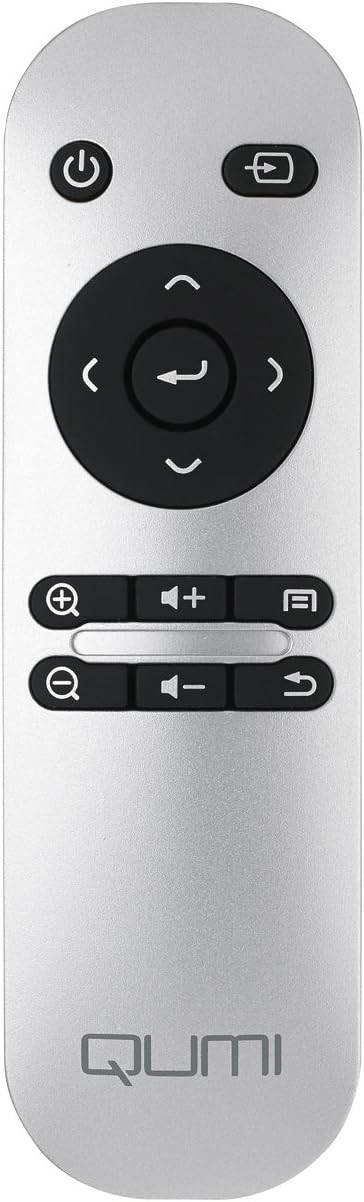
Image: The remote control for the Vivitek Qumi Q3 Plus-RD projector, featuring power, navigation, volume, and focus adjustment buttons.
4. סעטאַפּ
Follow these steps to set up your Vivitek Qumi Q3 Plus-RD projector for first use.
- מאַכט קשר: Connect the supplied AC power adapter to the 'DC IN' port on the projector and then plug it into a power outlet. The projector can also operate on its internal battery.
- אָרט: Place the projector on a stable, flat surface. Use the integrated kickstand to adjust the projection angle if needed. Ensure there are no obstructions to the lens or ventilation openings.
- מאַכט אויף: Press and hold the power button on the projector or the remote control to turn on the device.
- פאָקוס אַדזשאַסטמאַנט: Once powered on, use the focus buttons on the remote control to adjust the image sharpness. The Qumi Q3 Plus-RD features motorized focus for precise adjustment.
- Keystone Correction: The projector features digital auto keystone correction. If the image appears trapezoidal, the projector will automatically adjust it. Manual adjustment options may be available in the settings menu.
5. אַפּערייטינג ינסטרוקטיאָנס
This section details how to operate your Vivitek Qumi Q3 Plus-RD projector.
5.1 פּאַוערינג אויף / אַוועק
- צו מאַכט אויף: Press and hold the power button on the projector or the remote control until the device starts.
- צו מאַכט אַוועק: Press the power button on the projector or the remote control. A shutdown prompt will appear. Select 'Power Off' to shut down the system safely.
5.2 נאַוויגירן די אַנדרויד אָפּערירן סיסטעם
The Qumi Q3 Plus-RD runs on an Android operating system. Use the remote control's navigation buttons (up, down, left, right, OK) to move through menus and select options. A Bluetooth keyboard/mouse can also be paired for easier navigation.
5.3 מעדיע ווידערשפּיל
- USB דרייוו: Insert a USB flash drive into one of the USB ports. The system will typically detect it and prompt you to open the file בלעטערער אָדער מידיאַ שפּילער.
- מיקראָסד קאָרט: Insert a microSD card into the microSD slot. Similar to USB, the system will allow you to access its contents.
- אינערלעכער סטאָרידזש: The projector has 5.1 GB of available on-board memory for storing files און אַפּלאַקיישאַנז.
5.4 Connecting External Devices (HDMI)
To connect an external device such as a laptop, Blu-ray player, or gaming console:
- Connect one end of an HDMI cable to the HDMI port on the projector.
- Connect the other end of the HDMI cable to the HDMI output port on your external device.
- On the projector's home screen, navigate to the input selection and choose 'HDMI'.
6. קאַנעקטיוויטי
The Vivitek Qumi Q3 Plus-RD offers various connectivity options for seamless integration with your devices.
6.1 Wi-Fi סעטאַפּ
- פֿון דער היים־עקראַן, גייט צו 'סעטטינגס'.
- אויסקלייבן 'Wi-Fi' און עס אנצינדן.
- קלייַבט אייער געוואונטשענע Wi-Fi נעץ פֿון דער רשימה פֿון פֿאַראַן נעטוואָרקס.
- Enter the network password if prompted and connect.
6.2 בלועטאָאָטה פּערינג
You can pair Bluetooth devices such as external speakers, headphones, or a keyboard/mouse with your projector.
- פֿון דער היים־עקראַן, גייט צו 'סעטטינגס'.
- Select 'Bluetooth' and turn it on.
- שטעלן דיין בלועטאָאָטה מיטל אין פּערינג מאָדע.
- Select your device from the list of available devices on the projector and confirm pairing.
6.3 Wireless Content Sharing
The projector supports wireless content sharing from Android and iOS devices. Refer to the projector's specific application (e.g., HappyCast or similar pre-installed app) for detailed instructions on mirroring your device's screen.
7. וישאַלט
געהעריגע אויפהאלטונג גאראנטירט די לאנגעוויטי און אפטימאלע פערפארמאנס פון אייער פראיעקטאר.
- לענס רייניקונג: ווישט אָפּ די פּראָיעקטאָר לינז מיט אַ ווייכן, לינט-פֿרײַעם שטאָף ספּעציעל דיזיינד פֿאַר אָפּטישע פֿלאַכן. ניצט נישט קיין שאַרפֿע מאַטעריאַלן אָדער שאַרפֿע כעמיקאַלן.
- ווענטילאַטיאָן: Regularly check that the ventilation openings are clear of dust and debris. Use a soft brush or compressed air to clean them.
- באַטערי זאָרגן: For models with an internal battery, avoid fully discharging the battery frequently. If storing the projector for an extended period, charge the battery to approximately 50% to prolong its lifespan.
- סטאָרידזש: Store the projector in a cool, dry place away from direct sunlight and extreme temperatures.
8. טראָובלעשאָאָטינג
If you encounter issues with your Vivitek Qumi Q3 Plus-RD, refer to the following common problems and solutions.
- No Image Projected:
- זיכער מאַכן אַז דער פּראָיעקטאָר איז אנגעצינדן און די לענס דעקל איז אַוועקגענומען.
- Check the input source selection to ensure it matches the connected device (e.g., HDMI, USB).
- Verify that the external device is powered on and outputting a signal.
- קיין קול:
- אַדזשאַסטירן דעם באַנד אויף דעם פּראָיעקטאָר און דעם פֿאַרבונדענעם מקור־אַפּאַראַט.
- Check if external speakers are connected via Bluetooth or AV IN, and ensure they are powered on and functioning.
- Ensure the audio output settings on the source device are correctly configured.
- רימאָוט קאָנטראָל ניט ריספּאַנדינג:
- Ensure there are no obstructions between the remote and the projector's IR receiver (located at the rear).
- Replace the remote control battery (typically a coin cell battery).
- Wi-Fi/בלוטוט קאנעקטיוויטי פראבלעמען:
- Ensure Wi-Fi/Bluetooth is enabled in the projector's settings.
- ריסטאַרט דעם פּראָיעקטאָר און די דעוויס וואָס איר פּרוּווט צו פֿאַרבינדן.
- קוק פֿאַר ינטערפיראַנס פון אנדערע וויירליס דעוויסעס.
- בילד איז פארשוואומען:
- Use the remote control's focus buttons to adjust the image sharpness.
- זיכער מאַכן אַז די פּראָיעקציע־איבערפֿלאַך איז גלאַט און דער פּראָיעקטאָר איז סטאַביל.
9. ספּעסאַפאַקיישאַנז
Key technical specifications for the Vivitek Qumi Q3 Plus-RD projector:
| שטריך | באַשרייַבונג |
|---|---|
| מאָדעל נומער | Q3 PLUS-RD |
| ווייַז טיפּ | DLP |
| געבוירן ווייַז האַכלאָטע | 1280 רענטגענ 720 (HD 720 פּ) |
| ברייטנאַס | אַרויף צו קסנומקס לומענס |
| קאַנטראַסט פאַרהעלטעניש | 5,000:1 |
| קאַנעקטיוויטי טעכנאָלאָגיע | בלועטוט, HDMI, Wi-Fi |
| ספּעציעלע פֿעיִקייטן | Bluetooth, Portable, Android OS |
| אָפּערייטינג סיסטעם | Android V.4.42 |
| קפּו | Quad-core CPU at 1.5GHz |
| אינערלעכער סטאָרידזש | 5.1 GB available |
| באַטערי | 1 ליטהיום פּאָלימער באַטאַרייע (אַרייַנגערעכנט) |
| פּראָדוקט דימענשאַנז | 6.9 X 4 X 1.1 אינטשעס |
| פּונקט וואָג | 1 פונט |
10. וואָראַנטי און שטיצן
The Vivitek Qumi Q3 Plus-RD projector comes with a standard manufacturer's warranty. For detailed warranty information, please refer to the documentation kit included with your product or visit the official Vivitek webפּלאַץ.
For technical support, troubleshooting assistance, or service inquiries, please contact Vivitek customer support through their official channels. Keep your product's model number (Q3 PLUS-RD) and serial number handy when contacting support.