
1. הקדמה
The Centralite Pearl Thermostat is designed to provide precise temperature control with an intuitive touch interface. It integrates seamlessly with various smart home platforms using ZigBee connectivity, offering efficient management of residential HVAC systems. This manual provides essential information for installation, operation, and maintenance of your Pearl Thermostat.
2. שליסל פֿעיִקייטן
- Compatible with SmartThings, Spectrum, Cox, Time Warner Cable, Vera, and ZigBee platforms.
- Supports up to 2-stagE היץ און 2-stage cool HVAC systems.
- Designed for quick installation, typically within 15 minutes.
- Features a built-in power amplifier for extended wireless range.
- Equipped with responsive touch controls for user interaction.
3. פּעקל אינהאַלט
באַשטעטיקן אַז אַלע זאכן זענען פאַראַן אין דיין פּעקל:
- Pearl Thermostat
- מאָונטינג סקרוז (4)
- אַאַ באַטעריז (4)
- שנעל אָנהייב גייד
- וויירינג לאַבעלס
4. ינסטאַלירונג
איידער איר הייבט אן די אינסטאַלאַציע, זיכערט זיך אז די מאַכט צו אייער HVAC סיסטעם איז אויסגעלאָשן ביים קרייז ברעאַקער צו פאַרמייַדן עלעקטרישע קלאַפּ.
4.1 Mounting the Backplate
- Carefully remove your old thermostat from the wall. Note the wiring connections before disconnecting.
- Mount the Pearl Thermostat backplate to the wall using the provided mounting screws. Ensure it is level.
4.2 וויירינג
The Pearl Thermostat features quick-connect terminals for tool-free wiring. Match the wires from your HVAC system to the corresponding terminals on the thermostat backplate. Use the included wiring labels for identification.

פיגורע 1: דערציען view of the Pearl Thermostat backplate, illustrating battery compartments and quick-connect wiring terminals for HVAC system connection.
Common wiring configurations include:
- ר/רק/רה: 24V AC power (usually red wire)
- C: Common wire (for continuous 24V power, often blue or black)
- W/W1: Heat (usually white wire)
- יאָר/יאָר 1: Cool (usually yellow wire)
- G: Fan (usually green wire)
- אָ / ב: Reversing valve for heat pumps
Insert each stripped wire end into its corresponding terminal until it is securely held.
4.3 באַטאַרייע ייַנמאָנטירונג
Insert the four AA batteries into the designated compartments on the back of the thermostat unit. Ensure correct polarity.
4.4 Attaching the Thermostat
Align the thermostat unit with the mounted backplate and gently push until it clicks into place. Restore power to your HVAC system at the circuit breaker.
5. אַפּערייטינג ינסטרוקטיאָנס
The Pearl Thermostat features a clear LCD display and intuitive touch controls for easy operation.

פיגורע 2: פראָנט view of the Pearl Thermostat, highlighting the digital display and touch-sensitive buttons for Mode, Hold, and Fan functions.
5.1 אַדזשאַסטירן טעמפּעראַטור
ניצן די + און - touch areas on the right side of the thermostat to increase or decrease the desired temperature set point.
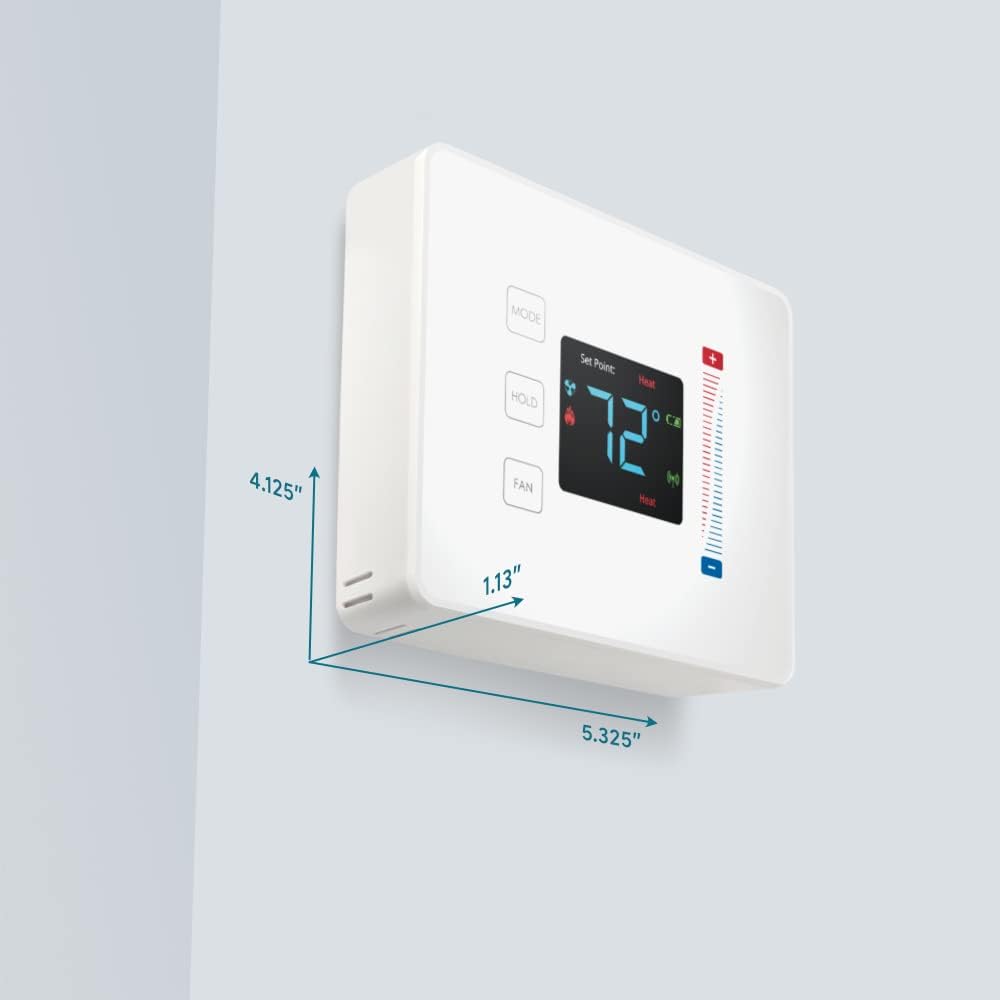
Figure 3: User interaction with the Pearl Thermostat's touch screen to modify temperature settings.
5.2 מאָדע סעלעקציע
דרוק די מאָדע button to cycle through available operating modes: Heat, Cool, Auto, Off.
5.3 האַלטן פֿונקציע
דרוק די האַלטן button to maintain the current temperature setting indefinitely, overriding any programmed schedules. Press again to release the hold and resume the schedule.
5.4 פאָכער קאָנטראָל
דרוק די פאָכער button to cycle through fan settings: Auto (fan runs only when heating or cooling) or On (fan runs continuously).
6. וישאַלט
6.1 באַטערי פאַרבייַט
The Pearl Thermostat is powered by four AA batteries. When the battery level is low, a low battery indicator will appear on the display. To replace batteries:
- Gently pull the thermostat unit off its backplate.
- Remove the old AA batteries and dispose of them properly.
- אַרײַנשטעלן פֿיר נײַע AA אַלקאַלײַן באַטעריעס, און זיכער מאַכן אַז די פּאָלאַריטעט איז ריכטיק.
- Reattach the thermostat unit to the backplate.
Regular battery replacement ensures uninterrupted operation and maintains ZigBee connectivity.
6.2 רייניקונג
ווישט די טערמאָסטאַט'ס ייבערפלאַך מיט אַ ווייכן, דamp cloth. Avoid using abrasive cleaners or solvents, as these can damage the display and finish.
7. טראָובלעשאָאָטינג
If you encounter issues with your Pearl Thermostat, refer to the following common troubleshooting steps:
- קיין אַרויסווייַז/מאַכט: Check if the AA batteries are correctly installed and fully charged. Ensure power to the HVAC system is on at the circuit breaker.
- HVAC סיסטעם רעאגירט נישט: Verify that the wiring connections to the backplate are secure. Confirm the thermostat is in the correct operating mode (Heat/Cool/Auto).
- Connectivity Issues (ZigBee): Ensure your smart home hub is powered on and within range. Refer to your smart home hub's instructions for device pairing. You may need to initiate a re-pairing process.
- אומרעכטע טעמפּעראַטור מעסטונגען: זיכער מאַכן אַז דער טערמאָסטאַט איז נישט אויסגעשטעלט צו דירעקטער זונשייַן, דראַפט, אָדער היץ קוועלער וואָס קענען אַפעקטירן זיין אינעווייניקסטן סענסאָר.
- Thermostat Not Responding to Touch: Gently clean the screen surface. If the issue persists, try removing the thermostat from its backplate, waiting 30 seconds, and reattaching it to perform a soft reset.
8. ספּעסאַפאַקיישאַנז

Figure 4: Dimensions of the Centralite Pearl Thermostat.
| באַשרייַבונג | דעטאַל |
|---|---|
| סאָרט | סענטראַלייט |
| מאָדעל נאָמען | Centralite Pearl Thermostat |
| מאָדעל נומער | 3000-wC |
| קאָנטראָללער טיפּ | SmartThings, Vera |
| קאָליר | ווייַס |
| טעמפּעראַטור קאָנטראָל טיפּ | פּראָגראַממאַבלע, דיגיטאַל |
| קאַנעקטיוויטי טעכנאָלאָגיע | זיגבעע |
| מאַכט מקור | Battery Powered (4 AA batteries, included) |
| פּונקט וואָג | 0.97 פונט (אומגעפער 15.5 אונסעס) |
| Voltage | 230 Volts (HVAC system) |
| מאַטעריאַל | פּערל |
| ווייַז טיפּ | לקד |
| ענדיקן טיפּ | אַטלעס |
| קאָנטראָל טיפּ | טאָוטשפּאַד קאָנטראָל |
| קאָנטראָל מעטאָד | אַפּ |
| מאַונטינג טיפּ | וואנט בארג |
| באַקלייט | יא |
| פּראָדוקט דימענשאַנז (L x W x H) | 5.33 X 1.13 X 4.13 אינטשעס |
| UPC | 812489022264 |
9. וואָראַנטי און שטיצן
For warranty information and technical support, please refer to the documentation included with your product or visit the official Centralite webזייטל. האַלט אייער קויף קוויטל ווי אַ באַווייַז פון קויפן.