
1. הקדמה
א דאנק פארן קויפןasing the Metronic Gulli 477148 CD-MP3 Player with USB Port. This portable audio device is designed for ease of use, allowing you to enjoy your favorite music from various sources including CDs, CD-R/RW, MP3 discs, and USB flash drives. This manual provides detailed instructions to help you set up, operate, and maintain your device for optimal performance.

פיגורע 1: פראָנט view of the Metronic Gulli 477148 CD-MP3 Player.
2. זיכערקייַט אינפֿאָרמאַציע
ביטע ליינט אלע זיכערהייט אינסטרוקציעס קערפול איידער איר ניצט דעם פראדוקט. האלט דעם מאנואל פאר שפעטערדיגע רעפערענץ.
- מאַכט מקור: ניצט נאָר דעם ספּעציפֿירטן מאַכט אַדאַפּטער אָדער באַטעריעס. זיכערט זיך אַז דער וואָלומען איזtage שוועבעלעך די רעקווירעמענץ פון די מיטל.
- וואַסער און נעץ: Do not expose the device to rain, moisture, or immerse it in water.
- היץ: האַלט דעם אַפּאַראַט אַוועק פֿון היץ־קוואַלן ווי ראַדיאַטאָרן, היץ־רעגיסטערס, אויוון, אָדער אַנדערע אַפּאַראַטן (אַרייַנגערעכנט ampליפיערס) וואָס פּראָדוצירן היץ.
- ווענטילאַטיאָן: בלאָקירט נישט קיין ווענטילאַציע עפענונגען. אינסטאַלירט לויט די אינסטרוקציעס פונעם פאַבריקאַנט.
- רייניקונג: ריין בלויז מיט אַ טרוקן שטאָף.
- סערוויס: דו זאלסט נישט פּרווון צו דינען דעם פּראָדוקט זיך. קאָנטאַקט אַלע קוואַלאַפייד סערוויס פּערסאַנעל.
- כעדפאָונז: ויסמיידן צוגעהערט אין הויך באַנד לעוועלס פֿאַר עקסטענדעד פּיריאַדז צו פאַרמייַדן געהער שעדיקן.
3. פּראָדוקט איבערview
Familiarize yourself with the various parts and controls of your CD-MP3 player.
3.1 פראָנט פּאַנעל קאָנטראָלס און פּאָרץ

Figure 2: Front panel with controls and ports.
- Volume Up/Down Buttons (V+/V-): אַדזשאַסטירן די פּלייבאַק באַנד.
- LCD ווייַז: Shows track number, time, mode, and ID3 tag אינפֿאָרמאַציע.
- מאָדע קנעפּל: Switches between CD, USB, and other available modes.
- שפּיל / פּויזע קנעפּל: סטאַרץ אָדער פּאָזאַז פּלייבאַק.
- האַלטן קנעפּל: סטאַפּס פּלייבאַק.
- פריערדיגע/צוריקשפּײַלן קנעפּל: Skips to the previous track or rewinds the current track.
- ווייטער/שנעל פאָרווערטס קנעפּל: Skips to the next track or fast forwards the current track.
- כעדפאָון דזשאַק (3.5 מם): פאַרבינדן כעדפאָונז פֿאַר פּריוואַט צוגעהערט.
- AUX אַרייַנשרייַב: פאַרבינדן פונדרויסנדיק אַודיאָ דעוויסעס.
- וסב פּאָרט: פֿאַרבינדט אַ USB פֿלאַש דרייוו פֿאַר MP3 ווידערשפּיל.
3.2 דערציען פּאַנעל

Figure 3: Rear panel with power input.
- אַק מאַכט אַרייַנשרייַב: Connect the provided AC power adapter.
- באַטערי אָפּטייל: (Located on the bottom, not visible in this image) Insert batteries for portable use.
4. סעטאַפּ
4.1 מאַכט די מיטל
The Metronic Gulli 477148 can be powered by either an AC adapter or batteries.
- AC מאַכט: Connect the supplied AC power adapter to the AC power input on the rear of the unit and plug the other end into a standard wall outlet.
- באַטאַרייע מאַכט: Open the battery compartment (usually on the bottom of the unit). Insert 6 x 1.5V C-type batteries (not included), ensuring correct polarity (+/-). Close the battery compartment securely.
4.2 ערשט מאַכט אויף
דרוק די מאַכט אויף / אַוועק button (if available, otherwise the Mode button usually powers it on) to turn on the device. The LCD display will illuminate.
5. אַפּערייטינג ינסטרוקטיאָנס
5.1 פּלייַינג קדס
- עפֿנט דעם דעקל פֿון סי-די אָפּטייל.
- Place a CD (CD, CD-R/RW, or MP3 CD) onto the spindle with the label side facing up.
- פֿאַרמאַכט דעם דעקל פֿון דעם סי-די אָפּטייל זיכער.
- דרוק די מאָדע קנעפּל צו אויסקלייַבן קאָמפּאַקטדיסק מאָדע.
- דרוק די שפּיל / פּויזע קנעפּל צו אָנהייבן פּלייבאַק.
- ניצן די פרייַערדיק / ריוויינד און ווייַטער / שנעל פאָרויס קנעפּלעך צו נאַוויגירן טראַקס.
- סטרויערן באַנד ניצן די V+/V- קנעפּלעך.
5.2 ניצן דעם USB פּאָרט
- אַרייַנלייגן אַ וסב בליץ פאָר מיט mp3 fileס אין די וסב פּאָרט.
- דרוק די מאָדע button to select USB mode. The device will automatically scan and begin playing MP3 files.
- ניצן די פרייַערדיק / ריוויינד און ווייַטער / שנעל פאָרויס קנעפּלעך צו נאַוויגירן טראַקס.
- סטרויערן באַנד ניצן די V+/V- קנעפּלעך.
5.3 באַניץ פון כעדפאָונז
Connect any standard 3.5mm headphones to the headphone jack for private listening. When headphones are connected, sound will typically be muted from the built-in speakers.
5.4 AUX אַרייַנשרייַב
Connect an external audio device (e.g., smartphone, tablet) to the AUX input using a 3.5mm audio cable (not included). Press the מאָדע button to select AUX mode. Audio from the external device will play through the CD-MP3 player's speakers.
5.5 Special Playback Functions
- ID3 Function: ווען פּלייינג mp3 files from a CD or USB, the LCD display will show information such as album name, artist, and track title.
- איבערחזרן פֿונקציע: דרוק די איבערחזרן button (if available, often combined with Mode or a dedicated button) to repeat the current track or all tracks.
- פּראָגראַם פֿונקציע: Allows you to program a specific order of tracks for playback. Refer to the device's specific button for programming.
- ראַנדאָם פונקציע: שפּילט לידער אין אַ צופֿעליקער סדר.
- Intro Function: Plays the first 10 seconds of each track on a CD or USB, allowing for quick song preview.
6. וישאַלט
6.1 רייניקונג
- ווישט די אויסערליכע זייט פון דער איינהייט מיט א ווייכן, טרוקענעם שטאָף.
- ניצט נישט קיין שרײַבנדיקע רייניגער, וואַקסן אדער סאָלווענטן, ווײַל זיי קענען שאַטן די ענדיקונג.
- פֿאַר די סי-די לענס, ניצט אַ ספּעציעלע סי-די לענס רייניגער דיסק.
6.2 סטאָרידזש
When not in use for extended periods, store the device in a cool, dry place. Remove batteries if storing for a long time to prevent leakage.
7. טראָובלעשאָאָטינג
| פּראָבלעם | מעגלעך סיבה | לייזונג |
|---|---|---|
| קיין מאַכט | AC אַדאַפּטער נישט ריכטיק פארבונדן; באַטעריעס אויסגעשעפּט אָדער נישט ריכטיק אַרײַנגעשטעלט. | קאָנטראָלירט די AC אַדאַפּטער פֿאַרבינדונג; פֿאַרבייט די באַטעריעס אָדער זיכערט זיך אַז די פּאָלאַריטעט איז ריכטיק. |
| קיין געזונט | קול צו נידעריג; כעדפאָונז פארבונדן; אומרעכט מאָדע אויסגעקליבן. | Increase volume; Disconnect headphones; Select correct mode (CD, USB, AUX). |
| סי-די שפּילט נישט | CD inserted incorrectly; CD dirty or scratched; CD compartment not closed; Incorrect mode. | Insert CD with label side up; Clean or replace CD; Close lid firmly; Select CD mode. |
| וסב איז נישט פּלייינג | USB drive not inserted correctly; USB drive not formatted correctly; No MP3 files on USB; Incorrect mode. | Reinsert USB drive; Ensure USB is FAT32 formatted; Transfer MP3 files to USB; Select USB mode. |
| דער אַרויסווייַזן איז נישט ארבעטן | Device off; Faulty unit. | Turn on device; If problem persists, contact support. |
8. ספּעסאַפאַקיישאַנז
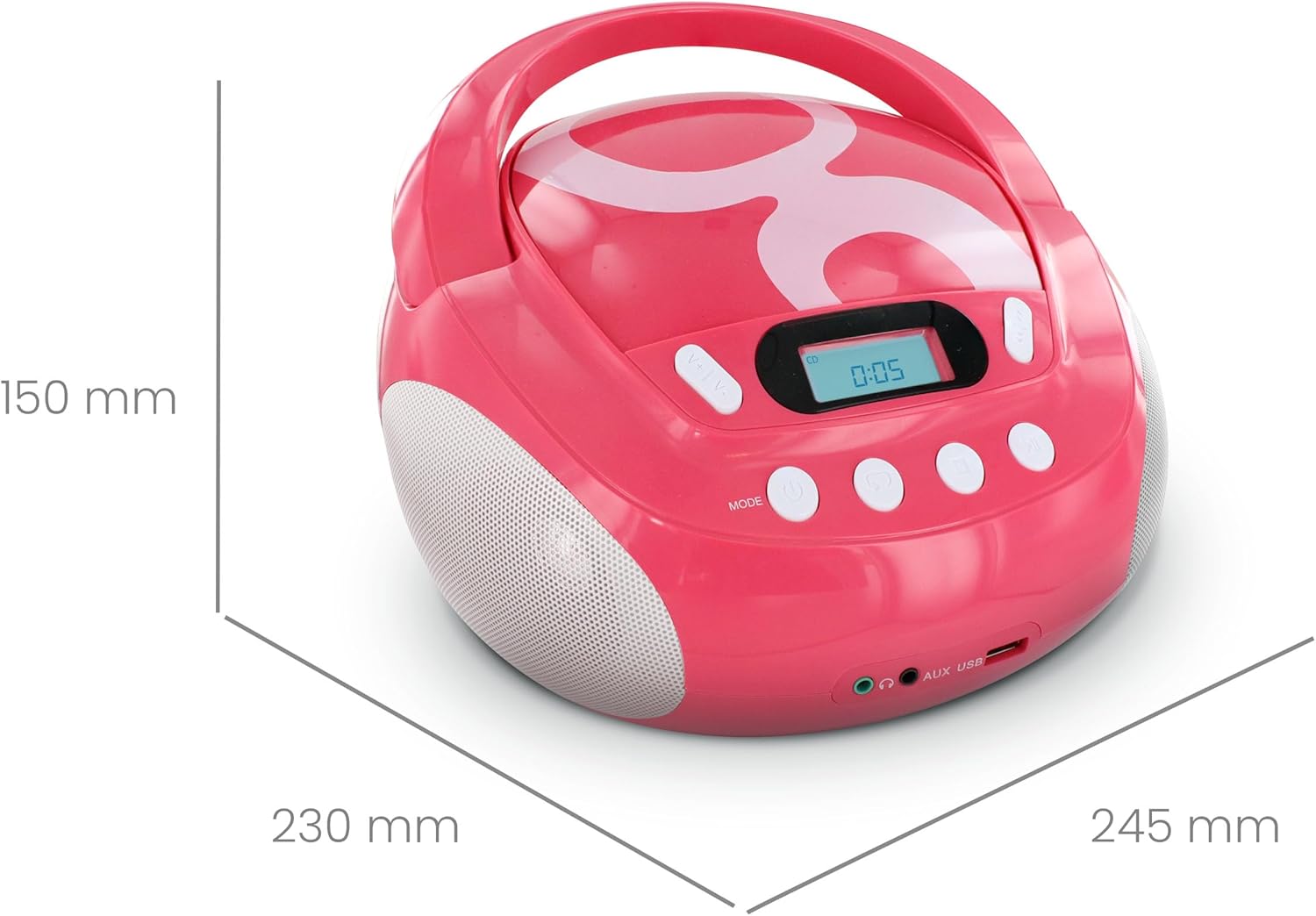
פיגור 4: פּראָדוקט דימענסיעס.
| סאָרט | מעטראָניק |
| מאָדעל נומער | 477148 |
| קאָליר | Gulli Rose |
| קאָמפּאַטיבלע מידיאַ | CD, CD-R/RW, MP3-CD, USB (MP3 files) |
| קאַנעקטיוויטי טעכנאָלאָגיע | אַגזיליערי, וסב |
| כעדפאָון דזשאַק | 3.5 מם |
| רעדנער טיפּ | סטערעאָ |
| רעזולטאַט מאַכט | 2 וואטס |
| מאַכט מקור | AC Powered, Battery Powered (6 x 1.5V C-type batteries) |
| דימענסיעס (L X W X H) | 28 x 24 x 16 ס״מ (אומגעפער 11 x 9.4 x 6.3 אינטשעס) |
| פּונקט וואָג | 1900 Grams (1.9 kg / 4.19 lbs) |
| ווייַז | לקד מיט באַקלייט |
9. וואָראַנטי און שטיצן
9.1 פאַבריקאַנט'ס גאַראַנטיע
דער פּראָדוקט קומט מיט אַ 2-יאָר פאַבריקאַנט ס וואָראַנטי פֿון דעם קויפֿדאַטום. ביטע באַהאַלטן אייער קויפֿבאַווײַז פֿאַר וואָראַנטי־פֿאָדערונגען. די וואָראַנטי דעקט חסרונות אין מאַטעריאַלן און אַרבעט אונטער נאָרמאַלן באַנוץ.
9.2 קונה שטיצן
For assistance with installation or use of this product, please contact the manufacturer's support line:
טעלעפאן: 0892 350 315
(Note: This number may incur charges depending on your service provider and location.)