
1. הקדמה
This manual provides detailed instructions for the installation, operation, and maintenance of your Thomson 512331 720p WiFi IP Camera. This wireless security camera features 720p HD resolution, advanced night vision, motion detection, and remote viewing capabilities via a smartphone or tablet application. Designed for outdoor use, it boasts an IP66 weather-resistant rating and a durable metal construction.
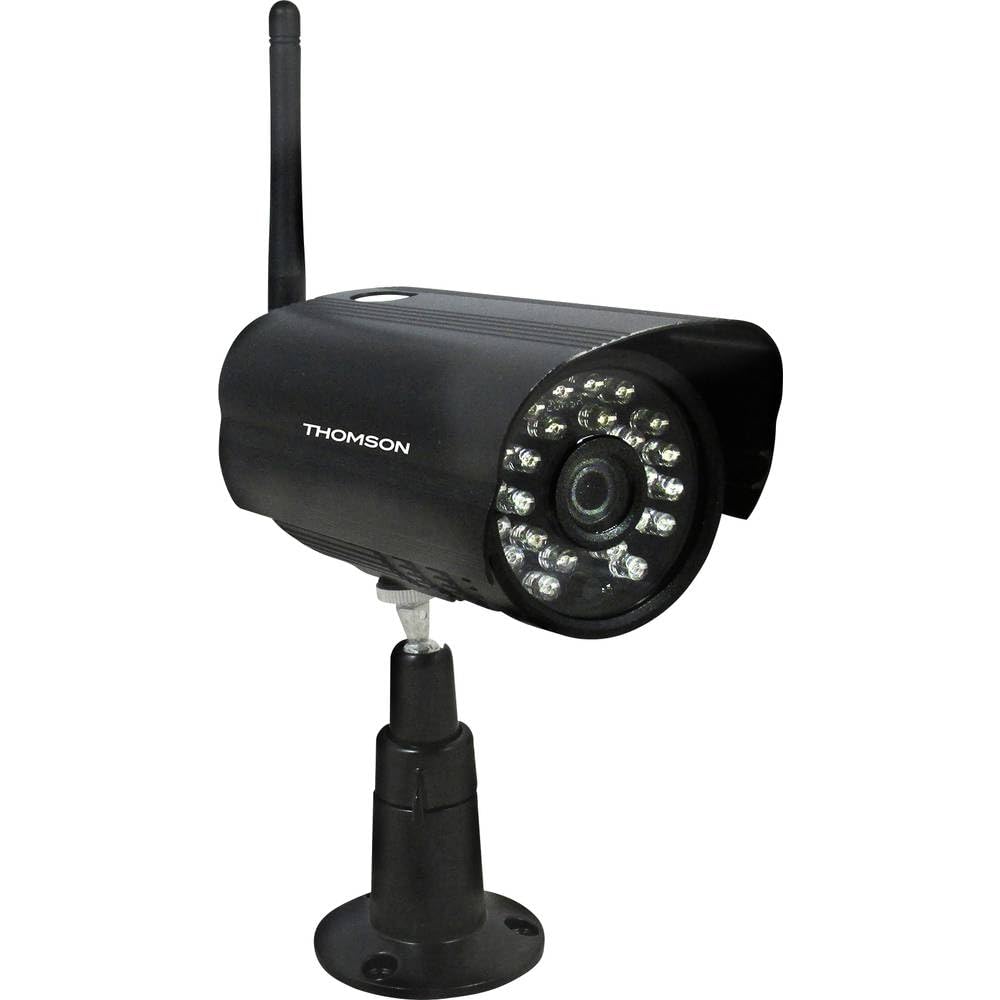
פיגורע 1: פראָנט view of the Thomson 512331 720p WiFi IP Camera. This image shows the camera's main body, lens, and antenna connection point, highlighting its compact and robust design suitable for outdoor surveillance.
2. פּעקל אינהאַלט
ביטע באַשטעטיקן אַז אַלע זאכן וואָס זענען אויסגערעכנט אונטן זענען אַרייַנגערעכנט אין אייער פּעקל. אויב עפּעס פעלנדיק אָדער צעבראָכן, קאָנטאַקטירט קונה שטיצע.
- Thomson 512331 IP Camera
- Power Adapter (230VAC/12VDC 500mA)
- WiFi אַנטענע
- מאָנטירונג קיט (שרויף און וואַנט פּלאַגז)
- באַניצער מאַנואַל (דעם דאָקומענט)
3. פּראָדוקט איבערview
The Thomson 512331 camera is designed for reliable surveillance with the following key features:
- לענס: 3.6mm fixed lens for a wide field of view.
- רעזאלוציע: 1280x720 (720p) HD video capture.
- נאַכט זעאונג: Infrared night vision with 24 LEDs, providing a range of up to 20 meters. Features color night vision capability.
- אַודיאָ: Integrated microphone for audio acquisition.
- קאַנעקטיוויטי: Wireless Wi-Fi connectivity for flexible placement.
- וועטער קעגנשטעל: IP66 rated for outdoor use, protecting against dust and powerful water jets.
- מאַטעריאַל: שטאַרק מעטאַלנע האָוסינג.
- מאַכט: 12VDC 500mA power input, maximum consumption 5W.
- ווידעא קאַמפּרעשאַן: H.264 for efficient storage and streaming.
- סטאָרידזש: Supports SD card for local storage (SD card not included).
4. סעטאַפּ
4.1 גשמיות ינסטאַלירונג
- קלייַבן אַ אָרט: Select a suitable outdoor location for the camera, ensuring it has a clear view פון דער געגנט וואָס איר ווילט מאָניטאָרירן און איז אין דער ראַנגע פון אייער Wi-Fi נעץ.
- אָנקלאַפּן די אַפּאַראַט: Use the provided mounting kit to securely attach the camera to a wall or other stable surface. Drill pilot holes if necessary, insert wall plugs, and fasten the camera bracket with screws.
- צובינדן WiFi אַנטענע: Screw the WiFi antenna firmly onto the designated port on the camera.
- פאַרבינדן מאַכט: Connect the power adapter to the camera's 12VDC input port and plug the adapter into a suitable power outlet. Ensure the power outlet is protected from weather if installed outdoors.
4.2 Network Configuration and App Setup
- אראפקאפיע די אַפּ: זוכן פֿאַר the official Thomson IP Camera application on your smartphone's or tablet's app store (iOS or Android). Download and install the application.
- שאַפֿן אַ חשבון: עפֿנט די אַפּ און פֿאָלגט די אינסטרוקציעס אויף דעם עקראַן צו שאַפֿן אַ נײַעם באַניצער אַקאַונט אָדער לאָגט זיך אײַן אויב איר האָט שוין אײנס.
- צוגעבן אַפּאַראַט: In the app, select the option to "Add Device" or "Add Camera." Follow the in-app wizard to connect your camera to your Wi-Fi network. This typically involves scanning a QR code on the camera or entering your Wi-Fi credentials.
- קאַנפיגיער סעטטינגס: Once connected, you can configure various settings such as motion detection sensitivity, recording schedules, and alert notifications within the app.
5. אַפּערייטינג ינסטרוקטיאָנס
5.1 לעבן View
Open the Thomson IP Camera app on your smartphone or tablet. Select your camera from the device list to view the live video feed. You can typically switch between standard and HD resolution, and access controls for audio and recording.
5.2 באַוועגונג דעטעקציע און וואָרענונגען
The camera is equipped with motion detection. When motion is detected, the camera can trigger recordings and send push notifications to your connected device. Adjust motion detection sensitivity and alert preferences in the app's settings.
5.3 נאַכט זעאונג
The camera automatically switches to infrared night vision in low-light conditions, providing clear black and white video. It also supports color night vision in certain conditions. The 24 built-in IR LEDs illuminate up to 20 meters.
5.4 רעקאָרדינג און פּלייבאַק
If an SD card is installed (not included), the camera can record video locally. Recordings can be triggered by motion or set on a schedule. Access recorded footagדורך די אַפּ'ס פּלייבאַק פֿונקציע.
6. וישאַלט
- רייניקונג: רייניקן פּעריִאָדיש די קאַמעראַ אָביעקטיוו און די קעסטל מיט אַ ווייכן, דamp שטאָף צו באַזייַטיקן שטויב און שמוץ. ניצט נישט שטרענגע כעמיקאַלן אָדער שאַרפע רייניקונגסמיטלען.
- Firmware דערהייַנטיקונגען: Check the app regularly for firmware updates. Keeping your camera's firmware up-to-date ensures optimal performance and security.
- מאַכט צושטעלן: Ensure the power adapter and cable are in good condition and free from damage.
- Wi-Fi קאַנעקשאַן: Verify your Wi-Fi signal strength periodically to ensure a stable connection for continuous surveillance.
7. טראָובלעשאָאָטינג
- אַפּאַראַט ניט קאַנעקטינג צו Wi-Fi:
- זיכער מאַכן אַז די קאַמעראַ איז אין דער ראַנגע פון דיין Wi-Fi ראַוטער.
- באַשטעטיקן אַז אייער Wi-Fi פּאַראָל איז ריכטיק אַרייַנגעגעבן אין דער אַפּ.
- ריסטאַרט דיין ראַוטער און די קאַמעראַ.
- Ensure your Wi-Fi network is 2.4GHz, as 5GHz networks may not be supported.
- קיין ווידעא פיד:
- Check if the camera is powered on.
- Confirm a stable internet connection on both the camera and your viewינג מיטל.
- ריסטאַרט די אַפּאַראַט און די אַפּ.
- באַוועגונג דעטעקשאַן ניט ארבעטן:
- Check motion detection settings in the app; ensure it is enabled and sensitivity is adjusted correctly.
- זיכער מאַכן אַז עס זענען נישטאָ קיין שטערונגען וואָס בלאָקירן די קאַמעראַ'ס view.
- Poor Night Vision Quality:
- רייניקט די קאַמעראַ לענס צו באַזײַטיקן יעדן שמוץ אָדער פֿלעקן.
- Ensure there are no reflective surfaces close to the camera that might interfere with IR illumination.
8. ספּעסאַפאַקיישאַנז
| מאָדעל נאָמען | 512331 |
| סאָרט | טאָמסאָן |
| דימענסיעס (L X W X H) | 50 X 50 X 28 סענטימעטער |
| וואָג | 500 גראַמז |
| קאַנעקטיוויטי טעכנאָלאָגיע | ווירעלעסס, ווי-פי |
| ספּעציעלע שטריך | נאַכט זעאונג |
| קאַמפּאַטאַבאַל דעוויסעס | טאַבלעט, סמאַרטפאָנע |
| מאַכט מקור | AC Power (12VDC 500mA adapter) |
| קאָנטראָללער טיפּ | iOS (via application) |
| מאַונטינג טיפּ | וואנט בארג |
| פּראָדוקט פֿעיִקייטן | Night Vision, Motion Detection |
| מאַטעריאַל | מעטאַל |
| וואַסער קעגנשטעל מדרגה | IP66 (וואָטערפּרוף) |
| פלינק טיפּ | Motion only |
| ליכט מקור טיפּ | געפירט |
| קאָנטראָל מעטאָד | אַפּפּליקאַטיאָן |
| מאַכט קאַנסאַמשאַן | 5 וואטס |
| באַטעריז פארלאנגט | ניין |
| נומער פון טשאַנאַלז | 1 |
| פאָקוס טיפּ | אַוטאָ פאָקוס |
| אָפּטיש סענסאָר טעכנאָלאָגיע | BSI CMOS |
| ווידעא האַכלאָטע | 720p (1280x720 פּיקסעלס) |
| נאַכט וויזשאַן ראַנגע | 20 מעטער |
| נאַכט זעאונג טיפּ | Infrared with Color Night Vision capability |
| פלאַש זכּרון טיפּ | SD (for local storage) |
9. וואָראַנטי און שטיצן
For warranty information and technical support, please refer to the documentation provided with your purchase or visit the official Thomson webזייטל. האַלט דיין קויפן באַווייַז פֿאַר וואָראַנטי קליימז.
אָנליין רעסורסן: www.thomson.eu