
הקדמה
Thank you for choosing the Divoom Onbeat 500 Portable Wireless Bluetooth Speaker. This device is designed to deliver powerful sound with convenient wireless connectivity. This manual will guide you through the setup, operation, and maintenance of your speaker to ensure optimal performance and longevity.
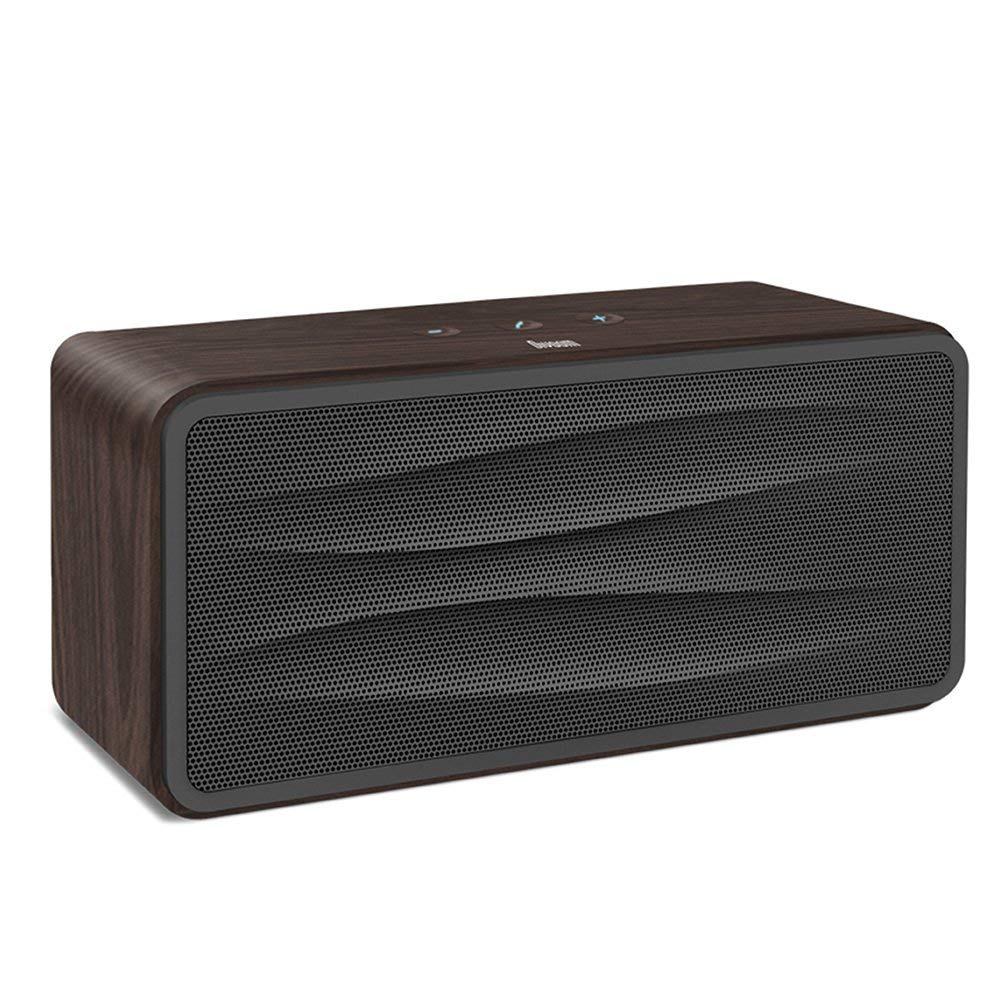
פיגורע 1: פראָנט view of the Divoom Onbeat 500 speaker. This image displays the speaker's main grille and overall design.
פּעקל אינהאַלט
ביטע טשעק די פּאַקעט פֿאַר די פאלגענדע זאכן:
- Divoom Onbeat 500 Speaker
- מיקראָ וסב טשאַרדזשינג קאַבלע
- אַגזיליערי קאַבלע
- באַניצער מאַנואַל (דעם דאָקומענט)
- וואָראַנטי קאַרד
פּראָדוקט פֿעיִקייטן
The Divoom Onbeat 500 speaker offers a range of features for an enhanced audio experience:
- שטאַרק געזונט: 2.1 channel design with a proprietary passive bass radiator for rich audio.
- NFC טעכנאָלאָגיע: Tap-to-pair functionality for quick and easy Bluetooth connection.
- בלועטאָאָטה קאַנעקטיוויטי: Wirelessly play and control music from up to 33 feet (10 meters) away.
- געבויט-אין ספּיקערז: Allows you to make and take calls directly from the speaker.
- לאַנג-בלייַביק באַטערי: Integrated 5000mAh battery provides extended playback time.
- אַגזיליערי אַרייַנשרייַב: For wired connection to non-Bluetooth devices.
סעטאַפּ
1. טשאַרדזשינג די ספּיקער
Before initial use, fully charge your Divoom Onbeat 500 speaker. Use the provided Micro USB charging cable to connect the speaker to a USB power source (e.g., computer USB port, USB wall adapter). The charging indicator light will illuminate during charging and turn off or change color when fully charged. A full charge typically provides 8-10 hours of playback.
2. פּאָווערינג אויף / אויסגעלאשן
- צו מאַכט אויף: Press and hold the Power button for a few seconds until you hear an audible prompt or see the indicator light illuminate.
- צו מאַכט אַוועק: דריק און האלט נאכאמאל דעם פאוער קנעפל פאר א פאר סעקונדעס ביז דער רעדנער לאזט זיך אויס.
3. בלועטאָאָטה פּערינג
The Onbeat 500 offers two methods for wireless connection:
NFC (Near Field Communication) Pairing:
If your device supports NFC, you can pair quickly:
- זיכער מאַכן אַז NFC איז אַקטיווירט אויף דיין סמאַרטפאָון אָדער טאַבלעט.
- With the Onbeat 500 powered on, gently tap your NFC-enabled device against the NFC area on the speaker.
- Confirm the pairing request on your device. The speaker will indicate a successful connection.
נאָרמאַל בלועטוט פּערינג:
For devices without NFC or for manual pairing:
- Power on the Divoom Onbeat 500 speaker. It will automatically enter Bluetooth pairing mode if no device is connected, or you may need to press a dedicated Bluetooth button (refer to speaker controls).
- On your audio device (smartphone, tablet, computer), go to the Bluetooth settings and enable Bluetooth.
- זוכן פֿאַר available devices. You should see "Divoom Onbeat 500" in the list.
- Select "Divoom Onbeat 500" to connect. The speaker will confirm the connection with an audible prompt.
4. AUX קאַנעקשאַן
To connect a device using the auxiliary cable:
- Connect one end of the provided auxiliary cable to the AUX-in port on the Divoom Onbeat 500.
- פֿאַרבינדט דעם אַנדערן עק פֿונעם הילפֿס־קאַבל צום כעדפֿאָן־דזשאַק אָדער אַודיאָ־אַרויסגאַנג פֿון אייער דעווייס.
- The speaker will automatically switch to AUX mode, or you may need to select it manually (refer to speaker controls).

פיגורע 2: זייַט view of the Divoom Onbeat 500, illustrating the location of the charging port, AUX input, and control buttons.
אַפּערייטינג די רעדנער
1. מוזיק פּלייבאַק
Once connected via Bluetooth or AUX, you can control music playback from your connected device. The speaker may also have integrated controls for volume adjustment, play/pause, and track skipping. Refer to the speaker's physical buttons for these functions.
2. רעדנערפאָון פאַנגקשאַנאַליטעט
When connected to a smartphone via Bluetooth, the Divoom Onbeat 500 can be used as a speakerphone:
- ענטפֿערן אַ רוף: Press the Call button (often indicated by a phone icon) on the speaker.
- ענדיקן אַ רוף: דרוק דעם רופן קנעפּל ווידער.
- פארווארפן א רוף: Press and hold the Call button.

פיגורע 3: דערציען view of the Divoom Onbeat 500, highlighting the passive bass radiator for enhanced low-frequency sound.
וישאַלט
1. רייניקונג
כדי צו אויפהאלטן דעם אויסזען און פונקציאנאליטעט פון אייער רעדנער:
- ווישט ווי די אויסערליכע זייט מיט א ווייכן, טרוקענעם, לינט-פֿרייע שטאָף.
- Do not use abrasive cleaners, alcohol, benzene, or other chemical solvents, as these may damage the finish.
- פֿאַרמײַדט אַרײַנצוקומען פֿײַכטקײַט אין קיין עפענונגען.
2. באַטערי קער
To prolong the life of the built-in lithium-ion battery:
- פֿאַרמײַדט אָפֿט פֿולשטענדיק אויסצולאָדן די באַטעריע.
- האַלט דעם רעדנער אין אַ קיל, טרוקן אָרט ווען עס איז נישט אין באַנוץ פֿאַר לענגערע פּעריאָדן.
- Charge the speaker at least once every three months if stored for a long time to prevent deep discharge.
טראָובלעשאָאָטינג
If you encounter issues with your Divoom Onbeat 500, please refer to the following common solutions:
| פּראָבלעם | מעגלעך לייזונג |
|---|---|
| רעדנער גייט נישט אן | Ensure the battery is charged. Connect the speaker to a power source using the Micro USB cable and try again. |
| קיין געזונט פון רעדנער | Check the volume level on both the speaker and your connected device. Ensure the speaker is correctly paired via Bluetooth or connected via AUX. Try re-pairing the Bluetooth device. |
| בלועטאָאָטה פּערינג פיילז | Ensure the speaker is in pairing mode. Turn off and on Bluetooth on your device. Move your device closer to the speaker. Clear previous Bluetooth connections on your device and try again. |
| נעבעך געזונט קוואַליטעט | Ensure the speaker and connected device are within range (for Bluetooth). Check for interference from other wireless devices. Try a different audio source or cable. |
ספּעסאַפאַקיישאַנז
Detailed technical specifications for the Divoom Onbeat 500 speaker:
- מאָדעל נאָמען: Divoom Onbeat 500
- רעדנער טיפּ: קאמפיוטער ספּיקער
- קאַנעקטיוויטי טעכנאָלאָגיע: בלועטאָאָטה
- ווירעלעסס קאָמוניקאַציע טעכנאָלאָגיע: בלועטאָאָטה
- קאָנטראָל אופֿן: ריר
- מאַכט מקור: באַטאַרייע פּאַוערד
- באַטערי: 1 ליטהיום יאָן באַטאַרייע (5000mAh)
- אַודיאָ וואָסtage: 20 וואטס
- רעדנער מאַקסימום רעזולטאַט מאַכט: 100 וואטס
- סאָונד סאָונד קאַנאַל קאַנפיגיעריישאַן: 2.1
- קאַמפּאַטאַבאַל דעוויסעס: Android, Windows, iPhone (iOS)
- קאַנעקטער טיפּ: USB (פֿאַר טשאַרדזשינג)
- פּראָדוקט דימענשאַנז: 22.5 x 7.49 x 10.49 סענטימעטער (LxWxH)
- נומער וואָג: 1.55 קג
- קאָליר: האָלצקוילן
- ספּעציעלע פֿעיִקייטן: NFC, Built-in Speakerphone, Passive Bass Radiator
וואָראַנטי און שטיצן
Your Divoom Onbeat 500 speaker comes with a limited warranty. Please refer to the included Warranty Card for detailed terms and conditions, including warranty period and coverage.
For technical support, service inquiries, or further assistance, please visit the official Divoom website or contact their customer service department using the information provided on your Warranty Card or product packaging. Please have your model number (Onbeat 500) and purchase details ready when contacting support.