
הקדמה
This manual provides essential information for the proper setup, operation, and maintenance of your Blue Octave Home 2.1-Channel Home Theater Speaker System, Model B22. Please read these instructions thoroughly before using the product to ensure optimal performance and longevity.
פּעקל אינהאַלט
באַשטעטיקט אַז אַלע זאכן וואָס זענען אויסגערעכנט אונטן זענען אַרייַנגערעכנט אין אייער פּעקל:
- 1 x סובוואָאָפער
- 2 x סאַטעליט רעדנערס
- 1 x 3.5mm Aux to RCA Cable
- 1 x RCA to RCA Cable
- 1 x רימאָוט קאָנטראָל
- 1 x באַניצער מאַנואַל (דאָס דאָקומענט)

פּראָדוקט פֿעיִקייטן
- 350 Watts System Power: Delivers robust audio output.
- Frequency Response: 40Hz - 20KHz for a wide range of sound.
- Magnetically Shielded: Reduces interference with other electronic devices.
- געבויט-אין אַודיאָ Amplifier: Integrated amplification for convenience.
- Ultimate Bass Boost Design: Enhanced low-frequency performance.
- Digitally Designed Port: Optimized for extra bass response.
- Rear Bass Control Knob: Allows adjustment of bass levels.
- Computerized Enclosure Design: Engineered for acoustic precision.
- Plug and Play Connections: Simple setup for various audio sources.
- Full Function Remote Control: Convenient wireless operation.
- Versatile Connectivity: Compatible with 3.5mm headphone output or RCA audio output devices.
סעטאַפּ אינסטרוקציעס
גיי די סטעפּס צו באַשטעטיקן דיין רעדנער סיסטעם:
- אָרט: Position the subwoofer on a stable surface, preferably on the floor, for optimal bass. Place the two satellite speakers equidistant from your listening position, facing towards you. Ensure adequate ventilation around the subwoofer.
- פֿאַרבינדן סאַטעליט רעדנערס: Connect the RCA cables from the satellite speakers to the 'OUTPUT INPUT' RCA jacks on the rear of the subwoofer. Ensure the left (white) and right (red) channels are matched correctly.
- פֿאַרבינדן אַודיאָ מקור:
- For devices with a 3.5mm headphone jack (e.g., computer, smartphone, tablet): Use the provided 3.5mm Aux to RCA cable. Connect the 3.5mm end to your device's headphone jack and the RCA ends to the 'INPUT' RCA jacks on the rear of the subwoofer.
- For devices with RCA audio outputs (e.g., TV, DVD player): Use the provided RCA to RCA cable. Connect one end to your device's audio output and the other end to the 'INPUT' RCA jacks on the rear of the subwoofer.
- מאַכט קשר: Ensure the power switch on the rear of the subwoofer is in the 'OFF' position. Plug the subwoofer's power cord into a standard AC power outlet.
- מאַכט אויף: Flip the power switch on the rear of the subwoofer to the 'ON' position. The system is now ready for operation.


אַפּערייטינג ינסטראַקשאַנז
מאַכט אויף / אַוועק
To power on the system, ensure the rear power switch is 'ON', then press the power button on the front panel of the subwoofer or on the remote control. Press again to power off.
באַנד קאָנטראָל
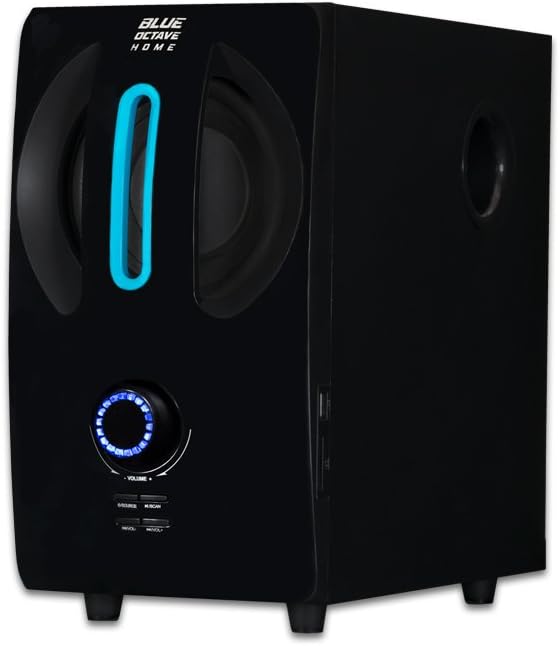
Adjust the master volume using the large rotary knob on the front of the subwoofer or the 'VOL+' and 'VOL-' buttons on the remote control.
אַרייַנשרייַב סעלעקציע
Press the 'SOURCE' button on the front panel of the subwoofer or the corresponding input buttons (AUX, FM, USB, SD) on the remote control to switch between audio sources.
באַס אַדזשאַסטמאַנט
The bass level can be fine-tuned using the 'BASS' control knob located on the rear panel of the subwoofer.

וישאַלט
To ensure the longevity and optimal performance of your speaker system, follow these maintenance guidelines:
- רייניקונג: Use a soft, dry cloth to clean the surfaces of the speakers and subwoofer. Avoid using liquid cleaners, aerosols, or abrasive materials, as they may damage the finish or internal components.
- ווענטילאַטיאָן: Ensure that the subwoofer's ventilation ports are not blocked. Proper airflow prevents overheating.
- סטאָרידזש: אויב איר לייגט די סיסטעם אויף פאר א לענגערע צייט, שטעלט עס אפ פון עלעקטריציטעט און לייגט עס אויף אין א קיל, טרוקן ארט ווייט פון דירעקט זונשייַן און עקסטרעמע טעמפּעראַטורן.
- קאַבלע זאָרגן: Avoid bending or crimping the audio and power cables excessively. Regularly check cables for any signs of wear or damage.
טראָובלעשאָאָטינג
אויב איר טרעפט פּראָבלעמען מיט אייער רעדנער סיסטעם, זעט די פאלגענדע געוויינטלעכע פּראָבלעמען און לייזונגען:
| פּראָבלעם | מעגלעך סיבה | לייזונג |
|---|---|---|
| קיין געזונט פון ספּיקערז |
|
|
| פארדרייט אדער אומקלארער קלאַנג |
|
|
| ווייַט קאָנטראָל נישט ארבעטן |
|
|
ספּעסאַפאַקיישאַנז
Detailed technical specifications for the Blue Octave Home B22 Speaker System:
- מאָדעל נאָמען: B22
- רעדנער טיפּ: Computer, Satellite, Subwoofer
- קאַמפּאַטאַבאַל דעוויסעס: Desktop, Laptop, MP3 Player, Smartphone, Tablet, Television
- Subwoofer Dimensions (H x W x D): 12.38" x 6.75" x 13.25"
- Satellite Speaker Dimensions (H x W x D): 6.75" x 4.125" x 4.5" each
- סאָונד סאָונד קאַנאַל קאַנפיגיעריישאַן: 2.1
- קאָליר: שוואַרץ
- נומער וואָג: 11 פונט
- קאָנטראָל אופֿן: Remote, Manual Knobs
- מאַכט מקור: קאָרדעד עלעקטריק
- רעדנער מאַקסימום רעזולטאַט מאַכט: 350 וואטס
- קאַנעקטיוויטי טעכנאָלאָגיע: Auxiliary (3.5mm, RCA)
- אַודיאָ רעזולטאַט מאָדע: סטערעאָ
- UPC: 849155039776

וואָראַנטי און שטיצן
This Blue Octave Home 2.1-Channel Home Theater Speaker System, Model B22, comes with a Limited Warranty. For specific details regarding warranty coverage, terms, and conditions, please refer to the warranty card included in your product packaging or contact Blue Octave Home customer support.
For technical assistance, troubleshooting beyond this manual, or warranty claims, please contact Blue Octave Home customer support through their official webוועבזייטל אדער די קאָנטאַקט אינפֿאָרמאַציע וואָס איז צוגעשטעלט געוואָרן מיט אייערע קויף דאָקומענטאַציע.